Skip to content
  • 0 Unread 0
  • Recent
  • Tags
  • Popular
  • Users
  • Groups
  • Donate
Collapse

Plutonium

  1. Home
  2. Launcher Support
  3. Failed to check for Updates

Failed to check for Updates

Scheduled Pinned Locked Moved Launcher Support
12 Posts 4 Posters 983 Views 1 Watching
  • Oldest to Newest
  • Newest to Oldest
  • Most Votes
Reply
  • Reply as topic
Log in to reply
This topic has been deleted. Only users with topic management privileges can see it.
  • 4mroor Offline
    4mroor Offline
    4mroor
    wrote on last edited by
    #1

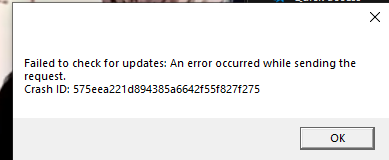
    Failed to check for Updates![alt text](Screenshot 2021-06-12 033756.png image url)Screenshot 2021-06-12 033816.png

    Dss0 1 Reply Last reply
    0
    • 4mroor Offline
      4mroor Offline
      4mroor
      wrote on last edited by
      #2

      vpn didnt work

      1 Reply Last reply
      0
      • 4mroor 4mroor

        Failed to check for Updates![alt text](Screenshot 2021-06-12 033756.png image url)Screenshot 2021-06-12 033816.png

        Dss0 Offline
        Dss0 Offline
        Dss0
        Plutonium Staff
        wrote on last edited by
        #3

        4mroor

        • remove the torrent from your torrent client if it's still running
        • re-download the launcher from here: https://cdn.plutonium.pw/updater/plutonium.exe
        • try changing your dns servers (https://www.windowscentral.com/how-change-your-pcs-dns-settings-windows-10)
        • try syncing your system time (https://www.groovypost.com/howto/synchronize-clock-windows-10-with-internet-atomic-time/)
        • which antivirus software do you use?
        Zargon7889 4mroor 2 Replies Last reply
        0
        • Dss0 Dss0

          4mroor

          • remove the torrent from your torrent client if it's still running
          • re-download the launcher from here: https://cdn.plutonium.pw/updater/plutonium.exe
          • try changing your dns servers (https://www.windowscentral.com/how-change-your-pcs-dns-settings-windows-10)
          • try syncing your system time (https://www.groovypost.com/howto/synchronize-clock-windows-10-with-internet-atomic-time/)
          • which antivirus software do you use?
          Zargon7889 Offline
          Zargon7889 Offline
          Zargon7889
          wrote on last edited by
          #4

          Dss0 the same thing happened to me. except I use webroot and it said it sees a malware in the files this game files has

          Dss0 1 Reply Last reply
          0
          • Zargon7889 Zargon7889

            Dss0 the same thing happened to me. except I use webroot and it said it sees a malware in the files this game files has

            Dss0 Offline
            Dss0 Offline
            Dss0
            Plutonium Staff
            wrote on last edited by
            #5

            Zargon7889 false positive, uninstall webroot completely.

            Zargon7889 1 Reply Last reply
            0
            • Dss0 Dss0

              Zargon7889 false positive, uninstall webroot completely.

              Zargon7889 Offline
              Zargon7889 Offline
              Zargon7889
              wrote on last edited by Zargon7889
              #6

              Dss0 is it a bad virus protector?

              Dss0 1 Reply Last reply
              0
              • Zargon7889 Zargon7889

                Dss0 is it a bad virus protector?

                Dss0 Offline
                Dss0 Offline
                Dss0
                Plutonium Staff
                wrote on last edited by
                #7

                Zargon7889 yes, windows defender is better.

                Zargon7889 1 Reply Last reply
                0
                • Dss0 Dss0

                  Zargon7889 yes, windows defender is better.

                  Zargon7889 Offline
                  Zargon7889 Offline
                  Zargon7889
                  wrote on last edited by
                  #8

                  Dss0 it crashes when i try top open it even after the launcher opens too. but I get the fail to check for updates pop up too

                  1 Reply Last reply
                  0
                  • Dss0 Dss0

                    4mroor

                    • remove the torrent from your torrent client if it's still running
                    • re-download the launcher from here: https://cdn.plutonium.pw/updater/plutonium.exe
                    • try changing your dns servers (https://www.windowscentral.com/how-change-your-pcs-dns-settings-windows-10)
                    • try syncing your system time (https://www.groovypost.com/howto/synchronize-clock-windows-10-with-internet-atomic-time/)
                    • which antivirus software do you use?
                    4mroor Offline
                    4mroor Offline
                    4mroor
                    wrote on last edited by
                    #9

                    Dss0 i do evrything you tell me but didnt work

                    i do not use antivirus

                    Dss0 1 Reply Last reply
                    0
                    • 4mroor 4mroor

                      Dss0 i do evrything you tell me but didnt work

                      i do not use antivirus

                      Dss0 Offline
                      Dss0 Offline
                      Dss0
                      Plutonium Staff
                      wrote on last edited by
                      #10

                      4mroor no idea then.

                      1 Reply Last reply
                      0
                      • One punch Offline
                        One punch Offline
                        One punch
                        wrote on last edited by
                        #11

                        I had the same problem, I fixed it by right clicking on the plutonium icon and if it said "read only" I unchecked it, that's it. Hope it is helpful.


                        One punch 1 Reply Last reply
                        0
                        • One punch One punch

                          I had the same problem, I fixed it by right clicking on the plutonium icon and if it said "read only" I unchecked it, that's it. Hope it is helpful.

                          One punch Offline
                          One punch Offline
                          One punch
                          wrote on last edited by
                          #12

                          One punch I forgot this step, rigth click and properties

                          1 Reply Last reply
                          0

                          Hello! It looks like you're interested in this conversation, but you don't have an account yet.

                          Getting fed up of having to scroll through the same posts each visit? When you register for an account, you'll always come back to exactly where you were before, and choose to be notified of new replies (either via email, or push notification). You'll also be able to save bookmarks and upvote posts to show your appreciation to other community members.

                          With your input, this post could be even better 💗

                          Register Login
                          Reply
                          • Reply as topic
                          Log in to reply
                          • Oldest to Newest
                          • Newest to Oldest
                          • Most Votes


                          • Login

                          • Don't have an account? Register

                          • Login or register to search.
                          • First post
                            Last post
                          0
                          • Unread 0
                          • Recent
                          • Tags
                          • Popular
                          • Users
                          • Groups
                          • Donate