Zombies - Not all Maps are working
-
So I went and got a VPS server, set up the T6 server using the guide and everything for normal Multiplayer works, be it Deathmatch, Free-For-All or everything mixed.
For some reason only certain Zombies maps are working and I can't seem to find any solutions for issue I am receiving. I am specifically trying to get Buried on standard survival to work.
-
So I went and got a VPS server, set up the T6 server using the guide and everything for normal Multiplayer works, be it Deathmatch, Free-For-All or everything mixed.
For some reason only certain Zombies maps are working and I can't seem to find any solutions for issue I am receiving. I am specifically trying to get Buried on standard survival to work.
-
@lResxt
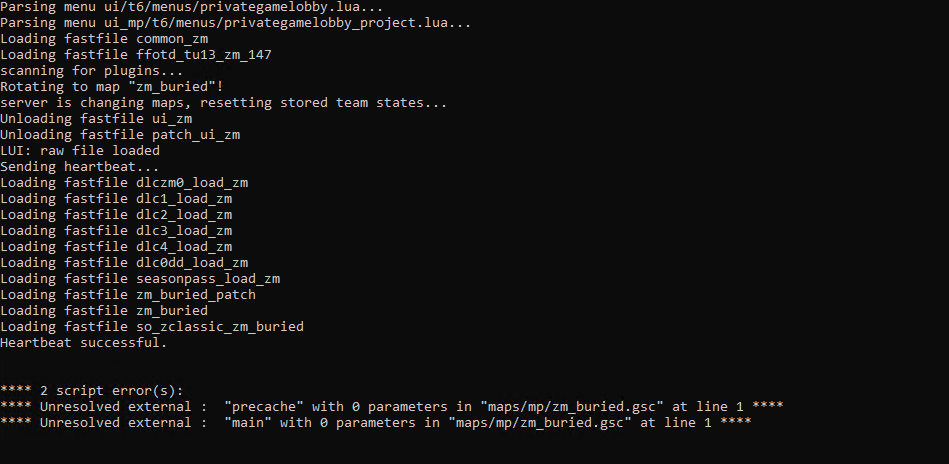
Where would I find the location of these files and where can I get the replacement files?
Also, I see that according to the default config it states the following:
sv_maprotation "exec zm_classic_processing.cfg map zm_buried......" Is this correct as I thought it would be sv_maprotation "exec zm_classic_buried.cfg map zm_buried......"
-
@lResxt
Where would I find the location of these files and where can I get the replacement files?
Also, I see that according to the default config it states the following:
sv_maprotation "exec zm_classic_processing.cfg map zm_buried......" Is this correct as I thought it would be sv_maprotation "exec zm_classic_buried.cfg map zm_buried......"
nvapctech The proper configs to execute are in the gamesettings folder. Their naming conventions are like that for consistency. It goes "zm_" + gametype + "_" + location.cfg. When making the configs I initially considered using the mapname instead of location but that would have caused even more confusion.
Blame Treyarch for insisting on using such a complicated system to determine the map.
-
nvapctech The proper configs to execute are in the gamesettings folder. Their naming conventions are like that for consistency. It goes "zm_" + gametype + "_" + location.cfg. When making the configs I initially considered using the mapname instead of location but that would have caused even more confusion.
Blame Treyarch for insisting on using such a complicated system to determine the map.
-
Hi JezuzLizard, I thought that was the case, but at the moment these are the only files I have on the server:
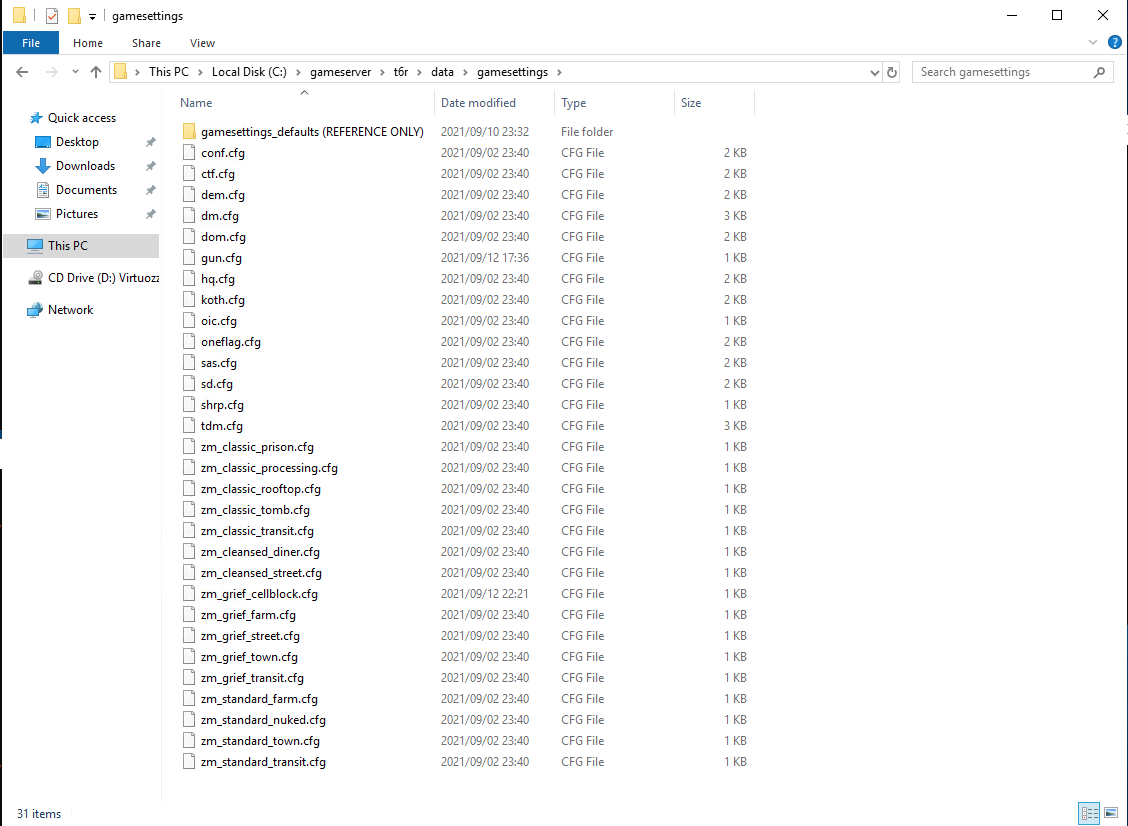
Do I need extra files or need to create the files from scratch as the above files is all I have since I originally set the server up.
nvapctech The error that occurs is likely a config issue unless you have mods installed. The game will parse these dvars in GSC to determine the location/gametype specific code:
ui_zm_mapstartlocation - Used to determine the specific location i.e. Town/Bus Depot/Farm etc
g_gametype/ui_gametype - Used to determine the specific gametype related code to use. i.e. Grief/Classic/Survival etc
ui_zm_gamemodegroup - Used to determine the specific gamemodegroup i.e. versus/cooperative type gamemode groups. Also attempts to load a fastfile based on this value.
Another possibility is that you could be missing fast files such as zm_buried_patch which contains the scripts required for the map.
-
nvapctech The error that occurs is likely a config issue unless you have mods installed. The game will parse these dvars in GSC to determine the location/gametype specific code:
ui_zm_mapstartlocation - Used to determine the specific location i.e. Town/Bus Depot/Farm etc
g_gametype/ui_gametype - Used to determine the specific gametype related code to use. i.e. Grief/Classic/Survival etc
ui_zm_gamemodegroup - Used to determine the specific gamemodegroup i.e. versus/cooperative type gamemode groups. Also attempts to load a fastfile based on this value.
Another possibility is that you could be missing fast files such as zm_buried_patch which contains the scripts required for the map.
JezuzLizard from what I can see, I have the file you suspect is missing but maybe something else is?:

It can't be the config as I am using the default config and it isn't working as intended
 .
. -
nvapctech The error that occurs is likely a config issue unless you have mods installed. The game will parse these dvars in GSC to determine the location/gametype specific code:
ui_zm_mapstartlocation - Used to determine the specific location i.e. Town/Bus Depot/Farm etc
g_gametype/ui_gametype - Used to determine the specific gametype related code to use. i.e. Grief/Classic/Survival etc
ui_zm_gamemodegroup - Used to determine the specific gamemodegroup i.e. versus/cooperative type gamemode groups. Also attempts to load a fastfile based on this value.
Another possibility is that you could be missing fast files such as zm_buried_patch which contains the scripts required for the map.
JezuzLizard got an extra error when I tried starting up zombies now:




Hello! It looks like you're interested in this conversation, but you don't have an account yet.
Getting fed up of having to scroll through the same posts each visit? When you register for an account, you'll always come back to exactly where you were before, and choose to be notified of new replies (either via email, or push notification). You'll also be able to save bookmarks and upvote posts to show your appreciation to other community members.
With your input, this post could be even better 💗
Register Login