Skip to content
  • 0 Unread 0
  • Recent
  • Tags
  • Popular
  • Users
  • Groups
  • Donate
Collapse

Plutonium

  1. Home
  2. Launcher Support
  3. Dll not found

Dll not found

Scheduled Pinned Locked Moved Launcher Support
12 Posts 2 Posters 3.5k Views 1 Watching
  • Oldest to Newest
  • Newest to Oldest
  • Most Votes
Reply
  • Reply as topic
Log in to reply
This topic has been deleted. Only users with topic management privileges can see it.
  • SLOL Offline
    SLOL Offline
    SLOL
    wrote on last edited by
    #1

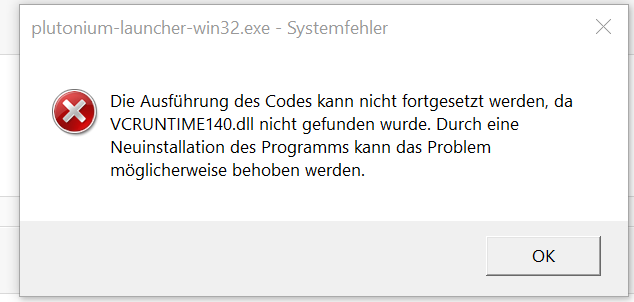
    I can not install the launcher because it says that the msvcp140.dll was not found, as well as the vcruntime140.dll it says. Reinstalling the program may solve the problem. i have tried to download it several times but it doesn't help i need help i want to download mw3 and bo2.

    Dss0 1 Reply Last reply
    1
    • SLOL SLOL

      I can not install the launcher because it says that the msvcp140.dll was not found, as well as the vcruntime140.dll it says. Reinstalling the program may solve the problem. i have tried to download it several times but it doesn't help i need help i want to download mw3 and bo2.

      Dss0 Offline
      Dss0 Offline
      Dss0
      Plutonium Staff
      wrote on last edited by
      #2

      SLOL covered here https://forum.plutonium.pw/topic/6832/common-launcher-issues-solutions

      SLOL 1 Reply Last reply
      0
      • Dss0 Dss0

        SLOL covered here https://forum.plutonium.pw/topic/6832/common-launcher-issues-solutions

        SLOL Offline
        SLOL Offline
        SLOL
        wrote on last edited by
        #3

        Dss0 dosn´t helped

        Dss0 2 Replies Last reply
        0
        • SLOL SLOL

          Dss0 dosn´t helped

          Dss0 Offline
          Dss0 Offline
          Dss0
          Plutonium Staff
          wrote on last edited by
          #4

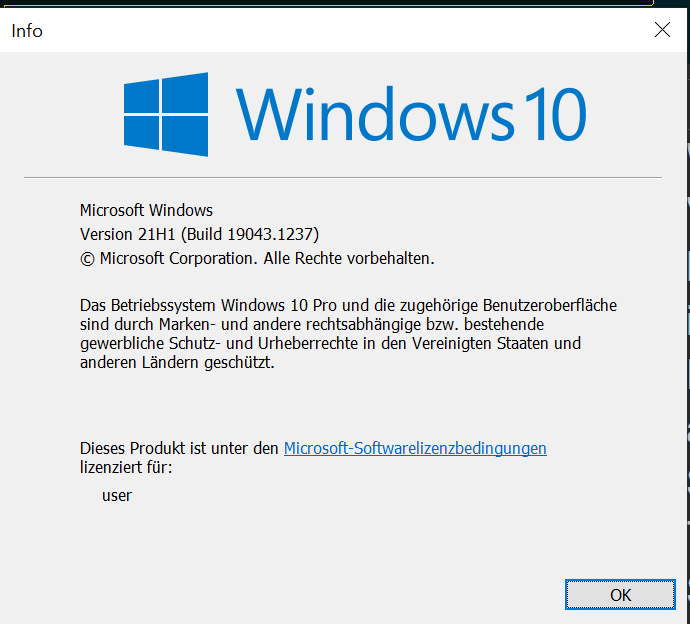
          SLOL did it display any error messages when trying to install the runtimes? Hit windows key + R and type "winver" into the run box then hit enter. Post a screenshot of the window that comes up.

          1 Reply Last reply
          0
          • SLOL Offline
            SLOL Offline
            SLOL
            wrote on last edited by
            #5

            Bild_2021-10-14_200606.png

            1 Reply Last reply
            0
            • SLOL SLOL

              Dss0 dosn´t helped

              Dss0 Offline
              Dss0 Offline
              Dss0
              Plutonium Staff
              wrote on last edited by
              #6

              SLOL if it still says msvcp140 is missing after installing this:

              https://dotnet.microsoft.com/download/dotnet-framework/thank-you/net472-web-installer
              https://aka.ms/vs/16/release/vc_redist.x64.exe
              https://aka.ms/vs/16/release/vc_redist.x86.exe

              then something is severly broken.
              If you downloaded any individual dll's before delete them, other than that:

              • open the start menu and search for "cmd"
              • run cmd as admin
              • execute the following command
              dism /online /cleanup-image /restorehealth
              
              • after dism has finished repairing your system restart your pc
              SLOL 1 Reply Last reply
              0
              • SLOL Offline
                SLOL Offline
                SLOL
                wrote on last edited by
                #7

                I check it later and what is with the Vcruntime140.dll ?

                Dss0 1 Reply Last reply
                0
                • SLOL SLOL

                  I check it later and what is with the Vcruntime140.dll ?

                  Dss0 Offline
                  Dss0 Offline
                  Dss0
                  Plutonium Staff
                  wrote on last edited by
                  #8

                  SLOL said in Dll not found:

                  Vcruntime140.dll

                  it's part of the microsoft visual c++ redist 2015-2019, if that file is missing you have to install that runtime, downloading individual dll files is not what you should do.

                  1 Reply Last reply
                  0
                  • SLOL Offline
                    SLOL Offline
                    SLOL
                    wrote on last edited by
                    #9

                    Bild_2021-10-16_201504.png Unbenannt 2.PNG

                    1 Reply Last reply
                    0
                    • Dss0 Dss0

                      SLOL if it still says msvcp140 is missing after installing this:

                      https://dotnet.microsoft.com/download/dotnet-framework/thank-you/net472-web-installer
                      https://aka.ms/vs/16/release/vc_redist.x64.exe
                      https://aka.ms/vs/16/release/vc_redist.x86.exe

                      then something is severly broken.
                      If you downloaded any individual dll's before delete them, other than that:

                      • open the start menu and search for "cmd"
                      • run cmd as admin
                      • execute the following command
                      dism /online /cleanup-image /restorehealth
                      
                      • after dism has finished repairing your system restart your pc
                      SLOL Offline
                      SLOL Offline
                      SLOL
                      wrote on last edited by
                      #10

                      Dss0 i downloaded from https://docs.microsoft.com/de-DE/cpp/windows/latest-supported-vc-redist?view=msvc-160 the 64 bit version and started it and seleced repair but it dosn´t helped. i also did this but this also dosn´t healped

                      Dss0 1 Reply Last reply
                      0
                      • SLOL SLOL

                        Dss0 i downloaded from https://docs.microsoft.com/de-DE/cpp/windows/latest-supported-vc-redist?view=msvc-160 the 64 bit version and started it and seleced repair but it dosn´t helped. i also did this but this also dosn´t healped

                        Dss0 Offline
                        Dss0 Offline
                        Dss0
                        Plutonium Staff
                        wrote on last edited by
                        #11

                        SLOL you need the x86 version, plutonium is 32 bit not 64.

                        1 Reply Last reply
                        1
                        • SLOL Offline
                          SLOL Offline
                          SLOL
                          wrote on last edited by
                          #12

                          Now the download goe´s thanks for the suport

                          1 Reply Last reply
                          0

                          Hello! It looks like you're interested in this conversation, but you don't have an account yet.

                          Getting fed up of having to scroll through the same posts each visit? When you register for an account, you'll always come back to exactly where you were before, and choose to be notified of new replies (either via email, or push notification). You'll also be able to save bookmarks and upvote posts to show your appreciation to other community members.

                          With your input, this post could be even better 💗

                          Register Login
                          Reply
                          • Reply as topic
                          Log in to reply
                          • Oldest to Newest
                          • Newest to Oldest
                          • Most Votes


                          • Login

                          • Don't have an account? Register

                          • Login or register to search.
                          • First post
                            Last post
                          0
                          • Unread 0
                          • Recent
                          • Tags
                          • Popular
                          • Users
                          • Groups
                          • Donate