Velocity Hud/Health Hud

-
Simple gsc script to show your health(with color changing depending on how low your health is) and velocity Hud that shows you highest velocity reached and current velocity speed.
Credits:
Clipzor = Clippy
Slxxpy = Sleepy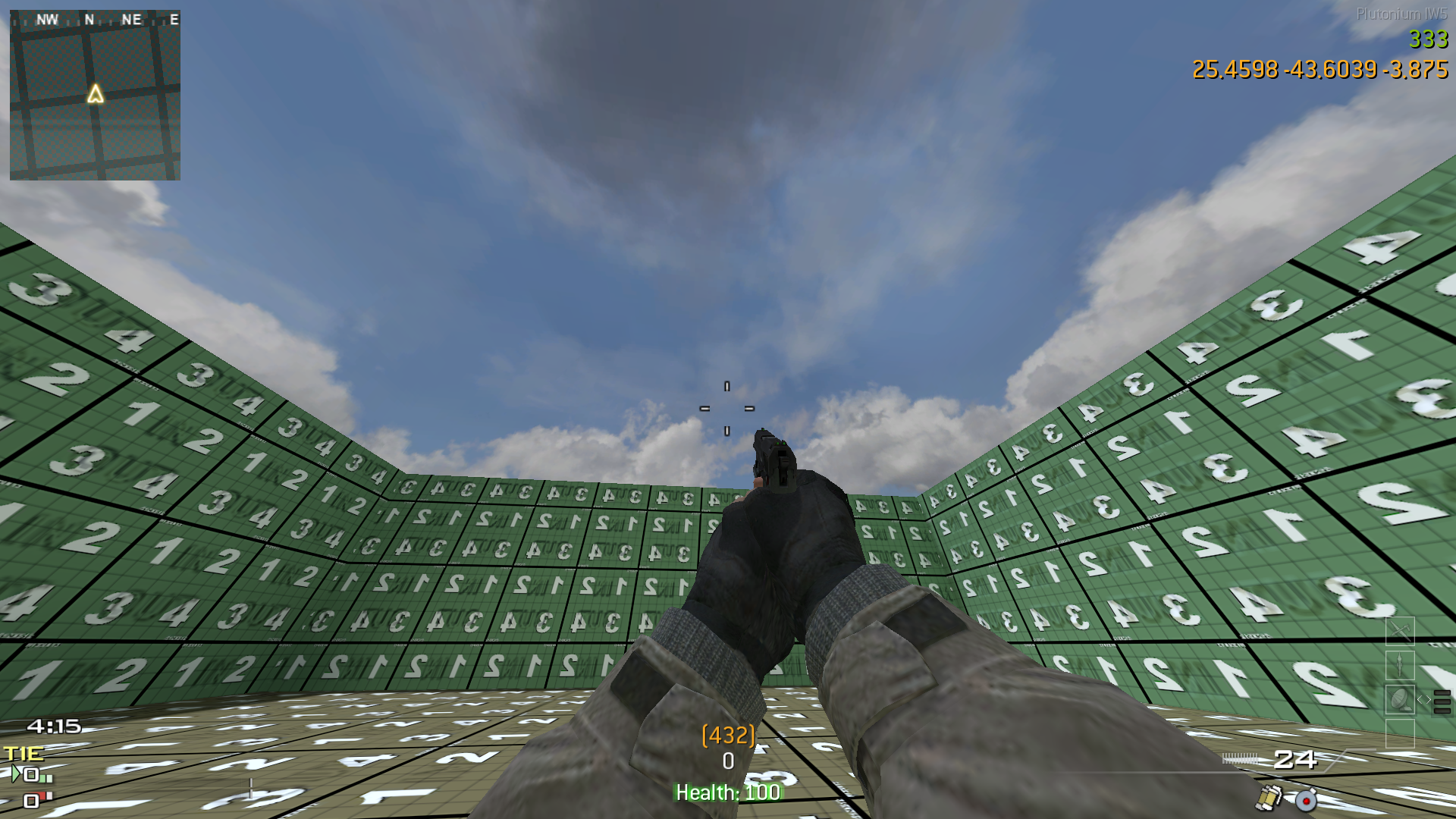
#include maps\mp\_utility; #include common_scripts\utility; #include maps\mp\gametypes\_hud_util; //Coded by Slxxpy and Clippy init(){ level thread onConnect(); } onConnect() { for (;;) { level waittill("connected", player); player thread PlayerSpawnedConnected(); player thread hudposition(); player thread Velocity(); player thread healthPlayer(); } } PlayerSpawnedConnected() { self endon("disconnect"); for(;;) { self waittill("spawned_player"); self.velhigh = 0; self.velhighmeter setText("^3(" +floor(self.velhigh) + ")" ); } } hudposition() { self endon("disconnect"); level endon("game_ended"); self.velmeter = self createFontString( "default", 1.5 ); self.velmeter setPoint( "BOTTOM", "BOTTOM", 0, -26 ); self.velmeter.label = &"^7"; self.velmeter.HideWhenInMenu = true; self.velhighmeter = self createFontString( "default", 1.5 ); self.velhighmeter setPoint( "BOTTOM", "BOTTOM", 0, -41 ); self.velhighmeter setText("^3(" +floor(self.velhigh) + ")" ); self.velhighmeter.HideWhenInMenu = true; } Velocity() { self endon("disconnect"); level endon("game_ended"); self.velhigh = 0; self.velhighmeter setValue(floor(self.velhigh)); while(true) { self.newvel = self getvelocity(); self.newvel = sqrt(float(self.newvel[0] * self.newvel[0]) + float(self.newvel[1] * self.newvel[1])); self.vel = self.newvel; self.velmeter setvalue(floor(self.vel)); if(self.vel > self.velhigh) { self.velhigh = self.vel; self.velhighmeter setText("^3(" +floor(self.velhigh) + ")" ); } wait 0.05; } } healthPlayer() { self endon("disconnect"); self.healthText = createFontString( "default", 1.4 ); self.healthText setPoint( "BOTTOM", "BOTTOM", 0, -8 ); self.healthText.glowalpha = 1; self.healthText.glowcolor = (0.0, 1.0, 0.0); self.healthText.HideWhenInMenu = true; for(;;) { self.healthText setText( "Health: "+ self.health); self.healthText.glowcolor = ( 1.0 - self.health / 100, self.health / 100, 0.0 ); wait 0.5; } } -
This post is deleted!
-
Slxxpy said in Velocity Hud/Health Hud:
        if(self.health >= 90)
        {
            self.healthText.glowcolor = (0.0, 1.0, 0.0);
        }
        else if(self.health >= 80)
        {
            self.healthText.glowcolor = (0.1, 0.9, 0.0);
        }
        else if(self.health >= 70)
        {
            self.healthText.glowcolor = (0.2, 0.8, 0.0);
        }
        else if(self.health >= 60)
        {
            self.healthText.glowcolor = (0.3, 0.7, 0.0);
        }
        else if(self.health >= 50)
        {
            self.healthText.glowcolor = (0.4, 0.6, 0.0);
        }
        else if(self.health >= 40)
        {
            self.healthText.glowcolor = (0.5, 0.5, 0.0);
        }
        else if(self.health >= 30)
        {
            self.healthText.glowcolor = (0.6, 0.4, 0.0);
        }
        else if(self.health >= 20)
        {
            self.healthText.glowcolor = (0.7, 0.3, 0.0);
        }
        else if(self.health >= 10)
        {
            self.healthText.glowcolor = (0.8, 0.2, 0.0);
        }
        else if(self.health >= 0)
        {
            self.healthText.glowcolor = (1.0, 0.0, 0.0);
        }
You can do something like this instead of using so many ifs
    self.healthText.glowcolor = (
        1.0 - self.health / 100,
        self.health / 100,
        0.0
    );
Which will calculate values like this
100 hp = (0.0, 1.0, 0.0)
90hp = (0.1, 0.9, 0.0)
...
10hp = (0.9, 0.1, 0.0)
0hp = (1.0, 0.0, 0.0)
-
Slxxpy said in Velocity Hud/Health Hud:
        if(self.health >= 90)
        {
            self.healthText.glowcolor = (0.0, 1.0, 0.0);
        }
        else if(self.health >= 80)
        {
            self.healthText.glowcolor = (0.1, 0.9, 0.0);
        }
        else if(self.health >= 70)
        {
            self.healthText.glowcolor = (0.2, 0.8, 0.0);
        }
        else if(self.health >= 60)
        {
            self.healthText.glowcolor = (0.3, 0.7, 0.0);
        }
        else if(self.health >= 50)
        {
            self.healthText.glowcolor = (0.4, 0.6, 0.0);
        }
        else if(self.health >= 40)
        {
            self.healthText.glowcolor = (0.5, 0.5, 0.0);
        }
        else if(self.health >= 30)
        {
            self.healthText.glowcolor = (0.6, 0.4, 0.0);
        }
        else if(self.health >= 20)
        {
            self.healthText.glowcolor = (0.7, 0.3, 0.0);
        }
        else if(self.health >= 10)
        {
            self.healthText.glowcolor = (0.8, 0.2, 0.0);
        }
        else if(self.health >= 0)
        {
            self.healthText.glowcolor = (1.0, 0.0, 0.0);
        }
You can do something like this instead of using so many ifs
    self.healthText.glowcolor = (
        1.0 - self.health / 100,
        self.health / 100,
        0.0
    );
Which will calculate values like this
100 hp = (0.0, 1.0, 0.0)
90hp = (0.1, 0.9, 0.0)
...
10hp = (0.9, 0.1, 0.0)
0hp = (1.0, 0.0, 0.0) -
This post is deleted!
-
can this work on cod 4 singleplayer?





Hello! It looks like you're interested in this conversation, but you don't have an account yet.
Getting fed up of having to scroll through the same posts each visit? When you register for an account, you'll always come back to exactly where you were before, and choose to be notified of new replies (either via email, or push notification). You'll also be able to save bookmarks and upvote posts to show your appreciation to other community members.
With your input, this post could be even better 💗
Register Login