Plutonium not opening there is not any error, i installed everything and i have windows latest version.
-
mine wont work either it is saying im missing files, i deleted it and reinstalled but still not opening/ working
-
it was working fine few weeks ago but its not evening open i have installed eveything that suggested in other forums and using latest windows too but its not opening.
Seventro It's probably your AV https://plutonium.pw/docs/antivirus/
-
Seventro It's probably your AV https://plutonium.pw/docs/antivirus/
-
Xerxes didn't worked and now i tried to launch codbo2 directly from plutonium-launcher-win32.exe then game
got crashed and says "Plutonium crashed exception caused by an external software module :- igdumdim32.dll" -
Seventro did you allow Plutonium through Windows Defender like the antivirus guide explains?
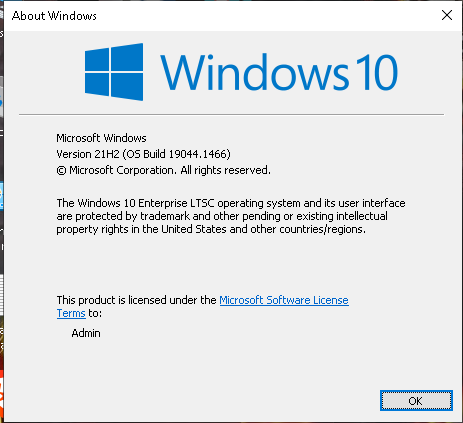
Also press Win + R, type winver and send a screenshot of the window
-
-
i getting this error because i have steam installed ?? plutonium have any problem with it ?
Seventro not really. igdumdim32 is your intel graphics driver so update that or if you use a laptop with dual gpus make sure the launcher uses the high performance one: https://plutonium.pw/docs/low-fps/#method-2-laptops-with-two-gpus, select plutonium-launcher-win32 instead of the bootstrapper here, that detects it automatically now.
Also check windows event viewer for any errors that come up after trying to launch pluto (windows logs -> application).
The windows version should be fine. -
Seventro not really. igdumdim32 is your intel graphics driver so update that or if you use a laptop with dual gpus make sure the launcher uses the high performance one: https://plutonium.pw/docs/low-fps/#method-2-laptops-with-two-gpus, select plutonium-launcher-win32 instead of the bootstrapper here, that detects it automatically now.
Also check windows event viewer for any errors that come up after trying to launch pluto (windows logs -> application).
The windows version should be fine.




Hello! It looks like you're interested in this conversation, but you don't have an account yet.
Getting fed up of having to scroll through the same posts each visit? When you register for an account, you'll always come back to exactly where you were before, and choose to be notified of new replies (either via email, or push notification). You'll also be able to save bookmarks and upvote posts to show your appreciation to other community members.
With your input, this post could be even better 💗
Register Login