[Release] UT2004 announcer
-
Made this for nostalgia and learning purposes, so I thought about sharing this with the community to see if more people would be interested in this mod.
This mod contains the following modifications:
Killstreak sounds
The sounds you hear when you achieve a certain gunstreak.- 5 kills - Killing spree
- 10 kills - Rampage
- 15 kills - Dominating
- 20 kills - Unstoppable
- 25 kills - God Like
- 30 kills - Wicked sick
Multi kills
This mod also contains the multi kill system from UT2004 with sounds and "splashcards".- 2 kills - Double kill
- 3 kills - Multi kill
- 4 kills - Mega kill
- 5 kills - Ultra kill
- 6 kills - Monster kill
- 7 kills - Ludicrous kill
- 8 kills - HOLY SHIT!
Misc sounds
- Firstblood
- Headshot
Timer
It also contains the sounds related to the time left in the match.Preview: https://www.youtube.com/watch?v=CHhHWRzgkEY
Download: https://github.com/Brentdevent/IW5-UT2004-Announcer/releases/tag/v1.0.0How to install
- Create a folder in your mods folder (for example "UTAnnouncer")
- Place the
mod.ffandmod.iwdin the UTAnnouncer folder - Place the
_custom_sounds.gscin the scripts folder
So the folder structure should look like this:

Server owners have to specify the path of the mod in the config files
For private match you typefs_game mods/UTAnnouncerin the console before loading a map.Interested in making your own announcer pack?
I included the rawfiles in my github repo so you can see how things are done.
https://github.com/Brentdevent/IW5-UT2004-AnnouncerNote: it requires basic Zonetool / mod tools knowledge. (https://github.com/ZoneTool/zonetool)
-
Made this for nostalgia and learning purposes, so I thought about sharing this with the community to see if more people would be interested in this mod.
This mod contains the following modifications:
Killstreak sounds
The sounds you hear when you achieve a certain gunstreak.- 5 kills - Killing spree
- 10 kills - Rampage
- 15 kills - Dominating
- 20 kills - Unstoppable
- 25 kills - God Like
- 30 kills - Wicked sick
Multi kills
This mod also contains the multi kill system from UT2004 with sounds and "splashcards".- 2 kills - Double kill
- 3 kills - Multi kill
- 4 kills - Mega kill
- 5 kills - Ultra kill
- 6 kills - Monster kill
- 7 kills - Ludicrous kill
- 8 kills - HOLY SHIT!
Misc sounds
- Firstblood
- Headshot
Timer
It also contains the sounds related to the time left in the match.Preview: https://www.youtube.com/watch?v=CHhHWRzgkEY
Download: https://github.com/Brentdevent/IW5-UT2004-Announcer/releases/tag/v1.0.0How to install
- Create a folder in your mods folder (for example "UTAnnouncer")
- Place the
mod.ffandmod.iwdin the UTAnnouncer folder - Place the
_custom_sounds.gscin the scripts folder
So the folder structure should look like this:
Server owners have to specify the path of the mod in the config files
For private match you typefs_game mods/UTAnnouncerin the console before loading a map.Interested in making your own announcer pack?
I included the rawfiles in my github repo so you can see how things are done.
https://github.com/Brentdevent/IW5-UT2004-AnnouncerNote: it requires basic Zonetool / mod tools knowledge. (https://github.com/ZoneTool/zonetool)
Brentdevent The download link only gets a flat file.
-
Ah thanks for letting me know. For some reason I can't edit the post anymore. Therefore I post a new link here.
Download link
https://github.com/Brentdevent/IW5-UT2004-Announcer/releases/tag/v1.0.0 -
Ah thanks for letting me know. For some reason I can't edit the post anymore. Therefore I post a new link here.
Download link
https://github.com/Brentdevent/IW5-UT2004-Announcer/releases/tag/v1.0.0Brentdevent I edited your post to include the correct download link.
Very nice release! I wish it would say triple kill instead of multi kill like on MW3. Also it might just be me but sounds volume is a bit too low in my opinion you don't really hear it while shooting.
But other than that it's awesome -
WICKED SICK
-
Brentdevent I edited your post to include the correct download link.
Very nice release! I wish it would say triple kill instead of multi kill like on MW3. Also it might just be me but sounds volume is a bit too low in my opinion you don't really hear it while shooting.
But other than that it's awesomeResxt Many thanks haha, yea I agree, if I can find some time, I'll take a look if I can increase the volume somehow.
There is unfortunately no sound for triple kills in UT2004 since they are called multi kills in this game. So that is the reason why I replaced it.I appreciate the feedback!
-
******* script runtime error *******
in call to builtin method "playsound"at function "timelimitclockut" in file "scripts/_custom_sounds.gsc"Help!
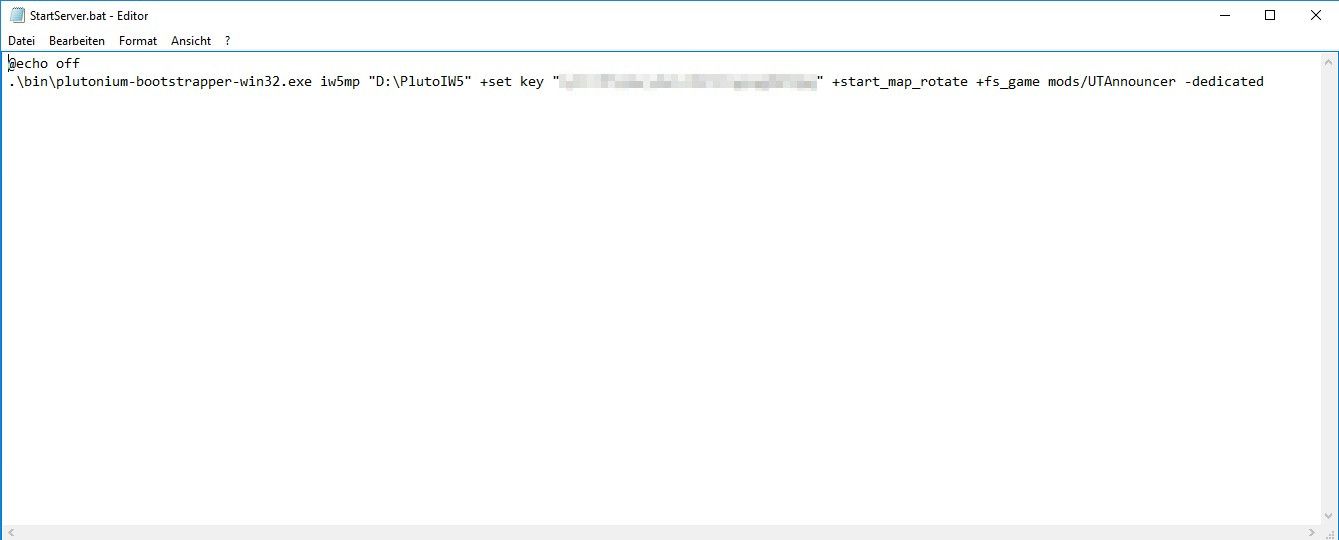
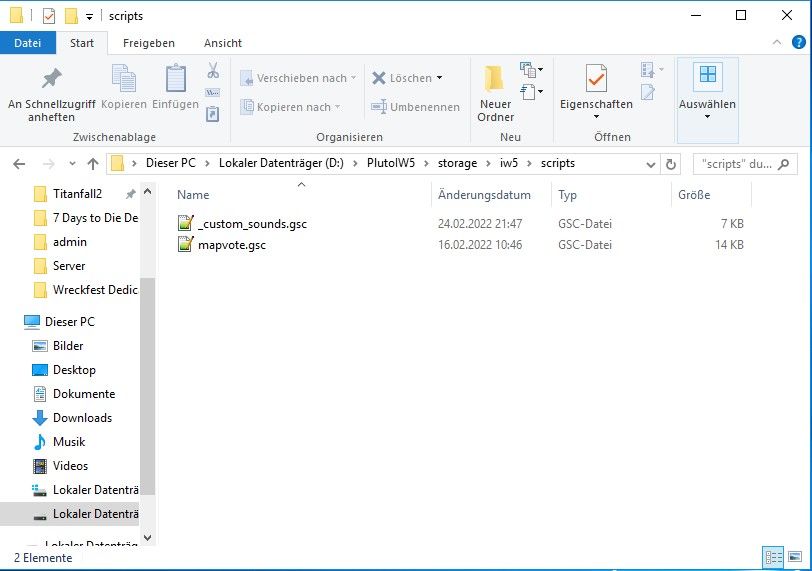
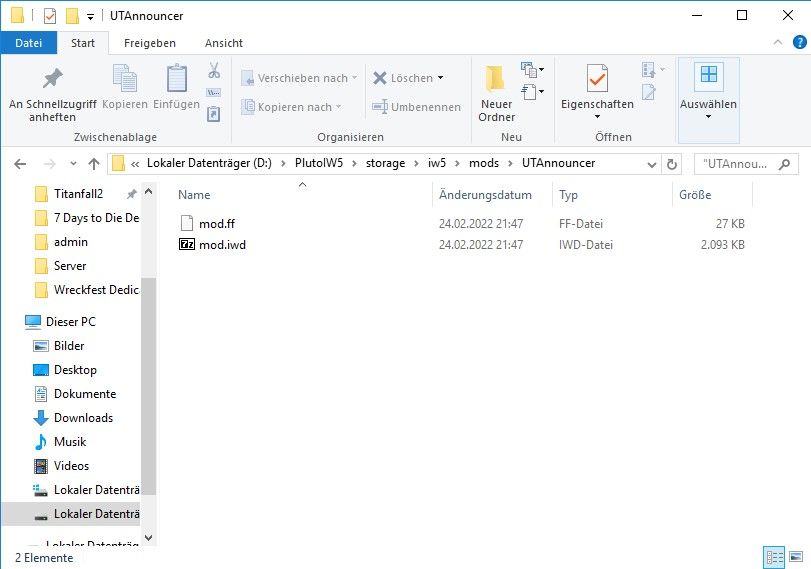
Vennek seems like the mod doesn't get loaded properly. I think it should be
+fs_game mods\UTAnnouncerinstead of+fs_game mods/UTAnnouncer? -
Brentdevent said in [Release] UT2004 announcer:
+fs_game mods\UTAnnouncer
+fs_game mods\UTAnnouncer doesn't work.




Hello! It looks like you're interested in this conversation, but you don't have an account yet.
Getting fed up of having to scroll through the same posts each visit? When you register for an account, you'll always come back to exactly where you were before, and choose to be notified of new replies (either via email, or push notification). You'll also be able to save bookmarks and upvote posts to show your appreciation to other community members.
With your input, this post could be even better 💗
Register Login