mw3 down?
-
Failed to fetch info: non-success status code: 403 403 Forbidden
What the does that mean?
-
Probably your firewall blocking the connection. Allow Plutonium through your FireWall.
-
Probably your firewall blocking the connection. Allow Plutonium through your FireWall.
@Mr-Android
I just played last week, even yesterday without any problems. I checked my firewall, plutonium is completely allowed. This is weird
-
Probably your firewall blocking the connection. Allow Plutonium through your FireWall.
@Mr-Android Are you able to start MW3, Mr. Android? I think the problem is not on my side tbh.
-
I am able to launch and play just fine.
-
It's certainly not us, we have over 100 players online right now. Who is your Internet Service Provider?
-
It's certainly not us, we have over 100 players online right now. Who is your Internet Service Provider?
@Mr-Android My ISP is called 'Zeelandnet' (from the Netherlands). However, I am able to connect to MW3 using a VPN, so the cause is indeed on my side. The weird thing is that I played yesterday without any problems. I only play on the infected server from Artyx. I absolutely didn't change anything to my local- or router firewall settings. I even re-checked. I also went through the 'known error problem solving' section to find a possible solution, but couldn't find anything useful, unfortunatly.
Tbh, I indeed think my ISP is the culprit. What else could it be since I didn't touched anything.
-
I suspect your router has some form of firewall, you may need to turn that off. Or allow Pluto through but most are either on or off. A VPN creates an encrypted tunnel, which the firewall is not able to inspect / block, hence my reasoning.
-
I suspect your router has some form of firewall, you may need to turn that off. Or allow Pluto through but most are either on or off. A VPN creates an encrypted tunnel, which the firewall is not able to inspect / block, hence my reasoning.
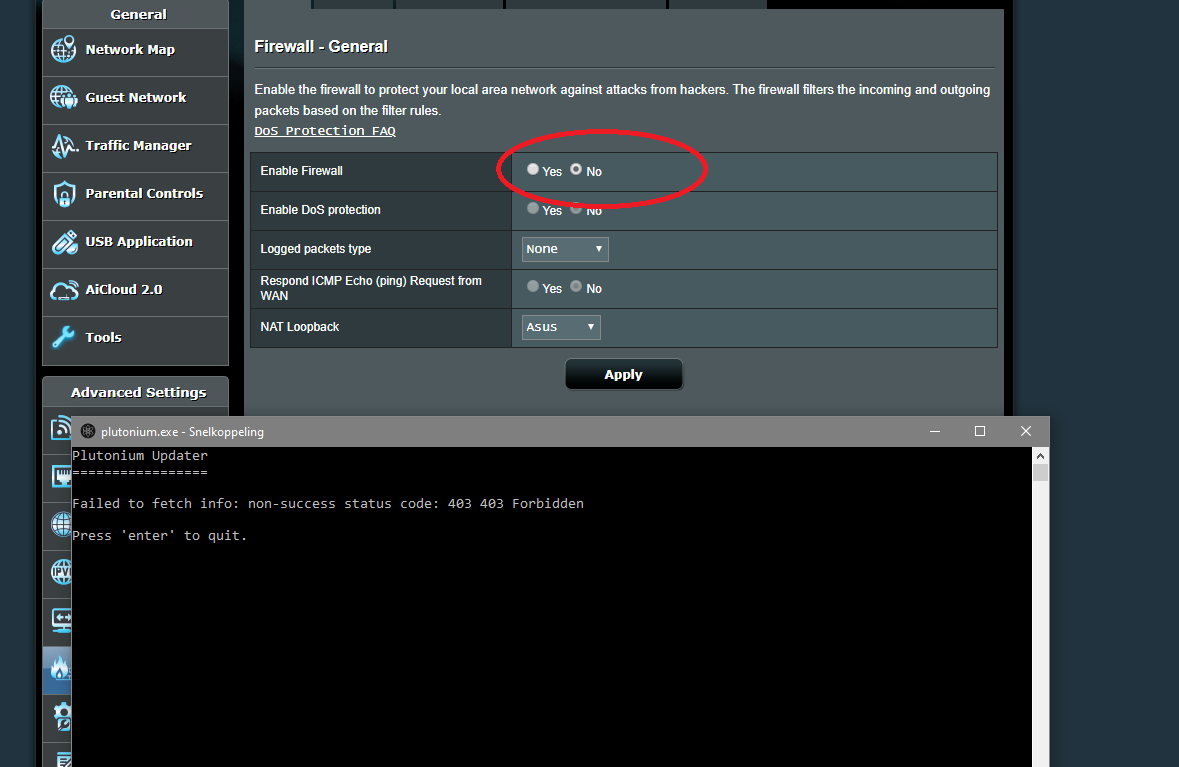
I even turned my router firewall (picture, both ipv4 and ipv6) and PC firewall completely off and it is still giving the error. Look, I am pretty sure my ISP's firewall is blocking it, since this all happens out of the blue. What is the IP-address I should ask for to unblock when I call customer support?
-
Try changing your dns servers to:
primary: 1.1.1.1
secondard: 1.0.0.1 -
idk what happened but suddenly I can play mw3 again though I didnt change anything?! not even my dns servers as Dss0 suggests.
I wished I could drop a solution to help future players encountering the same problem, but I honestly have no idea what this caused or why I am able to play mw3 again.
Thanks for all the support though, I can enjoy mw3 again

-
only advice i could give to ppl having same is to wait a couple of days and try again




Hello! It looks like you're interested in this conversation, but you don't have an account yet.
Getting fed up of having to scroll through the same posts each visit? When you register for an account, you'll always come back to exactly where you were before, and choose to be notified of new replies (either via email, or push notification). You'll also be able to save bookmarks and upvote posts to show your appreciation to other community members.
With your input, this post could be even better 💗
Register Login