Skip to content
  • 0 Unread 0
  • Recent
  • Tags
  • Popular
  • Users
  • Groups
Collapse

Plutonium

  1. Home
  2. BO1 Client Support
  3. PS4 Controllers

PS4 Controllers

Scheduled Pinned Locked Moved BO1 Client Support
16 Posts 5 Posters 2.0k Views 1 Watching
  • Oldest to Newest
  • Newest to Oldest
  • Most Votes
Reply
  • Reply as topic
Log in to reply
This topic has been deleted. Only users with topic management privileges can see it.
  • _Doge_undefined Offline
    _Doge_undefined Offline
    _Doge_
    wrote on last edited by
    #3

    Can you change controller sensitivity in game?

    1 Reply Last reply
    0
    • _Doge_undefined Offline
      _Doge_undefined Offline
      _Doge_
      wrote on last edited by
      #4

      This doesn't work.
      d436b8b1-eafd-4e70-8325-1c55ff1bc504-image.png
      It also shows me this/

      green_gobbyundefined 1 Reply Last reply
      0
      • _Doge_undefined _Doge_

        This doesn't work.
        d436b8b1-eafd-4e70-8325-1c55ff1bc504-image.png
        It also shows me this/

        green_gobbyundefined Offline
        green_gobbyundefined Offline
        green_gobby
        wrote on last edited by green_gobby
        #5

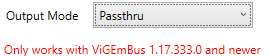
        _Doge_ Yes sorry about that, I forgot to mention a few things but you don't have to worry about that red text it's normal

        Make a profile that has "Passthru" as output mode and Xbox 360 as output controller, then (most importantly) select that profile from the drop-down list like the picture shows

        controller sensitivity can be changed in game, it works the same as if you used KB+MScreenshot_2.png

        1 Reply Last reply
        0
        • _Doge_undefined Offline
          _Doge_undefined Offline
          _Doge_
          wrote on last edited by
          #6

          Still didn't work. I saved it as Passthru and I selected my desired profile output mode is xbox 360 it wont respond in game. I can still navigate through UI using my controller tho.

          green_gobbyundefined 1 Reply Last reply
          0
          • _Doge_undefined _Doge_

            Still didn't work. I saved it as Passthru and I selected my desired profile output mode is xbox 360 it wont respond in game. I can still navigate through UI using my controller tho.

            green_gobbyundefined Offline
            green_gobbyundefined Offline
            green_gobby
            wrote on last edited by
            #7

            _Doge_ Did you install the DS4 driver? Go to Settings > Utils > Controller/Driver setup
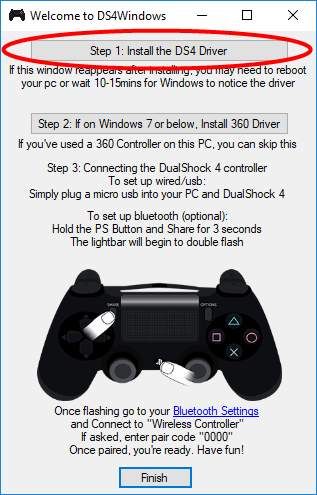
            img_59e99baaac090.jpg

            1 Reply Last reply
            0
            • _Doge_undefined Offline
              _Doge_undefined Offline
              _Doge_
              wrote on last edited by
              #8

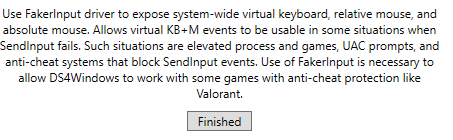
              I get a different screen when I do that. You must be on an older version I get this:
              2e4375ea-5e8b-4baa-bc73-a0bd7a857391-image.png

              b780bfc3-cea7-408a-95b7-576bc3d9dedb-image.png

              1 Reply Last reply
              0
              • green_gobbyundefined Offline
                green_gobbyundefined Offline
                green_gobby
                wrote on last edited by
                #9

                I remember it taking me ages to figure out how to fix this issue. Try "Hide DS4 controller" in the settings, other than that I'm out of ideas

                1 Reply Last reply
                1
                • _Doge_undefined Offline
                  _Doge_undefined Offline
                  _Doge_
                  wrote on last edited by
                  #10

                  Didn't work. Do I need steam or something to use controllers?

                  1 Reply Last reply
                  0
                  • _Doge_undefined Offline
                    _Doge_undefined Offline
                    _Doge_
                    wrote on last edited by
                    #11

                    green_gobby this is quite old but it worked on iw4x (ds4windows did). So I think I will ahve to change settings in the actual bo2. SO I think it might have to do with my in game settings i think it might be that i messed bout with commands so is there a way to reset my controls?

                    1 Reply Last reply
                    0
                    • _Doge_undefined _Doge_

                      How do I use PS4 Controllers on BO1? I have DS4Windows installed and everything but it wont respond in game. I can use the gamepad as a mouse but nothing else.

                      pikituso10undefined Offline
                      pikituso10undefined Offline
                      pikituso10
                      wrote on last edited by
                      #12

                      _Doge_ A friend have added plutonium launcher on steam, and it recognised the controller, try it
                      (sorry for my english)

                      1 Reply Last reply
                      0
                      • _Doge_undefined Offline
                        _Doge_undefined Offline
                        _Doge_
                        wrote on last edited by
                        #13

                        problem is solved lol gamepad was off

                        Kenshiro_undefined 1 Reply Last reply
                        0
                        • _Doge_undefined _Doge_

                          problem is solved lol gamepad was off

                          Kenshiro_undefined Offline
                          Kenshiro_undefined Offline
                          Kenshiro_
                          wrote on last edited by
                          #14

                          _Doge_ How did you achieve this ? I have the same issue

                          Kenshiro_undefined 1 Reply Last reply
                          0
                          • _Doge_undefined _Doge_

                            How do I use PS4 Controllers on BO1? I have DS4Windows installed and everything but it wont respond in game. I can use the gamepad as a mouse but nothing else.

                            X9Kamikaze9Xundefined Offline
                            X9Kamikaze9Xundefined Offline
                            X9Kamikaze9X
                            wrote on last edited by
                            #15
                            This post is deleted!
                            1 Reply Last reply
                            0
                            • Kenshiro_undefined Kenshiro_

                              _Doge_ How did you achieve this ? I have the same issue

                              Kenshiro_undefined Offline
                              Kenshiro_undefined Offline
                              Kenshiro_
                              wrote on last edited by
                              #16

                              Kenshiro_ in bo1 options, go to controls and enable gamepad

                              1 Reply Last reply
                              0

                              Hello! It looks like you're interested in this conversation, but you don't have an account yet.

                              Getting fed up of having to scroll through the same posts each visit? When you register for an account, you'll always come back to exactly where you were before, and choose to be notified of new replies (either via email, or push notification). You'll also be able to save bookmarks and upvote posts to show your appreciation to other community members.

                              With your input, this post could be even better 💗

                              Register Login
                              Reply
                              • Reply as topic
                              Log in to reply
                              • Oldest to Newest
                              • Newest to Oldest
                              • Most Votes


                              • Login

                              • Don't have an account? Register

                              • Login or register to search.
                              • First post
                                Last post
                              0
                              • Unread 0
                              • Recent
                              • Tags
                              • Popular
                              • Users
                              • Groups