Skip to content
  • 0 Unread 0
  • Recent
  • Tags
  • Popular
  • Users
  • Groups
  • Donate
Collapse

Plutonium

  1. Home
  2. BO1 Modding Releases & Resources
  3. [ZM] [Release] Remove Perk Limit

[ZM] [Release] Remove Perk Limit

Scheduled Pinned Locked Moved BO1 Modding Releases & Resources
23 Posts 17 Posters 33.6k Views 6 Watching
  • Oldest to Newest
  • Newest to Oldest
  • Most Votes
Reply
  • Reply as topic
Log in to reply
This topic has been deleted. Only users with topic management privileges can see it.
  • Duckyhub Duckyhub

    This is cool but wouldn’t it just be easier and cleaner to just use the replacefunc option?

    JezuzLizard Offline
    JezuzLizard Offline
    JezuzLizard
    Plutonium Staff
    wrote on last edited by
    #3

    Duckyhub replacefunc doesn't work on that type of function. I've already tried.

    Soliderror 1 Reply Last reply
    1
    • Duckyhub Duckyhub

      This is cool but wouldn’t it just be easier and cleaner to just use the replacefunc option?

      Ezentru Offline
      Ezentru Offline
      Ezentru
      wrote on last edited by Ezentru
      #4

      Duckyhub even if that was an option i have no idea how it works anyway.

      I had been looking for a way to remove the limit (including the way it's done in BO2) with no luck. However, thanks to @dontknowletsplay, I found out that you can replace game files without editing them and that the limit on perks could be found in the vending_trigger_think() function within _zombiemode_perks.gsc. rather than a variable in some random place in the code named something along the lines of "perk_purchase_limit". tried this method of replacing game file and it worked.

      1 Reply Last reply
      0
      • MONSTERK11ER Offline
        MONSTERK11ER Offline
        MONSTERK11ER
        Contributor
        wrote on last edited by
        #5

        will this work in public lobbies?

        Ezentru 1 Reply Last reply
        0
        • MONSTERK11ER MONSTERK11ER

          will this work in public lobbies?

          Ezentru Offline
          Ezentru Offline
          Ezentru
          wrote on last edited by Ezentru
          #6

          MONSTERK11ER I haven't tested that. Though I think it has a chance of working.

          Would certainly depend on the server though. I am unable to test this at the moment as I am still getting the "No avaliable sessions found" error.

          1 Reply Last reply
          0
          • Pistakilla Offline
            Pistakilla Offline
            Pistakilla
            wrote on last edited by
            #7

            I've subtracted self.num_perks to 5 upon a player's spawn. That way whenever the player spawns they would start off with self.num_perks = -5 which according to vending_think(), the thread will revert back to the start when self.num_perks = 4; each perk you buy will add the variable to 1. With the change I propose, after buying 4 perks would total the variable to -1. So long as the variable does not equal 4, you can buy as many perks as you want.

            Apply this equation to make it easier:

            (x * -1) + 4 = Amount of perks to buy on the map
            

            Where (in this case) x = -5 and according to the equation, it will equal 9. The only exception is that x must equal a negative number.

            TL;DR

            just make a custom script and add self.num_perks to a negative number in onPlayerSpawned()

            init()
            {
            	thread onPlayerConnect();
            }
            
            onPlayerConnect()
            {
            	for(;;)
            	{
            		level waittill ("connecting", player);
            
            		player thread onPlayerSpawned();
            	}
            }
            
            onPlayerSpawned()
            {
            	for(;;)
            	{
            		self waittill("spawned_player");
            
            		self.num_perks = -5; //Remove perk limit, must be a negative number
            
            	}
            }
            
            1 Reply Last reply
            4
            • Ezentru Ezentru

              Script that sets zombie perk limit to 9. Replaces game file without needing to edit it.

              To install:

              1. Download file
              2. Place downloaded file in the following folder: \AppData\Local\Plutonium\storage\t5\maps
              BigMacJr Offline
              BigMacJr Offline
              BigMacJr
              wrote on last edited by
              #8

              Ezentru map?? do i put it in mods or do i create a new folder and name it maps??

              Ezentru 1 Reply Last reply
              8
              • BigMacJr BigMacJr

                Ezentru map?? do i put it in mods or do i create a new folder and name it maps??

                Ezentru Offline
                Ezentru Offline
                Ezentru
                wrote on last edited by Ezentru
                #9

                BigMacJr yeah create new folder named maps and put file in there.

                Alternatively, follow the reply above yours' instructions to achieve the same result as my script. If you use their script instead, copy my version of code into a text file, change the extension of the file to .gsc and then place the file in the following directory: \AppData\Local\Plutonium\storage\t5\scripts\sp

                Note: The reason you wanna use this version is because if you put his file where you are supposed to put it (\AppData\Local\Plutonium\storage\t5\scripts\sp\zom), it wont execute the script. and if you put it in sp, then it executes before you are even in a game. Adding that check for whether you are in "zombiemode" makes it so it executes and doesnt crash game upon launch.

                init()
                {
                        if ( GetDvar( #"zombiemode" ) == "1" )
                        {
                            level thread onPlayerConnect();
                        }
                            
                }
                
                onPlayerConnect()
                {
                	for(;;)
                	{
                		level waittill ("connecting", player);
                
                		player thread onPlayerSpawned();
                	}
                }
                
                onPlayerSpawned()
                {
                	for(;;)
                	{
                		self waittill("spawned_player");
                
                		self.num_perks = -5; //Remove perk limit, must be a negative number
                
                	}
                }
                
                1 Reply Last reply
                0
                • JezuzLizard JezuzLizard

                  Duckyhub replacefunc doesn't work on that type of function. I've already tried.

                  Soliderror Offline
                  Soliderror Offline
                  Soliderror
                  wrote on last edited by
                  #10

                  I managed to get replace func to work on this function.

                  1 Reply Last reply
                  1
                  • Aoteruz Offline
                    Aoteruz Offline
                    Aoteruz
                    wrote on last edited by
                    #11

                    Would it work if I put it in T6/script and create a map folder? Or is this for bo1 only?

                    Pistakilla 1 Reply Last reply
                    0
                    • Aoteruz Aoteruz

                      Would it work if I put it in T6/script and create a map folder? Or is this for bo1 only?

                      Pistakilla Offline
                      Pistakilla Offline
                      Pistakilla
                      wrote on last edited by
                      #12

                      @Avengeful_Gaming Would work for bo2, but there's already an easier way to do so.

                      1 Reply Last reply
                      0
                      • Ezentru Ezentru

                        Script that sets zombie perk limit to 9. Replaces game file without needing to edit it.

                        To install:

                        1. Download file
                        2. Place downloaded file in the following folder: \AppData\Local\Plutonium\storage\t5\maps
                        X2BelchLord Offline
                        X2BelchLord Offline
                        X2BelchLord
                        wrote on last edited by
                        #13

                        Ezentru im a bit new to pc modding so this might be a bit of a stupid question but where is appdata?

                        Ezentru shwdrrrrrr angxlzj 3 Replies Last reply
                        0
                        • X2BelchLord X2BelchLord

                          Ezentru im a bit new to pc modding so this might be a bit of a stupid question but where is appdata?

                          Ezentru Offline
                          Ezentru Offline
                          Ezentru
                          wrote on last edited by
                          #14

                          @mr_foxinator easiest way to get to it is pressing the windows key + R, and then typing %appdata%.

                          X2BelchLord 1 Reply Last reply
                          0
                          • Ezentru Ezentru

                            @mr_foxinator easiest way to get to it is pressing the windows key + R, and then typing %appdata%.

                            X2BelchLord Offline
                            X2BelchLord Offline
                            X2BelchLord
                            wrote on last edited by
                            #15

                            Ezentru thank you : )

                            1 Reply Last reply
                            1
                            • X2BelchLord X2BelchLord

                              Ezentru im a bit new to pc modding so this might be a bit of a stupid question but where is appdata?

                              shwdrrrrrr Offline
                              shwdrrrrrr Offline
                              shwdrrrrrr
                              wrote on last edited by
                              #16

                              @mr_foxinator windows + r
                              type "%appdata%"
                              and there you go

                              1 Reply Last reply
                              0
                              • TankLover24 Offline
                                TankLover24 Offline
                                TankLover24
                                wrote on last edited by
                                #17

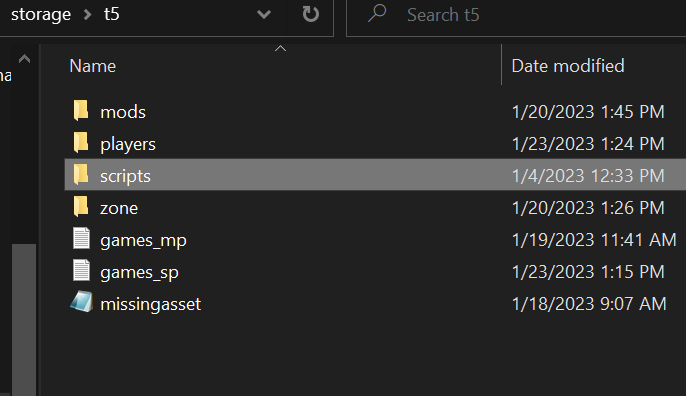
                                07566fe9-9c07-4ac8-a42b-5f73cb31e416-image.png
                                I am in the t5 folder for plutonium and i dont see a "Maps folder to place the Zombiemode_perks.gsc into do i create one or put it into mods

                                1 Reply Last reply
                                2
                                • X2BelchLord X2BelchLord

                                  Ezentru im a bit new to pc modding so this might be a bit of a stupid question but where is appdata?

                                  angxlzj Offline
                                  angxlzj Offline
                                  angxlzj
                                  wrote on last edited by
                                  #18
                                  This post is deleted!
                                  1 Reply Last reply
                                  0
                                  • EddxCr20 Offline
                                    EddxCr20 Offline
                                    EddxCr20
                                    wrote on last edited by
                                    #19

                                    Stupid question. How can I add this to my own T5 server?

                                    1 Reply Last reply
                                    0
                                    • bhfff bhfff referenced this topic on
                                    • Ezentru Ezentru

                                      Script that sets zombie perk limit to 9. Replaces game file without needing to edit it.

                                      To install:

                                      1. Download file
                                      2. Place downloaded file in the following folder: \AppData\Local\Plutonium\storage\t5\maps
                                      qzy124 Offline
                                      qzy124 Offline
                                      qzy124
                                      wrote on last edited by
                                      #20

                                      Ezentru I LOVE YOU THANK YOU SO FUCKING MUCH I COULDN'T PLAY FOR A MONTH

                                      1 Reply Last reply
                                      1
                                      • K4YN3_04 Offline
                                        K4YN3_04 Offline
                                        K4YN3_04
                                        wrote on last edited by
                                        #21

                                        yesssirrrr

                                        1 Reply Last reply
                                        0
                                        • TheAdriESP107 Offline
                                          TheAdriESP107 Offline
                                          TheAdriESP107
                                          wrote on last edited by
                                          #22
                                          This post is deleted!
                                          1 Reply Last reply
                                          0

                                          Hello! It looks like you're interested in this conversation, but you don't have an account yet.

                                          Getting fed up of having to scroll through the same posts each visit? When you register for an account, you'll always come back to exactly where you were before, and choose to be notified of new replies (either via email, or push notification). You'll also be able to save bookmarks and upvote posts to show your appreciation to other community members.

                                          With your input, this post could be even better 💗

                                          Register Login
                                          Reply
                                          • Reply as topic
                                          Log in to reply
                                          • Oldest to Newest
                                          • Newest to Oldest
                                          • Most Votes


                                          • 1
                                          • 2
                                          • Login

                                          • Don't have an account? Register

                                          • Login or register to search.
                                          • First post
                                            Last post
                                          0
                                          • Unread 0
                                          • Recent
                                          • Tags
                                          • Popular
                                          • Users
                                          • Groups
                                          • Donate