[Re-Release] [ZM] BO4 Perk and Powerup Shader Pack
-
Credit
Original post by Nathan3197
Perk and Powerup Shaders created by Robit
Tombstone, Widows Wine, Extra BO4 & Other Set of Perk Shaders from Call of Duty Maps Website
All perk icons downscaled, modified, converted and organized by Ahrimdon
This is a re-release of the BO4 Perk and Powerup Shaders originally posted by Nathan3197.
Perk Icons from Call of Duty Maps:

Perk Icons by Robit:

Powerup Icons by Robit:

Extra BO4 Perk Icons from Call of Duty Maps:

The original release of these shaders have subtle flaws and pixelation on each icon. I losslessly downloaded, downscaled, modified, converted and organized the BO4 Perk and Powerup shaders.
For example:
Notice the slight pixelation & little black dot at the top of Stamin-Up:

This is removed with my repack.
Same thing with Electric Cherry, notice the pixelation & little black dots on the entire image:
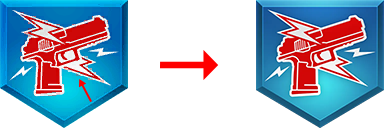
This is also removed with my repack.
Install
WaW
-
Go into your
pluto_t4_full_gamegame directory -
In your
mainfolder, copy one of the .iwd files with animagesfolder inside of it -
Open the file, and go into the
imagesfolder -
Delete everything but one file inside the folder
-
Drag the .iwi files into the
.iwd/images -
Delete the remaining file and rename the .iwd to
iw_28
or
Use the premade .iwd file I have created
BO1
-
Go into your
pluto_t5_full_gamegame directory -
In your
mainfolder, copy one of the .iwd files with animagesfolder inside of it -
Open the file, and go into the
imagesfolder -
Delete everything but one file inside the folder
-
Drag the .iwi files into the
.iwd/images -
Delete the remaining file and rename the .iwd to
iw_43
or
Use the premade .iwd file I have created
BO2
- Drag all .iwi files into your
%localappdata&/Plutonium/storage/t6/imagesfolder (Create the folder if you don't have it)
BO3
- You're going to have to figure this one out lol. Plutonium only supports WaW-BO2 and I don't want to infringe on their rules.
File Types
I have converted and included the following file types for each game:
WaW
- .dds - Uncompiled Direct Draw Surface File - Exported in BC3 (DXT4-DXT5)
- .iwi - Compiled Image File Ready to Add to Game
- .png - 512x512 (Original Size) & 128x128 (Downscaled Size)
BO1
- .dds - Uncompiled Direct Draw Surface File - Exported in BC3 (DXT4-DXT5)
- .iwi - Compiled Image File Ready to Add to Game
- .png - 512x512 (Original Size) & 128x128 (Downscaled Size)
BO2
- .dds - Uncompiled Direct Draw Surface File - Exported in BC3 (DXT4-DXT5)
- .iwi - Compiled Image File Ready to Add to Game
- .png - 512x512 (Original Size) & 128x128 (Downscaled Size)
BO3
- .tiff - Raw Icons to be Added to .gdt
- .gdt - Premade Perk Icons Exported in .gdt Using Mod Tools - Asset Editor
- .zone - Template .zone File for Parsing Them into Mod
- .png - 512x512 (Original Size) & 128x128 (Downscaled Size)
- Note: In BO2, Mule Kick & Vulture Aid perk shaders have some pixelation at the bottom when in-game. This only happens in BO2. Not sure why this is, if anyone knows why, please let me know!
If there are any mistakes and/or anything I've missed, please let me know down below! Enjoy!
-
Hello! It looks like you're interested in this conversation, but you don't have an account yet.
Getting fed up of having to scroll through the same posts each visit? When you register for an account, you'll always come back to exactly where you were before, and choose to be notified of new replies (either via email, or push notification). You'll also be able to save bookmarks and upvote posts to show your appreciation to other community members.
With your input, this post could be even better 💗
Register Login