Staff Support Needed according to the Err Message
-
Hi, i'm new here on the Forum, i had time using Plutonium past year and everything apparently worked fine, but someday, i accidentaly formated my pc and everything were gone, and i tried to download this today, upload, install the game, every single step, but i got this:

Edit: This message appears when i try to run T4M Multiplayer and Co-op/Zombies
-
Hi, i'm new here on the Forum, i had time using Plutonium past year and everything apparently worked fine, but someday, i accidentaly formated my pc and everything were gone, and i tried to download this today, upload, install the game, every single step, but i got this:
Edit: This message appears when i try to run T4M Multiplayer and Co-op/Zombiessbjshephard22 upload the .dmp file to google drive and post the link here:

Also if you have msi afterburner/rivatuner or any other software with an overlay disable it.
-
sbjshephard22 upload the .dmp file to google drive and post the link here:
Also if you have msi afterburner/rivatuner or any other software with an overlay disable it.
https://drive.google.com/file/d/12QF350Y0CshsSpp2fJlKqMqLjVR9G1mx/view?usp=sharing, https://drive.google.com/file/d/13wy74R4UvkxMx9focK4izGCqwWS_Fg3A/view?usp=sharing, https://drive.google.com/file/d/17wpObs7D_xk13Q9FT1oCFkX89fVBhyMm/view?usp=sharing, https://drive.google.com/file/d/1LhEuo7zlnBMOhQz_4WtwImVAOFEr2v5D/view?usp=sharing, https://drive.google.com/file/d/1MHhtBI25YJbNgpFCC4IlvK2uEUPmFvXi/view?usp=sharing, https://drive.google.com/file/d/1MXbRHPRhDDy89-zxLU6uLTqRTwdpttEP/view?usp=sharing, https://drive.google.com/file/d/1OanmGAwH_WreN4aSsGD8XBt3BTjlUy6k/view?usp=sharing, https://drive.google.com/file/d/1j4YQ_f-yt05HLY4Kaiqh2hwtVomaAvnu/view?usp=sharing, https://drive.google.com/file/d/1o9FV59uVI-q2_w1V-vEvvtHltz5agi-c/view?usp=sharing, https://drive.google.com/file/d/1pmUablzwIeHQxU1WIytBiwsokJ9Nu5SM/view?usp=sharing
-
https://drive.google.com/file/d/12QF350Y0CshsSpp2fJlKqMqLjVR9G1mx/view?usp=sharing, https://drive.google.com/file/d/13wy74R4UvkxMx9focK4izGCqwWS_Fg3A/view?usp=sharing, https://drive.google.com/file/d/17wpObs7D_xk13Q9FT1oCFkX89fVBhyMm/view?usp=sharing, https://drive.google.com/file/d/1LhEuo7zlnBMOhQz_4WtwImVAOFEr2v5D/view?usp=sharing, https://drive.google.com/file/d/1MHhtBI25YJbNgpFCC4IlvK2uEUPmFvXi/view?usp=sharing, https://drive.google.com/file/d/1MXbRHPRhDDy89-zxLU6uLTqRTwdpttEP/view?usp=sharing, https://drive.google.com/file/d/1OanmGAwH_WreN4aSsGD8XBt3BTjlUy6k/view?usp=sharing, https://drive.google.com/file/d/1j4YQ_f-yt05HLY4Kaiqh2hwtVomaAvnu/view?usp=sharing, https://drive.google.com/file/d/1o9FV59uVI-q2_w1V-vEvvtHltz5agi-c/view?usp=sharing, https://drive.google.com/file/d/1pmUablzwIeHQxU1WIytBiwsokJ9Nu5SM/view?usp=sharing
sbjshephard22 all the dump files are corrupted..
- post a screenshot of your game folder
- hit windows key + r and type "winver" into the run box, hit enter and post a screenshot of the window that comes up
- are you playing on a virtual machine?
Other than that:
- exclude plutonium from your antivirus software -> https://plutonium.pw/docs/antivirus/
- repair your game files -> https://plutonium.pw/docs/repair/
- try closing all programs that are running in the background
- if you have msi afterburner/rivatuner or any other software with an overlay disable it
- install everything that's in the redist folder in your game folder
- verify the integrity of your system files:
- open the start menu and search for "cmd"
- run cmd as admin
- execute the following command
dism /online /cleanup-image /restorehealth- after dism has finished repairing your system restart your pc
-
sbjshephard22 upload the .dmp file to google drive and post the link here:
Also if you have msi afterburner/rivatuner or any other software with an overlay disable it.
Dss0 I have Steam, but it's disabled at least, i have no other background programs running...
Edit: I'm not using Virtual Machine, it's the Native Windows 10 but every effect disabled, and black backgroud, to improve performance
-
sbjshephard22 all the dump files are corrupted..
- post a screenshot of your game folder
- hit windows key + r and type "winver" into the run box, hit enter and post a screenshot of the window that comes up
- are you playing on a virtual machine?
Other than that:
- exclude plutonium from your antivirus software -> https://plutonium.pw/docs/antivirus/
- repair your game files -> https://plutonium.pw/docs/repair/
- try closing all programs that are running in the background
- if you have msi afterburner/rivatuner or any other software with an overlay disable it
- install everything that's in the redist folder in your game folder
- verify the integrity of your system files:
- open the start menu and search for "cmd"
- run cmd as admin
- execute the following command
dism /online /cleanup-image /restorehealth- after dism has finished repairing your system restart your pc

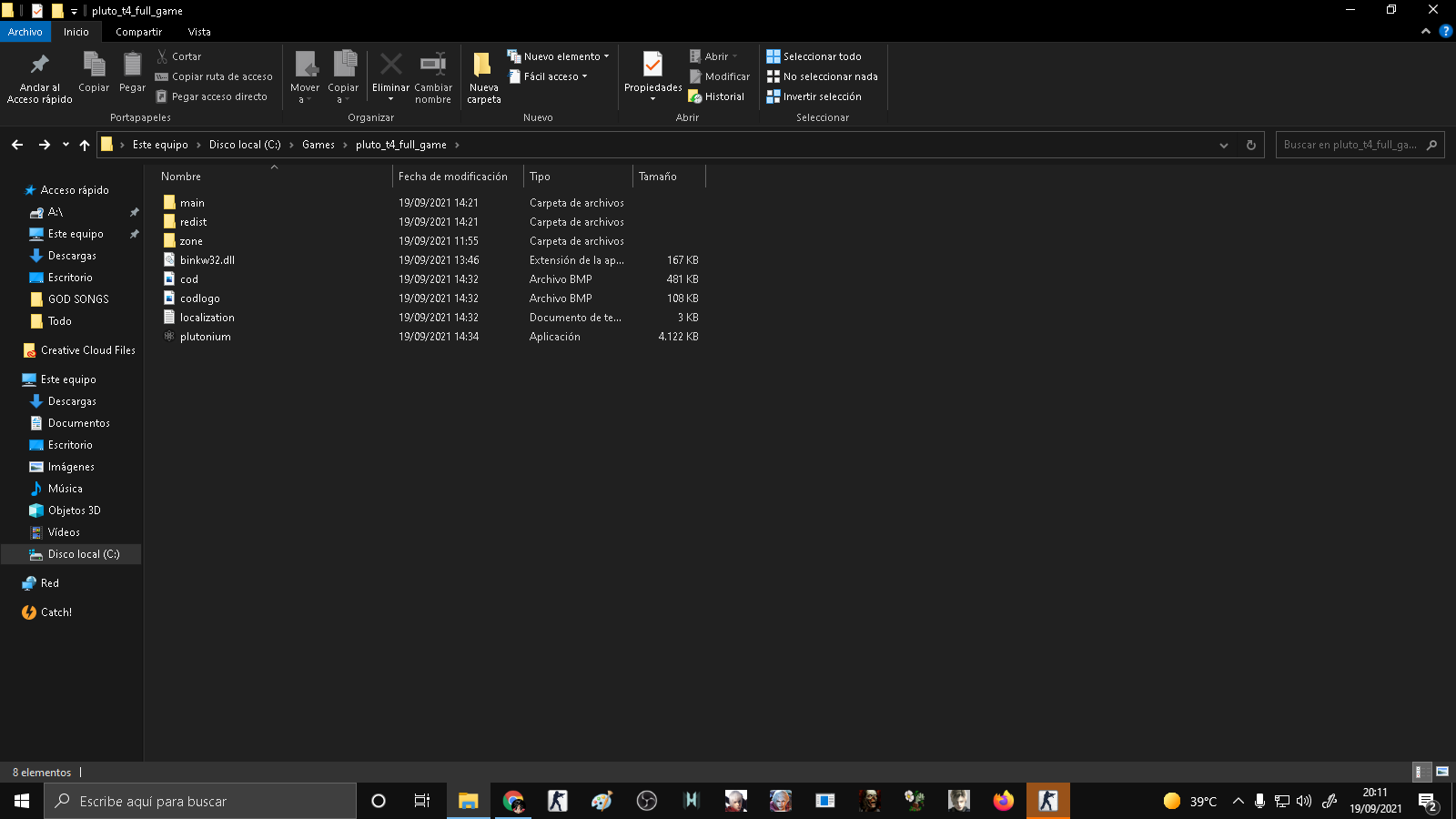


Excuse me for link everything, i think it could help you, refering to antivirus, i have the Windows Defender and AVG disabled (yes, the only external antivirus i use) -
And also i forgot to say that i tried a couple of times repairing the game, installing and uninstalling both the mod and the torrent copy, and simply didn't work, i applied restart on the pc, i wish it could fix the error


Hello! It looks like you're interested in this conversation, but you don't have an account yet.
Getting fed up of having to scroll through the same posts each visit? When you register for an account, you'll always come back to exactly where you were before, and choose to be notified of new replies (either via email, or push notification). You'll also be able to save bookmarks and upvote posts to show your appreciation to other community members.
With your input, this post could be even better 💗
Register Login