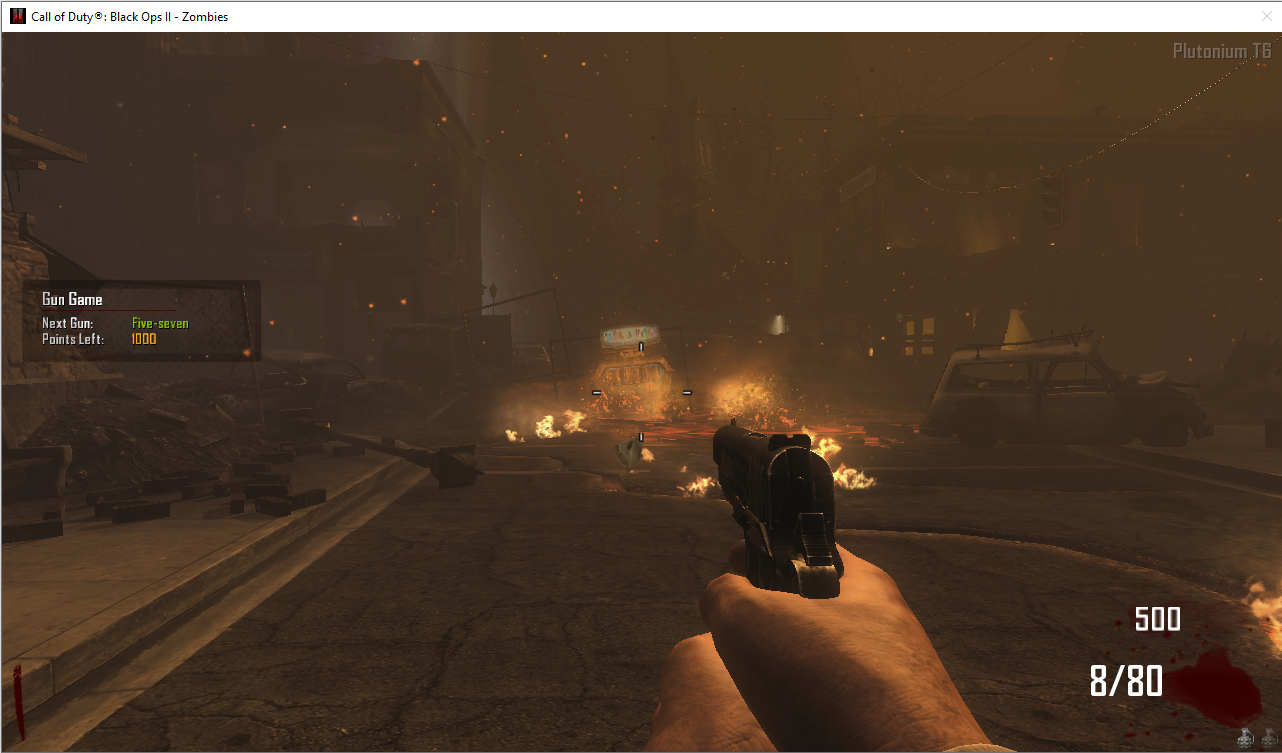
[Release] Black ops II Zombies: GunGame
-
Developed by @DotkorSAS
Updated the 24/05/2023Instructions
How to play kill based or score based
In the init method there is a variable called
level.gg_scorebasedjust set this variable to 0 to play the "kill based" version or you set it to 1 to play the "score based" versionHow to add infinite rotation
In order to make sure that the game does not end and the weapons contiunate to rotate you have to set in the gsc code the variable
level.gg_rotationto 0. If set to a valid int number it will rotate that amount of times.How to add weapons
- Open the .gsc file and look at the init function.
- Type
insertWeapon("yourweapon_zm");in the case of the switch of the map you want add.
How to customize kills or score for the next gun
To set a value you choose as "kill series" or "point series" just add an argument when calling the
insertWeaponmethod.
The method will change frominsertWeapon("yourweapon_zm");toinsertWeapon("yourweapon_zm", 50);if you want to set 50 kills to go to the next weapon.Exemple
 switch(map)
    {
        case "town":
            insertWeapon("m1911_zm");
            insertWeapon("fiveseven_zm");
            insertWeapon("beretta93r_zm");
            insertWeapon("judge_zm");
            insertWeapon("fivesevendw_zm");
            insertWeapon("mp5k_zm");
            insertWeapon("870mcs_zm");
            insertWeapon("rottweil72_zm");
            insertWeapon("yourweapon_zm"); // I added this
            break;
        ...
    }
Download & Source code
Download a available on my github page here
-
How did you do to use it in town?
-
xZymph Dude im playing on redacted, this post talk about the gungame for bo2
-
true, I had not noticed. I try to use it but when starting the game it doesn't give me any weapon.
-
xZymph don't edit anything and use this last version, i added a few things and i fixed a few issue. Now all work 100% on private, on server im testing
-
then it must be my problem, thank you very much anyway
-
sorry guys i am new here big fan of gun games can someone tell me how to install or enable it
thanks -
hey man I'm wondering how I can add this to my dedicated server I think i went in one of your gun game servers so can u help me, please
-
Ray0189 i don't have any gungame server, how do you went in 1 of mine gungame servers?
You have to take the code, converti the file with the code in a gsc file and put the file in gametypes_zm folder of your server -
como hago para poder jugarlo ??
que tengo que hacer?? -
I was playing Nuketown gungame and I had noticed after the MP5 it switches to the PDW but the PDW isn't in that map and just makes you have no weapon and on the left side just spams Test Test Test. I was wondering if you can fix the guns on maps
-
I was playing Nuketown gungame and I had noticed after the MP5 it switches to the PDW but the PDW isn't in that map and just makes you have no weapon and on the left side just spams Test Test Test. I was wondering if you can fix the guns on maps
@PrincessYoshi yea, now im on my new pc, i probaly left the gun in the weapon rotation, you can remove it from the self.weapons and taht should fix it. Now i release a code for zombies speed and then i'll fix it. Continue to report bugs and problem i'll fix everything

-
Thank you for sharing it, I have put it on the server and it has had good acceptance, they are already asking me to increase the rooms, I will let you know any bug that the code presents
-
Developed by @DotkorSAS
Updated the 24/05/2023Instructions
How to play kill based or score based
In the init method there is a variable called
level.gg_scorebasedjust set this variable to 0 to play the "kill based" version or you set it to 1 to play the "score based" versionHow to add infinite rotation
In order to make sure that the game does not end and the weapons contiunate to rotate you have to set in the gsc code the variable
level.gg_rotationto 0. If set to a valid int number it will rotate that amount of times.How to add weapons
- Open the .gsc file and look at the init function.
- Type
insertWeapon("yourweapon_zm");in the case of the switch of the map you want add.
How to customize kills or score for the next gun
To set a value you choose as "kill series" or "point series" just add an argument when calling the
insertWeaponmethod.
The method will change frominsertWeapon("yourweapon_zm");toinsertWeapon("yourweapon_zm", 50);if you want to set 50 kills to go to the next weapon.Exemple
 switch(map)
    {
        case "town":
            insertWeapon("m1911_zm");
            insertWeapon("fiveseven_zm");
            insertWeapon("beretta93r_zm");
            insertWeapon("judge_zm");
            insertWeapon("fivesevendw_zm");
            insertWeapon("mp5k_zm");
            insertWeapon("870mcs_zm");
            insertWeapon("rottweil72_zm");
            insertWeapon("yourweapon_zm"); // I added this
            break;
        ...
    }
Download & Source code
Download a available on my github page here
Sorex hola una pregunta como instalo el mod
-
how do you turn it on idk how to do the var thingy
-
Hi sorry im new to plutonium and I dont understand how to play this solo/how to use this code to play gun game could someone help me
-
Developed by @DotkorSAS
Updated the 24/05/2023Instructions
How to play kill based or score based
In the init method there is a variable called
level.gg_scorebasedjust set this variable to 0 to play the "kill based" version or you set it to 1 to play the "score based" versionHow to add infinite rotation
In order to make sure that the game does not end and the weapons contiunate to rotate you have to set in the gsc code the variable
level.gg_rotationto 0. If set to a valid int number it will rotate that amount of times.How to add weapons
- Open the .gsc file and look at the init function.
- Type
insertWeapon("yourweapon_zm");in the case of the switch of the map you want add.
How to customize kills or score for the next gun
To set a value you choose as "kill series" or "point series" just add an argument when calling the
insertWeaponmethod.
The method will change frominsertWeapon("yourweapon_zm");toinsertWeapon("yourweapon_zm", 50);if you want to set 50 kills to go to the next weapon.Exemple
 switch(map)
    {
        case "town":
            insertWeapon("m1911_zm");
            insertWeapon("fiveseven_zm");
            insertWeapon("beretta93r_zm");
            insertWeapon("judge_zm");
            insertWeapon("fivesevendw_zm");
            insertWeapon("mp5k_zm");
            insertWeapon("870mcs_zm");
            insertWeapon("rottweil72_zm");
            insertWeapon("yourweapon_zm"); // I added this
            break;
        ...
    }
Download & Source code
Download a available on my github page here
Sorex how do i use it?
-
Developed by @DotkorSAS
Updated the 24/05/2023Instructions
How to play kill based or score based
In the init method there is a variable called
level.gg_scorebasedjust set this variable to 0 to play the "kill based" version or you set it to 1 to play the "score based" versionHow to add infinite rotation
In order to make sure that the game does not end and the weapons contiunate to rotate you have to set in the gsc code the variable
level.gg_rotationto 0. If set to a valid int number it will rotate that amount of times.How to add weapons
- Open the .gsc file and look at the init function.
- Type
insertWeapon("yourweapon_zm");in the case of the switch of the map you want add.
How to customize kills or score for the next gun
To set a value you choose as "kill series" or "point series" just add an argument when calling the
insertWeaponmethod.
The method will change frominsertWeapon("yourweapon_zm");toinsertWeapon("yourweapon_zm", 50);if you want to set 50 kills to go to the next weapon.Exemple
 switch(map)
    {
        case "town":
            insertWeapon("m1911_zm");
            insertWeapon("fiveseven_zm");
            insertWeapon("beretta93r_zm");
            insertWeapon("judge_zm");
            insertWeapon("fivesevendw_zm");
            insertWeapon("mp5k_zm");
            insertWeapon("870mcs_zm");
            insertWeapon("rottweil72_zm");
            insertWeapon("yourweapon_zm"); // I added this
            break;
        ...
    }
Download & Source code
Download a available on my github page here
Sorex wow thats sick. keep up the great work dude!
-
Developed by @DotkorSAS
Updated the 24/05/2023Instructions
How to play kill based or score based
In the init method there is a variable called
level.gg_scorebasedjust set this variable to 0 to play the "kill based" version or you set it to 1 to play the "score based" versionHow to add infinite rotation
In order to make sure that the game does not end and the weapons contiunate to rotate you have to set in the gsc code the variable
level.gg_rotationto 0. If set to a valid int number it will rotate that amount of times.How to add weapons
- Open the .gsc file and look at the init function.
- Type
insertWeapon("yourweapon_zm");in the case of the switch of the map you want add.
How to customize kills or score for the next gun
To set a value you choose as "kill series" or "point series" just add an argument when calling the
insertWeaponmethod.
The method will change frominsertWeapon("yourweapon_zm");toinsertWeapon("yourweapon_zm", 50);if you want to set 50 kills to go to the next weapon.Exemple
 switch(map)
    {
        case "town":
            insertWeapon("m1911_zm");
            insertWeapon("fiveseven_zm");
            insertWeapon("beretta93r_zm");
            insertWeapon("judge_zm");
            insertWeapon("fivesevendw_zm");
            insertWeapon("mp5k_zm");
            insertWeapon("870mcs_zm");
            insertWeapon("rottweil72_zm");
            insertWeapon("yourweapon_zm"); // I added this
            break;
        ...
    }
Download & Source code
Download a available on my github page here
Sorex i would love to see it work like the bo3 GG mod, where if you die you just lose one gun and the money you use doesnt add to the gun points
-
Sorex The download link is down. I would really appreciate it if you could fix it.





Hello! It looks like you're interested in this conversation, but you don't have an account yet.
Getting fed up of having to scroll through the same posts each visit? When you register for an account, you'll always come back to exactly where you were before, and choose to be notified of new replies (either via email, or push notification). You'll also be able to save bookmarks and upvote posts to show your appreciation to other community members.
With your input, this post could be even better 💗
Register Login