Skip to content
  • 0 Unread 0
  • Recent
  • Popular
  • Users
  • Donate
Collapse
Home Docs Stats Discord Donate
Download
  1. Home
  2. Launcher Support
  3. File missing

File missing

Scheduled Pinned Locked Moved Launcher Support
10 Posts 3 Posters 1.3k Views 2 Watching
  • Oldest to Newest
  • Newest to Oldest
  • Most Votes
Reply
  • Reply as topic
Log in to reply
This topic has been deleted. Only users with topic management privileges can see it.
  • RvssianAK
    RvssianAK
    RvssianAK
    wrote on last edited by
    #1

    i just install everything like i saw in the page but the files of black ops 2 are missing t6zm-t6mp

    WolflexZ hindercanrun 2 Replies Last reply
    0
    • RvssianAK RvssianAK

      i just install everything like i saw in the page but the files of black ops 2 are missing t6zm-t6mp

      WolflexZ
      WolflexZ
      WolflexZ
      Contributor
      wrote on last edited by
      #2

      RvssianAK what did you download exactly?

      RvssianAK 1 Reply Last reply
      0
      • RvssianAK RvssianAK

        i just install everything like i saw in the page but the files of black ops 2 are missing t6zm-t6mp

        hindercanrun
        hindercanrun
        hindercanrun
        Contributor
        wrote on last edited by hindercanrun
        #3

        RvssianAK you dont need them
        plutonium takes care of it
        even if you had the .exes you would need the steam api.dll(and not just some random one)

        1 Reply Last reply
        0
        • WolflexZ WolflexZ

          RvssianAK what did you download exactly?

          RvssianAK
          RvssianAK
          RvssianAK
          wrote on last edited by RvssianAK
          #4

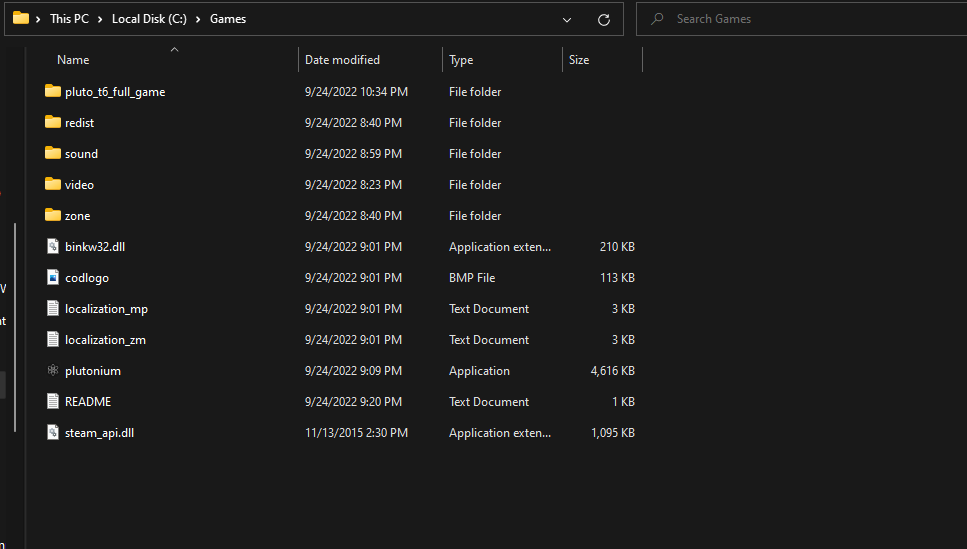
          WolflexZ Screenshot 2022-09-25 001849.png

          i download the 2 links that its shows on the tutorial.(sorry for my english) and for the gsc studio i gotta have them its says

          hindercanrun WolflexZ 2 Replies Last reply
          0
          • RvssianAK RvssianAK

            WolflexZ Screenshot 2022-09-25 001849.png

            i download the 2 links that its shows on the tutorial.(sorry for my english) and for the gsc studio i gotta have them its says

            hindercanrun
            hindercanrun
            hindercanrun
            Contributor
            wrote on last edited by
            #5

            RvssianAK why do you have sets of game files?

            RvssianAK 1 Reply Last reply
            0
            • hindercanrun hindercanrun

              RvssianAK why do you have sets of game files?

              RvssianAK
              RvssianAK
              RvssianAK
              wrote on last edited by
              #6

              hindercanrun idk i just did what the page has

              hindercanrun 1 Reply Last reply
              0
              • RvssianAK RvssianAK

                hindercanrun idk i just did what the page has

                hindercanrun
                hindercanrun
                hindercanrun
                Contributor
                wrote on last edited by
                #7

                RvssianAK well plutonium doesnt give you a readme file or a steamapi.dll file

                1 Reply Last reply
                0
                • RvssianAK
                  RvssianAK
                  RvssianAK
                  wrote on last edited by
                  #8

                  i did all the step from this page https://plutonium.pw/docs/install/

                  hindercanrun 1 Reply Last reply
                  0
                  • RvssianAK RvssianAK

                    i did all the step from this page https://plutonium.pw/docs/install/

                    hindercanrun
                    hindercanrun
                    hindercanrun
                    Contributor
                    wrote on last edited by
                    #9

                    RvssianAK no, you got ur files from somewhere else, then downloaded the plutonium files, plutonium does not give you a readme file and a steam_api.dll file

                    1 Reply Last reply
                    0
                    • RvssianAK RvssianAK

                      WolflexZ Screenshot 2022-09-25 001849.png

                      i download the 2 links that its shows on the tutorial.(sorry for my english) and for the gsc studio i gotta have them its says

                      WolflexZ
                      WolflexZ
                      WolflexZ
                      Contributor
                      wrote on last edited by
                      #10

                      RvssianAK Delete all those files except plutonium and pluto_t6_full_game folder. What matters is what's inside the pluto_t6_full_game folder. You either boot up plutonium launcher and set the path to C:\Games\pluto_t6_full_game
                      I don't know why you have those extra files.
                      1 Reply Last reply
                      0

                      Hello! It looks like you're interested in this conversation, but you don't have an account yet.

                      Getting fed up of having to scroll through the same posts each visit? When you register for an account, you'll always come back to exactly where you were before, and choose to be notified of new replies (either via email, or push notification). You'll also be able to save bookmarks and upvote posts to show your appreciation to other community members.

                      With your input, this post could be even better 💗

                      Register Login
                      Reply
                      • Reply as topic
                      Log in to reply
                      • Oldest to Newest
                      • Newest to Oldest
                      • Most Votes


                      • Login

                      • Don't have an account? Register

                      • Login or register to search.
                      • First post
                        Last post
                      0
                      • Unread 0
                      • Recent
                      • Popular
                      • Users
                      • Donate