Skip to content
  • 0 Unread 0
  • Recent
  • Tags
  • Popular
  • Users
  • Groups
  • Donate
Collapse

Plutonium

  1. Home
  2. BO2 Client Support
  3. Game closing and running in the background.

Game closing and running in the background.

Scheduled Pinned Locked Moved BO2 Client Support
8 Posts 2 Posters 882 Views 2 Watching
  • Oldest to Newest
  • Newest to Oldest
  • Most Votes
Reply
  • Reply as topic
Log in to reply
This topic has been deleted. Only users with topic management privileges can see it.
  • TheTwo Offline
    TheTwo Offline
    TheTwo
    wrote on last edited by
    #1

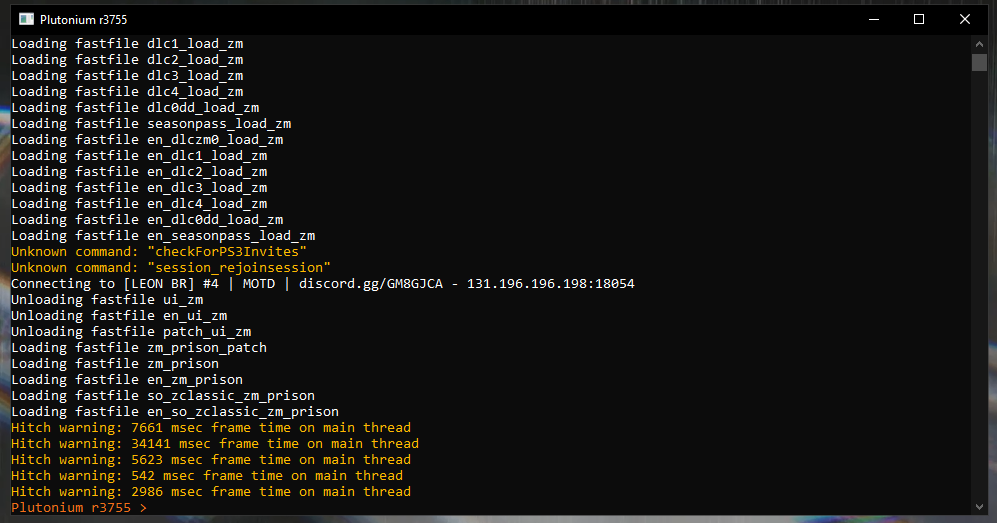
    Whenever I play for a few minutes or a few hours, my game closes the window and runs in the background, but I can't get back into the game. It happens more frequently in Origins and Mob of the Dead. Many people are experiencing this issue, and we see threads about it, but there are no answers. We ask that if you can't resolve it, at least provide some response so we can understand what is happening. We don't know if the error is hardware-related or if it's with Plutonium/game. Thank you.Screenshot_2.png Screenshot_6.png
    Hadi77KSA 1 Reply Last reply
    0
    • TheTwo TheTwo

      Whenever I play for a few minutes or a few hours, my game closes the window and runs in the background, but I can't get back into the game. It happens more frequently in Origins and Mob of the Dead. Many people are experiencing this issue, and we see threads about it, but there are no answers. We ask that if you can't resolve it, at least provide some response so we can understand what is happening. We don't know if the error is hardware-related or if it's with Plutonium/game. Thank you.Screenshot_2.png Screenshot_6.png

      Hadi77KSA Offline
      Hadi77KSA Offline
      Hadi77KSA
      Contributor
      wrote on last edited by
      #2

      You can try pasting and executing this in the command window: r_fullscreen 0; vid_restart
      This puts the game in Windowed mode.

      TheTwo 1 Reply Last reply
      0
      • Hadi77KSA Hadi77KSA

        You can try pasting and executing this in the command window: r_fullscreen 0; vid_restart
        This puts the game in Windowed mode.

        TheTwo Offline
        TheTwo Offline
        TheTwo
        wrote on last edited by
        #3

        Hadi77KSA Hey buddy, I don't think that's the problem, but thanks for the input!

        Hadi77KSA 1 Reply Last reply
        0
        • TheTwo Offline
          TheTwo Offline
          TheTwo
          wrote on last edited by
          #4


          video of the problem

          Notice by the sound that the game is running in the background, but still, I can't get back to playing it.

          1 Reply Last reply
          0
          • TheTwo TheTwo

            Hadi77KSA Hey buddy, I don't think that's the problem, but thanks for the input!

            Hadi77KSA Offline
            Hadi77KSA Offline
            Hadi77KSA
            Contributor
            wrote on last edited by
            #5

            TheTwo I sincerely apologise for even bothering to suggest something that some people have reported to have worked for a similar problem.

            TheTwo 1 Reply Last reply
            0
            • Hadi77KSA Hadi77KSA

              TheTwo I sincerely apologise for even bothering to suggest something that some people have reported to have worked for a similar problem.

              TheTwo Offline
              TheTwo Offline
              TheTwo
              wrote on last edited by TheTwo
              #6

              Hadi77KSA Hey, I didn't mean to be rude, I've tried that before. So, I was thinking it might not really be related to the issue.

              Here's a report, exactly what happens to me: report

              Hadi77KSA 1 Reply Last reply
              0
              • TheTwo TheTwo

                Hadi77KSA Hey, I didn't mean to be rude, I've tried that before. So, I was thinking it might not really be related to the issue.

                Here's a report, exactly what happens to me: report

                Hadi77KSA Offline
                Hadi77KSA Offline
                Hadi77KSA
                Contributor
                wrote on last edited by
                #7

                TheTwo as long as you apologise, it’s alright. You could list what you’ve tried so far, that’ll save some time.
                I unfortunately couldn’t find much regarding this problem. I found someone saying that the problem for them was caused by their graphics card drivers. So, it might be worth clean installing your GPU drivers either using your GPU provider’s software or using a drivers updater tool like DriversCloud. As for suggestions, the only things I’ve found are: remove all scripts and custom textures, try borderless windowed r_fullscreen 2; vid_restart, and check that no program is causing this (antivirus, overlay programs). You could also check the following for general suggestions: https://forum.plutonium.pw/post/107955

                TheTwo 1 Reply Last reply
                0
                • Hadi77KSA Hadi77KSA

                  TheTwo as long as you apologise, it’s alright. You could list what you’ve tried so far, that’ll save some time.
                  I unfortunately couldn’t find much regarding this problem. I found someone saying that the problem for them was caused by their graphics card drivers. So, it might be worth clean installing your GPU drivers either using your GPU provider’s software or using a drivers updater tool like DriversCloud. As for suggestions, the only things I’ve found are: remove all scripts and custom textures, try borderless windowed r_fullscreen 2; vid_restart, and check that no program is causing this (antivirus, overlay programs). You could also check the following for general suggestions: https://forum.plutonium.pw/post/107955

                  TheTwo Offline
                  TheTwo Offline
                  TheTwo
                  wrote on last edited by
                  #8

                  everything you mentioned has been tried, so I guess the issue might be with the hardware since I don't have a dedicated GPU. As I mentioned before, I just wanted to know if the problem was with the hardware or the game/launcher. It's really frustrating to be in the middle of a match and suddenly lose progress due to an error that I don't understand. I wanted to know if it's my fault or the game's fault.


                  1 Reply Last reply
                  0

                  Hello! It looks like you're interested in this conversation, but you don't have an account yet.

                  Getting fed up of having to scroll through the same posts each visit? When you register for an account, you'll always come back to exactly where you were before, and choose to be notified of new replies (either via email, or push notification). You'll also be able to save bookmarks and upvote posts to show your appreciation to other community members.

                  With your input, this post could be even better 💗

                  Register Login
                  Reply
                  • Reply as topic
                  Log in to reply
                  • Oldest to Newest
                  • Newest to Oldest
                  • Most Votes


                  • Login

                  • Don't have an account? Register

                  • Login or register to search.
                  • First post
                    Last post
                  0
                  • Unread 0
                  • Recent
                  • Tags
                  • Popular
                  • Users
                  • Groups
                  • Donate