Skip to content
  • 0 Unread 0
  • Recent
  • Tags
  • Popular
  • Users
  • Groups
  • Donate
Collapse

Plutonium

  1. Home
  2. BO1 Modding Support & Discussion
  3. Modded camos not loading

Modded camos not loading

Scheduled Pinned Locked Moved BO1 Modding Support & Discussion
14 Posts 4 Posters 2.9k Views 2 Watching
  • Oldest to Newest
  • Newest to Oldest
  • Most Votes
Reply
  • Reply as topic
Log in to reply
This topic has been deleted. Only users with topic management privileges can see it.
  • GhostRider0125 Offline
    GhostRider0125 Offline
    GhostRider0125
    Banned
    wrote on last edited by GhostRider0125
    #2

    first of when you load a game are your guns glowing white or theyre just normal like how they were cuz if its that then you didnt install the patch right

    if they are then the names of the iwis file are probably wrong😆

    https://forum.plutonium.pw/topic/31053/animated-camos-v2-0-zm

    GetKlipt 1 Reply Last reply
    1
    • GhostRider0125 GhostRider0125

      first of when you load a game are your guns glowing white or theyre just normal like how they were cuz if its that then you didnt install the patch right

      if they are then the names of the iwis file are probably wrong😆

      https://forum.plutonium.pw/topic/31053/animated-camos-v2-0-zm

      GetKlipt Offline
      GetKlipt Offline
      GetKlipt
      wrote on last edited by
      #3

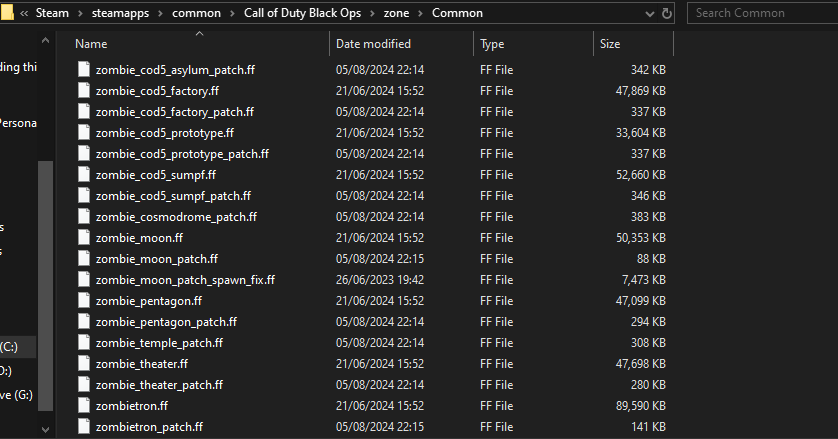
      GhostRider0125 they arent showing up at all tbf but i have them in the correct spot lemme just take a screenshot rq. N i even tried deleting them n reinstalling them. appreciate the help btw 🙏 eafc2bac-e030-43db-bacf-6703a659c6a5-image.png

      1 Reply Last reply
      1
      • GhostRider0125 Offline
        GhostRider0125 Offline
        GhostRider0125
        Banned
        wrote on last edited by GhostRider0125
        #4

        (C:\Program Files (x86)\Steam\steamapps\common\Call of Duty Black Ops\main)
        (C:\Program Files (x86)\Steam\steamapps\common\Call of Duty Black Ops\zone\Common)
        these are for steam version lad heres the plutonium route😆

        at bottom left corner of your screen right click your windows icon and select Run then type : %localappdata%

        then go to plutonium folder then storage then t5 then put your .iwi or .iwd files in ((images)) (if you dont have it create one and rename it to images) folder

        now go one folder back put the .ff files in zone folder

        idk but i think there was mod.ff if its yours then go back one folder again and make ((mods)) folder and put it in
        and done😁

        Bone Crusher GetKlipt 2 Replies Last reply
        0
        • GhostRider0125 GhostRider0125

          (C:\Program Files (x86)\Steam\steamapps\common\Call of Duty Black Ops\main)
          (C:\Program Files (x86)\Steam\steamapps\common\Call of Duty Black Ops\zone\Common)
          these are for steam version lad heres the plutonium route😆

          at bottom left corner of your screen right click your windows icon and select Run then type : %localappdata%

          then go to plutonium folder then storage then t5 then put your .iwi or .iwd files in ((images)) (if you dont have it create one and rename it to images) folder

          now go one folder back put the .ff files in zone folder

          idk but i think there was mod.ff if its yours then go back one folder again and make ((mods)) folder and put it in
          and done😁

          Bone Crusher Offline
          Bone Crusher Offline
          Bone Crusher
          wrote on last edited by
          #5

          GhostRider0125 he didnt add them to the zone folder

          GhostRider0125 andresito_20 2 Replies Last reply
          1
          • Bone Crusher Bone Crusher

            GhostRider0125 he didnt add them to the zone folder

            GhostRider0125 Offline
            GhostRider0125 Offline
            GhostRider0125
            Banned
            wrote on last edited by
            #6

            Bone Crusher yeah well you did type in your post to put it in zone then common so thats not hes fault😂
            (C:\Program Files (x86)\Steam\steamapps\common\Call of Duty Black Ops\zone\Common)😆

            Bone Crusher 1 Reply Last reply
            0
            • GhostRider0125 GhostRider0125

              (C:\Program Files (x86)\Steam\steamapps\common\Call of Duty Black Ops\main)
              (C:\Program Files (x86)\Steam\steamapps\common\Call of Duty Black Ops\zone\Common)
              these are for steam version lad heres the plutonium route😆

              at bottom left corner of your screen right click your windows icon and select Run then type : %localappdata%

              then go to plutonium folder then storage then t5 then put your .iwi or .iwd files in ((images)) (if you dont have it create one and rename it to images) folder

              now go one folder back put the .ff files in zone folder

              idk but i think there was mod.ff if its yours then go back one folder again and make ((mods)) folder and put it in
              and done😁

              GetKlipt Offline
              GetKlipt Offline
              GetKlipt
              wrote on last edited by
              #7

              GhostRider0125 thank you very much for the help it ended up working

              1 Reply Last reply
              1
              • GhostRider0125 Offline
                GhostRider0125 Offline
                GhostRider0125
                Banned
                wrote on last edited by
                #8

                np dude👌😆
                if you want to have all your guns have camos you can check my pack for it😁
                https://forum.plutonium.pw/topic/37554/my-custom-bo1-pack-animated-camos

                GetKlipt 1 Reply Last reply
                0
                • Bone Crusher Bone Crusher

                  GhostRider0125 he didnt add them to the zone folder

                  andresito_20 Offline
                  andresito_20 Offline
                  andresito_20
                  Contributor
                  wrote on last edited by andresito_20
                  #9

                  Bone Crusher @JeffersonEpstein
                  Hello, friend. Be careful when modifying the base game by changing the images, as Plutonium's anticheat can detect modified files. That's why a dedicated space was created for this purpose, 't6/image/<yourtexture.iwi>'

                  Bone Crusher 2 Replies Last reply
                  1
                  • GhostRider0125 GhostRider0125

                    np dude👌😆
                    if you want to have all your guns have camos you can check my pack for it😁
                    https://forum.plutonium.pw/topic/37554/my-custom-bo1-pack-animated-camos

                    GetKlipt Offline
                    GetKlipt Offline
                    GetKlipt
                    wrote on last edited by
                    #10

                    GhostRider0125 thank you bro appreciate it my b just seen this

                    GhostRider0125 1 Reply Last reply
                    1
                    • GhostRider0125 GhostRider0125

                      Bone Crusher yeah well you did type in your post to put it in zone then common so thats not hes fault😂
                      (C:\Program Files (x86)\Steam\steamapps\common\Call of Duty Black Ops\zone\Common)😆

                      Bone Crusher Offline
                      Bone Crusher Offline
                      Bone Crusher
                      wrote on last edited by
                      #11

                      GhostRider0125 no, he has to add it to the zone\common folder but he didnt, the patches he showed on the screenshot are the base game files, he did not add anything at all anywhere on his game folder

                      GhostRider0125 1 Reply Last reply
                      1
                      • andresito_20 andresito_20

                        Bone Crusher @JeffersonEpstein
                        Hello, friend. Be careful when modifying the base game by changing the images, as Plutonium's anticheat can detect modified files. That's why a dedicated space was created for this purpose, 't6/image/<yourtexture.iwi>'

                        Bone Crusher Offline
                        Bone Crusher Offline
                        Bone Crusher
                        wrote on last edited by Bone Crusher
                        #12

                        andresito_20 you cant use this patches on online games if the server doesnt use them aswell so the anti cheat would do nothing LUL
                        also the anti cheat doesnt and cant difference between a texture on Plutonium\storage\t5\images and your main folder.

                        1 Reply Last reply
                        1
                        • GetKlipt GetKlipt

                          GhostRider0125 thank you bro appreciate it my b just seen this

                          GhostRider0125 Offline
                          GhostRider0125 Offline
                          GhostRider0125
                          Banned
                          wrote on last edited by
                          #13

                          @JeffersonEpstein np lad 😆👍

                          1 Reply Last reply
                          0
                          • Bone Crusher Bone Crusher

                            GhostRider0125 no, he has to add it to the zone\common folder but he didnt, the patches he showed on the screenshot are the base game files, he did not add anything at all anywhere on his game folder

                            GhostRider0125 Offline
                            GhostRider0125 Offline
                            GhostRider0125
                            Banned
                            wrote on last edited by
                            #14

                            Bone Crusher yeah but puting it in t6 is better than in your game files😁😆

                            1 Reply Last reply
                            0

                            Hello! It looks like you're interested in this conversation, but you don't have an account yet.

                            Getting fed up of having to scroll through the same posts each visit? When you register for an account, you'll always come back to exactly where you were before, and choose to be notified of new replies (either via email, or push notification). You'll also be able to save bookmarks and upvote posts to show your appreciation to other community members.

                            With your input, this post could be even better 💗

                            Register Login
                            Reply
                            • Reply as topic
                            Log in to reply
                            • Oldest to Newest
                            • Newest to Oldest
                            • Most Votes


                            • Login

                            • Don't have an account? Register

                            • Login or register to search.
                            • First post
                              Last post
                            0
                            • Unread 0
                            • Recent
                            • Tags
                            • Popular
                            • Users
                            • Groups
                            • Donate