Skip to content
  • 0 Unread 0
  • Recent
  • Tags
  • Popular
  • Users
  • Groups
  • Donate
Collapse

Plutonium

  1. Home
  2. Launcher Support
  3. Failing to download

Failing to download

Scheduled Pinned Locked Moved Launcher Support
8 Posts 3 Posters 1.1k Views 1 Watching
  • Oldest to Newest
  • Newest to Oldest
  • Most Votes
Reply
  • Reply as topic
Log in to reply
This topic has been deleted. Only users with topic management privileges can see it.
  • LovingMood Offline
    LovingMood Offline
    LovingMood
    wrote on last edited by
    #1

    Every time I try to download the Plutonium Updater I get this message:
    "Failed to download file bin/plutonium-bootstrapper-win32.exe

    1 Reply Last reply
    0
    • HannesC Offline
      HannesC Offline
      HannesC
      Plutonium Staff
      wrote on last edited by
      #2

      Need the whole error, could you screenshot it please?

      1 Reply Last reply
      1
      • RealHazza Offline
        RealHazza Offline
        RealHazza
        wrote on last edited by
        #3

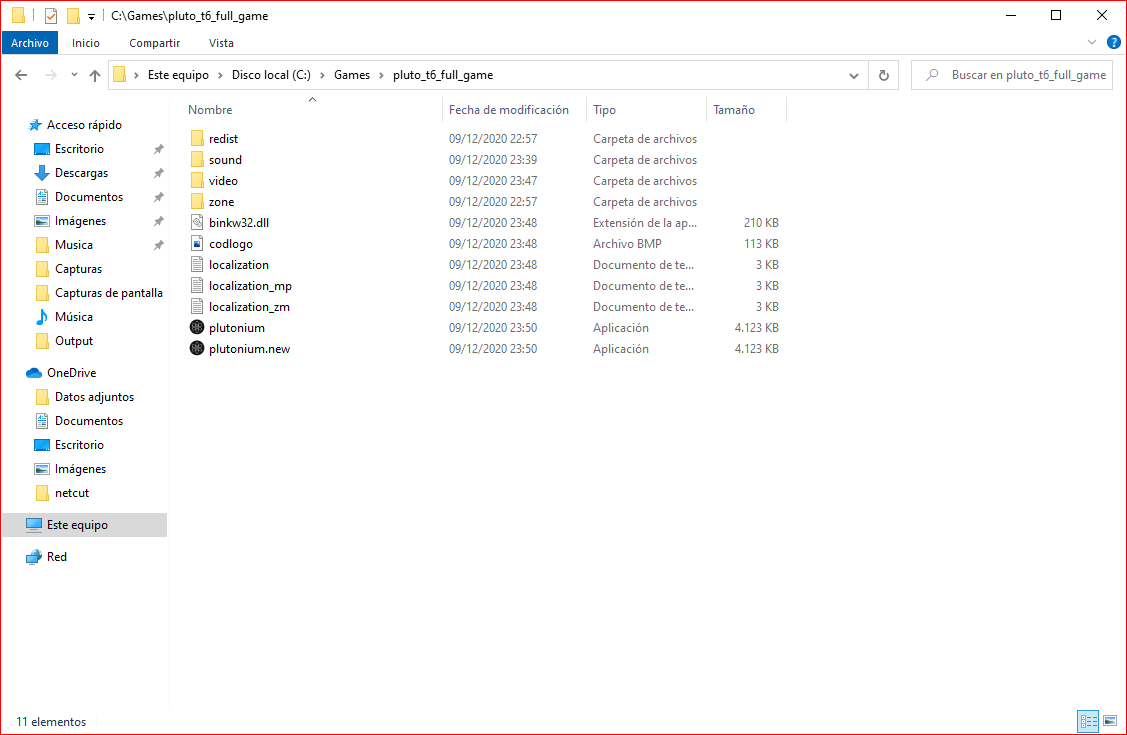
        Moderator I need help I do not understand why the folder is downloaded 100% and it is missing game files and I get an error

        ![alt text](image url)a22b2379-0021-444f-889b-99e068875401-image.png

        When you download the file "pluto_t6_full_game So the incomplete download came out I have seen youtubers who download the same as me and have more files.

        1 Reply Last reply
        0
        • LovingMood Offline
          LovingMood Offline
          LovingMood
          wrote on last edited by
          #4

          Crash ID: 1d1bea2056a84aff91f2463da5f460d8
          Plutonium.Updater.Core.Models.UpdateException: Failed to update file bin/plutonium-bootstrapper-win32.exe ---> System.IO.IOException: Incorrect function.

          at System.IO.__Error.WinIOError(Int32 errorCode, String maybeFullPath)
          at System.IO.FileStream.WriteCore(Byte[] buffer, Int32 offset, Int32 count)
          at System.IO.File.InternalWriteAllBytes(String path, Byte[] bytes, Boolean checkHost)
          at Plutonium.Updater.Core.Updater.<Run>d__23.MoveNext()
          --- End of inner exception stack trace ---
          at Plutonium.Updater.Core.Updater.<Run>d__23.MoveNext()
          --- End of stack trace from previous location where exception was thrown ---
          at System.Runtime.ExceptionServices.ExceptionDispatchInfo.Throw()
          at System.Runtime.CompilerServices.TaskAwaiter.HandleNonSuccessAndDebuggerNotification(Task task)
          at Plutonium.Updater.App.Windows.UpdateWindow.<UpdateWindow_Loaded>d__6.MoveNext()

          1 Reply Last reply
          0
          • HannesC Offline
            HannesC Offline
            HannesC
            Plutonium Staff
            wrote on last edited by
            #5

            What antivirus do you use?

            RealHazza 1 Reply Last reply
            0
            • HannesC HannesC

              What antivirus do you use?

              RealHazza Offline
              RealHazza Offline
              RealHazza
              wrote on last edited by
              #6

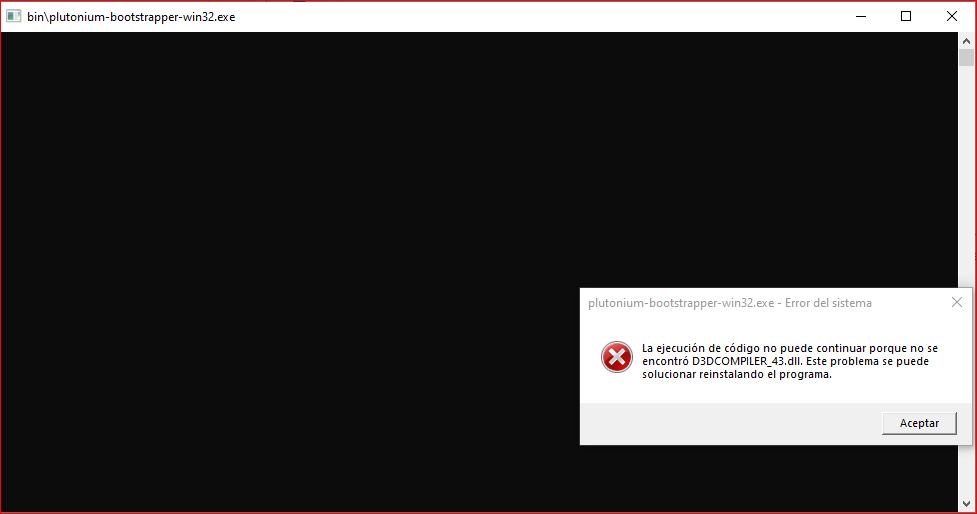
              HannesC Seguridad Windows, Avast Free Antivirus, Necesito que comuniquemos en otro medio, por aqui tengo que esperar 600 segundos para responder, Si usas discord mandame la solicitud ! Nicolas#6428.

              Y me salio este error cuando puse para modo zombies 900e5d37-746c-4fd1-ad23-ef0e9527522c-image.png
              1 Reply Last reply
              0
              • LovingMood Offline
                LovingMood Offline
                LovingMood
                wrote on last edited by
                #7

                I use webroot secureanywhere,
                I also have to wait 10 minutes to reply since I have a new account with you guys.

                1 Reply Last reply
                0
                • HannesC Offline
                  HannesC Offline
                  HannesC
                  Plutonium Staff
                  wrote on last edited by HannesC
                  #8

                  @NicolasLopez456 Your error has nothing to do with this thread, install the redists and run dxsetup.exe inside the directx folder, from the redist folder provided with the basegame. Also having 2 trash AVs isn't ideal, I'd recommend uninstalling them and using Defender.

                  LovingMood That's probably the case, uninstall webroot and launch Pluto again. It probably won't let you uninstall it and throw a lot of access denied errors and what not, try googling how to uninstall webroot instead.

                  1 Reply Last reply
                  0

                  Hello! It looks like you're interested in this conversation, but you don't have an account yet.

                  Getting fed up of having to scroll through the same posts each visit? When you register for an account, you'll always come back to exactly where you were before, and choose to be notified of new replies (either via email, or push notification). You'll also be able to save bookmarks and upvote posts to show your appreciation to other community members.

                  With your input, this post could be even better 💗

                  Register Login
                  Reply
                  • Reply as topic
                  Log in to reply
                  • Oldest to Newest
                  • Newest to Oldest
                  • Most Votes


                  • Login

                  • Don't have an account? Register

                  • Login or register to search.
                  • First post
                    Last post
                  0
                  • Unread 0
                  • Recent
                  • Tags
                  • Popular
                  • Users
                  • Groups
                  • Donate