Based on information provided in Plutonium’s documentation for the anticheat, under “What will not get me banned”; if the mod’s instructions tell you to follow this guide, you’ll be fine. I reckon you’ll also be fine if the mod uses this directory: %localappdata%\Plutonium\storage\t5\scripts
 undefined
Hadi77KSA
@Hadi77KSA
Posts
-
Dumb question about custom maps and mods -
[ZM] Moon Easter Egg mod (Solo & Coop)Awks if Richtofen isn’t getting the constructed Vril Generator at the beginning of the match on Moon, I suspect that the host either doesn’t have the mod installed correctly or they haven’t loaded the mod before starting the match. Could you provide a picture from the host showing the mod loaded in-game as well as a picture showing the contents of the mod’s
mapsfolder? Paste here the full path of the mod’smapsfolder as well. -
[ZM] Moon Easter Egg mod (Solo & Coop)Awks sorry, but I don’t recognise this step from your description. Could you explain it in more detail and provide what map you’re talking about?
-
[ZM] Moon Easter Egg mod (Solo & Coop)Sp3cialFox the one in my comment (or my separate post) still works.
-
Does anyone have this mod?blzmes you’ll have to follow the original mod’s instructions, which state to replace some files. I’ve followed the instructions and got it to work. Although, I suggest you back-up every file that the mod requires replacing.
Edit:
For those wondering, here’s the original mod’s page links (download links are dead):
https://zombiemodding.com/index.php?topic=19581.0
https://zombiemodding.com/index.php?action=downloads;sa=view;down=1914For alternative steps for Plutonium, you can follow this:
- Go to:
%localappdata%\Plutonium\storage\t5 - Open the
modsfolder. Create it if it doesn't exist. - Paste the mod's folder that you've downloaded into
mods. - Take the files ending with .ff from the mod's folder to
%localappdata%\Plutonium\storage\t5\zone
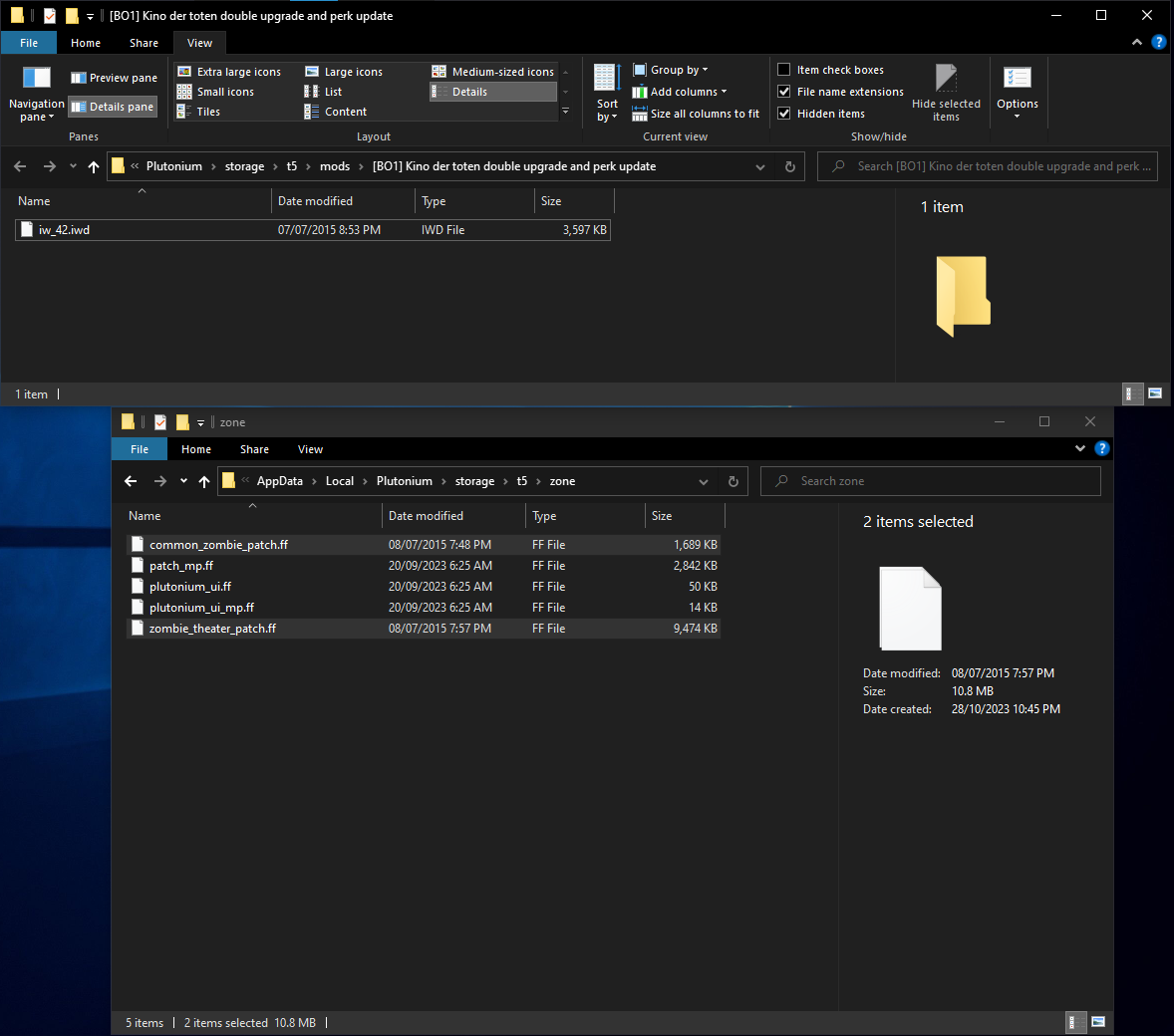
Here’s a picture showing where the files should end up in after following these instructions:
- Open the game and load the mod. This is necessary for the mod's textures to work.
To make the game not use the mod, simply undo step 4.
- Go to:
-
[ZM] Moon Easter Egg mod (Solo & Coop)MorganJeff that comment was asking about an older version of the mod. The version provided in my comment has been updated to make that step work with any number of players.
-
[ZM] Moon Easter Egg mod (Solo & Coop)MorganJeff the answer is included in my comment that contains the download link.
-
Does anyone have this mod?It’s included in this Telegram post, which I’ve sent to you on Discord but you chose to ignore for whatever reason: https://t.me/callofduty_modding/70
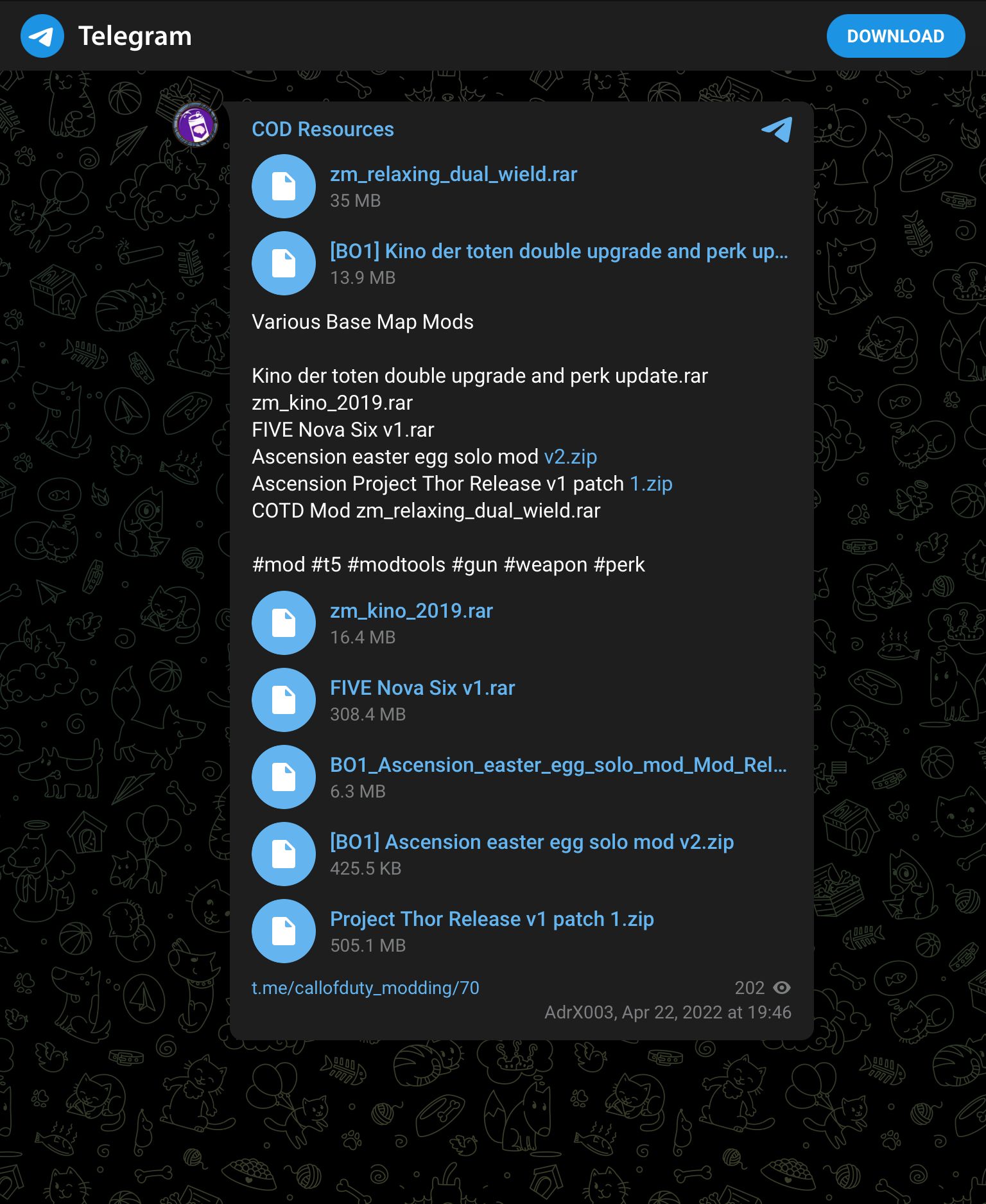
If you’d like a direct download link, then here’s a Discord link as I couldn’t figure out how to get a direct Telegram download link: download -
Tranzit maxis solo easter eggSerGanton the quote from Maxis about drained power supplies shortly after placing the Turbine seems to not matter. The quote always triggers on solo soon after placing the Turbine under the tower regardless of if you’re using the solo mod or not. You can see in this video of a solo Maxis speedrun that Maxis says the power supplies drained quote shortly after placing the Turbine, but the mod works as intended as seen by the step getting completed once the Avogadro is killed with an EMP Grenade under the tower while the Turbine is active, indicated by Maxis’ quote: “You have done well, but yet we need more energy.”
I suggest that you watch the Turbine before killing the Avogadro with an EMP. If it starts not emitting power, then you might fail and have to redo the step if you kill the Avogadro while having that low-power Turbine under the tower. Otherwise, once you kill the Avogadro with an EMP while there’s a Turbine under the tower, either listen to Maxis’ quote regarding having done well, or try completing the last step.
Update (2025/01/22):
Additionally, you’ll want to allow up to 6 seconds between placing the first Turbine and killing the Avogadro. I found out about this in October of last year and mentioned it in one of the topics I’ve posted. -
[ZM] Moon Easter Egg mod (Solo & Coop)molasku as I’ve discussed with you on Discord, all the mod does on Moon is give Richtofen the constructed Vril Generator. Any other issues are unrelated to the mod, and a Moon Easter Egg guide should be referred to for such problems.
-
Does anyone know how I can install the "Cold War Zombies Mod for Black Ops 2" mod?Based on the name and version number, I’m guessing you’re using this mod: https://forum.plutonium.pw/post/63067
You need to downloadCold.War.Overhaul.Mod.zip, not the source code. -
[Release][ZM] Solo and Any Player Easter Egg Mods(v2) Any Player EE
Any Player EE Scripts
This mod makes the Easter Eggs of the Black Ops maps Ascension, Shangri-La, and Moon possible with any number of players. For Ascension and Shangri-La, the modifications were made to match the changes applied by the Solo Easter Eggs mod for BO3.
Any Player EE SR Scripts
This mod makes the Easter Eggs of the Black Ops maps Ascension and Shangri-La possible with any number of players for the purpose of speedruns. For Ascension, the modifications were made to mix between the old BO1 solo mod and the Solo Easter Eggs mod for BO3. For Shangri-La, the modifications were made to match the changes applied by the BO3 Solo Easter Eggs mod.
Installation
- Download the latest release.
release_main.ziporrelease_speedruns.zip - Extract the
any_player_ee/any_player_ee_srfolder from the ZIP file that was downloaded. - Move the
any_player_ee/any_player_ee_srfolder to the correct directory:- For Game_Mod, install to
BO1_GAME_FOLDER\mods - For Plutonium, follow their guide for T5: https://plutonium.pw/docs/modding/loading-mods/#loading-mods--custom-zombies-maps-for-bo1
- For Game_Mod, install to
- Start the game and load the mod from the in-game
Modsmenu.
Alternative Installation for Plutonium
Following this method makes the scripts be loaded automatically without needing to select the mod from the in-game
Modsmenu.- Follow steps 1 & 2 from the main installation instructions.
- Go to
%localappdata%\Plutonium\storage\t5by pressing Win+R then pasting the mentioned path then press OK. - Open the
any_player_ee/any_player_ee_srfolder and copy theany_player_ee.iwd/any_player_ee_sr.iwdfile from inside of it. - Paste the
any_player_ee.iwd/any_player_ee_sr.iwdfile into thet5folder.
Features
Ascension
Space Monkeys Round Buttons
Any Player EE Scripts
Requires only as many buttons as there are players instead of all.
Any Player EE SR Scripts
Requires all 4 buttons to be pressed within 100 seconds in the case of less than 4 players.
Lunar Lander Letters
On solo, does not require the player to be riding the lander to be able to collect the letters.
On co-op, this step is unchanged.Damaging the Orb
On solo, the Matryoshka Dolls are not required. However, the rest of the weapons are required, which are: Gersh Device, Zeus Cannon (upgraded Thunder Gun), Porter's X2 Ray Gun (upgraded Ray Gun).
On co-op, this step is unchanged.Shangri-La
Entering Eclipse
Requires pushing only as many buttons as there are players instead of all.
Matching Tiles Puzzle
On solo, requires walking over all tiles on the side where the button for making the tiles appear is to complete the step.
On co-op, this step is unchanged.Water Slide
On solo, the player is only required to go down the water slide.
On co-op, requires all players except one to be at the bottom of the water slide standing on the pressure plate, then the remaining player to go down the slide while the rest are on the pressure plate.Moon
Any Player EE Scripts
The Vril Generator is given to the player playing as Richtofen regardless of the number of players and regardless of the completions of the previous maps' Easter Eggs.
Additionally, on solo, the player will always spawn as Richtofen.FAQ
Q: I am stuck on some Easter Egg step. Could you help?
A: Generally, if you ask for help with any Easter Egg step, I will try to assist you. Note that the scripts do not modify anything outside of what is mentioned. Refer to the Features section for the changes made by the scripts, otherwise you could check existing guides such as the ones from the CoD Fandom Wiki.
Q: How do I make sure the scripts are loaded?
A: The Any Player EE scripts come with a message in green/blue/yellow colours that appears when the player loads in indicating the scripts are loaded. Another method of checking is to get the host to execute the Plutonium console commands:
flashScriptHashes; scriptHashesIf the scripts are loaded, they will appear in the list of scripts.
(v1) BO1-Eggs
This mod allows the Easter Eggs of Ascension, Shangri-La, and Moon to be done solo. These scripts also work for any number of players.
I’ve originally had most of what’s written in this guide as a comment under a post for the Moon solo mod, but I figured it would be better to make it into a separate post. The mod’s scripts are provided by teh-bandit.Gameplay Guide
Ascension
- Easter egg completable with any amount of players
- Synchronized buttons step now gives players 100 seconds to press all 4 buttons when not in a 4 player game
- Lander step is skipped when playing solo
- Freeing Gersh step only requires the ZeusCannon and Gersh Device when playing solo
Shangri-La
- Easter egg completable with any amount of players
- Tile matching step is automatically completed shortly after activating when playing solo
- Water slide step only requires hitting the switch/lever that is in the water slide
Moon
- Easter egg completable with any amount of players
- No longer requires completion of previous easter eggs
- Richtofen MUST be in game
Download
Use this link to download the scripts: https://github.com/teh-bandit/BO1-Eggs/archive/refs/heads/main.zip
Extract theBO1-Eggs-mainfolder. This will be the mod’s folder containing the necessary files. Don’t modify its contents.
You can rename the folder if you wish. I have it renamed toBO1-Eggs
IMPORTANT: if you plan on using this mod with other players, each player other than the host will need to either make sure they don’t have a mod loaded or match the name of the mod folder.Installation
Follow this link to install: https://plutonium.pw/docs/modding/loading-mods/#loading-mods--custom-zombies-maps-for-bo1
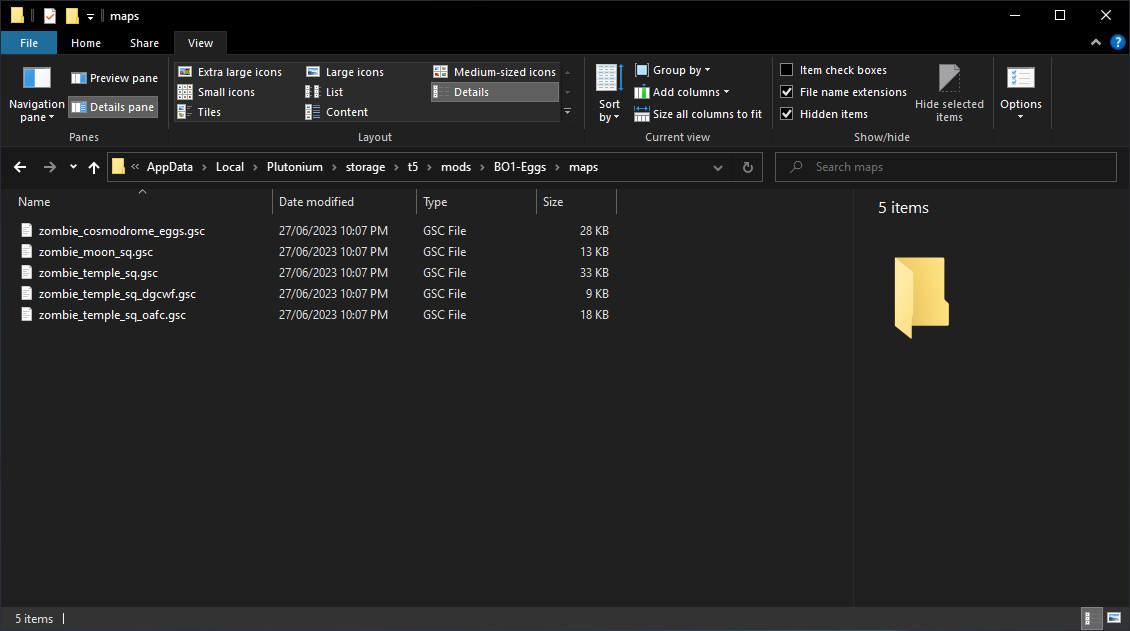
The below picture shows the path and content of the mod’s
mapsfolder after finishing:
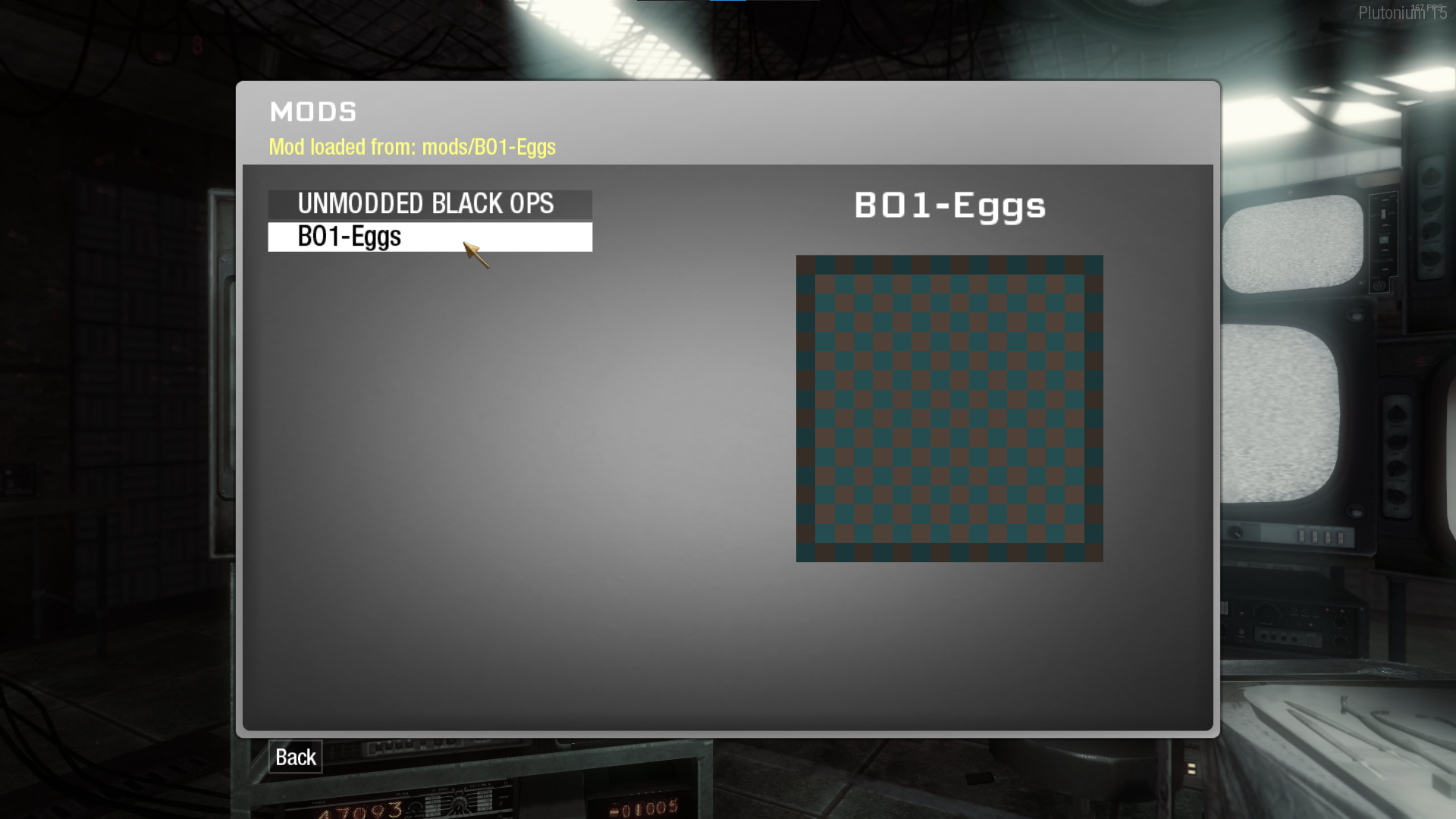
The Mods menu should show the mod if it’s been installed in the correct path. The below picture shows the mod appearing in the Mods menu and a line showing which mod is loaded if one is loaded:
Note: if the mod doesn’t appear in the Mods menu after correctly placing it in the directory stated in the instructions I’ve linked, then try the alternative of extracting the mod’smapsfolder and placing it in:%localappdata%\Plutonium\storage\t5
Note that doing so will automatically load the scripts designated to a map whenever that map is loaded.FAQ
- Q: How do I know if the mod is working properly?
A: Generally, by checking the Plutonium bootstrapper for the following line:
whereLoading script "maps/FILENAME"...FILENAMEcan be any name from the mod’smapsfolder.
This should be under:
------- Game Initialization -------
There can be multiples of that “Loading script” line with different filenames depending on the map. If you don’t find this line or if the steps that should get changed aren’t changed, then check if the mod is installed correctly and that it’s loaded. Check the instructions in Installation for installing and loading the mod.
Credits
teh_bandit - For the scripts and the Gameplay Guide of v1.
Hadi77KSA - Me - [email protected]
Itzs Nukez/Price and the speedrunning community - For decisions regarding Any Player EE SR Scripts.Notice
THIS MATERIAL IS NOT MADE OR SUPPORTED BY ACTIVISION.
- Download the latest release.
-
problems with t6 shared mystery box scriptLink the mod please. If you’re using this, then it’s because Plutonium’s compiler doesn’t use slashes (/) for paths, but instead uses backslashes (\). If there’s a compiled version of the mod, use that instead.
-
[ZM] Moon Easter Egg mod (Solo & Coop)@RagucciDoko
I’m guessing that the cut/German version of the game does indeed prevent mods from showing up in the Mods menu even if the mod’s folder is placed in the correct directory.The alternative is to extract the mod’smapsfolder and place it in:%localappdata%\Plutonium\storage\t5
Note that doing so will automatically load the scripts designated to a map whenever that map is loaded.Edit: according to RagucciDoko, the mod’s folder was installed in an incorrect path and the game’s version is the uncut German version. I guess the situation regarding the cut version remains a mystery at least for me.
-
T6 Solo/Duo Easter Egg for Buried and Die Rise?_EMP are you getting a message at the start of the match that says: “Any Player EE Mod Die Rise”? If you aren’t getting the message, then copy and paste the full path of where you’ve installed the mod. If you are getting the message and the elevator step isn’t working, then make sure the Nav Table is built.
-
Quoted Text’s Colour Is Black When Using the Website’s Dark/Night ModeQuoted text is barely readable when the website’s theme is set to dark/night as the text’s colour becomes black, especially when the brightness is set to something low.
Example showing the black text on the dark background: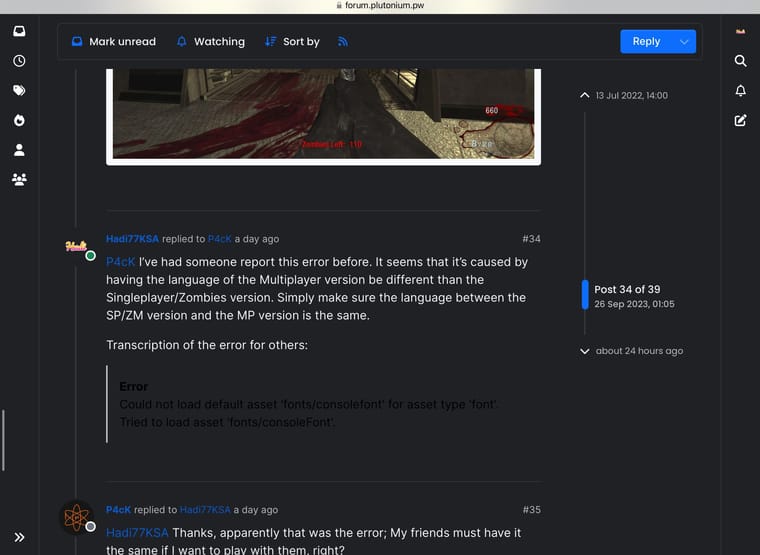
If you’re reading this post while having the website appearance be set to dark, view this:
How visible is this in dark mode?
Do you consider this to be readable? -
T6 Solo/Duo Easter Egg for Buried and Die Rise?You could try mine: https://forum.plutonium.pw/post/126436
-
[ZM] Moon Easter Egg mod (Solo & Coop)P4cK the mod file name must match, otherwise you’ll face issues. Although, I’ve had someone say that having just the host have the files installed is enough, but I haven’t tested that. If you try that out, let me know how it goes.
-
[ZM] Moon Easter Egg mod (Solo & Coop)P4cK I’ve had someone report this error before. It seems that it’s caused by having the language of the Multiplayer version be different than the Singleplayer/Zombies version. Simply make sure the language between the SP/ZM version and the MP version is the same.
Transcription of the error for others:
Error
Could not load default asset 'fonts/consolefont' for asset type 'font'.
Tried to load asset 'fonts/consoleFont'.Update (2025/03/14)
Alternatively, before selecting the mod, open the console and execute this command:
loc_language ( dvarInt( loc_language ) )You should only need to do this if you see that the
loc_languagehas a latched value. -
[ZM] Moon Easter Egg mod (Solo & Coop)P4cK First, make sure the path of the maps folder is exactly as shown in this picture:
Then, after clicking "Mods" in-game, click on the mod to load it. It will say that the mod is loaded once you open the mods menu again.
After this, just start the map you want and play.