Skip to content
  • Recent
  • Tags
  • Popular
  • Users
  • Groups
  • Donate
Collapse

Plutonium

Littlegodsundefined

Littlegods

@Littlegods
About
Posts
81
Topics
7
Shares
0
Groups
0
Followers
11
Following
3

Posts

Recent Best Controversial

  • [Release][ZM] Mod Menu | Healthbar | Weapons | Perks | Powerups | Upgrade | Night Mode | Teleport | Bank | Stats | Aimbot | Ufo | Freeze Zombies | Sound Menu | Legacy mods | Shader
    Littlegodsundefined Littlegods

    KillerKitten995
    You are the first person to give me feedback, so first of all, thank you very much for using the mod 🙌
    I am currently working on fixing and improving the things you mentioned.

    Regarding your request about how to open the menu: by default, the keys are ADS + Melee, and the mod also includes a menu where you can change and configure the keybinds to whatever is most comfortable for you.

    As for the weapon statistics, it is possible to display that kind of information as you described. If you can provide information or the name of another mod that uses a similar system, I will gladly investigate it and see how to implement it.

    I will mention you in 3 to 4 hours, after posting this update, so you can see a preview of the Mod Menu 4.2.0 update.

    BO2 Modding Releases & Resources

  • [Release][ZM] Mod Menu | Healthbar | Weapons | Perks | Powerups | Upgrade | Night Mode | Teleport | Bank | Stats | Aimbot | Ufo | Freeze Zombies | Sound Menu | Legacy mods | Shader
    Littlegodsundefined Littlegods

    yDizzi
    Well, my friend, you have two options: clone the project or simply download the release as a v4.0.0.rar file.
    Here is the link: https://github.com/andr3xcl/littlegods-mod/releases/tag/v4.0.0
    34e8636a-4058-46ee-a62d-1ea33b645996-image.png

    BO2 Modding Releases & Resources

  • [Release][ZM] Mod Menu | Healthbar | Weapons | Perks | Powerups | Upgrade | Night Mode | Teleport | Bank | Stats | Aimbot | Ufo | Freeze Zombies | Sound Menu | Legacy mods | Shader
    Littlegodsundefined Littlegods

    Alexoomin The menu has developer menu restrictions, which the bank disappears because it encourages the player to have a fair match without compromising the purpose of the implemented statistics. Even your stats are not saved if the developer mode is active or if sv_cheats is set to 1.

    BO2 Modding Releases & Resources

  • [Release][ZM] Stats Web
    Littlegodsundefined Littlegods

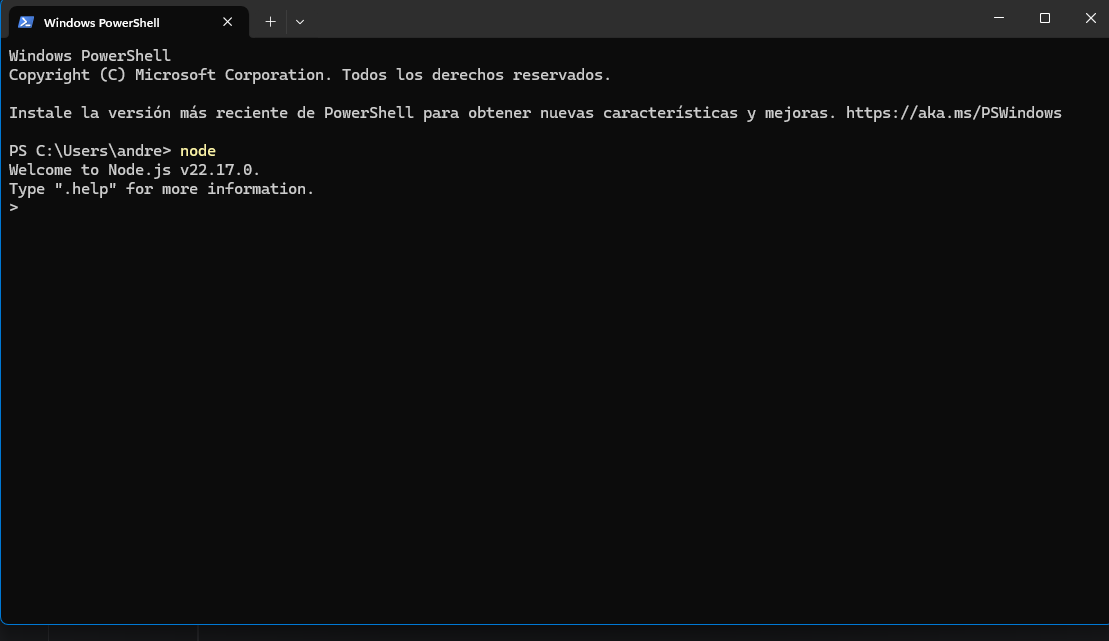
    FaZe Flick If you install Node.js, to check that it's working correctly, run PowerShell and type node. If the version number appears, it means everything is fine. Then run the project's .bat files. First, install the dependency, and you're done.
    da445553-49c1-4957-8814-054856bae766-image.png

    BO2 Modding Releases & Resources

  • [Release][ZM] Mod Menu | Healthbar | Weapons | Perks | Powerups | Upgrade | Night Mode | Teleport | Bank | Stats | Aimbot | Ufo | Freeze Zombies | Sound Menu | Legacy mods | Shader
    Littlegodsundefined Littlegods

    JYoung1
    Video
    https://www.youtube.com/watch?v=iy5rDO8fckE&t

    Direct download
    https://github.com/andr3xcl/littlegods-mod/releases/download/v4.0.0/v4.0.0.rar

    BO2 Modding Releases & Resources

  • [Release][ZM] Stats Web
    Littlegodsundefined Littlegods

    said in [Release][ZM] Stats Web:

    1. Requirements
      Install Node.js

    FaZe Flick

    BO2 Modding Releases & Resources

  • Black screen when starting a game
    Littlegodsundefined Littlegods

    fireclaw1233 I sent an image of what happened.

    BO2 Client Support

  • [Release][ZM] Nightmode x Commands
    Littlegodsundefined Littlegods

    VersionGameScriptPlatformAuthor

    Update 1.3.0 (mob of the dead | Remove lightning-flashing)

    Fixes

    When playing the zm_prison map, for some reason the map's lightning would reset to darkness. The map's lightning has been completely removed for a better experience.

    Source remove lightning-flashing

    https://forum.plutonium.pw/topic/43437/release-zm-hotfix-zm_prison-remove-lightning-flashing

    Source Code

    GitHub Repo

    Install

    AppData\Local\Plutonium\storage\t6\raw\scripts\zm
    

    Acknowledgments

    Thanks to mr.kennutbuster for testing the code and contributing improvements.

    BO2 Modding Releases & Resources

  • [Release][ZM][Hotfix] zm_prison (Remove lightning-flashing)
    Littlegodsundefined Littlegods

    Hi, I’m bringing you a solution to this post, to remove the lightning-flashing from Prison / Mob of the Dead. I hope it helps you.

    I noticed that you were having a compilation error.

    Since the post is old, I wanted to bring it back and include the proper credits.
    Re: [Release] Remove Mob of the Dead Lightning/Flashing

    #include maps\mp\_utility;
    #include common_scripts\utility;
    #include maps\mp\zombies\_zm_utility;
    
    init()
    {
    	if ( level.script == "zm_prison" )
    	{
    		level._callbacks["on_player_connect"][16] = ::player_lightning_manager_override;
    	}
    }
    
    player_lightning_manager_override()
    {
    	self setclientfieldtoplayer( "toggle_lightning", 0 );
    }
    

    Install

    AppData\Local\Plutonium\storage\t6\raw\scripts\zm
    
    BO2 Modding Releases & Resources

  • [Release][ZM] Nightmode x Commands
    Littlegodsundefined Littlegods

    VersionGameScriptPlatformAuthor

    Update 1.2.0 (Hotfix, Data)

    Fixes

    • ValueNight now persists when changing the filter
    • Black screen when starting the game (Fixed)
    • The fast_restart and map_restart commands no longer negatively affect nightmode

    Update

    • You can now save the nightmode variables: state, filter, night value, and fog
    • The fast_restart and map_restart commands now correctly load the saved variables

    Data

    • state: enabled
    • filter: 2
    • nightvalue: 10
    • fog: 1

    This is the save path for your nightmode configuration file

    AppData\Local\Plutonium\storage\t6\raw\scriptdata\nightmode
    

    Source Code

    GitHub Repo

    Install

    AppData\Local\Plutonium\storage\t6\raw\scripts\zm
    

    Acknowledgments

    Thanks to mr.kennutbuster for testing the code and contributing improvements.

    BO2 Modding Releases & Resources

  • [Release][ZM] Nightmode x Commands
    Littlegodsundefined Littlegods

    Enxito I accidentally pushed a commit. I’ll fix it within 1 to 2 hours.

    BO2 Modding Releases & Resources

  • [Release][ZM] Mod Menu | Healthbar | Weapons | Perks | Powerups | Upgrade | Night Mode | Teleport | Bank | Stats | Aimbot | Ufo | Freeze Zombies | Sound Menu | Legacy mods | Shader
    Littlegodsundefined Littlegods

    Ivobardolf
    Yes, the truth is I forgot about the bank limit. It was a disaster if the amount exceeded a million; the account would go into overdraft and the player would be ruined.

    BO2 Modding Releases & Resources

  • [Release][ZM] Mod Menu | Healthbar | Weapons | Perks | Powerups | Upgrade | Night Mode | Teleport | Bank | Stats | Aimbot | Ufo | Freeze Zombies | Sound Menu | Legacy mods | Shader
    Littlegodsundefined Littlegods

    Update 4.0.0 (Compatibility with web statistics - Menu shader - Menu postition - Menu glow - Pack style menu - Pack style selector - bank hotfix - nightmode fix)

    Overview

    This update brings a huge wave of improvements and fixes, focusing on maximum user customization and stability.

    Fixes

    • Bank System: Fixed withdrawal errors. The specific withdrawal limit is now adjusted to 1,000,000 points, while deposits now support virtually unlimited amounts correctly.
    • Bus Depot Support: Bus Depot survival map is now correctly detected as an independent map for statistics tracking.
    • Night Mode Fixed: Comprehensive fix for Night Mode; it now functions correctly across all maps.

    Improvements

    • Night Mode Redesign: Night Mode has been completely overhauled for better visuals and performance.
    • Standardized Menu Sizing: All menus now share consistent dimensions (fixing previous disproportionate sizing). This standardization enables the new "Menu Position" resizing features.
    • Robust Banking: Further adjustments to the banking system to ensure stability with large transaction amounts.
    • Rencent Match Menu: Supports bank transactions.
      a3ac9757-fc3b-437f-bd27-e2c0a557b323-Plutonium T6 Zombies (r5164) 07-12-2025 22_02_11.png

    New Features

    • Settings menu
      f67966f8-8e77-4554-ac18-8e17a6be5151-Plutonium T6 Zombies (r5164) 07-12-2025 22_03_27.png
    • Menu Glow (Beta): Added a dynamic glow effect to the menu.
      1cb1c037-9fe7-4253-b03e-10487c82c26b-Plutonium T6 Zombies (r5164) 07-12-2025 22_03_37.png
    • Menu Shaders (Beta): New option to customize shaders for the Menu Background, Header, and Selector.
      1179d77e-a794-45b5-ad15-dfbc4d09e079-Plutonium T6 Zombies (r5164) 07-12-2025 22_06_50.png
    • Menu Position & Sizing (Beta): You can now move the menu, resize it, and fully customize its dimensions in-game. Changes can be saved.
      5d782a5f-a119-492c-aacd-beb3292249aa-Plutonium T6 Zombies (r5164) 07-12-2025 22_06_10.png
      f768b6d3-5ea4-4b75-9747-5ce69286147b-Plutonium T6 Zombies (r5164) 07-12-2025 22_07_30.png
    • Menu Style Pack: Added a total of 83 unique menu styles.
    • Selector Style Pack: Added a total of 33 unique selector styles.

    Web Statistics Integration

    • Full Compatibility: The menu is now fully integrated with the Stats Web project. https://forum.plutonium.pw/topic/43291/release-zm-stats-web
    • Important: Install the web project files, but DO NOT use the scripts_zm.bat utility to install the scripts. The menu already has these statistics features built-in.
      Just run your stats and the website and you're all set 🙂
      639522af-420b-416a-a9ab-17a58f1486ac-image.png

    Important Notice

    • Please refrain from using commands like fast_restart or map_restart. Always launch maps correctly from the Main Menu to ensure all scripts load properly.

    Beta

    • Content consists of modifications that may have issues. If you use this mod and find anything problematic, please feel free to contact me through this post even if it’s not specifically related to the beta versions.

    Source Code

    Download v4.0.0

    Install

    new folder
    AppData\Local\Plutonium\storage\t6\raw\scripts\zm\
    old folder
    AppData\Local\Plutonium\storage\t6\scripts\zm\
    Aquí explicé algunos pasos rápidos:
    
    ingles
    To open the menu, you need to aim and knife at the same time.
    To move up, press the numeric key 1, and to move down, press the numeric key 2
    To enter a menu, press F on your keyboard.**
    
    spanish
    Para abrir el menú, debes apuntar y apuñalar al mismo tiempo.
    Para moverte hacia arriba, presiona la tecla numérica 1, y para moverte hacia abajo, presiona la tecla numérica 2.
    Para entrar a un menú, presiona F en tu teclado.
    
    BO2 Modding Releases & Resources

  • [Release][ZM] Stats Web
    Littlegodsundefined Littlegods

    FaZeFlickAlt Frostyninja1212
    Depending on the support from this project, I can expand into more modalities.

    BO2 Modding Releases & Resources

  • Hitmarket ZM
    Littlegodsundefined Littlegods

    MiaDeexire ThatOneFurryOwO FaZeFlickAlt

    https://forum.plutonium.pw/topic/42985/hit-marker-zombies/3

    Ahi tienen un scripts que subi espero que les sirva

    Temas De Español

  • [Release][ZM] Stats Web
    Littlegodsundefined Littlegods

    briskoLEGOAT Thank you for trying this project, any feedback is welcome.

    BO2 Modding Releases & Resources

  • [Release][ZM] Stats Web
    Littlegodsundefined Littlegods

    FaZeFlickAlt Thanks for your concern, but this project does not attempt to bypass Plutonium’s admins. It is a completely safe project for the community and fully open-source and free.

    I also got the green light from the admin Xerxes when I announced the preview of this project… but in any case, I’m willing to cooperate if any issue arises.

    BO2 Modding Releases & Resources

  • [Release][ZM] Bank x Commands | pay, paybank (All Maps)
    Littlegodsundefined Littlegods

    VersionGameScriptPlatformAuthor

    Hotfix Update v1.0.7 (bank.gsc)

    ingles:

    A fatal issue has been fixed where if the player had more than 1,000,000 points saved in the bank for example, 1,500,000 using the #wall command would result in a negative balance, and the file would also reset to 0.

    The save system in the file used to be 32-bit, but now it is unlimited, allowing absurdly large amounts to be stored in the bank, and withdrawals will be calculated correctly.

    This means that if the player has amounts higher than the game’s allowed limit, a restriction of 1,000,000 points will be applied. If they try to withdraw more than that, a message will notify them that they have reached the maximum amount they can withdraw. However, deposits have no restrictions players can deposit any amount.

    Now the #w <amount> command is smarter and can withdraw the exact needed amount. For example, if you're close to the 1,000,000 limit and you have 999,999 points, then you need just 1 more point to reach the limit. If you type #w 1000, it will only withdraw the 1 remaining point needed. This is just an example, but it works with any amount close to the withdrawal limit.

    Español:

    Se ha solucionado un error fatal en el que, si el jugador tenía más de 1.000.000 de puntos guardados en el banco por ejemplo, 1.500.000, al retirar con el comando #wall el saldo quedaba en negativo y, además, el archivo se reiniciaba a 0.
    El sistema de guardado del archivo antes era de 32 bits, pero ahora es ilimitado, permitiendo guardar cantidades absurdamente altas en el banco, y los descuentos se realizarán correctamente.

    Esto significa que, si el jugador tiene cantidades superiores al límite permitido por el juego, se aplicará una restricción de 1.000.000 de puntos. Si intenta retirar más de esa cantidad, se le notificará que ha alcanzado el máximo de puntos que puede retirar. Sin embargo, al depositar no existe ninguna restricción: puedes depositar cualquier cantidad.

    Ahora el comando #w <cantidad> es más inteligente y puede retirar exactamente lo necesario. Por ejemplo, si estás cerca del límite de 1.000.000 y tienes 999.999 puntos, te falta 1 punto para llegar al máximo. Si escribes #w 1000, solo retirará ese 1 punto restante. Es solo un ejemplo, pero funciona con cualquier cantidad que esté cerca del límite de retiro.

    Download source code

    GitHub Repo

    Install

    AppData\Local\Plutonium\storage\t6\raw\scripts\zm
    
    BO2 Modding Releases & Resources

  • [Release][ZM] Stats Web
    Littlegodsundefined Littlegods

    Dec Thank you, my friend. I appreciate your support and look forward to working together in the future.

    BO2 Modding Releases & Resources
  • 1 / 1
  • Login

  • Don't have an account? Register

  • Login or register to search.
  • First post
    Last post
0
  • Recent
  • Tags
  • Popular
  • Users
  • Groups
  • Donate