i watch a video of your map , its good map , GG

yaybeat
@yaybeat
Posts
-
[ZM] CHIISAI - Custom Zombies Map (Update: 11/12/2026) -
3D Cinema 1.3 - Custom Zombies Map [Updated]Here is my latest map featuring challenges, easter eggs, and plenty of other custom things to have fun on the map.
It is a medium-sized map with a medium-to-high difficulty level.- No Dogs
- Teleporter
- Add Weapon BO2, MW2, IW and BO3
- Add Perk BO2 AND BO3
- Secret Room
- Games
- Challenge
- PAP
- easter eggs
- Buyable Ending
- Buyable Staff
- Buyable ammo
- Boss
- Custom Perk Icone
- Music
- SoulBox
- Turret
Update 06/09/2026
Add tar21 and fix errorUpdate 13/09/2026
Add Custom Powerups- Weapon Upgrade
- Freeze
- Zombie Magnet
- Negative Points
- Temporary Perk
- Thunderstorm
- Random Weapon
and fix error
Update 19/09/2026
You can now Pack-a-Punch your weapons twice! Around
15 weapons currently support this double upgrade feature.Update 26/09/2026 v1.1
Add new Perk Custom : Parallel Echo – a BO1 Zombies perk where death turns
you into an invulnerable ghost for 30 seconds.
Reach your tombstone to revive as a Clone,
the revived version of your original
Base self. Both have separate
money and weapons,
and each death switches you between them.Update 07/10/2026 v1.2
Add new custom menu and font colors.
New weapon: BO2 Taser. Added camos and weapons in backroomThe HUD uses a pyramid layout for perk icons, centering each r
ow dynamically as the number of active perks increases.
and fix error.Update 10/10/2026 v1.3
Added the survival version of the custom mapImportant: To progress through the map, you need to find a video cassette hidden in the cinema room.


CHALLENGE MAP / VERSION NORMAL
DownloadSURVIVAL MAP / SURVIVAL VERSION
DownloadThank you
- Blitz
- Shippudden
-
3D Cinema 1.3 - Custom Zombies Map [Updated]SavoyHp Thanks for the feedback.
To clarify: the GSC code was AI-assisted, and only the perk icons were AI-generated. I then retouched them, cut them out, and converted them multiple times.
The 3D models were imported by me, and the textures were made/edited in Photoshop.
Calling the whole map “AI slop” isn’t accurate. If the visual style isn’t to your taste, that’s your opinion.
I’m open to constructive criticism about gameplay and difficulty. -
3D Cinema 1.3 - Custom Zombies Map [Updated]thank you , and good game
-
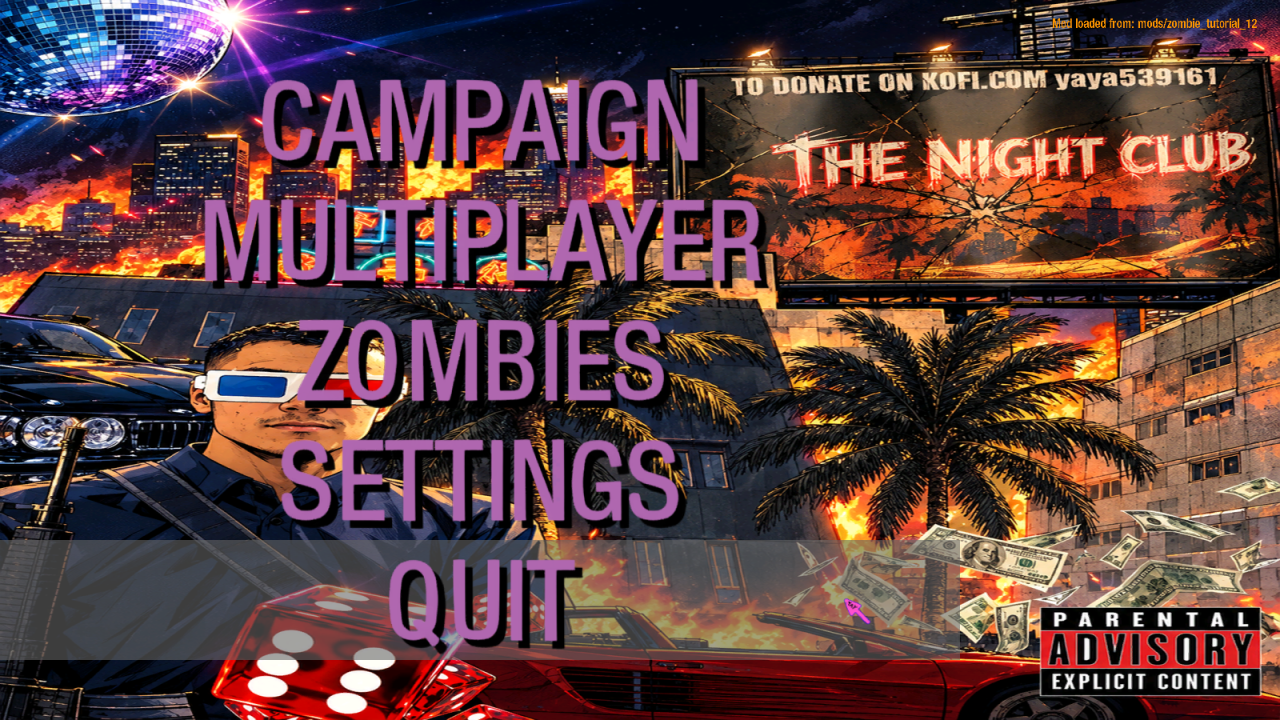
Custom 2D Menu BackgroundA simple tutorial to replace the default BO1 zombies menu background (3D interrogation room / TVs) with a custom 2D image.
Step 1 — Place the menu files
Copy the following files into your mod folder:
mods/<yourmodname>/ui/main.menu
mods/<yourmodname>/ui/main_online.menu
mods/<yourmodname>/ui/private_mission_select_zombie.menuAnd this file into your maps folder:
mods/<yourmodname>/maps/frontend.gsc
Step 2 — Create your menu image
Create an image with the following specs:
Size: 1024 x 1024 (or 2048 x 2048)
Format: .dds (24-bit, no alpha)
Content: Your custom background image
Save the image as mon_menu.dds
Step 3 — Create the material in Asset Manager
Open Asset Manager
Load your .gdt file
Click New Entry
Name: mon_menu
Set the following parameters:
materialType 2d
surfaceType <none>
blendFunc Replace
alphaTest Always
tile no tile
mipmap nomip bilinearIn the Color map field, click ... and select your mon_menu.dds
File → Save
PC Convert → Convert Selected
Step 4 — Copy files to your mod
Once the conversion is done, copy the generated files:
mods/<yourmodname>/images/mon_menu.iwi
Step 5 — Add entries to mod.csv
Open mods/<yourmodname>/mod.csv and add the following lines:
material,mon_menu
rawfile,maps/frontend.gsc
menufile,ui/main.menu
menufile,ui/main_online.menu
menufile,ui/private_mission_select_zombie.menuStep 6 — Build and test
Thank you for watching this tutorial
DOWNLOAD : https://mega.nz/folder/z85l2IJD#X7kD3Og3zIMEN-HzKxlZXg