Skip to content
  • 0 Unread 0
  • Recent
  • Popular
  • Users
  • Donate
Collapse

Plutonium

yaybeat

yaybeat

@yaybeat
Unfollow Follow
About
Posts
8
Topics
3
Shares
0
Groups
0
Followers
13
Following
13

Posts

Recent Best Controversial

  • Custom 2D Menu Background
    yaybeat yaybeat

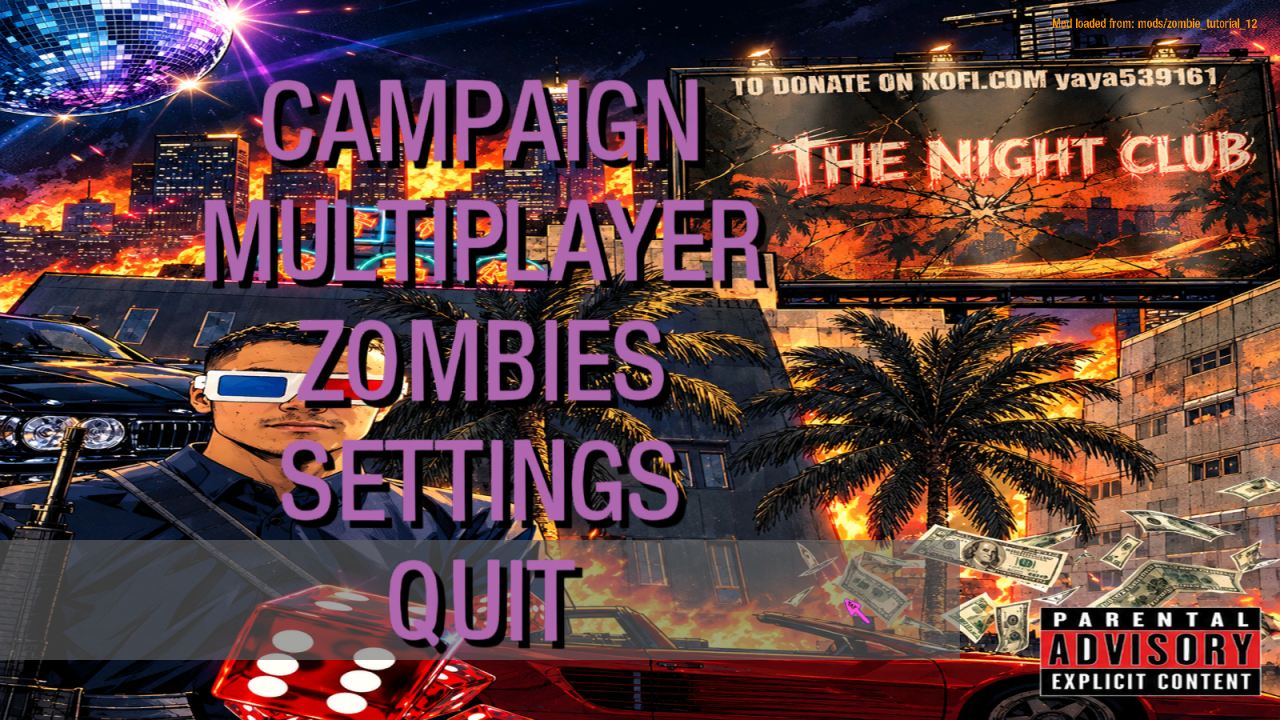
    A simple tutorial to replace the default BO1 zombies menu background (3D interrogation room / TVs) with a custom 2D image.

    Step 1 — Place the menu files

    Copy the following files into your mod folder:

    mods/<yourmodname>/ui/main.menu
    mods/<yourmodname>/ui/main_online.menu
    mods/<yourmodname>/ui/private_mission_select_zombie.menu

    And this file into your maps folder:

    mods/<yourmodname>/maps/frontend.gsc

    Step 2 — Create your menu image

    Create an image with the following specs:

    Size: 1024 x 1024 (or 2048 x 2048)

    Format: .dds (24-bit, no alpha)

    Content: Your custom background image

    Save the image as mon_menu.dds

    Step 3 — Create the material in Asset Manager

    Open Asset Manager

    Load your .gdt file

    Click New Entry

    Name: mon_menu

    Set the following parameters:

    materialType 2d
    surfaceType <none>
    blendFunc Replace
    alphaTest Always
    tile no tile
    mipmap nomip bilinear

    In the Color map field, click ... and select your mon_menu.tga

    File → Save

    PC Convert → Convert Selected

    Step 4 — Copy files to your mod

    Once the conversion is done, copy the generated files:

    mods/<yourmodname>/images/mon_menu.iwi

    Step 5 — Add entries to mod.csv

    Open mods/<yourmodname>/mod.csv and add the following lines:

    material,mon_menu
    rawfile,maps/frontend.gsc
    menufile,ui/main.menu
    menufile,ui/main_online.menu
    menufile,ui/private_mission_select_zombie.menu

    Step 6 — Build and test

    Thank you for watching this tutorial

    DOWNLOAD : https://mega.nz/folder/z85l2IJD#X7kD3Og3zIMEN-HzKxlZXg

    alt text

    BO1 Modding Releases & Resources

  • [NEW PERK] Tutorial – Black Ops 1 Custom Zombies: Adding the Parallel Echo Perk
    yaybeat yaybeat

    here is a simple tutorail for add a new perk , Parallel Echo

    imgperk13.png

    -When you have the perk and take fatal damage, you do NOT die.
    -Instead, you are teleported to a dark, isolated area.
    -After a short teleport animation, you respawn as a ghost at a spawn point.
    -In ghost mode:
    -Your screen turns red and desaturated.
    -You have a blood overlay.
    -You are given a B23R with limited ammo.
    -You have 30 seconds to find your tombstone.
    -A tombstone is left where you "died".
    -If you reach the tombstone and hold use, you revive.
    -If you fail to reach it in 30 seconds, you die for real.
    -When you revive, you become "Clone 2".
    -First time you become Clone 2:
    -You get a TMP.
    -Your score is set to 1500.
    -Later revives:
    -You keep your saved money for that form.
    -You keep weapons you picked up in ghost mode if you don't already have them.
    -You can switch back and forth between your original self and Clone 2 each time you die and revive.
    -The perk icon changes to a ghost icon while you are in ghost mode.
    -You cannot buy the perk again if you already have it or if you have an active tombstone to recover.

    TUTORIAL

    1 Put the files in the corresponding folders.

    2 In zombiemode_perks_custom
    Open this file and add the following line in the init() function:

    add_perk( "specialty_parralel", 4069, true, "custom_vending_parallel", "custom_vending_parallel_on", "custom_vending_parallel", "specialty_parralel0", "revive_light", "Parallel Echo", 2, "mus_perks_doubletap_sting" );

    3 — your_map.gsc
    Add in the main() function:

    level thread maps_zm_custom_whoswho::init();

    And in your map's precache function:

    maps_zm_custom_whoswho::custom_whoswho_precache();

    4 — Modify perk_hud_create() in _zombiemode_perks_custom.gsc
    IMPORTANT: to prevent perk icons from overlapping each other, you must replace the existing perk_hud_create() function with this pyramid version using 40x40 icons:

    perk_hud_create( perk )
    {
    if ( !IsDefined( self.perk_hud ) )
    {
    self.perk_hud = [];
    }

    hud = create_simple_hud( self );
    hud.foreground = true; 
    hud.sort = 1; 
    hud.hidewheninmenu = false; 
    
    if( level.zombie_vars["zombie_perk_hud_type"] == "cw" )
    {
    	hud.alignX = "center"; 
        hud.alignY = "bottom";
        hud.horzAlign = "center"; 
        hud.vertAlign = "bottom";
        hud.x = 0;
        hud.y = hud.y - 20;
    }
    else
    {
    	hud.alignX = "left"; 
    	hud.alignY = "bottom";
    	hud.horzAlign = "user_left"; 
    	hud.vertAlign = "user_bottom";
    
    	// ====================================================
    	// PYRAMIDE : 13 perks repartis en 4 rangees
    	//   Rangee 0 (bas)  : 5 icones (index 0-4)
    	//   Rangee 1        : 4 icones (index 5-8)
    	//   Rangee 2        : 3 icones (index 9-11)
    	//   Rangee 3 (haut) : 1 icone  (index 12)
    	// ====================================================
    	index = self.perk_hud.size;
    	spacing = 44;
    	row_height = 44;
    
    	if ( index < 5 )
    	{
    		row = 0; col = index; base_x = 0;
    	}
    	else if ( index < 9 )
    	{
    		row = 1; col = index - 5; base_x = 18;
    	}
    	else if ( index < 12 )
    	{
    		row = 2; col = index - 9; base_x = 36;
    	}
    	else
    	{
    		row = 3; col = 0; base_x = 72;
    	}
    
    	hud.x = base_x + col * spacing;
    	hud.y = -70 - (row * row_height);
    }
    
    hud.alpha = 0;
    hud fadeOverTime(0.6);
    hud.alpha = 1;
    
    // ====================================================
    // ICONE AGRANDIE : 40x40
    // ====================================================
    hud SetShader( level.zombie_perks[ perk ].perk_shader, 40, 40 );
    hud scaleOverTime( 0.6, 40, 40 );
    
    self.perk_hud[ perk ] = hud;
    
    if( level.zombie_vars["zombie_perk_hud_type"] == "cw" )
    {
    	x_start = -1 * ((self.perk_hud.size * 36) / 2);
    
        keys = GetArrayKeys( self.perk_hud );
    
        for( i = 0; i < keys.size; i++ )
        {
            self.perk_hud[keys[i]].x = x_start;
            x_start += 36;
        }
    }
    

    }

    5 in your mod.csv put this :

    material,zmb12_perk13_texture1
    material,~-gzmb12_perk13_texture1
    material,specialty_parralel0
    material,specialty_parralel1

    5
    On your map in Radiant, you must place 6 entities:

    Entity Targetname Role
    script_model ,targetname custom_whoswho_buy_trigger (the model 3d)

    put this in a blackbox_____
    script_struct ,targetname parallel_echo_fx_spot Point where the teleport animation plays
    script_origin ,targetname teleport_perk13_1 Player 1 position
    script_origin ,targetname teleport_perk13_2 Player 2 position
    script_origin ,targetname teleport_perk13_3 Player 3 position
    script_origin ,targetname teleport_perk13_4 Player 4 position


    put this toward initial spawn points or elsewhere in your map____
    script_origin ,targetname spawn_fantome1 Ghost respawn position 1
    script_origin ,targetname spawn_fantome2 Ghost respawn position 2
    script_origin ,targetname spawn_fantome3 Ghost respawn position 3
    script_origin ,targetname spawn_fantome4 Ghost respawn position 4


    ⚠️ Place the teleport_perk13_* in a dark, isolated area (the "black box") and the spawn_fantome* at your map's initial spawn points.

    6: Compilation
    Open your mod in Launcher.exe
    Click Build Mod
    Wait for compilation
    Launch the game

    !! if you don't have a _zombiemode_perks_custom, add the file in yous maps folder !!

    Thanks wathcing this tutorial

    Dowload : https://mega.nz/folder/PJ0j2bbL#hRXaSNGOohluFWUCll1s_w

    Video : https://www.youtube.com/watch?v=7j_NrMO8q6E

    BO1 Modding Releases & Resources

  • 3D Cinema 1.3 - Custom Zombies Map [Updated]
    yaybeat yaybeat

    crackero420 Hi! You need to go to your Plutonium BO1 path, normally: AppData\Local\Plutonium\storage\t5. Then, create a folder named mods inside t5, and put the map folder in it.

    BO1 Modding Releases & Resources

  • 3D Cinema 1.3 - Custom Zombies Map [Updated]
    yaybeat yaybeat

    SavoyHp Thanks for the feedback.
    To clarify: the GSC code was AI-assisted, and only the perk icons were AI-generated. I then retouched them, cut them out, and converted them multiple times.
    The 3D models were imported by me, and the textures were made/edited in Photoshop.
    Calling the whole map “AI slop” isn’t accurate. If the visual style isn’t to your taste, that’s your opinion.
    I’m open to constructive criticism about gameplay and difficulty.

    BO1 Modding Releases & Resources

  • 3D Cinema 1.3 - Custom Zombies Map [Updated]
    yaybeat yaybeat

    blauwbeer , Thanks, it's easier to play with four people than solo. Indeed

    BO1 Modding Releases & Resources

  • 3D Cinema 1.3 - Custom Zombies Map [Updated]
    yaybeat yaybeat

    thank you , and good game

    BO1 Modding Releases & Resources

  • 3D Cinema 1.3 - Custom Zombies Map [Updated]
    yaybeat yaybeat

    Here is my latest map featuring challenges, easter eggs, and plenty of other custom things to have fun on the map.
    It is a medium-sized map with a medium-to-high difficulty level.

    • No Dogs
    • Teleporter
    • Add Weapon BO2, MW2, IW and BO3
    • Add Perk BO2 AND BO3
    • Secret Room
    • Games
    • Challenge
    • PAP
    • easter eggs
    • Buyable Ending
    • Buyable Staff
    • Buyable ammo
    • Boss
    • Custom Perk Icone
    • Music
    • SoulBox
    • Turret

    Update 06/09/2026
    Add tar21 and fix error

    Update 13/09/2026
    Add Custom Powerups

    • Weapon Upgrade
    • Freeze
    • Zombie Magnet
    • Negative Points
    • Temporary Perk
    • Thunderstorm
    • Random Weapon
      and fix error

    Update 19/09/2026
    You can now Pack-a-Punch your weapons twice! Around
    15 weapons currently support this double upgrade feature.

    Update 26/09/2026 v1.1
    Add new Perk Custom : Parallel Echo – a BO1 Zombies perk where death turns
    you into an invulnerable ghost for 30 seconds.
    Reach your tombstone to revive as a Clone,
    the revived version of your original
    Base self. Both have separate
    money and weapons,
    and each death switches you between them.

    Update 07/10/2026 v1.2
    Add new custom menu and font colors.
    New weapon: BO2 Taser. Added camos and weapons in backroom

    The HUD uses a pyramid layout for perk icons, centering each r
    ow dynamically as the number of active perks increases.
    and fix error.

    Update 10/10/2026 v1.3
    Added the survival version of the custom map

    Important: To progress through the map, you need to find a video cassette hidden in the cinema room.

    video guide

    image1.png
    image2.png
    alt text

    alt text

    7055fc50-2854-4170-838c-59205075be93.png

    CHALLENGE MAP / VERSION NORMAL
    Download

    SURVIVAL MAP / SURVIVAL VERSION
    Download

    Thank you

    • Blitz
    • Shippudden
    BO1 Modding Releases & Resources

  • [ZM] CHIISAI - Custom Zombies Map
    yaybeat yaybeat

    i watch a video of your map , its good map , GG

    BO1 Modding Releases & Resources
  • 1 / 1
  • Login

  • Don't have an account? Register

  • Login or register to search.
  • First post
    Last post
0
  • Unread 0
  • Recent
  • Popular
  • Users
  • Donate