Skip to content
  • 0 Unread 0
  • Recent
  • Tags
  • Popular
  • Users
  • Groups
  • Donate
Collapse

Plutonium

  1. Home
  2. BO2 Server Hosting Support
  3. WARNING: config file dedicated.cfg not found.

WARNING: config file dedicated.cfg not found.

Scheduled Pinned Locked Moved BO2 Server Hosting Support
8 Posts 5 Posters 3.0k Views
  • Oldest to Newest
  • Newest to Oldest
  • Most Votes
Reply
  • Reply as topic
Log in to reply
This topic has been deleted. Only users with topic management privileges can see it.
  • kenp Offline
    kenp Offline
    kenp
    wrote on last edited by kenp
    #1

    I'm trying to host a private server for BO2, I followed the tutorial closely, but I have this:

    D:\BO2\t6rmp.exe console:

    WARNING: config file dedicated.cfg not found.
    

    I tried to modify the file !start_mp_server.bat by changing set cfg=dedicated.cfg to set cfg=t6r/data/dedicated.cfg, but it still doesn't change anything.

    screenshot.png

    Kalitos 1 Reply Last reply
    0
    • kenp kenp

      I'm trying to host a private server for BO2, I followed the tutorial closely, but I have this:

      D:\BO2\t6rmp.exe console:

      WARNING: config file dedicated.cfg not found.
      

      I tried to modify the file !start_mp_server.bat by changing set cfg=dedicated.cfg to set cfg=t6r/data/dedicated.cfg, but it still doesn't change anything.

      screenshot.png

      Kalitos Offline
      Kalitos Offline
      Kalitos
      wrote on last edited by
      #2

      kenp Made sure the file is in the correct location?
      D:\BO2\t6r\data\

      1 Reply Last reply
      0
      • kenp Offline
        kenp Offline
        kenp
        wrote on last edited by
        #3

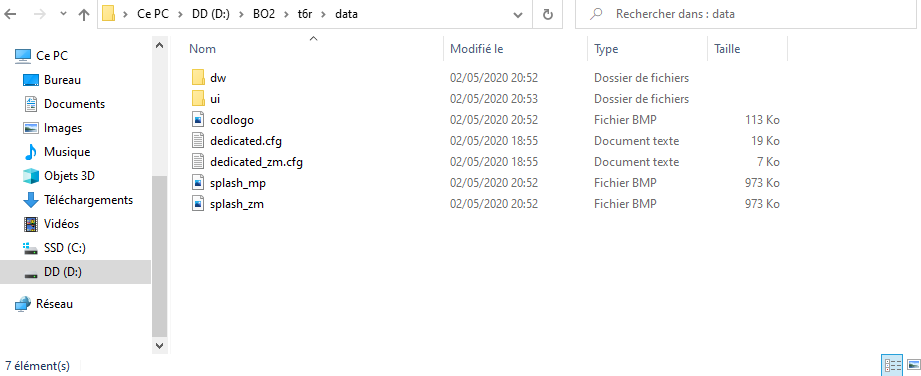
        Kalitos yes, this file is in the right location: D:\BO2\t6r\data\

        2eb7dc11-7e18-4a2a-9f7d-0583bd3bb466-image.png

        Kalitos SoyRA 2 Replies Last reply
        0
        • kenp kenp

          Kalitos yes, this file is in the right location: D:\BO2\t6r\data\

          2eb7dc11-7e18-4a2a-9f7d-0583bd3bb466-image.png

          Kalitos Offline
          Kalitos Offline
          Kalitos
          wrote on last edited by
          #4

          kenp The only thing that occurs to me is that you must run it as an administrator or also check the content of the file dedicated.cfg that is correct

          1 Reply Last reply
          0
          • kenp kenp

            Kalitos yes, this file is in the right location: D:\BO2\t6r\data\

            2eb7dc11-7e18-4a2a-9f7d-0583bd3bb466-image.png

            SoyRA Offline
            SoyRA Offline
            SoyRA
            Contributor
            wrote on last edited by
            #5

            kenp Mmm...dedicated.cfg or dedicated.cfg.txt?
            I recommend you to have the option "View file extension" activated. Google it if you don't know how to activate it.

            1 Reply Last reply
            2
            • kenp Offline
              kenp Offline
              kenp
              wrote on last edited by
              #6

              I change for dedicated.cfg.txt, it works.

              Thank you!

              1 Reply Last reply
              0
              • BigBeanGames Offline
                BigBeanGames Offline
                BigBeanGames
                wrote on last edited by
                #7

                so you changed the file into a .txt and then it worked? or what exactly did you do?

                Levity 1 Reply Last reply
                0
                • BigBeanGames BigBeanGames

                  so you changed the file into a .txt and then it worked? or what exactly did you do?

                  Levity Offline
                  Levity Offline
                  Levity
                  wrote on last edited by
                  #8

                  BigBeanGames no, his file name extensions were turned off. He had it saved as a .txt, but it needs to be just a .cfg

                  1 Reply Last reply
                  0

                  Hello! It looks like you're interested in this conversation, but you don't have an account yet.

                  Getting fed up of having to scroll through the same posts each visit? When you register for an account, you'll always come back to exactly where you were before, and choose to be notified of new replies (either via email, or push notification). You'll also be able to save bookmarks and upvote posts to show your appreciation to other community members.

                  With your input, this post could be even better 💗

                  Register Login
                  Reply
                  • Reply as topic
                  Log in to reply
                  • Oldest to Newest
                  • Newest to Oldest
                  • Most Votes


                  • Login

                  • Don't have an account? Register

                  • Login or register to search.
                  • First post
                    Last post
                  0
                  • Unread 0
                  • Recent
                  • Tags
                  • Popular
                  • Users
                  • Groups
                  • Donate