Skip to content
  • 0 Unread 0
  • Recent
  • Tags
  • Popular
  • Users
  • Groups
  • Donate
Collapse

Plutonium

  1. Home
  2. MW3 Modding Releases & Resources
  3. CAMO MW3 DARK MATTER
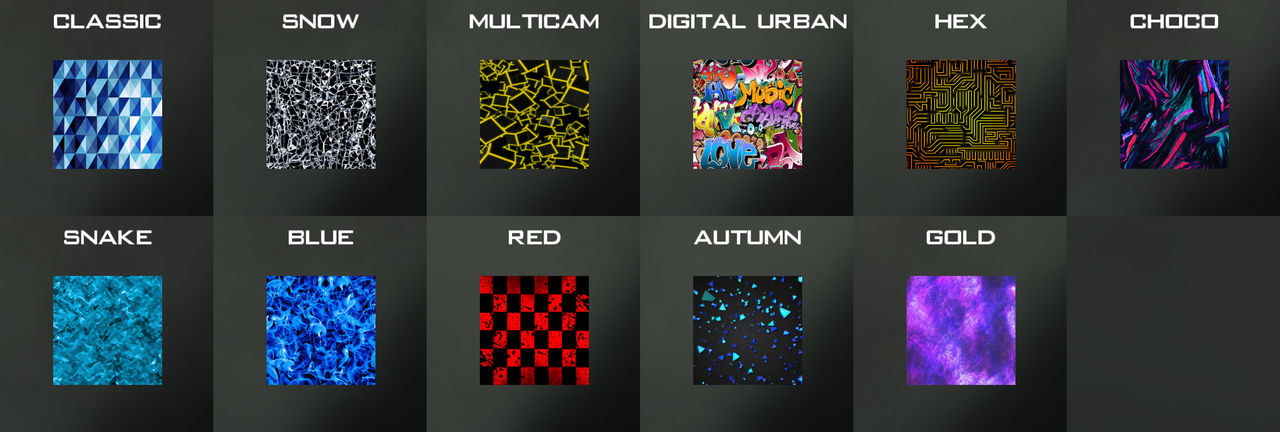
CAMO MW3 DARK MATTER

Scheduled Pinned Locked Moved MW3 Modding Releases & Resources
callofdutymodmultiplayersmw3
13 Posts 10 Posters 7.6k Views 1 Watching
  • Oldest to Newest
  • Newest to Oldest
  • Most Votes
Reply
  • Reply as topic
Log in to reply
This topic has been deleted. Only users with topic management privileges can see it.
  • sharkorix74 Offline
    sharkorix74 Offline
    sharkorix74
    wrote on last edited by sharkorix74
    #1

    https://www.mediafire.com/file/mbrd5a58155zvwy/z_Camo_Pack.iwd/file

    text alternatif

    ButterNutSquash 1 Reply Last reply
    4
    • Ryzer38 Offline
      Ryzer38 Offline
      Ryzer38
      wrote on last edited by
      #2

      thx you so much !!

      1 Reply Last reply
      0
      • Resxt Offline
        Resxt Offline
        Resxt
        Plutonium Staff
        wrote on last edited by
        #3

        This is like the 5th repost of this

        1 Reply Last reply
        1
        • sharkorix74 sharkorix74

          https://www.mediafire.com/file/mbrd5a58155zvwy/z_Camo_Pack.iwd/file

          text alternatif

          ButterNutSquash Offline
          ButterNutSquash Offline
          ButterNutSquash
          wrote on last edited by
          #4

          sharkorix74 i try to open the file full of the camos and it doesnt open idk why, do you know why?

          1 Reply Last reply
          1
          • zVxHeartless Offline
            zVxHeartless Offline
            zVxHeartless
            wrote on last edited by
            #5

            Where do you put this, I'm new to Plutonium

            Resxt Pillian Mbuzcut 2 Replies Last reply
            0
            • zVxHeartless zVxHeartless

              Where do you put this, I'm new to Plutonium

              Resxt Offline
              Resxt Offline
              Resxt
              Plutonium Staff
              wrote on last edited by
              #6

              zVxHeartless
              https://plutonium.pw/docs/modding/loading-textures/

              1 Reply Last reply
              0
              • zVxHeartless zVxHeartless

                Where do you put this, I'm new to Plutonium

                Pillian Mbuzcut Offline
                Pillian Mbuzcut Offline
                Pillian Mbuzcut
                wrote on last edited by
                #7

                zVxHeartless same problem here, i put in the images folder but nothing appens.

                gunmd0wn 1 Reply Last reply
                0
                • Pillian Mbuzcut Pillian Mbuzcut

                  zVxHeartless same problem here, i put in the images folder but nothing appens.

                  gunmd0wn Offline
                  gunmd0wn Offline
                  gunmd0wn
                  wrote on last edited by
                  #8

                  @popov_yeahh place the iwd file directly into your
                  %AppData%/local/plutonium/storage/iw5 directory without extracting it.

                  Diego Costa Pillian Mbuzcut 2 Replies Last reply
                  0
                  • gunmd0wn gunmd0wn

                    @popov_yeahh place the iwd file directly into your
                    %AppData%/local/plutonium/storage/iw5 directory without extracting it.

                    Diego Costa Offline
                    Diego Costa Offline
                    Diego Costa
                    wrote on last edited by
                    #9

                    gunmd0wn said in CAMO MW3 DARK MATTER:

                    %AppData%/local/plutonium/storage/iw5

                    Pillian Mbuzcut 1 Reply Last reply
                    0
                    • gunmd0wn gunmd0wn

                      @popov_yeahh place the iwd file directly into your
                      %AppData%/local/plutonium/storage/iw5 directory without extracting it.

                      Pillian Mbuzcut Offline
                      Pillian Mbuzcut Offline
                      Pillian Mbuzcut
                      wrote on last edited by
                      #10

                      gunmd0wn thanks i will try

                      1 Reply Last reply
                      0
                      • Diego Costa Diego Costa

                        gunmd0wn said in CAMO MW3 DARK MATTER:

                        %AppData%/local/plutonium/storage/iw5

                        Pillian Mbuzcut Offline
                        Pillian Mbuzcut Offline
                        Pillian Mbuzcut
                        wrote on last edited by
                        #11

                        @MeeTheoryy i tried, this works, last time i put it in my images folder, that's why it didn't work 👍

                        1 Reply Last reply
                        0
                        • VeloFFA Offline
                          VeloFFA Offline
                          VeloFFA
                          wrote on last edited by
                          #12

                          so i cant find where to put it and it didnt give me a file for the camos just like a bunch of codes

                          LastDemon99 1 Reply Last reply
                          0
                          • VeloFFA VeloFFA

                            so i cant find where to put it and it didnt give me a file for the camos just like a bunch of codes

                            LastDemon99 Offline
                            LastDemon99 Offline
                            LastDemon99
                            wrote on last edited by
                            #13

                            @BoLT-Velo windows + r, paste %localappdata%/Plutonium/storage/iw5 press ok and paste the entire file into the folder that will open.
                            camos preview in the original post: https://forum.plutonium.pw/topic/1263/release-camo-pack?_=1648950868126

                            1 Reply Last reply
                            0

                            Hello! It looks like you're interested in this conversation, but you don't have an account yet.

                            Getting fed up of having to scroll through the same posts each visit? When you register for an account, you'll always come back to exactly where you were before, and choose to be notified of new replies (either via email, or push notification). You'll also be able to save bookmarks and upvote posts to show your appreciation to other community members.

                            With your input, this post could be even better 💗

                            Register Login
                            Reply
                            • Reply as topic
                            Log in to reply
                            • Oldest to Newest
                            • Newest to Oldest
                            • Most Votes


                            • Login

                            • Don't have an account? Register

                            • Login or register to search.
                            • First post
                              Last post
                            0
                            • Unread 0
                            • Recent
                            • Tags
                            • Popular
                            • Users
                            • Groups
                            • Donate