PLEASE HELP, ERROR, BO1 CRASH WHEN LANCHING
-
Driver Method
Press Win+R, write this:
dxdiag, press Ok, select Display in the window that opens, then look at the Device section for your device name and manufacturer. After you determine those, update your graphics drivers.- https://www.nvidia.com/drivers/
- https://www.amd.com/drivers/
- https://downloadcenter.intel.com/
- OEM website of your device
CFG Method
- Press Win+R and paste this path:
%localappdata%\Plutonium\storage\t5 - Open the
playersfolder (create it if it doesn’t exist) - Place the
.cfgfiles from the following link into theplayersfolder https://mega.nz/folder/9ksUkSrA#TRYDTvno7hW_khFlJCB7mg
-
Hadi77KSA It didnt work, still showing the error
joshcool909 either your specs are too weak or you’re facing a different exception address than the ones my comment fix. I don’t have other suggestions for the exception addresses in this thread.
-
This post is deleted!
-
joshcool909 either your specs are too weak or you’re facing a different exception address than the ones my comment fix. I don’t have other suggestions for the exception addresses in this thread.
-
Hadi77KSA What are specs? And how can I check if they're weak or not?
joshcool909 system specifications, i.e. the hardware components. I’d say to use a website that compares hardware components between your specs and the game’s minimum requirements as listed on the Steam page of the game.
-
This post is deleted!
-
joshcool909 system specifications, i.e. the hardware components. I’d say to use a website that compares hardware components between your specs and the game’s minimum requirements as listed on the Steam page of the game.
Hadi77KSA Everything looks good to me, i got 8 gig ram and bo2 runs perfectly fine
-
 Hadi77KSA referenced this topic on
-
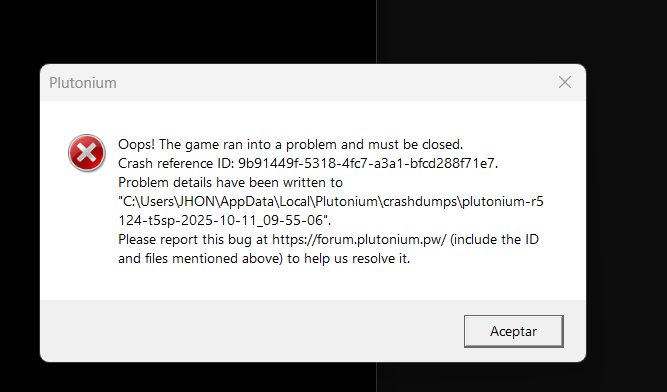
Hello friends, I get the following error code, and the only thing I did was reset the PC to factory settings, but now I get this error, but BO2 does enter correctly. What doesn't work is BO1, despite many methods I've tried, it doesn't want to work.
I speak Spanish, but they respond faster if I speak English. I look forward to your response.
-
Driver Method
Press Win+R, write this:
dxdiag, press Ok, select Display in the window that opens, then look at the Device section for your device name and manufacturer. After you determine those, update your graphics drivers.- https://www.nvidia.com/drivers/
- https://www.amd.com/drivers/
- https://downloadcenter.intel.com/
- OEM website of your device
CFG Method
- Press Win+R and paste this path:
%localappdata%\Plutonium\storage\t5 - Open the
playersfolder (create it if it doesn’t exist) - Place the
.cfgfiles from the following link into theplayersfolder https://mega.nz/folder/9ksUkSrA#TRYDTvno7hW_khFlJCB7mg
-
Driver Method
Press Win+R, write this:
dxdiag, press Ok, select Display in the window that opens, then look at the Device section for your device name and manufacturer. After you determine those, update your graphics drivers.- https://www.nvidia.com/drivers/
- https://www.amd.com/drivers/
- https://downloadcenter.intel.com/
- OEM website of your device
CFG Method
- Press Win+R and paste this path:
%localappdata%\Plutonium\storage\t5 - Open the
playersfolder (create it if it doesn’t exist) - Place the
.cfgfiles from the following link into theplayersfolder https://mega.nz/folder/9ksUkSrA#TRYDTvno7hW_khFlJCB7mg
-
Driver Method
Press Win+R, write this:
dxdiag, press Ok, select Display in the window that opens, then look at the Device section for your device name and manufacturer. After you determine those, update your graphics drivers.- https://www.nvidia.com/drivers/
- https://www.amd.com/drivers/
- https://downloadcenter.intel.com/
- OEM website of your device
CFG Method
- Press Win+R and paste this path:
%localappdata%\Plutonium\storage\t5 - Open the
playersfolder (create it if it doesn’t exist) - Place the
.cfgfiles from the following link into theplayersfolder https://mega.nz/folder/9ksUkSrA#TRYDTvno7hW_khFlJCB7mg
-
Driver Method
Press Win+R, write this:
dxdiag, press Ok, select Display in the window that opens, then look at the Device section for your device name and manufacturer. After you determine those, update your graphics drivers.- https://www.nvidia.com/drivers/
- https://www.amd.com/drivers/
- https://downloadcenter.intel.com/
- OEM website of your device
CFG Method
- Press Win+R and paste this path:
%localappdata%\Plutonium\storage\t5 - Open the
playersfolder (create it if it doesn’t exist) - Place the
.cfgfiles from the following link into theplayersfolder https://mega.nz/folder/9ksUkSrA#TRYDTvno7hW_khFlJCB7mg
Hadi77KSA TY VERY MUCH THIS SOLVED THE PROBLEM, i was looking for a solution in all youtube and forums and this is the only one that worked.
-
Driver Method
Press Win+R, write this:
dxdiag, press Ok, select Display in the window that opens, then look at the Device section for your device name and manufacturer. After you determine those, update your graphics drivers.- https://www.nvidia.com/drivers/
- https://www.amd.com/drivers/
- https://downloadcenter.intel.com/
- OEM website of your device
CFG Method
- Press Win+R and paste this path:
%localappdata%\Plutonium\storage\t5 - Open the
playersfolder (create it if it doesn’t exist) - Place the
.cfgfiles from the following link into theplayersfolder https://mega.nz/folder/9ksUkSrA#TRYDTvno7hW_khFlJCB7mg
-
Hadi77KSA Hey Man, Would be really helpful if you reupload the cfg file as it is unavailable now
stzrm.zeroseven they’re still available.



Hello! It looks like you're interested in this conversation, but you don't have an account yet.
Getting fed up of having to scroll through the same posts each visit? When you register for an account, you'll always come back to exactly where you were before, and choose to be notified of new replies (either via email, or push notification). You'll also be able to save bookmarks and upvote posts to show your appreciation to other community members.
With your input, this post could be even better 💗
Register Login