Skip to content
  • 0 Unread 0
  • Recent
  • Tags
  • Popular
  • Users
  • Groups
  • Donate
Collapse

Plutonium

  1. Home
  2. BO1 Client Support
  3. PLEASE HELP, ERROR, BO1 CRASH WHEN LANCHING

PLEASE HELP, ERROR, BO1 CRASH WHEN LANCHING

Scheduled Pinned Locked Moved BO1 Client Support
40 Posts 19 Posters 22.4k Views 3 Watching
  • Oldest to Newest
  • Newest to Oldest
  • Most Votes
Reply
  • Reply as topic
Log in to reply
This topic has been deleted. Only users with topic management privileges can see it.
  • joshcool909 joshcool909

    Hadi77KSA It didnt work, still showing the error

    Hadi77KSA Offline
    Hadi77KSA Offline
    Hadi77KSA
    Contributor
    wrote on last edited by
    #28

    joshcool909 either your specs are too weak or you’re facing a different exception address than the ones my comment fix. I don’t have other suggestions for the exception addresses in this thread.

    joshcool909 1 Reply Last reply
    0
    • joshcool909 Offline
      joshcool909 Offline
      joshcool909
      wrote on last edited by
      #29
      This post is deleted!
      1 Reply Last reply
      0
      • Hadi77KSA Hadi77KSA

        joshcool909 either your specs are too weak or you’re facing a different exception address than the ones my comment fix. I don’t have other suggestions for the exception addresses in this thread.

        joshcool909 Offline
        joshcool909 Offline
        joshcool909
        wrote on last edited by
        #30

        Hadi77KSA What are specs? And how can I check if they're weak or not?

        Hadi77KSA 1 Reply Last reply
        0
        • joshcool909 joshcool909

          Hadi77KSA What are specs? And how can I check if they're weak or not?

          Hadi77KSA Offline
          Hadi77KSA Offline
          Hadi77KSA
          Contributor
          wrote on last edited by
          #31

          joshcool909 system specifications, i.e. the hardware components. I’d say to use a website that compares hardware components between your specs and the game’s minimum requirements as listed on the Steam page of the game.

          joshcool909 1 Reply Last reply
          0
          • joshcool909 Offline
            joshcool909 Offline
            joshcool909
            wrote on last edited by
            #32
            This post is deleted!
            1 Reply Last reply
            0
            • Hadi77KSA Hadi77KSA

              joshcool909 system specifications, i.e. the hardware components. I’d say to use a website that compares hardware components between your specs and the game’s minimum requirements as listed on the Steam page of the game.

              joshcool909 Offline
              joshcool909 Offline
              joshcool909
              wrote on last edited by
              #33

              Hadi77KSA Everything looks good to me, i got 8 gig ram and bo2 runs perfectly fine

              1 Reply Last reply
              0
              • Hadi77KSA Hadi77KSA referenced this topic on
              • carrington Offline
                carrington Offline
                carrington
                wrote on last edited by
                #34

                Hello friends, I get the following error code, and the only thing I did was reset the PC to factory settings, but now I get this error, but BO2 does enter correctly. What doesn't work is BO1, despite many methods I've tried, it doesn't want to work.

                I speak Spanish, but they respond faster if I speak English. I look forward to your response.
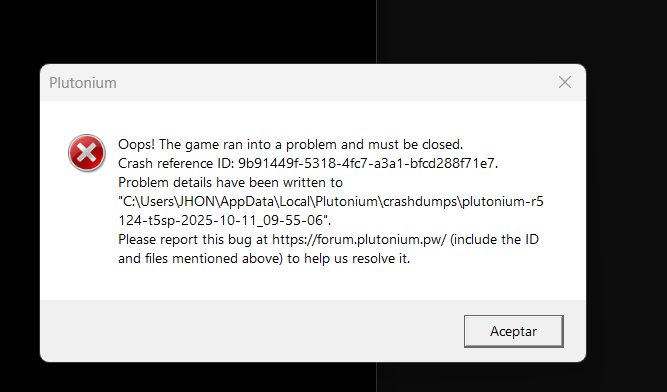
                Captura de pantalla 2025-10-11 095517.png

                1 Reply Last reply
                0
                • Hadi77KSA Hadi77KSA

                  Driver Method

                  Press Win+R, write this: dxdiag, press Ok, select Display in the window that opens, then look at the Device section for your device name and manufacturer. After you determine those, update your graphics drivers.

                  • https://www.nvidia.com/drivers/
                  • https://www.amd.com/drivers/
                  • https://downloadcenter.intel.com/
                  • OEM website of your device

                  CFG Method

                  1. Press Win+R and paste this path: %localappdata%\Plutonium\storage\t5
                  2. Open the players folder (create it if it doesn’t exist)
                  3. Place the .cfg files from the following link into the players folder https://mega.nz/folder/9ksUkSrA#TRYDTvno7hW_khFlJCB7mg
                  lakiiii27 Offline
                  lakiiii27 Offline
                  lakiiii27
                  wrote on last edited by
                  #35

                  Hadi77KSA said in PLEASE HELP, ERROR, BO1 CRASH WHEN LANCHING:

                  %localappdata%\Plutonium\storage\t5

                  thaaaaaaanksss

                  1 Reply Last reply
                  0
                  • Hadi77KSA Hadi77KSA

                    Driver Method

                    Press Win+R, write this: dxdiag, press Ok, select Display in the window that opens, then look at the Device section for your device name and manufacturer. After you determine those, update your graphics drivers.

                    • https://www.nvidia.com/drivers/
                    • https://www.amd.com/drivers/
                    • https://downloadcenter.intel.com/
                    • OEM website of your device

                    CFG Method

                    1. Press Win+R and paste this path: %localappdata%\Plutonium\storage\t5
                    2. Open the players folder (create it if it doesn’t exist)
                    3. Place the .cfg files from the following link into the players folder https://mega.nz/folder/9ksUkSrA#TRYDTvno7hW_khFlJCB7mg
                    aviciimoh Offline
                    aviciimoh Offline
                    aviciimoh
                    wrote on last edited by
                    #36

                    Annotation 2026-01-18 004054.png

                    brooo can u help me plz same issue when i play zombie but not all map

                    1 Reply Last reply
                    0
                    • Hadi77KSA Hadi77KSA

                      Driver Method

                      Press Win+R, write this: dxdiag, press Ok, select Display in the window that opens, then look at the Device section for your device name and manufacturer. After you determine those, update your graphics drivers.

                      • https://www.nvidia.com/drivers/
                      • https://www.amd.com/drivers/
                      • https://downloadcenter.intel.com/
                      • OEM website of your device

                      CFG Method

                      1. Press Win+R and paste this path: %localappdata%\Plutonium\storage\t5
                      2. Open the players folder (create it if it doesn’t exist)
                      3. Place the .cfg files from the following link into the players folder https://mega.nz/folder/9ksUkSrA#TRYDTvno7hW_khFlJCB7mg
                      GeraCxHx Offline
                      GeraCxHx Offline
                      GeraCxHx
                      wrote on last edited by
                      #37

                      Hadi77KSA Funciona completamente para resolver

                      Exception Code: 0xC0000005
                      Exception Address: 0x0071F125

                      1 Reply Last reply
                      0
                      • Hadi77KSA Hadi77KSA

                        Driver Method

                        Press Win+R, write this: dxdiag, press Ok, select Display in the window that opens, then look at the Device section for your device name and manufacturer. After you determine those, update your graphics drivers.

                        • https://www.nvidia.com/drivers/
                        • https://www.amd.com/drivers/
                        • https://downloadcenter.intel.com/
                        • OEM website of your device

                        CFG Method

                        1. Press Win+R and paste this path: %localappdata%\Plutonium\storage\t5
                        2. Open the players folder (create it if it doesn’t exist)
                        3. Place the .cfg files from the following link into the players folder https://mega.nz/folder/9ksUkSrA#TRYDTvno7hW_khFlJCB7mg
                        nachitoxxx Offline
                        nachitoxxx Offline
                        nachitoxxx
                        wrote on last edited by
                        #38

                        Hadi77KSA TY VERY MUCH THIS SOLVED THE PROBLEM, i was looking for a solution in all youtube and forums and this is the only one that worked.

                        1 Reply Last reply
                        0
                        • Hadi77KSA Hadi77KSA

                          Driver Method

                          Press Win+R, write this: dxdiag, press Ok, select Display in the window that opens, then look at the Device section for your device name and manufacturer. After you determine those, update your graphics drivers.

                          • https://www.nvidia.com/drivers/
                          • https://www.amd.com/drivers/
                          • https://downloadcenter.intel.com/
                          • OEM website of your device

                          CFG Method

                          1. Press Win+R and paste this path: %localappdata%\Plutonium\storage\t5
                          2. Open the players folder (create it if it doesn’t exist)
                          3. Place the .cfg files from the following link into the players folder https://mega.nz/folder/9ksUkSrA#TRYDTvno7hW_khFlJCB7mg
                          stzrm.zeroseven Offline
                          stzrm.zeroseven Offline
                          stzrm.zeroseven
                          wrote last edited by
                          #39

                          Hadi77KSA Hey Man, Would be really helpful if you reupload the cfg file as it is unavailable now

                          Hadi77KSA 1 Reply Last reply
                          0
                          • stzrm.zeroseven stzrm.zeroseven

                            Hadi77KSA Hey Man, Would be really helpful if you reupload the cfg file as it is unavailable now

                            Hadi77KSA Offline
                            Hadi77KSA Offline
                            Hadi77KSA
                            Contributor
                            wrote last edited by
                            #40

                            stzrm.zeroseven they’re still available.

                            1 Reply Last reply
                            0

                            Hello! It looks like you're interested in this conversation, but you don't have an account yet.

                            Getting fed up of having to scroll through the same posts each visit? When you register for an account, you'll always come back to exactly where you were before, and choose to be notified of new replies (either via email, or push notification). You'll also be able to save bookmarks and upvote posts to show your appreciation to other community members.

                            With your input, this post could be even better 💗

                            Register Login
                            Reply
                            • Reply as topic
                            Log in to reply
                            • Oldest to Newest
                            • Newest to Oldest
                            • Most Votes


                            • 1
                            • 2
                            • Login

                            • Don't have an account? Register

                            • Login or register to search.
                            • First post
                              Last post
                            0
                            • Unread 0
                            • Recent
                            • Tags
                            • Popular
                            • Users
                            • Groups
                            • Donate
