[Release][ZM] Any Player Easter Egg Mods
-
Hadi77KSA thanks youuuu!
-
Hey, just wanted to post something to help out with my troubles trying to install the Tranzit Richtofen EE - 2 emp mod.
Originally, the file we downloaded is a .iwd file, which is what confused me when the instructions said to "extract" the scripts file from the .iwd file. Turns out, you can just rename the .iwd file to a .zip file, which will then grant access to the files inside of it. (Before, when I tried to open the .iwd file, it would open the notepad app with a bunch of gibberish text which was super confusing)
What I did to make the mod work was to change the .iwd file to a .zip file, and then I could extract the contents of the file, and then paste the scripts file (from the now uncompressed .zip file) into the T6 folder. The original mod still works as intended, but now we can install the additional mods (like the 2 emp mod for tranzit) by going into the scripts/zm/zm_tranzit directory and pasting the .gsc file into there.
Sorry if this is a double post, but I just wanted to save anybody else the time who may have ran into this issue. It took about half an hour of troubleshooting for me to figure it out.
Hope this helps!
OP, if you need more info/screenshots to help improve the "individual file" instructions in your original post, I'd be happy to get them for you.
-
Hey, just wanted to post something to help out with my troubles trying to install the Tranzit Richtofen EE - 2 emp mod.
Originally, the file we downloaded is a .iwd file, which is what confused me when the instructions said to "extract" the scripts file from the .iwd file. Turns out, you can just rename the .iwd file to a .zip file, which will then grant access to the files inside of it. (Before, when I tried to open the .iwd file, it would open the notepad app with a bunch of gibberish text which was super confusing)
What I did to make the mod work was to change the .iwd file to a .zip file, and then I could extract the contents of the file, and then paste the scripts file (from the now uncompressed .zip file) into the T6 folder. The original mod still works as intended, but now we can install the additional mods (like the 2 emp mod for tranzit) by going into the scripts/zm/zm_tranzit directory and pasting the .gsc file into there.
Sorry if this is a double post, but I just wanted to save anybody else the time who may have ran into this issue. It took about half an hour of troubleshooting for me to figure it out.
Hope this helps!
OP, if you need more info/screenshots to help improve the "individual file" instructions in your original post, I'd be happy to get them for you.
johnjohnson13 This was really helpful, thanks man!
-
do i need tranzit extra ric and maxis solo both loaded at the same time? or do i only need one of them? i loaded them both at the transit folder and when i reached the part with the lamps and emp i deactivated 2 lamps and nothing happend.
-
do i need tranzit extra ric and maxis solo both loaded at the same time? or do i only need one of them? i loaded them both at the transit folder and when i reached the part with the lamps and emp i deactivated 2 lamps and nothing happend.
Traingoboom76 you can have both or just the one for the mod you’re interested in, just make sure what you’re looking for is getting loaded. Check the FAQ entry for “Q: How do I make sure the scripts are loaded?”
-
Hey, just wanted to post something to help out with my troubles trying to install the Tranzit Richtofen EE - 2 emp mod.
Originally, the file we downloaded is a .iwd file, which is what confused me when the instructions said to "extract" the scripts file from the .iwd file. Turns out, you can just rename the .iwd file to a .zip file, which will then grant access to the files inside of it. (Before, when I tried to open the .iwd file, it would open the notepad app with a bunch of gibberish text which was super confusing)
What I did to make the mod work was to change the .iwd file to a .zip file, and then I could extract the contents of the file, and then paste the scripts file (from the now uncompressed .zip file) into the T6 folder. The original mod still works as intended, but now we can install the additional mods (like the 2 emp mod for tranzit) by going into the scripts/zm/zm_tranzit directory and pasting the .gsc file into there.
Sorry if this is a double post, but I just wanted to save anybody else the time who may have ran into this issue. It took about half an hour of troubleshooting for me to figure it out.
Hope this helps!
OP, if you need more info/screenshots to help improve the "individual file" instructions in your original post, I'd be happy to get them for you.
johnjohnson13 I appreciate your interest in contributing. However, it’s not required to use the scripts folder provided with the mod to load the extra scripts since their latest versions can be used as standalone. To load them, you can simply follow the official Plutonium tutorial for loading gsc mods, but I’d advise to perform an additional step of placing them in their respective map-specific folders although doing so is not necessary.
-
Traingoboom76 you can have both or just the one for the mod you’re interested in, just make sure what you’re looking for is getting loaded. Check the FAQ entry for “Q: How do I make sure the scripts are loaded?”
Hadi77KSA
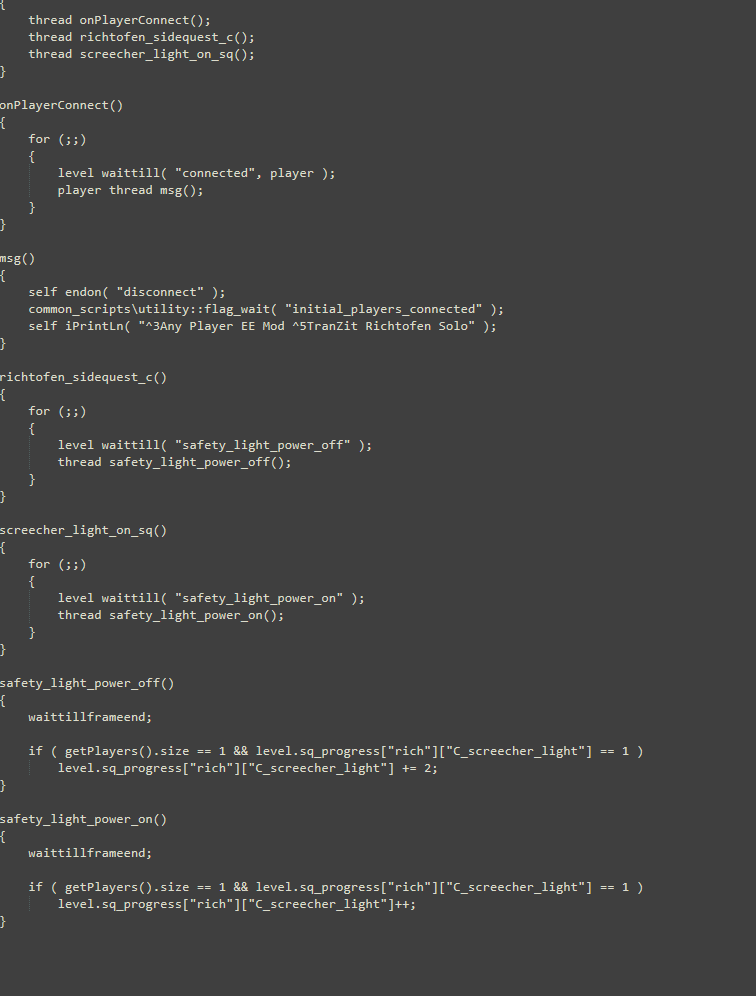 it tells me the scripts are loaded when i load into transit with maxis script being green and ric being yellow. typing in the command showes me the game recognizes them, and i put them both in the zm_transit folder. i dont know what to change to make this work i put an image of the script, maybe it's missing something? idk i'm pretty clueless as to what could have gone wrong.
 -
Hadi77KSA
it tells me the scripts are loaded when i load into transit with maxis script being green and ric being yellow. typing in the command showes me the game recognizes them, and i put them both in the zm_transit folder. i dont know what to change to make this work i put an image of the script, maybe it's missing something? idk i'm pretty clueless as to what could have gone wrong.Traingoboom76 there’s nothing to change. If it’s loaded, the mod will do its thing when playing alone. For the TranZit Richtofen modification to take effect, make sure that the map symbol and tower are not glowing blue, play alone, successfully complete the steps before attempting the final step of the Easter Egg, and that the EMPs on the last step detonate within 5 seconds of the first one (in other words, be fast once you throw the first EMP).
-
Traingoboom76 there’s nothing to change. If it’s loaded, the mod will do its thing when playing alone. For the TranZit Richtofen modification to take effect, make sure that the map symbol and tower are not glowing blue, play alone, successfully complete the steps before attempting the final step of the Easter Egg, and that the EMPs on the last step detonate within 5 seconds of the first one (in other words, be fast once you throw the first EMP).
-
Hadi77KSA so how do i do that? do i just get a denizen first to teleport to the next lamp?
-
Traingoboom76 that’s one way, yeah.
-
Hadi77KSA would you recomend another way which might be faster?
Traingoboom76 the other way is more difficult. So, not really.
-
Traingoboom76 the other way is more difficult. So, not really.
-
Hadi77KSA is there anything i can do to maybe extend that timer to something more reasonable like 10 seconds?
Traingoboom76 no, it’s the way the devs programmed the step. To increase the time window, you’d need a custom script to change the logic of the step. The TranZit Richtofen solo mod by teh-bandit completely eliminates the time limit in solo: link
Without modifying the logic of the step through a custom script, you’d just have to do it until you do it fast enough. Search for video guides if you don’t want to use a different script. -
The following scripts allow the main Easter Egg quests to be done with any number of players—whether it is solo (1 player), duo (2 players), trio (3 players), or even more than 4 players—while aiming to be as similar to the original Easter Eggs as possible.
Installation
- Download the latest release.
- Extract the
zm_any_player_eefolder from the ZIP file that was downloaded. - Go to
%localappdata%\Plutonium\storage\t6by pressing Win+R then pasting the mentioned path then pressing OK, and open themodsfolder. If themodsfolder does not exist, create it.
- Move the
zm_any_player_eefolder to inside themodsfolder. - Start the game and load the mod through the in-game
Modsmenu.
Patches
Can be found in
zm_any_player_ee\Patchesdie_rise_extra_no_reset_floor_puzzle.gsccan be used along withdie_rise_any_player_ee.gsc
The file goes inscripts\zm\zm_highrise
This patch makes the floor symbols not reset once an incorrect symbol is stepped on.nav_autocomplete.gscto go inscripts\zm
This patch builds the Nav Tables and applies the Navcards to all maps for all players.
Alternative Installation Methods
Following any of these methods makes the scripts be loaded automatically without needing to select the mod from the in-game
Modsmenu.All Scripts
- Follow steps 1 & 2 from the main installation instructions.
- Go to
%localappdata%\Plutonium\storage\t6by pressing Win+R then pasting the mentioned path then press OK. - Open the
zm_any_player_eefolder and copy thezm_any_player_ee.iwdfile from inside of it. - Paste the
zm_any_player_ee.iwdfile into thet6folder.
Individual Files
- Follow steps 1 & 2 from the main installation instructions.
- Go to
%localappdata%\Plutonium\storage\t6by pressing Win+R then pasting the mentioned path then press OK, and open thescripts\zmdirectory. Create thescripts\zmdirectory if it does not exist. - Open the
zm_any_player_eefolder then thezm_any_player_ee.iwdfile from inside of it, and extract thescriptsfolder. - Find the files from the extracted
scriptsfolder and place them into their respective map's folder. If the map's folder does not exist, create it and place it into the directory%localappdata%\Plutonium\storage\t6\scripts\zm.- TranZit's scripts go to
scripts\zm\zm_transit - Die Rise's scripts go to
scripts\zm\zm_highrise - Buried's scripts go to
scripts\zm\zm_buried - Origins' scripts go to
scripts\zm\zm_tomb
- TranZit's scripts go to
Features
TranZit
- Tower Step and Lamp Post Step for the Maxis Side
For solo, only require 1 Turbine.
Die Rise
- Nav Table
The script by default will automatically build the Nav Table if it is not already built. To prevent this, the person hosting will need to open the console and execute the following command:
set any_player_ee_highrise_nav "0"- Elevators Step and Dragon Puzzle
Require the same amount as the number of players.
If the Dragon Puzzle step is failed, it will reset back to require the same amount as the number of players.- Trample Steam Step
a) Maxis Side
- On solo and on 3p while the 1st ball is already flinging between Trample Steams placed on a set of lion symbols, only one Trample Steam will be required in order to be able to place down a ball.
- If the number of players is 3 or less, the players will have the ability to place both balls on the same set of Trample Steams.
- On 3p, having the 1st ball flinging is required to be able to place the other ball on the lone Trample Steam.
b) Richtofen Side
Requires the players to place Trample Steams only on the same amount of symbols as players.
Buried
a) Maxis Side
- Wisp Step
For less than 3p, wisp will no longer rely on zombies getting near it.
- Bells Step
For less than 3p, time limit will be removed. Will only reset if it is failed.
b) Richtofen Side
- Round Infinity A.K.A. the Time Bomb Step
On 4p or less, requires all players in the lobby to be near the location of the Time Bomb.
If the number of players is greater than 4, the step will only work if 4 players are near the location, no more no less, exactly how it works without the mod.Sharpshooter
Minimum number of required targets:
- 1p: 20 targets (Candy Shop)
- 2p: 39 targets (Candy Shop + Saloon (19))
- Otherwise: all 84 targets
Super Easter Egg
Allows for the Super Easter Egg button to be accessible with any number of players as long as:
- the players have, collectively, inserted the Navcards on all three Victis maps of TranZit, Die Rise, and Buried;
- each player in the lobby has completed the Victis maps' Easter Eggs on the same side across the maps;
- the completed side across all players is the same.
For more than 4 players, the mod will only check the player progress that is shown on the box.
Origins
Spawns stone tablets near the challenge boxes for players to grab the One Inch Punch from. This allows for matches of 5+ players to be able to obtain the One Inch Punch to complete Step 6: Wield a Fist of Iron of the Easter Egg.
Configuration Options
Name Description any_player_ee_transit_maxis_1p(0-18) Max number of players for which solo behaviour will be in effect. Default: 1. Vanilla: 0 any_player_ee_highrise_nav(0-1) Automatically build the Nav Table without having previously built it. Default: 1. Vanilla: 0 any_player_ee_highrise_elevators(0-4) Min number of required elevators. Default: -1. Vanilla: 4 any_player_ee_highrise_drg_puzzle(0-4) Min number of required floor puzzle symbols. Default: -1. Vanilla: 4 any_player_ee_highrise_maxis_pts_1p(0-18) Specific number of players for which Maxis Trample Steams solo behaviour will be in effect. Default: 1. Vanilla: 0 any_player_ee_highrise_maxis_pts_3p(0-18) Specific number of players for which Maxis Trample Steams 3p behaviour will be in effect. Default: 3. Vanilla: 0 any_player_ee_highrise_maxis_pts_ignore_has_ball(0-1) Ignore the existence of a ball on the Maxis Trample Steam(s) when creating ball place trigs. Default: 1. Vanilla: 0 any_player_ee_highrise_rich_pts(0-4) Min number of required Trample Steams for Richtofen. Default: -1. Vanilla: 4 any_player_ee_buried_maxis_ctw(0-18) Max number of players for which Maxis wisp health auto-regeneration will be in effect. Default: 2. Vanilla: 0 any_player_ee_buried_maxis_ip(0-18) Max number of players for which Maxis bells time limit removal will be in effect. Default: 2. Vanilla: 0 any_player_ee_buried_rich_tpo(0-18) Specific number of players required near the Guillotine to activate Richtofen round infinity. Default: -1. Vanilla: 4 any_player_ee_buried_ows(0-84) Min number of required targets for sharpshooter. Default: -1. Vanilla: 84 any_player_ee_buried_metagame(0-18) Max number of players whose completions will be checked for the Super Easter Egg. Default: 4. Vanilla: -1 Alternative Mods With Extra Features + Other Maps
- TranZit Extra: makes the EMP step on the Richtofen quest on solo only require 2 EMPs instead of 4.
tranzit_extra_richtofen_solo.gsc - Die Rise Extra: on the Trample Steam step on the Maxis side while there are less than 4 players, gives the players the ability to pick up extra Trample Steams, and the zombies will ignore the Trample Steams placed during the step.
die_rise_extra_springpads_maxis.gsc - Mob of the Dead: cleaned-up version of teh_bandit's mod. This mod functions the same way as his mod, where a bot is spawned in once all mobsters' numbers are entered into the number pad on solo.
motd_solo.gsc
To install, follow the steps in the Individual Files alternative installation method. The script goes toscripts\zm\zm_prison - Buried Extra: different versions have been provided containing the following features:-
- Richtofen maze levers step notifies the players whether each lever has sparked or not.
buried_extra_richtofen_maze_lever_sparks.gsc - Maxis bells step auto-completes once started on solo.
buried_extra_maxis_solo_bells.gsc - On the sharpshooter step on 3p, the players can choose the minimum number of targets to either be 61–65 or all targets on every attempt; where choosing the minimum to be 61–65 targets is done by shooting less than or exactly 65 targets, and choosing the minimum to be all targets is done by shooting more than 65 targets.
buried_extra_sharpshooter_3p.gsc
- Richtofen maze levers step notifies the players whether each lever has sparked or not.
- Origins Extra: on Step 3: Rain Fire, makes the button timeout 35 seconds, similar to BO3.
origins_extra_rain_fire_35s.gsc
FAQ
Q: Do I/we need all of these mods to do all the EEs?
A: Depends on the number of players and which maps and side you choose. The host is required to have the mods installed. The following shows the required files (which are contained in
zm_any_player_ee.iwdand get automatically loaded from it):- 1p:-
- TranZit Maxis:
tranzit_maxis_any_player_ee.gsc - Die Rise:
die_rise_any_player_ee.gsc - Buried and Super:
buried_any_player_ee.gsc
- TranZit Maxis:
- 2p/3p:-
- Die Rise:
die_rise_any_player_ee.gsc - Buried Richtofen and Super:
buried_any_player_ee.gsc
- Die Rise:
- 4p:- None
- More than 4p:-
- Super:
buried_any_player_ee.gsc - Origins:
origins_any_player_ee.gsc
- Super:
Q: I am stuck on some Easter Egg step. Could you help?
A: Generally, if you ask for help with any Easter Egg step, I will try to assist you. Note that the scripts do not modify anything outside of what is mentioned. Refer to the Features section for the changes made by the scripts, otherwise you could check existing guides such as the ones from the CoD Fandom Wiki.
Q: How do I make sure the scripts are loaded?
A: Most of my scripts come with a message in green/blue/yellow colours that appears when the player loads in indicating the scripts are loaded. Another method of checking is to get the host to execute the Plutonium console commands:
flashScriptHashes; scriptHashesIf the scripts are loaded, they will appear in the list of scripts.
Q: I want to use this without loading it as a mod so that I can have my normal stats or play with a different mod loaded. How do I load these scripts without loading them as a mod from the Mods menu?
A: Since my mod is composed of only
.gscscript files, it can be loaded without the need to select it from the in-gameModsmenu. To do so, follow one of the Alternative Installation Methods to make the scripts able to be loaded automatically.Q: On TranZit, should I worry that Maxis says the Turbine does not have enough power shortly after placing the Turbine under the tower?
A: Likely a vanilla game issue, especially if the Turbine begins not emitting power. If the Turbine is emitting power, then you probably should not worry. Wait at least 6 seconds after placing the Turbine(s) before killing the Avogadro just to be safe.
Q: On Die Rise, why is the elevator step not completing even though we are standing on enough elevator symbols?
A: Vanilla game problem. You need to make sure the Nav Table is fully built.
Q: On Die Rise, why is the Ballistic Knife step not completing even though Maxis said his quote about reincarnation, and the Ballistic Knife is upgraded and is shot into the Buddha room?
A: Vanilla game problem. The player shooting the Ballistic Knife must not have a melee weapon (Bowie Knife, Galvaknuckles) nor have bled out, which includes falling off the map and getting crushed with the exception of doing so while having Who's Who or solo Quick Revive. To fix this, get another player—who does not have a melee weapon nor has bled out—to do the step.
Credits
- CCDeroga: TranZit Maxis mod, Buried Maxis mod.
- teh_bandit: TranZit Richtofen mod, Mob of the Dead mod, and other contributions mentioned in the credited people's scripts.
- DaddyDontStop: Die Rise Maxis mod, Buried Maxis mod.
- shyperson0/znchi: Die Rise Richtofen mod.
- Stick Gaming/Nathan3197: Buried Richtofen mod.
- Raheem1 and the Easter Egg speedrunning community: testing my Die Rise's mod, and giving opinions on my changes made to Die Rise's mod and Buried's mod.
-
-
it doesnt show im online?
-
LUXURAY just get the host to send and invite and join through it. The mod does no changes outside the maps.
-
Hi, thanks a lot for the mods. Can the Tranzit Easter egg be done with 2 or 3 players—for both the Maxis and Richtofen sides? Is the standard installation sufficient, or do I need to install the alternative methods?


Hello! It looks like you're interested in this conversation, but you don't have an account yet.
Getting fed up of having to scroll through the same posts each visit? When you register for an account, you'll always come back to exactly where you were before, and choose to be notified of new replies (either via email, or push notification). You'll also be able to save bookmarks and upvote posts to show your appreciation to other community members.
With your input, this post could be even better 💗
Register Login