[Release][ZM] Any Player Easter Egg Mods
-
[KI]Val09 yes, that means the motd_solo script is loaded, and that you’ll be able to do the Easter Egg for Mob of the Dead in solo.
-
Hadi77KSA I get the same result, and in the end it says "raw," , and the bot doesn't appear. What can I do?
Robert2532M the bot spawns in after entering the prisoner numbers.
-
Hey! was just wondering it was possible to merge this mod with the BO2 Remix mod or any other mod in general, thanks!
tallynxd as long as they don’t change how Easter Eggs work, they should be compatible. If they're a fs_game mod that requires loading from the Mods menu, then for my mod instead of following the main installation instructions, you could follow one of the alternative installation methods so that it loads automatically without needing to load it from the Mods menu.
-
 Ivobardolf referenced this topic on
-
When any of my friends try to join me, or vice versa, we get an error that says fs_game mismatch between server () and client, and we all checked and made sure we had the mod loaded, and installed correctly.
ceresian it would depend on what is exactly shown. If it says in the error message nothing inside the parentheses for the server but shows some value for the client, then the host didn’t load it as a mod from the mods menu while the other person did. This can happen if the host followed one of the alternative installation methods while the other person followed the main installation. At this point, it’s not necessary for the other person to install/load the mod. Example error:
fs_game mismatch between server () and client (mods/zm_any_player_ee)
If it’s the opposite, where the parentheses of the server have a value but the ones of the client don’t, then that indicates the host loaded it as a mod from the mods menu while the other person didn’t. This can happen if host followed the main installation while the other person didn’t follow it or didn’t load the mod from the mods menu. Example error:
fs_game mismatch between server (mods/zm_any_player_ee) and client ()
Otherwise, if it shows different values in the two sets of parentheses, then someone between the host and the other person didn’t install it correctly or didn’t load the correct mod.
In any case, the fix is to either get the host to follow one of the alternative installation methods so the other people don’t have to install/load the mod, or have everyone follow the main installation.
-
im tryin do to tranzit ee richtofen side and when i load the match it say scripts/zm/zm_transit/tranzit_maxis_solo.gsc so the mods is it only for maxis side? because at the last step i throw my emp and it dosent work and yes i was throwing my emp fast and try it 3 time and still dosent valid the ee richtofen side plssss help
-
im tryin do to tranzit ee richtofen side and when i load the match it say scripts/zm/zm_transit/tranzit_maxis_solo.gsc so the mods is it only for maxis side? because at the last step i throw my emp and it dosent work and yes i was throwing my emp fast and try it 3 time and still dosent valid the ee richtofen side plssss help
SimMachinexQc you have to install the TranZit Extra script for Richtofen solo mod. I don’t include it with the other files because TranZit Richtofen is possible solo without mods although it is difficult.
-
Hadi77KSA thanks youuuu!
-
Hey, just wanted to post something to help out with my troubles trying to install the Tranzit Richtofen EE - 2 emp mod.
Originally, the file we downloaded is a .iwd file, which is what confused me when the instructions said to "extract" the scripts file from the .iwd file. Turns out, you can just rename the .iwd file to a .zip file, which will then grant access to the files inside of it. (Before, when I tried to open the .iwd file, it would open the notepad app with a bunch of gibberish text which was super confusing)
What I did to make the mod work was to change the .iwd file to a .zip file, and then I could extract the contents of the file, and then paste the scripts file (from the now uncompressed .zip file) into the T6 folder. The original mod still works as intended, but now we can install the additional mods (like the 2 emp mod for tranzit) by going into the scripts/zm/zm_tranzit directory and pasting the .gsc file into there.
Sorry if this is a double post, but I just wanted to save anybody else the time who may have ran into this issue. It took about half an hour of troubleshooting for me to figure it out.
Hope this helps!
OP, if you need more info/screenshots to help improve the "individual file" instructions in your original post, I'd be happy to get them for you.
-
Hey, just wanted to post something to help out with my troubles trying to install the Tranzit Richtofen EE - 2 emp mod.
Originally, the file we downloaded is a .iwd file, which is what confused me when the instructions said to "extract" the scripts file from the .iwd file. Turns out, you can just rename the .iwd file to a .zip file, which will then grant access to the files inside of it. (Before, when I tried to open the .iwd file, it would open the notepad app with a bunch of gibberish text which was super confusing)
What I did to make the mod work was to change the .iwd file to a .zip file, and then I could extract the contents of the file, and then paste the scripts file (from the now uncompressed .zip file) into the T6 folder. The original mod still works as intended, but now we can install the additional mods (like the 2 emp mod for tranzit) by going into the scripts/zm/zm_tranzit directory and pasting the .gsc file into there.
Sorry if this is a double post, but I just wanted to save anybody else the time who may have ran into this issue. It took about half an hour of troubleshooting for me to figure it out.
Hope this helps!
OP, if you need more info/screenshots to help improve the "individual file" instructions in your original post, I'd be happy to get them for you.
johnjohnson13 This was really helpful, thanks man!
-
do i need tranzit extra ric and maxis solo both loaded at the same time? or do i only need one of them? i loaded them both at the transit folder and when i reached the part with the lamps and emp i deactivated 2 lamps and nothing happend.
-
do i need tranzit extra ric and maxis solo both loaded at the same time? or do i only need one of them? i loaded them both at the transit folder and when i reached the part with the lamps and emp i deactivated 2 lamps and nothing happend.
Traingoboom76 you can have both or just the one for the mod you’re interested in, just make sure what you’re looking for is getting loaded. Check the FAQ entry for “Q: How do I make sure the scripts are loaded?”
-
Hey, just wanted to post something to help out with my troubles trying to install the Tranzit Richtofen EE - 2 emp mod.
Originally, the file we downloaded is a .iwd file, which is what confused me when the instructions said to "extract" the scripts file from the .iwd file. Turns out, you can just rename the .iwd file to a .zip file, which will then grant access to the files inside of it. (Before, when I tried to open the .iwd file, it would open the notepad app with a bunch of gibberish text which was super confusing)
What I did to make the mod work was to change the .iwd file to a .zip file, and then I could extract the contents of the file, and then paste the scripts file (from the now uncompressed .zip file) into the T6 folder. The original mod still works as intended, but now we can install the additional mods (like the 2 emp mod for tranzit) by going into the scripts/zm/zm_tranzit directory and pasting the .gsc file into there.
Sorry if this is a double post, but I just wanted to save anybody else the time who may have ran into this issue. It took about half an hour of troubleshooting for me to figure it out.
Hope this helps!
OP, if you need more info/screenshots to help improve the "individual file" instructions in your original post, I'd be happy to get them for you.
johnjohnson13 I appreciate your interest in contributing. However, it’s not required to use the scripts folder provided with the mod to load the extra scripts since their latest versions can be used as standalone. To load them, you can simply follow the official Plutonium tutorial for loading gsc mods, but I’d advise to perform an additional step of placing them in their respective map-specific folders although doing so is not necessary.
-
Traingoboom76 you can have both or just the one for the mod you’re interested in, just make sure what you’re looking for is getting loaded. Check the FAQ entry for “Q: How do I make sure the scripts are loaded?”
Hadi77KSA
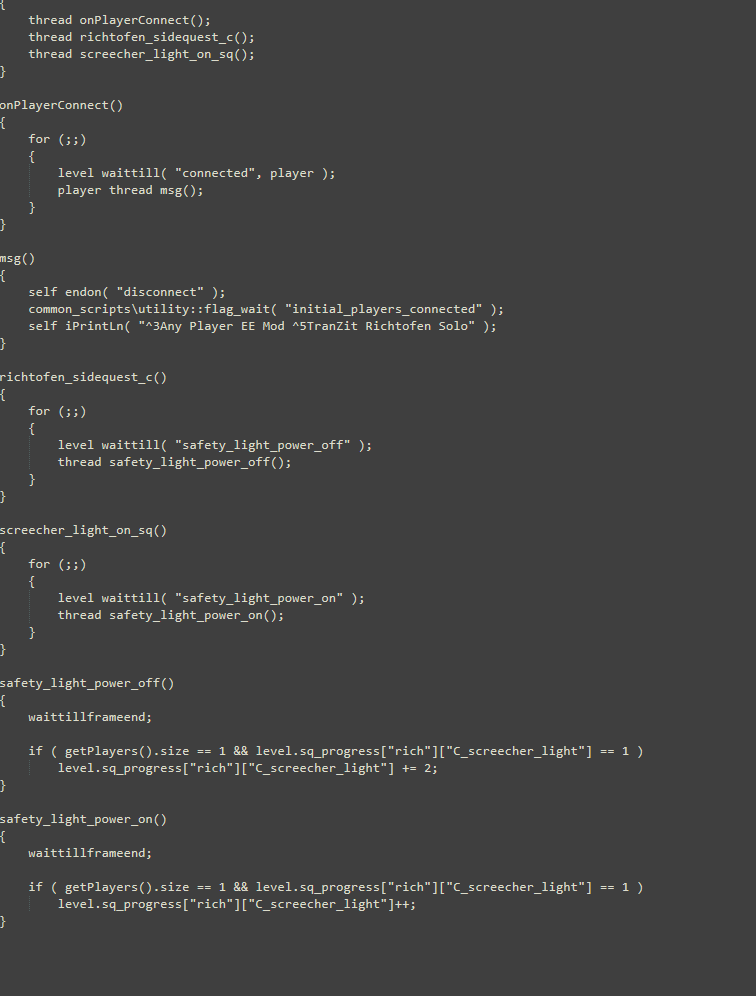 it tells me the scripts are loaded when i load into transit with maxis script being green and ric being yellow. typing in the command showes me the game recognizes them, and i put them both in the zm_transit folder. i dont know what to change to make this work i put an image of the script, maybe it's missing something? idk i'm pretty clueless as to what could have gone wrong.
 -
Hadi77KSA
it tells me the scripts are loaded when i load into transit with maxis script being green and ric being yellow. typing in the command showes me the game recognizes them, and i put them both in the zm_transit folder. i dont know what to change to make this work i put an image of the script, maybe it's missing something? idk i'm pretty clueless as to what could have gone wrong.Traingoboom76 there’s nothing to change. If it’s loaded, the mod will do its thing when playing alone. For the TranZit Richtofen modification to take effect, make sure that the map symbol and tower are not glowing blue, play alone, successfully complete the steps before attempting the final step of the Easter Egg, and that the EMPs on the last step detonate within 5 seconds of the first one (in other words, be fast once you throw the first EMP).
-
Traingoboom76 there’s nothing to change. If it’s loaded, the mod will do its thing when playing alone. For the TranZit Richtofen modification to take effect, make sure that the map symbol and tower are not glowing blue, play alone, successfully complete the steps before attempting the final step of the Easter Egg, and that the EMPs on the last step detonate within 5 seconds of the first one (in other words, be fast once you throw the first EMP).
-
Hadi77KSA so how do i do that? do i just get a denizen first to teleport to the next lamp?
-
Traingoboom76 that’s one way, yeah.
-
Hadi77KSA would you recomend another way which might be faster?
Traingoboom76 the other way is more difficult. So, not really.


Hello! It looks like you're interested in this conversation, but you don't have an account yet.
Getting fed up of having to scroll through the same posts each visit? When you register for an account, you'll always come back to exactly where you were before, and choose to be notified of new replies (either via email, or push notification). You'll also be able to save bookmarks and upvote posts to show your appreciation to other community members.
With your input, this post could be even better 💗
Register Login