Launcher not opening
-
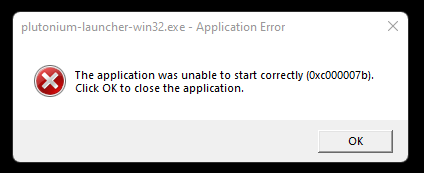
I disabled windows defender and it still didn't open. I tried it first on windows 10 and it didn't work but when it worked on my windows 11 laptop I upgraded my PC to windows 11 and it still doesn't work. This is the only error I'm getting and I've looked up countless tutorials on how to fix this error and I haven't gotten anything to work.
-
I disabled windows defender and it still didn't open. I tried it first on windows 10 and it didn't work but when it worked on my windows 11 laptop I upgraded my PC to windows 11 and it still doesn't work. This is the only error I'm getting and I've looked up countless tutorials on how to fix this error and I haven't gotten anything to work.
FullSizeMattress Crash with an error (0x000007b, crashdump error or similar)
There is no easy answer for this but here are some possible solutions
- Add Plutonium as an exception in your antivirus or uninstall it (do what is said for your antivirus in the documentation) https://plutonium.pw/docs/antivirus
- Repair your game: https://plutonium.pw/docs/repair/
- Update your GPU drivers
- Install DirectX (even if it's already installed): https://www.microsoft.com/en-us/download/details.aspx?id=35
- If you're running the game in a virtual machine don't, this doesn't work
- If you're using ReShade remove it. It's not supported on Plutonium and will make your game crash
- Close programs with overlays or disable their overlays (Steam, MSI Afterburner, Rivatuner etc.)
- Try to unplug devices connected to your PC (VR headset, other monitors, controllers etc.)
- If you use an Avermedia capture card uninstall its drivers
- Verify the integrity of your system files:
Open the start menu and search for "cmd"
Run cmd as admin
Copy and paste (right click) each command below one by one in the cmd and press enter after each command
Only put the next command when the one you ran is finished.
DISM /Online /Cleanup-Image /CheckHealth
DISM /Online /Cleanup-Image /ScanHealth
DISM /Online /Cleanup-Image /RestoreHealth
sfc /scannow
Once it's done restart your PC
As a last resort doing a clean install of Windows (factory reset) could solve the issue. Don't install your usual programs at first just install your GPU drivers, Direct X, your browser and Discord for example and test like that.
-
FullSizeMattress Crash with an error (0x000007b, crashdump error or similar)
There is no easy answer for this but here are some possible solutions
- Add Plutonium as an exception in your antivirus or uninstall it (do what is said for your antivirus in the documentation) https://plutonium.pw/docs/antivirus
- Repair your game: https://plutonium.pw/docs/repair/
- Update your GPU drivers
- Install DirectX (even if it's already installed): https://www.microsoft.com/en-us/download/details.aspx?id=35
- If you're running the game in a virtual machine don't, this doesn't work
- If you're using ReShade remove it. It's not supported on Plutonium and will make your game crash
- Close programs with overlays or disable their overlays (Steam, MSI Afterburner, Rivatuner etc.)
- Try to unplug devices connected to your PC (VR headset, other monitors, controllers etc.)
- If you use an Avermedia capture card uninstall its drivers
- Verify the integrity of your system files:
Open the start menu and search for "cmd"
Run cmd as admin
Copy and paste (right click) each command below one by one in the cmd and press enter after each command
Only put the next command when the one you ran is finished.
DISM /Online /Cleanup-Image /CheckHealth
DISM /Online /Cleanup-Image /ScanHealth
DISM /Online /Cleanup-Image /RestoreHealth
sfc /scannow
Once it's done restart your PC
As a last resort doing a clean install of Windows (factory reset) could solve the issue. Don't install your usual programs at first just install your GPU drivers, Direct X, your browser and Discord for example and test like that.
hindercanrun 0xc0000007b means missing redistributables or AV blocking pluto.
- download and run this: https://git.io/redists
- follow these steps: https://plutonium.pw/docs/antivirus
the rest of the things you listed won't fix this error anyways, they can be tried when someone is getting 0xc0000005.
-
hindercanrun 0xc0000007b means missing redistributables or AV blocking pluto.
- download and run this: https://git.io/redists
- follow these steps: https://plutonium.pw/docs/antivirus
the rest of the things you listed won't fix this error anyways, they can be tried when someone is getting 0xc0000005.
Dss0 ah okay
-
hindercanrun 0xc0000007b means missing redistributables or AV blocking pluto.
- download and run this: https://git.io/redists
- follow these steps: https://plutonium.pw/docs/antivirus
the rest of the things you listed won't fix this error anyways, they can be tried when someone is getting 0xc0000005.
Dss0 That fixed it. Thank you so much!!!
-
For me dont open plutonium.exe after extract
What's the problem? My windows is 7 -
For me dont open plutonium.exe after extract
What's the problem? My windows is 7Mehdi1998 windows 7 in 2024 is crazy
-
hindercanrun 0xc0000007b means missing redistributables or AV blocking pluto.
- download and run this: https://git.io/redists
- follow these steps: https://plutonium.pw/docs/antivirus
the rest of the things you listed won't fix this error anyways, they can be tried when someone is getting 0xc0000005.
Dss0 what was the link you provided for a fix. It doesn’t exist anymore when I click on it….
 I’m having the same issue of the launcher not even opening. I’ve tried all the cmd stuff installed and updated everything I needed still nothing. I know this reply is 4 years old but it’s my last hope before I reinstall windows which I really don’t want to do




Hello! It looks like you're interested in this conversation, but you don't have an account yet.
Getting fed up of having to scroll through the same posts each visit? When you register for an account, you'll always come back to exactly where you were before, and choose to be notified of new replies (either via email, or push notification). You'll also be able to save bookmarks and upvote posts to show your appreciation to other community members.
With your input, this post could be even better 💗
Register Login