Skip to content
  • 0 Unread 0
  • Recent
  • Tags
  • Popular
  • Users
  • Groups
  • Donate
Collapse

Plutonium

  1. Home
  2. BO2 Server Hosting Support
  3. How to spawn player 2 before end of round 1 (zombies)

How to spawn player 2 before end of round 1 (zombies)

Scheduled Pinned Locked Moved BO2 Server Hosting Support
14 Posts 8 Posters 4.8k Views 2 Watching
  • Oldest to Newest
  • Newest to Oldest
  • Most Votes
Reply
  • Reply as topic
Log in to reply
This topic has been deleted. Only users with topic management privileges can see it.
  • xJiroZomber935x Offline
    xJiroZomber935x Offline
    xJiroZomber935x
    wrote on last edited by
    #3

    Where I have to set the gsc on this new update?

    1 Reply Last reply
    0
    • Lupercal Offline
      Lupercal Offline
      Lupercal
      wrote on last edited by
      #4

      luigistyle
      Skipping cutscene at the same time doesn't work.
      Using map_restart or fast_restart just leaves the map on a black screen.
      Same with dying out to restart.

      Is there documentation anywhere on how to setup a GSC on Plutonium?
      Or for a similar workaround?

      Cahz 1 Reply Last reply
      0
      • Lupercal Lupercal

        luigistyle
        Skipping cutscene at the same time doesn't work.
        Using map_restart or fast_restart just leaves the map on a black screen.
        Same with dying out to restart.

        Is there documentation anywhere on how to setup a GSC on Plutonium?
        Or for a similar workaround?

        Cahz Offline
        Cahz Offline
        Cahz
        VIP
        wrote on last edited by Cahz
        #5

        Lupercal GSC's can be loaded onto dedicated servers (which can be hosted on your computer).
        T6 Dedicated Server Guide
        Loading GSC on a Dedicated Server Guide

        To have all players spawn on round 1, you can use this simple GSC in your script.

        Add this into your script anywhere.

        spawn_if_round_one() //force spawn player
        {
        	wait 5; //waits for blackscreen to load
        	if ( self.sessionstate == "spectator" && level.round_number == 1 )
        	{
        		self [[ level.spawnplayer ]]();
        		if ( level.script != "zm_tomb" || level.script != "zm_prison" || !is_classic() )
        			thread maps\mp\zombies\_zm::refresh_player_navcard_hud();
        	}
        }
        

        Then add this

        player thread spawn_if_round_one();
        

        under your OnPlayerConnect function, like so.

        onPlayerConnect()
        {
        	level endon( "end_game" );
                self endon( "disconnect" );
        	for (;;)
        	{
        		level waittill( "connected", player );
        		player thread spawn_if_round_one();
        	}
        }
        

        Hope this helps

        szoroscsirke21 AdrX003 Cahz 3 Replies Last reply
        1
        • Cahz Cahz

          Lupercal GSC's can be loaded onto dedicated servers (which can be hosted on your computer).
          T6 Dedicated Server Guide
          Loading GSC on a Dedicated Server Guide

          To have all players spawn on round 1, you can use this simple GSC in your script.

          Add this into your script anywhere.

          spawn_if_round_one() //force spawn player
          {
          	wait 5; //waits for blackscreen to load
          	if ( self.sessionstate == "spectator" && level.round_number == 1 )
          	{
          		self [[ level.spawnplayer ]]();
          		if ( level.script != "zm_tomb" || level.script != "zm_prison" || !is_classic() )
          			thread maps\mp\zombies\_zm::refresh_player_navcard_hud();
          	}
          }
          

          Then add this

          player thread spawn_if_round_one();
          

          under your OnPlayerConnect function, like so.

          onPlayerConnect()
          {
          	level endon( "end_game" );
                  self endon( "disconnect" );
          	for (;;)
          	{
          		level waittill( "connected", player );
          		player thread spawn_if_round_one();
          	}
          }
          

          Hope this helps

          szoroscsirke21 Offline
          szoroscsirke21 Offline
          szoroscsirke21
          wrote on last edited by
          #6

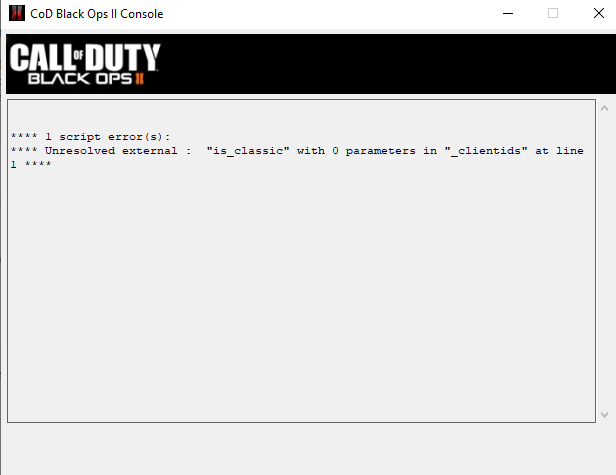
          Cahz theres is some problem with !is_classic();asfafafas.png

          Cahz 1 Reply Last reply
          0
          • szoroscsirke21 szoroscsirke21

            Cahz theres is some problem with !is_classic();asfafafas.png

            Cahz Offline
            Cahz Offline
            Cahz
            VIP
            wrote on last edited by
            #7

            szoroscsirke21 the is_classic() function is held in _zm_utility.gsc which means you're missing the include for it.

            Add this include to the top of your _clientids.gsc file.
            #include maps/mp/zombies/_zm_utility;

            1 Reply Last reply
            0
            • szoroscsirke21 Offline
              szoroscsirke21 Offline
              szoroscsirke21
              wrote on last edited by szoroscsirke21
              #8

              Thank You! Cahz
              It fixed the error message, but the scipts still not works. I think im stupid. My friend only revive after round 1 finished. I cant make it work. 😕

              Cahz 1 Reply Last reply
              0
              • szoroscsirke21 szoroscsirke21

                Thank You! Cahz
                It fixed the error message, but the scipts still not works. I think im stupid. My friend only revive after round 1 finished. I cant make it work. 😕

                Cahz Offline
                Cahz Offline
                Cahz
                VIP
                wrote on last edited by
                #9

                szoroscsirke21 You need to make sure you're doing the steps correctly. Yes, you copied the script, but you must not have the player thread spawn_if_round_one(); in your _clientids.gsc file.

                1 Reply Last reply
                0
                • MrMrE Offline
                  MrMrE Offline
                  MrMrE
                  wrote on last edited by MrMrE
                  #10

                  on the host console just use command:
                  fast_restart
                  this set map to all initial positions and if all players are present the command starts over the map with all present and alive round 1

                  it is worth while setting up a dedicated server on one of the lan machines you and friend are playing on, which ever is most powerful, xpartygo on my pc runs a lil laggy but dedicated host and client simultaneously actually has a smother outcome. AND then you can use fast_restart on dedicated

                  Lupercal 1 Reply Last reply
                  0
                  • MrMrE MrMrE

                    on the host console just use command:
                    fast_restart
                    this set map to all initial positions and if all players are present the command starts over the map with all present and alive round 1

                    it is worth while setting up a dedicated server on one of the lan machines you and friend are playing on, which ever is most powerful, xpartygo on my pc runs a lil laggy but dedicated host and client simultaneously actually has a smother outcome. AND then you can use fast_restart on dedicated

                    Lupercal Offline
                    Lupercal Offline
                    Lupercal
                    wrote on last edited by
                    #11

                    @MrE-Ronski85
                    I am already using a dedicated server on my machine....
                    And the fast_restart or map_restart commands used to crash server.
                    Now those commands don't even work.

                    And when the game ends, the lobby crashes with error:
                    "CG_Spawn: no free fake entities"

                    Same error will then occur on every lobby join until I restart the server.

                    1 Reply Last reply
                    0
                    • Misumi'El Offline
                      Misumi'El Offline
                      Misumi'El
                      wrote on last edited by
                      #12

                      Cahz I try to add this code to my script, but it doesn't work. I've already remade my GSC code (It even worked with codes that didn't work) but this specific script doesn't work.

                      And to make matters worse, I still don't know much about programming

                      1 Reply Last reply
                      0
                      • Cahz Cahz

                        Lupercal GSC's can be loaded onto dedicated servers (which can be hosted on your computer).
                        T6 Dedicated Server Guide
                        Loading GSC on a Dedicated Server Guide

                        To have all players spawn on round 1, you can use this simple GSC in your script.

                        Add this into your script anywhere.

                        spawn_if_round_one() //force spawn player
                        {
                        	wait 5; //waits for blackscreen to load
                        	if ( self.sessionstate == "spectator" && level.round_number == 1 )
                        	{
                        		self [[ level.spawnplayer ]]();
                        		if ( level.script != "zm_tomb" || level.script != "zm_prison" || !is_classic() )
                        			thread maps\mp\zombies\_zm::refresh_player_navcard_hud();
                        	}
                        }
                        

                        Then add this

                        player thread spawn_if_round_one();
                        

                        under your OnPlayerConnect function, like so.

                        onPlayerConnect()
                        {
                        	level endon( "end_game" );
                                self endon( "disconnect" );
                        	for (;;)
                        	{
                        		level waittill( "connected", player );
                        		player thread spawn_if_round_one();
                        	}
                        }
                        

                        Hope this helps

                        AdrX003 Offline
                        AdrX003 Offline
                        AdrX003
                        wrote on last edited by
                        #13
                        This post is deleted!
                        1 Reply Last reply
                        0
                        • Cahz Cahz

                          Lupercal GSC's can be loaded onto dedicated servers (which can be hosted on your computer).
                          T6 Dedicated Server Guide
                          Loading GSC on a Dedicated Server Guide

                          To have all players spawn on round 1, you can use this simple GSC in your script.

                          Add this into your script anywhere.

                          spawn_if_round_one() //force spawn player
                          {
                          	wait 5; //waits for blackscreen to load
                          	if ( self.sessionstate == "spectator" && level.round_number == 1 )
                          	{
                          		self [[ level.spawnplayer ]]();
                          		if ( level.script != "zm_tomb" || level.script != "zm_prison" || !is_classic() )
                          			thread maps\mp\zombies\_zm::refresh_player_navcard_hud();
                          	}
                          }
                          

                          Then add this

                          player thread spawn_if_round_one();
                          

                          under your OnPlayerConnect function, like so.

                          onPlayerConnect()
                          {
                          	level endon( "end_game" );
                                  self endon( "disconnect" );
                          	for (;;)
                          	{
                          		level waittill( "connected", player );
                          		player thread spawn_if_round_one();
                          	}
                          }
                          

                          Hope this helps

                          Cahz Offline
                          Cahz Offline
                          Cahz
                          VIP
                          wrote on last edited by
                          #14
                          This post is deleted!
                          1 Reply Last reply
                          0

                          Hello! It looks like you're interested in this conversation, but you don't have an account yet.

                          Getting fed up of having to scroll through the same posts each visit? When you register for an account, you'll always come back to exactly where you were before, and choose to be notified of new replies (either via email, or push notification). You'll also be able to save bookmarks and upvote posts to show your appreciation to other community members.

                          With your input, this post could be even better 💗

                          Register Login
                          Reply
                          • Reply as topic
                          Log in to reply
                          • Oldest to Newest
                          • Newest to Oldest
                          • Most Votes


                          • Login

                          • Don't have an account? Register

                          • Login or register to search.
                          • First post
                            Last post
                          0
                          • Unread 0
                          • Recent
                          • Tags
                          • Popular
                          • Users
                          • Groups
                          • Donate