Skip to content
  • 0 Unread 0
  • Recent
  • Tags
  • Popular
  • Users
  • Groups
  • Donate
Collapse

Plutonium

  1. Home
  2. MW3 Server Hosting Support
  3. Exaggerated use of cpu by plutonium-bootstrapper-win32 (50% each) !question to admins

Exaggerated use of cpu by plutonium-bootstrapper-win32 (50% each) !question to admins

Scheduled Pinned Locked Moved MW3 Server Hosting Support
14 Posts 7 Posters 1.9k Views 1 Watching
  • Oldest to Newest
  • Newest to Oldest
  • Most Votes
Reply
  • Reply as topic
Log in to reply
This topic has been deleted. Only users with topic management privileges can see it.
  • Kalitos Offline
    Kalitos Offline
    Kalitos
    wrote on last edited by
    #1

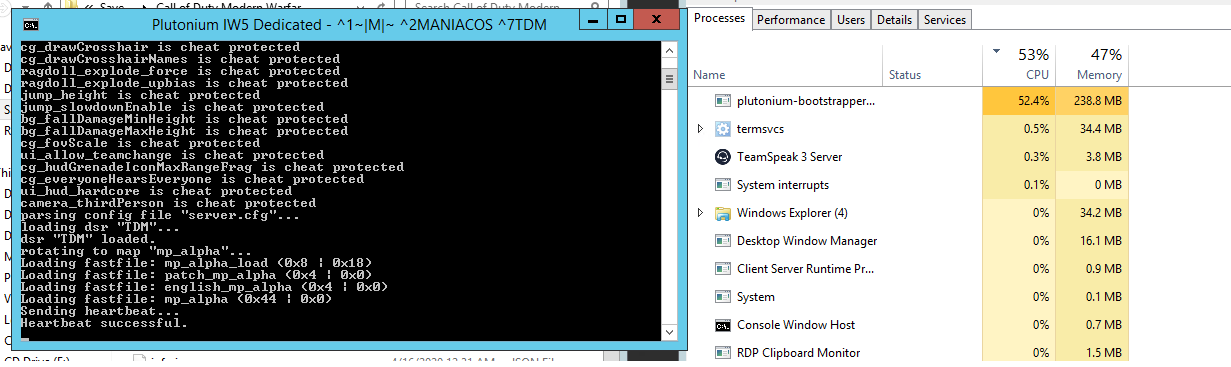
    Personally, the server executable constantly occupies 50% of the use of the cpu, I do not know if this is normal in this new server for mw3, or they can do something about the drastic use of the cpu by the executable.
    I comment it, because I already have in my own vps 3 servers of mw3 in the client of teknogos and unlike pluto, these 3 together do not occupy even 50% of the use of cpu.

    1 Reply Last reply
    1
    • Xerxes Offline
      Xerxes Offline
      Xerxes
      Plutonium Staff
      wrote on last edited by
      #2

      You will have to provide additional information as this seems to be an issue on your end.

      01bb47d9-4323-47a1-a30a-b5e328bd4f14-grafik.png

      Kalitos 1 Reply Last reply
      0
      • Xerxes Xerxes

        You will have to provide additional information as this seems to be an issue on your end.

        01bb47d9-4323-47a1-a30a-b5e328bd4f14-grafik.png

        Kalitos Offline
        Kalitos Offline
        Kalitos
        wrote on last edited by Kalitos
        #3

        Xerxes Well this is my case:
        ogj.png

        It is very different from your image, did I do something wrong? You will tell me. 😧

        1 Reply Last reply
        0
        • Mr. Android Offline
          Mr. Android Offline
          Mr. Android
          Plutonium Admin
          wrote on last edited by
          #4

          List your specs.

          Kalitos 1 Reply Last reply
          0
          • Mr. Android Mr. Android

            List your specs.

            Kalitos Offline
            Kalitos Offline
            Kalitos
            wrote on last edited by
            #5

            @Mr-Android MY PC ?

            Mr. Android 1 Reply Last reply
            0
            • Kalitos Kalitos

              @Mr-Android MY PC ?

              Mr. Android Offline
              Mr. Android Offline
              Mr. Android
              Plutonium Admin
              wrote on last edited by
              #6

              Kalitos The specs of the machine that you are hosting your server on.

              Kalitos 1 Reply Last reply
              0
              • Mr. Android Mr. Android

                Kalitos The specs of the machine that you are hosting your server on.

                Kalitos Offline
                Kalitos Offline
                Kalitos
                wrote on last edited by
                #7

                @Mr-Android

                PC.png

                1 Reply Last reply
                0
                • Mr. Limp Dick Offline
                  Mr. Limp Dick Offline
                  Mr. Limp Dick
                  wrote on last edited by
                  #8

                  looks like a vps. how many core you bought access to?

                  Kalitos 1 Reply Last reply
                  0
                  • Xerxes Offline
                    Xerxes Offline
                    Xerxes
                    Plutonium Staff
                    wrote on last edited by
                    #9

                    Seems like some skids are testing their booters.
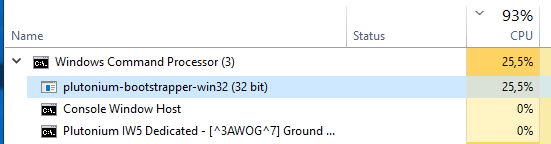
                    ea5aef5a-e9d5-4af1-9bb1-41b4b24f2abb-grafik.png

                    1 Reply Last reply
                    0
                    • Mr. Limp Dick Mr. Limp Dick

                      looks like a vps. how many core you bought access to?

                      Kalitos Offline
                      Kalitos Offline
                      Kalitos
                      wrote on last edited by Kalitos
                      #10

                      @Mr-Limp-Dick Yes, it is a vps, which I have always had to host my servers, in terms of cores, it is 2 cores
                      At first I had with windows server 2008, but I could not run the mw3 server with that version, I had to change to windows server 2012, Now I will change to Windows Server 2019 to see what effect it has.

                      Xerxes As for your question, the exaggerated use is from when I start the server, whether or not it is with players.

                      Update:
                      I have already installed Windows Server 2019 and it follows the same problem. The use of the cpu is exaggerated, since the server starts.

                      2019.png

                      1 Reply Last reply
                      0
                      • Nick Offline
                        Nick Offline
                        Nick
                        Contributor
                        wrote on last edited by
                        #11

                        I noticed similar issues like this when deploying on lower spec/older systems before launch when testing.

                        All of our bare-metal systems (4 cores/8 threads minimum) seem to run the servers fine with little to no CPU usage unless players are online and active.

                        Kalitos 1 Reply Last reply
                        0
                        • Nick Nick

                          I noticed similar issues like this when deploying on lower spec/older systems before launch when testing.

                          All of our bare-metal systems (4 cores/8 threads minimum) seem to run the servers fine with little to no CPU usage unless players are online and active.

                          Kalitos Offline
                          Kalitos Offline
                          Kalitos
                          wrote on last edited by
                          #12

                          Nick In the end I deduced that in old machines the server consumes more resources.

                          1 Reply Last reply
                          0
                          • saddia Offline
                            saddia Offline
                            saddia
                            wrote on last edited by
                            #13

                            As you are having trouble with the Steam client bootstrapper, so it can be fixed by running steam as an administrator. To do that you can go for these steps. In the start tap Windows + R button to launch the Run application and write “taskmgr”. This is an instruction that will help in to bringing up the Task Manager so search for different Steam procedures which are running and close them one by one. Press https://appuals.com/how-to-fix-the-steam-client-bootstrapper-high-cpu-problem-on-windows/ this site to check more solutions. Don’t let them open any of them. This makes sure that the changes we make stay concrete and get saved so when we start the client again, it doesn’t show any errors. In the end, right click on the Steam client and choose the option that says “Run as administrator”.


                            Dss0 1 Reply Last reply
                            0
                            • saddia saddia

                              As you are having trouble with the Steam client bootstrapper, so it can be fixed by running steam as an administrator. To do that you can go for these steps. In the start tap Windows + R button to launch the Run application and write “taskmgr”. This is an instruction that will help in to bringing up the Task Manager so search for different Steam procedures which are running and close them one by one. Press https://appuals.com/how-to-fix-the-steam-client-bootstrapper-high-cpu-problem-on-windows/ this site to check more solutions. Don’t let them open any of them. This makes sure that the changes we make stay concrete and get saved so when we start the client again, it doesn’t show any errors. In the end, right click on the Steam client and choose the option that says “Run as administrator”.
                              Dss0 Offline
                              Dss0 Offline
                              Dss0
                              Plutonium Staff
                              wrote on last edited by
                              #14

                              saddia this is about the plutonium bootstrapper, nothing to do with steam..
                              also this topic is a year old.
                              /locked

                              1 Reply Last reply
                              0

                              Hello! It looks like you're interested in this conversation, but you don't have an account yet.

                              Getting fed up of having to scroll through the same posts each visit? When you register for an account, you'll always come back to exactly where you were before, and choose to be notified of new replies (either via email, or push notification). You'll also be able to save bookmarks and upvote posts to show your appreciation to other community members.

                              With your input, this post could be even better 💗

                              Register Login
                              Reply
                              • Reply as topic
                              Log in to reply
                              • Oldest to Newest
                              • Newest to Oldest
                              • Most Votes


                              • Login

                              • Don't have an account? Register

                              • Login or register to search.
                              • First post
                                Last post
                              0
                              • Unread 0
                              • Recent
                              • Tags
                              • Popular
                              • Users
                              • Groups
                              • Donate



