Skip to content
  • 0 Unread 0
  • Recent
  • Popular
  • Users
  • Donate
Collapse

Plutonium

  1. Home
  2. MW3 Server Hosting Support
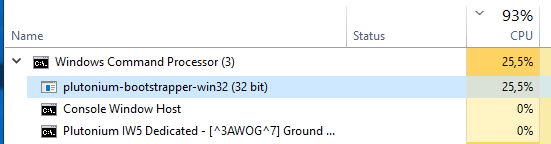
  3. Exaggerated use of cpu by plutonium-bootstrapper-win32 (50% each) !question to admins

Exaggerated use of cpu by plutonium-bootstrapper-win32 (50% each) !question to admins

Scheduled Pinned Locked Moved MW3 Server Hosting Support
14 Posts 7 Posters 1.9k Views 1 Watching
  • Oldest to Newest
  • Newest to Oldest
  • Most Votes
Reply
  • Reply as topic
Log in to reply
This topic has been deleted. Only users with topic management privileges can see it.
  • Mr. Android Offline
    Mr. Android Offline
    Mr. Android
    Plutonium Admin
    wrote on last edited by
    #4

    List your specs.

    Kalitos 1 Reply Last reply
    0
    • Mr. Android Mr. Android

      List your specs.

      Kalitos Offline
      Kalitos Offline
      Kalitos
      wrote on last edited by
      #5

      @Mr-Android MY PC ?

      Mr. Android 1 Reply Last reply
      0
      • Kalitos Kalitos

        @Mr-Android MY PC ?

        Mr. Android Offline
        Mr. Android Offline
        Mr. Android
        Plutonium Admin
        wrote on last edited by
        #6

        Kalitos The specs of the machine that you are hosting your server on.

        Kalitos 1 Reply Last reply
        0
        • Mr. Android Mr. Android

          Kalitos The specs of the machine that you are hosting your server on.

          Kalitos Offline
          Kalitos Offline
          Kalitos
          wrote on last edited by
          #7

          @Mr-Android

          PC.png

          1 Reply Last reply
          0
          • Mr. Limp Dick Offline
            Mr. Limp Dick Offline
            Mr. Limp Dick
            wrote on last edited by
            #8

            looks like a vps. how many core you bought access to?

            Kalitos 1 Reply Last reply
            0
            • Xerxes Offline
              Xerxes Offline
              Xerxes
              Plutonium Staff
              wrote on last edited by
              #9

              Seems like some skids are testing their booters.
              ea5aef5a-e9d5-4af1-9bb1-41b4b24f2abb-grafik.png

              1 Reply Last reply
              0
              • Mr. Limp Dick Mr. Limp Dick

                looks like a vps. how many core you bought access to?

                Kalitos Offline
                Kalitos Offline
                Kalitos
                wrote on last edited by Kalitos
                #10

                @Mr-Limp-Dick Yes, it is a vps, which I have always had to host my servers, in terms of cores, it is 2 cores
                At first I had with windows server 2008, but I could not run the mw3 server with that version, I had to change to windows server 2012, Now I will change to Windows Server 2019 to see what effect it has.

                Xerxes As for your question, the exaggerated use is from when I start the server, whether or not it is with players.

                Update:
                I have already installed Windows Server 2019 and it follows the same problem. The use of the cpu is exaggerated, since the server starts.

                2019.png

                1 Reply Last reply
                0
                • Nick Offline
                  Nick Offline
                  Nick
                  Contributor
                  wrote on last edited by
                  #11

                  I noticed similar issues like this when deploying on lower spec/older systems before launch when testing.

                  All of our bare-metal systems (4 cores/8 threads minimum) seem to run the servers fine with little to no CPU usage unless players are online and active.

                  Kalitos 1 Reply Last reply
                  0
                  • Nick Nick

                    I noticed similar issues like this when deploying on lower spec/older systems before launch when testing.

                    All of our bare-metal systems (4 cores/8 threads minimum) seem to run the servers fine with little to no CPU usage unless players are online and active.

                    Kalitos Offline
                    Kalitos Offline
                    Kalitos
                    wrote on last edited by
                    #12

                    Nick In the end I deduced that in old machines the server consumes more resources.

                    1 Reply Last reply
                    0
                    • saddia Offline
                      saddia Offline
                      saddia
                      wrote on last edited by
                      #13

                      As you are having trouble with the Steam client bootstrapper, so it can be fixed by running steam as an administrator. To do that you can go for these steps. In the start tap Windows + R button to launch the Run application and write “taskmgr”. This is an instruction that will help in to bringing up the Task Manager so search for different Steam procedures which are running and close them one by one. Press https://appuals.com/how-to-fix-the-steam-client-bootstrapper-high-cpu-problem-on-windows/ this site to check more solutions. Don’t let them open any of them. This makes sure that the changes we make stay concrete and get saved so when we start the client again, it doesn’t show any errors. In the end, right click on the Steam client and choose the option that says “Run as administrator”.


                      Dss0 1 Reply Last reply
                      0
                      • saddia saddia

                        As you are having trouble with the Steam client bootstrapper, so it can be fixed by running steam as an administrator. To do that you can go for these steps. In the start tap Windows + R button to launch the Run application and write “taskmgr”. This is an instruction that will help in to bringing up the Task Manager so search for different Steam procedures which are running and close them one by one. Press https://appuals.com/how-to-fix-the-steam-client-bootstrapper-high-cpu-problem-on-windows/ this site to check more solutions. Don’t let them open any of them. This makes sure that the changes we make stay concrete and get saved so when we start the client again, it doesn’t show any errors. In the end, right click on the Steam client and choose the option that says “Run as administrator”.

                        Dss0 Offline
                        Dss0 Offline
                        Dss0
                        Plutonium Staff
                        wrote on last edited by
                        #14

                        saddia this is about the plutonium bootstrapper, nothing to do with steam..
                        also this topic is a year old.
                        /locked

                        1 Reply Last reply
                        0

                        Hello! It looks like you're interested in this conversation, but you don't have an account yet.

                        Getting fed up of having to scroll through the same posts each visit? When you register for an account, you'll always come back to exactly where you were before, and choose to be notified of new replies (either via email, or push notification). You'll also be able to save bookmarks and upvote posts to show your appreciation to other community members.

                        With your input, this post could be even better 💗

                        Register Login
                        Reply
                        • Reply as topic
                        Log in to reply
                        • Oldest to Newest
                        • Newest to Oldest
                        • Most Votes


                        • Login

                        • Don't have an account? Register

                        • Login or register to search.
                        • First post
                          Last post
                        0
                        • Unread 0
                        • Recent
                        • Popular
                        • Users
                        • Donate


