Skip to content
  • 0 Unread 0
  • Recent
  • Tags
  • Popular
  • Users
  • Groups
  • Donate
Collapse

Plutonium

  1. Home
  2. BO2 Client Support
  3. Crash

Crash

Scheduled Pinned Locked Moved BO2 Client Support
15 Posts 4 Posters 1.0k Views 1 Watching
  • Oldest to Newest
  • Newest to Oldest
  • Most Votes
Reply
  • Reply as topic
Log in to reply
This topic has been deleted. Only users with topic management privileges can see it.
  • Brandondr2 Offline
    Brandondr2 Offline
    Brandondr2
    wrote on last edited by
    #2

    same thing here dont know whats going on

    1 Reply Last reply
    0
    • ihojanysan ihojanysan

      Hello, I have a problem the bo2 crashes without warning and what appears in the crash folder is this https://drive.google.com/file/d/1FFCGVs08JIjzFnShwQMhgTwt7RzR38pE/view

      Dss0 Offline
      Dss0 Offline
      Dss0
      Plutonium Staff
      wrote on last edited by
      #3

      ihojanysan it crashes in AcLayers.dll (not plutonium), try installing all available windows updates.

      ihojanysan 1 Reply Last reply
      0
      • Dss0 Dss0

        ihojanysan it crashes in AcLayers.dll (not plutonium), try installing all available windows updates.

        ihojanysan Offline
        ihojanysan Offline
        ihojanysan
        wrote on last edited by
        #4

        Dss0 hi, i have the latest version

        Dss0 1 Reply Last reply
        0
        • ihojanysan ihojanysan

          Dss0 hi, i have the latest version

          Dss0 Offline
          Dss0 Offline
          Dss0
          Plutonium Staff
          wrote on last edited by
          #5

          ihojanysan install this http://download.windowsupdate.com/d/msdownload/update/software/updt/2017/11/windows10.0-kb4051963-x64_92317bd805e6cb9101f4c8576c5a0a80a234446f.msu

          Brandondr2 1 Reply Last reply
          0
          • ihojanysan Offline
            ihojanysan Offline
            ihojanysan
            wrote on last edited by
            #6

            It tells me that the update is not equippable for the team

            Dss0 1 Reply Last reply
            0
            • Dss0 Dss0

              ihojanysan install this http://download.windowsupdate.com/d/msdownload/update/software/updt/2017/11/windows10.0-kb4051963-x64_92317bd805e6cb9101f4c8576c5a0a80a234446f.msu

              Brandondr2 Offline
              Brandondr2 Offline
              Brandondr2
              wrote on last edited by
              #7

              Dss0 i installed it. it says i couldnt because it wasnt valid

              1 Reply Last reply
              0
              • ihojanysan ihojanysan

                It tells me that the update is not equippable for the team

                Dss0 Offline
                Dss0 Offline
                Dss0
                Plutonium Staff
                wrote on last edited by
                #8

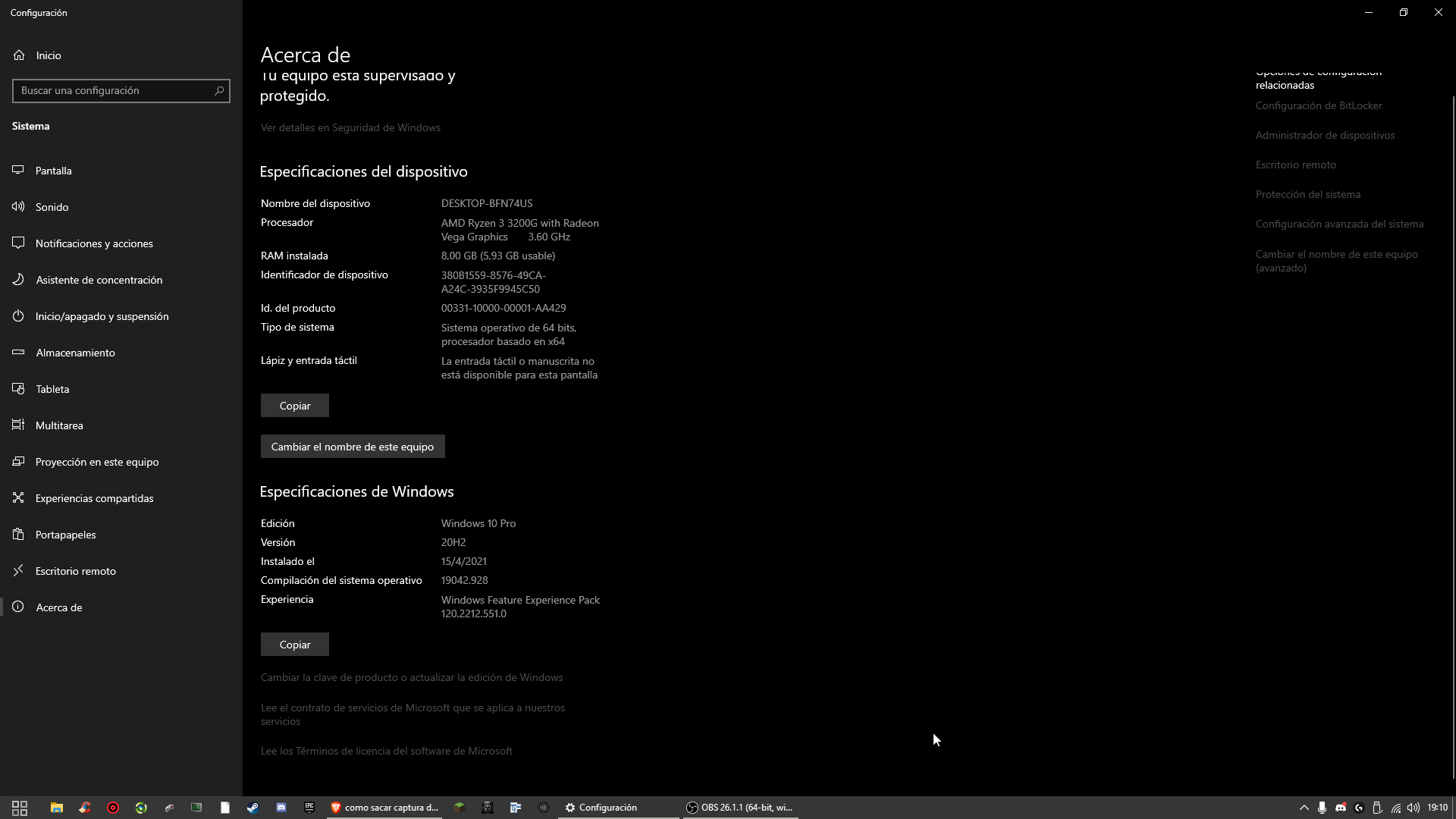
                ihojanysan right click your start button -> system then go down to "windows specifications". Post a screenshot of that.
                Brandondr2 your error might be related to something different, create your own topic and upload the dump file.

                Brandondr2 1 Reply Last reply
                0
                • ihojanysan Offline
                  ihojanysan Offline
                  ihojanysan
                  wrote on last edited by ihojanysan
                  #9

                  Screenshot 2021-04-23 19-10-31.png

                  Dss0 1 Reply Last reply
                  0
                  • ihojanysan ihojanysan

                    Screenshot 2021-04-23 19-10-31.png

                    Dss0 Offline
                    Dss0 Offline
                    Dss0
                    Plutonium Staff
                    wrote on last edited by
                    #10

                    ihojanysan

                    • open the start menu and search for "cmd"
                    • run cmd as admin
                    • execute the following command
                    dism /online /cleanup-image /restorehealth
                    
                    • after dism has finished repairing your system restart your pc

                    If it still doesn't work i'm out of ideas.

                    1 Reply Last reply
                    0
                    • ihojanysan Offline
                      ihojanysan Offline
                      ihojanysan
                      wrote on last edited by
                      #11

                      when it reaches 100 it comes back do I have to wait or close?

                      Dss0 1 Reply Last reply
                      0
                      • Dss0 Dss0

                        ihojanysan right click your start button -> system then go down to "windows specifications". Post a screenshot of that.
                        Brandondr2 your error might be related to something different, create your own topic and upload the dump file.

                        Brandondr2 Offline
                        Brandondr2 Offline
                        Brandondr2
                        wrote on last edited by
                        #12

                        Dss0 mate i cant even see where to start one lol

                        1 Reply Last reply
                        0
                        • ihojanysan ihojanysan

                          when it reaches 100 it comes back do I have to wait or close?

                          Dss0 Offline
                          Dss0 Offline
                          Dss0
                          Plutonium Staff
                          wrote on last edited by
                          #13

                          ihojanysan comes back? What does it say?
                          Brandondr2
                          alt text

                          1 Reply Last reply
                          0
                          • ihojanysan Offline
                            ihojanysan Offline
                            ihojanysan
                            wrote on last edited by
                            #14

                            hello I'm done but now the game at any time closes without error or warning

                            1 Reply Last reply
                            0
                            • HannesC Offline
                              HannesC Offline
                              HannesC
                              Plutonium Staff
                              wrote on last edited by
                              #15

                              ihojanysan Without any crashdumps? Is there anything in the event logs regarding Pluto? Also what antivirus do you use?

                              1 Reply Last reply
                              0

                              Hello! It looks like you're interested in this conversation, but you don't have an account yet.

                              Getting fed up of having to scroll through the same posts each visit? When you register for an account, you'll always come back to exactly where you were before, and choose to be notified of new replies (either via email, or push notification). You'll also be able to save bookmarks and upvote posts to show your appreciation to other community members.

                              With your input, this post could be even better 💗

                              Register Login
                              Reply
                              • Reply as topic
                              Log in to reply
                              • Oldest to Newest
                              • Newest to Oldest
                              • Most Votes


                              • Login

                              • Don't have an account? Register

                              • Login or register to search.
                              • First post
                                Last post
                              0
                              • Unread 0
                              • Recent
                              • Tags
                              • Popular
                              • Users
                              • Groups
                              • Donate