Skip to content
  • 0 Unread 0
  • Recent
  • Popular
  • Users
  • Donate
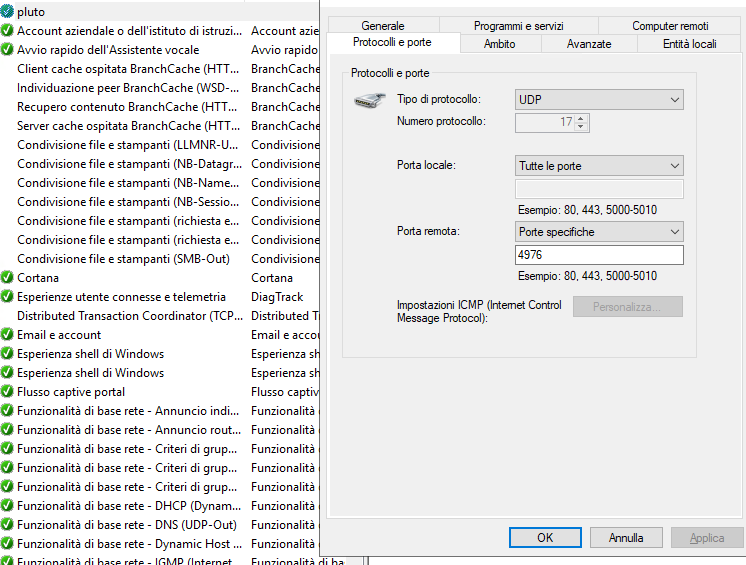
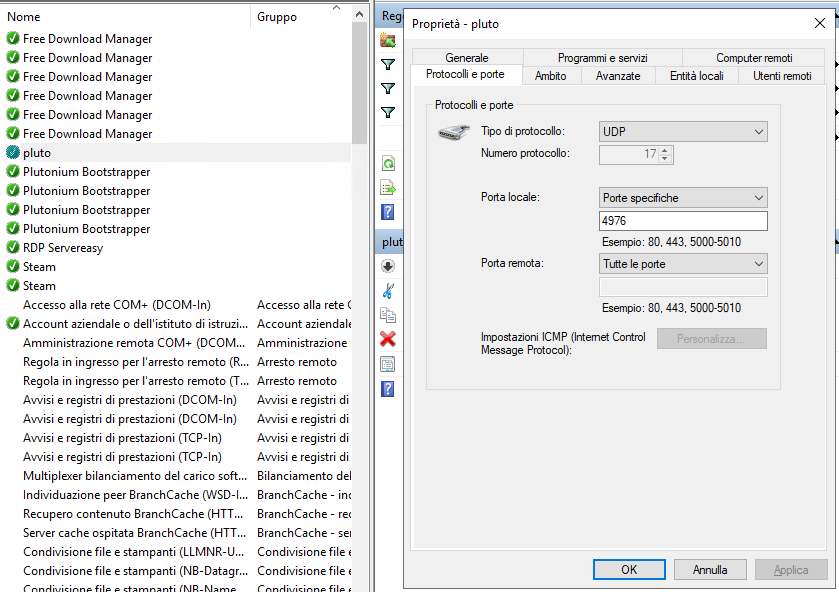
Collapse
Home Docs Stats Discord Donate
Download
  1. Home
  2. BO2 Server Hosting Support
  3. Server working perfectly but nobody can connect to it

Server working perfectly but nobody can connect to it

Scheduled Pinned Locked Moved BO2 Server Hosting Support
12 Posts 3 Posters 1.1k Views 2 Watching
  • Oldest to Newest
  • Newest to Oldest
  • Most Votes
Reply
  • Reply as topic
Log in to reply
This topic has been deleted. Only users with topic management privileges can see it.
  • CafYT
    CafYT
    CafYT
    wrote on last edited by
    #1

    Hello guys, recently I bought a VPS to host a BOII server, after the initial config the server is up (Heartbeat successful) but neither me or my friends can see the server in the list or connect through direct access with ip+port.
    I already tried another server key (not seeming to be the issue) and deactivate windows firewall (VPS running in Windows Server).
    I can upload whatever you need.

    hindercanrun 1 Reply Last reply
    0
    • CafYT CafYT

      Hello guys, recently I bought a VPS to host a BOII server, after the initial config the server is up (Heartbeat successful) but neither me or my friends can see the server in the list or connect through direct access with ip+port.
      I already tried another server key (not seeming to be the issue) and deactivate windows firewall (VPS running in Windows Server).
      I can upload whatever you need.

      hindercanrun
      hindercanrun
      hindercanrun
      Contributor
      wrote on last edited by hindercanrun
      #2

      CafYT you need to port forward

      nah this is false

      1 Reply Last reply
      0
      • Resxt
        Resxt
        Resxt
        Plutonium Staff
        wrote on last edited by Resxt
        #3

        What was said above is false.
        On a VPS what you need is

        • Allow plutonium-bootstrapper32.exe in the firewall
        • Allow the port used by your server in the firewall for both incoming and outgoing connections with the UDP protocol
        CafYT 1 Reply Last reply
        0
        • hindercanrun
          hindercanrun
          hindercanrun
          Contributor
          wrote on last edited by
          #4

          Oh he said vps, didn’t read that

          1 Reply Last reply
          0
          • Resxt Resxt

            What was said above is false.
            On a VPS what you need is

            • Allow plutonium-bootstrapper32.exe in the firewall
            • Allow the port used by your server in the firewall for both incoming and outgoing connections with the UDP protocol
            CafYT
            CafYT
            CafYT
            wrote on last edited by
            #5

            Resxt done, but nothing seems to change

            Resxt 1 Reply Last reply
            0
            • CafYT CafYT

              Resxt done, but nothing seems to change

              Resxt
              Resxt
              Resxt
              Plutonium Staff
              wrote on last edited by
              #6

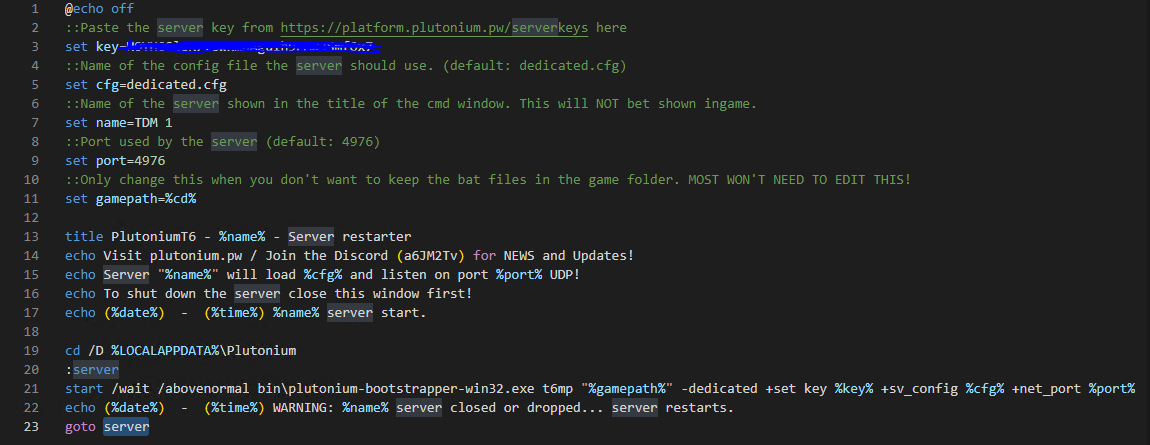
              CafYT show the firewall rule for the exe, the 2 rules for the port as well as your server bat (hide the server key). So that's 4 screenshots.

              CafYT 1 Reply Last reply
              0
              • Resxt Resxt

                CafYT show the firewall rule for the exe, the 2 rules for the port as well as your server bat (hide the server key). So that's 4 screenshots.

                CafYT
                CafYT
                CafYT
                wrote on last edited by
                #7

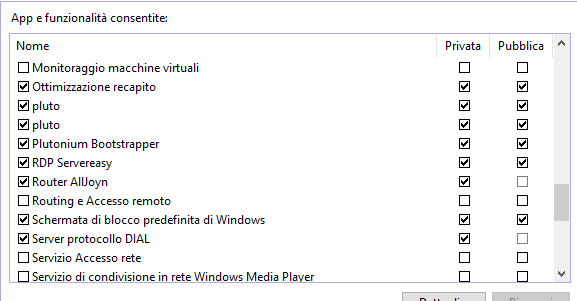
                Resxt out.PNG in.PNG firewall exe rule.PNG batfile.PNG
                Sorry if it's everything in italian

                Resxt 1 Reply Last reply
                0
                • CafYT CafYT

                  Resxt out.PNG in.PNG firewall exe rule.PNG batfile.PNG
                  Sorry if it's everything in italian

                  Resxt
                  Resxt
                  Resxt
                  Plutonium Staff
                  wrote on last edited by
                  #8

                  CafYT first screenshot says local port all and the second screenshot is the contrary?
                  Here is how it should be for both rules.
                  2f0b2eab-32aa-4cb4-92f3-5a6e3a63cda0-image.png

                  Also for the outbound rule make sure you chose "Allow the connection" since by default it's always on blocked
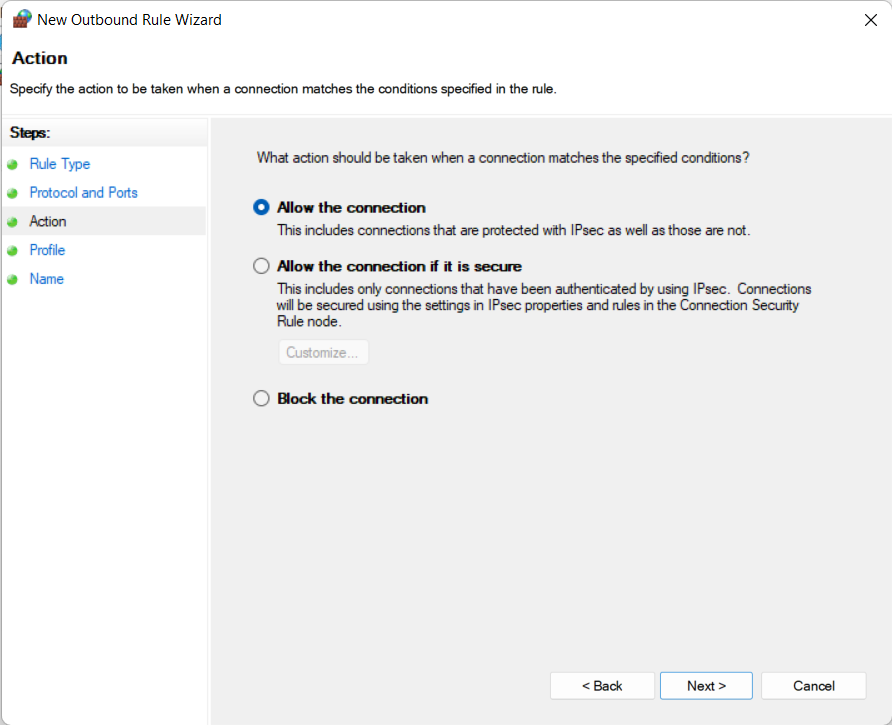
                  6a1dae98-0478-4ed5-8f63-89e4568e744c-image.png

                  And last thing I'm not sure your Plutonium Bootstrapper rule is right.
                  Make sure you added %localappdata%\Plutonium\bin\plutonium-bootstrapper-win32.exe in the firewall rules
                  This is in Control panel > System and security > Allow an app through Windows firewall (blue text)
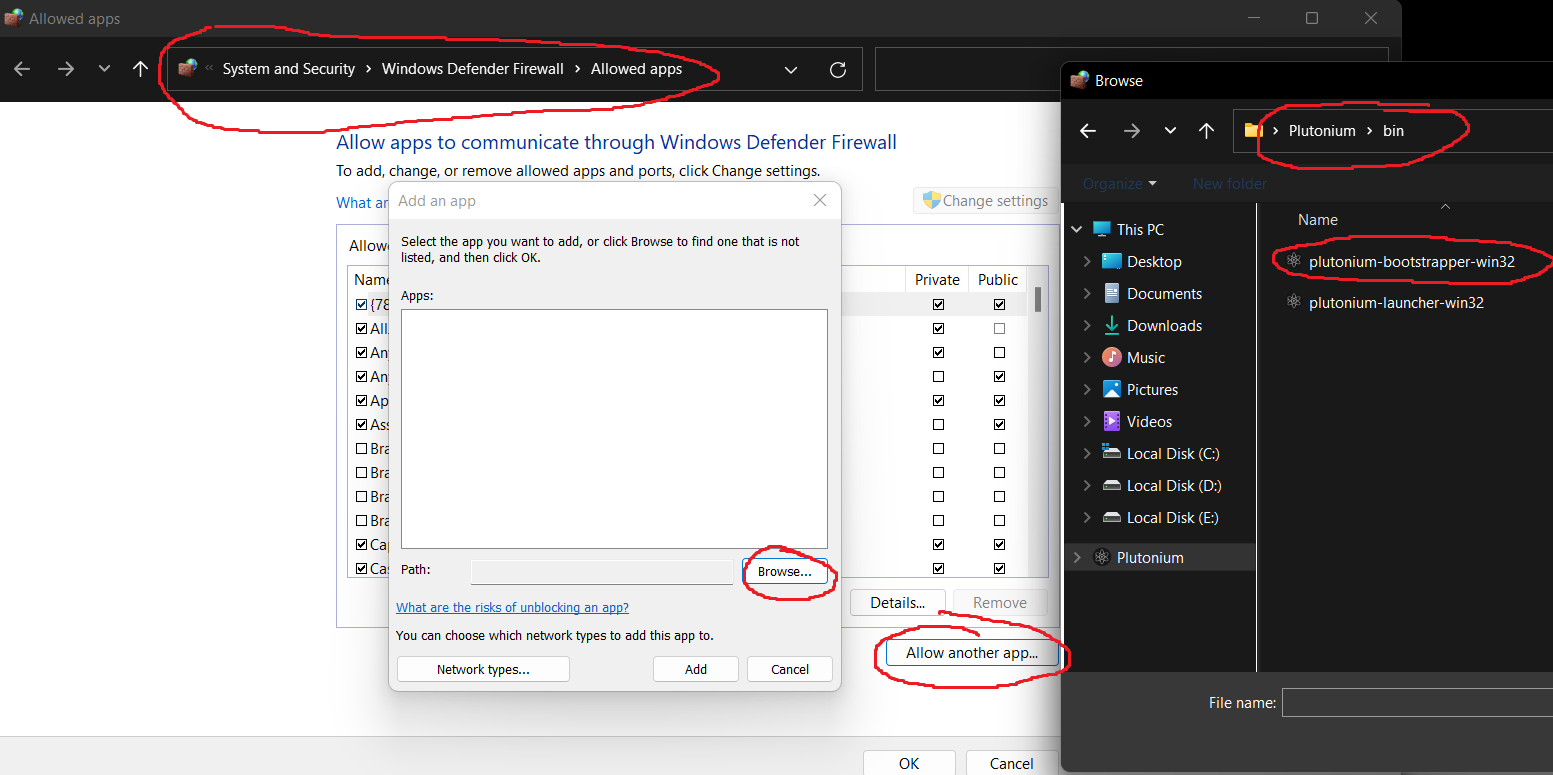
                  d6b45e20-0576-430d-bd46-da31e0664f44-image.png

                  CafYT 1 Reply Last reply
                  0
                  • Resxt Resxt

                    CafYT first screenshot says local port all and the second screenshot is the contrary?
                    Here is how it should be for both rules.
                    2f0b2eab-32aa-4cb4-92f3-5a6e3a63cda0-image.png

                    Also for the outbound rule make sure you chose "Allow the connection" since by default it's always on blocked
                    6a1dae98-0478-4ed5-8f63-89e4568e744c-image.png

                    And last thing I'm not sure your Plutonium Bootstrapper rule is right.
                    Make sure you added %localappdata%\Plutonium\bin\plutonium-bootstrapper-win32.exe in the firewall rules
                    This is in Control panel > System and security > Allow an app through Windows firewall (blue text)
                    d6b45e20-0576-430d-bd46-da31e0664f44-image.png

                    CafYT
                    CafYT
                    CafYT
                    wrote on last edited by
                    #9

                    Resxt did that, still can't find it

                    Resxt 1 Reply Last reply
                    0
                    • CafYT CafYT

                      Resxt did that, still can't find it

                      Resxt
                      Resxt
                      Resxt
                      Plutonium Staff
                      wrote on last edited by
                      #10

                      CafYT you need to let the server run for around 30s for it to be visible in the server browser and then you need to refresh the list in-game and search for it and wait for some seconds or a good amount if your internet isn't very fast.

                      Also note that when you do all these changes you need to completely close all bats related to your server and start them again for this to take effect.

                      Can you please close your server completely, the 2 cmds opened, and start it again by double clicking the bat file then give me your server name so I can check?
                      Your server name is the name you set here https://platform.plutonium.pw/serverkeys
                      It's set by the key, nothing else

                      Please let your server run until I answer again so that I can check

                      CafYT 1 Reply Last reply
                      0
                      • Resxt Resxt

                        CafYT you need to let the server run for around 30s for it to be visible in the server browser and then you need to refresh the list in-game and search for it and wait for some seconds or a good amount if your internet isn't very fast.

                        Also note that when you do all these changes you need to completely close all bats related to your server and start them again for this to take effect.

                        Can you please close your server completely, the 2 cmds opened, and start it again by double clicking the bat file then give me your server name so I can check?
                        Your server name is the name you set here https://platform.plutonium.pw/serverkeys
                        It's set by the key, nothing else

                        Please let your server run until I answer again so that I can check

                        CafYT
                        CafYT
                        CafYT
                        wrote on last edited by
                        #11

                        Resxt done, still not appearing (15m) the server is named "belserver"

                        Resxt 1 Reply Last reply
                        0
                        • CafYT CafYT

                          Resxt done, still not appearing (15m) the server is named "belserver"

                          Resxt
                          Resxt
                          Resxt
                          Plutonium Staff
                          wrote on last edited by
                          #12

                          CafYT yeah it's not in the list and not joinable through the connect command either
                          I would say contact your VPS provider or wait for someone else to help as I don't have any other idea
                          Maybe your VPS provider doesn't allow hosting services or you have an additional firewall/the port is already used by something else I don't know
                          1 Reply Last reply
                          0

                          Hello! It looks like you're interested in this conversation, but you don't have an account yet.

                          Getting fed up of having to scroll through the same posts each visit? When you register for an account, you'll always come back to exactly where you were before, and choose to be notified of new replies (either via email, or push notification). You'll also be able to save bookmarks and upvote posts to show your appreciation to other community members.

                          With your input, this post could be even better 💗

                          Register Login
                          Reply
                          • Reply as topic
                          Log in to reply
                          • Oldest to Newest
                          • Newest to Oldest
                          • Most Votes


                          • Login

                          • Don't have an account? Register

                          • Login or register to search.
                          • First post
                            Last post
                          0
                          • Unread 0
                          • Recent
                          • Popular
                          • Users
                          • Donate