Skip to content
  • 0 Unread 0
  • Recent
  • Tags
  • Popular
  • Users
  • Groups
Collapse

Plutonium

  1. Home
  2. Launcher Support
  3. Dll not found

Dll not found

Scheduled Pinned Locked Moved Launcher Support
12 Posts 2 Posters 2.8k Views 1 Watching
  • Oldest to Newest
  • Newest to Oldest
  • Most Votes
Reply
  • Reply as topic
Log in to reply
This topic has been deleted. Only users with topic management privileges can see it.
  • Dss0undefined Dss0

    SLOL covered here https://forum.plutonium.pw/topic/6832/common-launcher-issues-solutions

    SLOLundefined Offline
    SLOLundefined Offline
    SLOL
    wrote on last edited by
    #3

    Dss0 dosn´t helped

    Dss0undefined 2 Replies Last reply
    0
    • SLOLundefined SLOL

      Dss0 dosn´t helped

      Dss0undefined Offline
      Dss0undefined Offline
      Dss0
      Plutonium Staff
      wrote on last edited by
      #4

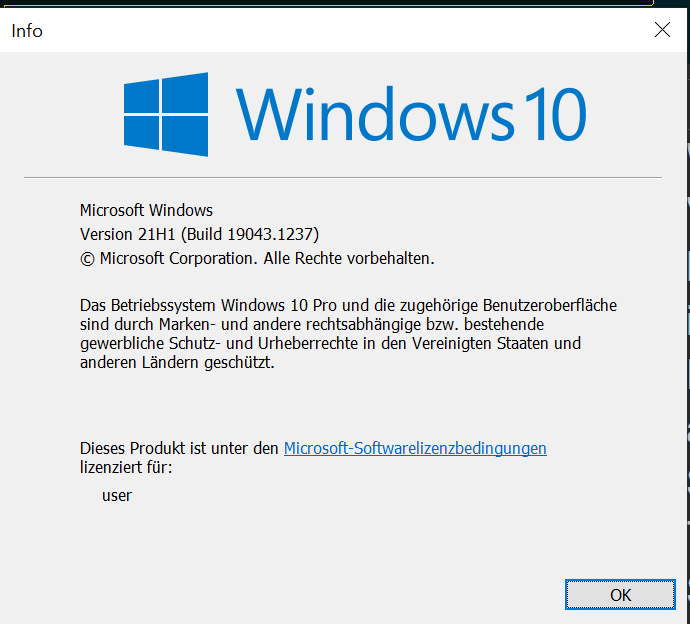
      SLOL did it display any error messages when trying to install the runtimes? Hit windows key + R and type "winver" into the run box then hit enter. Post a screenshot of the window that comes up.

      1 Reply Last reply
      0
      • SLOLundefined Offline
        SLOLundefined Offline
        SLOL
        wrote on last edited by
        #5

        Bild_2021-10-14_200606.png

        1 Reply Last reply
        0
        • SLOLundefined SLOL

          Dss0 dosn´t helped

          Dss0undefined Offline
          Dss0undefined Offline
          Dss0
          Plutonium Staff
          wrote on last edited by
          #6

          SLOL if it still says msvcp140 is missing after installing this:

          https://dotnet.microsoft.com/download/dotnet-framework/thank-you/net472-web-installer
          https://aka.ms/vs/16/release/vc_redist.x64.exe
          https://aka.ms/vs/16/release/vc_redist.x86.exe

          then something is severly broken.
          If you downloaded any individual dll's before delete them, other than that:

          • open the start menu and search for "cmd"
          • run cmd as admin
          • execute the following command
          dism /online /cleanup-image /restorehealth
          
          • after dism has finished repairing your system restart your pc
          SLOLundefined 1 Reply Last reply
          0
          • SLOLundefined Offline
            SLOLundefined Offline
            SLOL
            wrote on last edited by
            #7

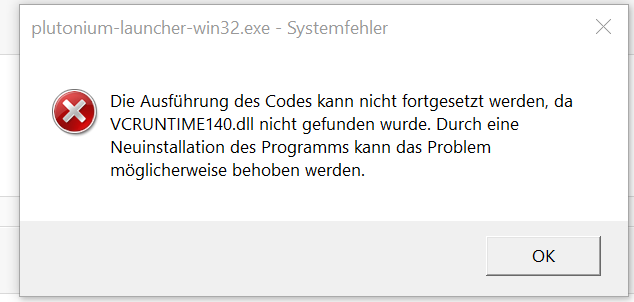
            I check it later and what is with the Vcruntime140.dll ?

            Dss0undefined 1 Reply Last reply
            0
            • SLOLundefined SLOL

              I check it later and what is with the Vcruntime140.dll ?

              Dss0undefined Offline
              Dss0undefined Offline
              Dss0
              Plutonium Staff
              wrote on last edited by
              #8

              SLOL said in Dll not found:

              Vcruntime140.dll

              it's part of the microsoft visual c++ redist 2015-2019, if that file is missing you have to install that runtime, downloading individual dll files is not what you should do.

              1 Reply Last reply
              0
              • SLOLundefined Offline
                SLOLundefined Offline
                SLOL
                wrote on last edited by
                #9

                Bild_2021-10-16_201504.png Unbenannt 2.PNG

                1 Reply Last reply
                0
                • Dss0undefined Dss0

                  SLOL if it still says msvcp140 is missing after installing this:

                  https://dotnet.microsoft.com/download/dotnet-framework/thank-you/net472-web-installer
                  https://aka.ms/vs/16/release/vc_redist.x64.exe
                  https://aka.ms/vs/16/release/vc_redist.x86.exe

                  then something is severly broken.
                  If you downloaded any individual dll's before delete them, other than that:

                  • open the start menu and search for "cmd"
                  • run cmd as admin
                  • execute the following command
                  dism /online /cleanup-image /restorehealth
                  
                  • after dism has finished repairing your system restart your pc
                  SLOLundefined Offline
                  SLOLundefined Offline
                  SLOL
                  wrote on last edited by
                  #10

                  Dss0 i downloaded from https://docs.microsoft.com/de-DE/cpp/windows/latest-supported-vc-redist?view=msvc-160 the 64 bit version and started it and seleced repair but it dosn´t helped. i also did this but this also dosn´t healped

                  Dss0undefined 1 Reply Last reply
                  0
                  • SLOLundefined SLOL

                    Dss0 i downloaded from https://docs.microsoft.com/de-DE/cpp/windows/latest-supported-vc-redist?view=msvc-160 the 64 bit version and started it and seleced repair but it dosn´t helped. i also did this but this also dosn´t healped

                    Dss0undefined Offline
                    Dss0undefined Offline
                    Dss0
                    Plutonium Staff
                    wrote on last edited by
                    #11

                    SLOL you need the x86 version, plutonium is 32 bit not 64.

                    1 Reply Last reply
                    1
                    • SLOLundefined Offline
                      SLOLundefined Offline
                      SLOL
                      wrote on last edited by
                      #12

                      Now the download goe´s thanks for the suport

                      1 Reply Last reply
                      0

                      Hello! It looks like you're interested in this conversation, but you don't have an account yet.

                      Getting fed up of having to scroll through the same posts each visit? When you register for an account, you'll always come back to exactly where you were before, and choose to be notified of new replies (either via email, or push notification). You'll also be able to save bookmarks and upvote posts to show your appreciation to other community members.

                      With your input, this post could be even better 💗

                      Register Login
                      Reply
                      • Reply as topic
                      Log in to reply
                      • Oldest to Newest
                      • Newest to Oldest
                      • Most Votes


                      • Login

                      • Don't have an account? Register

                      • Login or register to search.
                      • First post
                        Last post
                      0
                      • Unread 0
                      • Recent
                      • Tags
                      • Popular
                      • Users
                      • Groups