Skip to content
  • 0 Unread 0
  • Recent
  • Tags
  • Popular
  • Users
  • Groups
  • Donate
Collapse

Plutonium

  1. Home
  2. BO2 Server Hosting Support
  3. !start_zm_server.bat won't open

!start_zm_server.bat won't open

Scheduled Pinned Locked Moved BO2 Server Hosting Support
18 Posts 3 Posters 1.4k Views 1 Watching
  • Oldest to Newest
  • Newest to Oldest
  • Most Votes
Reply
  • Reply as topic
Log in to reply
This topic has been deleted. Only users with topic management privileges can see it.
  • Resxt Offline
    Resxt Offline
    Resxt
    Plutonium Staff
    wrote on last edited by
    #4

    Most likely bad port forward or firewall issue or wrong server key or you didn't install the files in storage\t6

    1 Reply Last reply
    0
    • Dominican_4ever Dominican_4ever

      2872f598-3c85-4285-b61d-64002100882a-image.png

      Dss0 Offline
      Dss0 Offline
      Dss0
      Plutonium Staff
      wrote on last edited by
      #5

      Dominican_4ever have you started !updatePluto.bat first? What's inside the zone folder?

      Dominican_4ever 1 Reply Last reply
      0
      • Dss0 Dss0

        Dominican_4ever have you started !updatePluto.bat first? What's inside the zone folder?

        Dominican_4ever Offline
        Dominican_4ever Offline
        Dominican_4ever
        wrote on last edited by Dominican_4ever
        #6

        Dss0 yeah, updatepluto wont open either and inside the zone folder is the regular zone stuff

        Dss0 1 Reply Last reply
        0
        • Dominican_4ever Dominican_4ever

          Dss0 yeah, updatepluto wont open either and inside the zone folder is the regular zone stuff

          Dss0 Offline
          Dss0 Offline
          Dss0
          Plutonium Staff
          wrote on last edited by
          #7

          Dominican_4ever and running plutonium.exe directly? If it also doesn't open follow the troubleshooting steps here: https://forum.plutonium.pw/topic/6832/common-launcher-issues-solutions (Issue: Launcher does not respond when trying to start it)

          Dominican_4ever 1 Reply Last reply
          0
          • Dss0 Dss0

            Dominican_4ever and running plutonium.exe directly? If it also doesn't open follow the troubleshooting steps here: https://forum.plutonium.pw/topic/6832/common-launcher-issues-solutions (Issue: Launcher does not respond when trying to start it)

            Dominican_4ever Offline
            Dominican_4ever Offline
            Dominican_4ever
            wrote on last edited by
            #8

            Dss0 When I didn't edit !updatePluto.bat it worked but when I followed a youtube video it told me to only keep the first line. and Plutonium.exe I did run directly and it was fine, but it didn't need to update.

            Dss0 1 Reply Last reply
            0
            • Dominican_4ever Dominican_4ever

              Dss0 When I didn't edit !updatePluto.bat it worked but when I followed a youtube video it told me to only keep the first line. and Plutonium.exe I did run directly and it was fine, but it didn't need to update.

              Dss0 Offline
              Dss0 Offline
              Dss0
              Plutonium Staff
              wrote on last edited by
              #9

              Dominican_4ever don't follow random youtube tutorials, they may already be outdated.. follow only our official guide: https://plutonium.pw/docs/server/t6/setting-up-a-server/

              1 Reply Last reply
              0
              • Dominican_4ever Offline
                Dominican_4ever Offline
                Dominican_4ever
                wrote on last edited by Dominican_4ever
                #10

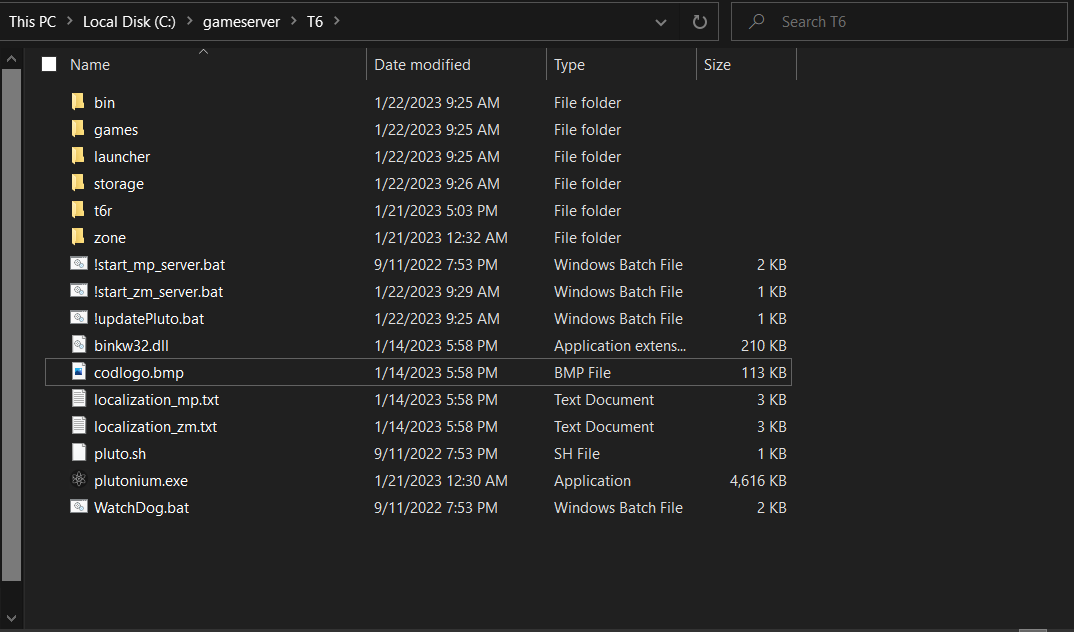
                Resxt I followed the stuff but it barely helped me so I was doing stuff on my own, here's what I got so far. 29ac0061-23ac-449c-8c12-137d9abe5f8a-image.png
                Resxt 1 Reply Last reply
                0
                • Dominican_4ever Dominican_4ever

                  Resxt I followed the stuff but it barely helped me so I was doing stuff on my own, here's what I got so far. 29ac0061-23ac-449c-8c12-137d9abe5f8a-image.png

                  Resxt Offline
                  Resxt Offline
                  Resxt
                  Plutonium Staff
                  wrote on last edited by
                  #11

                  Dominican_4ever this is really wrong. You somehow installed Plutonium inside your server. What you need is a copy of the game, not Plutonium itself

                  Dominican_4ever 1 Reply Last reply
                  0
                  • Resxt Resxt

                    Dominican_4ever this is really wrong. You somehow installed Plutonium inside your server. What you need is a copy of the game, not Plutonium itself

                    Dominican_4ever Offline
                    Dominican_4ever Offline
                    Dominican_4ever
                    wrote on last edited by
                    #12

                    Resxt YouTube is so trash, I get it now, thank you, so you want me to install the base game again, correct?

                    Resxt 1 Reply Last reply
                    0
                    • Dominican_4ever Dominican_4ever

                      Resxt YouTube is so trash, I get it now, thank you, so you want me to install the base game again, correct?

                      Resxt Offline
                      Resxt Offline
                      Resxt
                      Plutonium Staff
                      wrote on last edited by
                      #13

                      Dominican_4ever it's really simple. You simply need to put the server files (.bat) in your game folder or if you prefer, create a copy of your game folder. You simply need the game files.

                      Literally just do what the doc says you don't need to mess with files and yes please don't watch potentially outdated (or even sometimes wrong) videos from random people
                      https://plutonium.pw/docs/server/t6/setting-up-a-server/

                      It says "a copy of the game" which means well.. the game. It never says to install Plutonium by modifying a bit file etc, don't do that

                      Dominican_4ever 1 Reply Last reply
                      0
                      • Resxt Resxt

                        Dominican_4ever it's really simple. You simply need to put the server files (.bat) in your game folder or if you prefer, create a copy of your game folder. You simply need the game files.

                        Literally just do what the doc says you don't need to mess with files and yes please don't watch potentially outdated (or even sometimes wrong) videos from random people
                        https://plutonium.pw/docs/server/t6/setting-up-a-server/

                        It says "a copy of the game" which means well.. the game. It never says to install Plutonium by modifying a bit file etc, don't do that

                        Dominican_4ever Offline
                        Dominican_4ever Offline
                        Dominican_4ever
                        wrote on last edited by
                        #14

                        Resxt Alr thx, I will put the server files in my game folder. Also, do I need the bin, games, launcher, and storage folders? (btw the !start_zm_server.bat still isn't working)

                        Resxt 1 Reply Last reply
                        0
                        • Dominican_4ever Dominican_4ever

                          Resxt Alr thx, I will put the server files in my game folder. Also, do I need the bin, games, launcher, and storage folders? (btw the !start_zm_server.bat still isn't working)

                          Resxt Offline
                          Resxt Offline
                          Resxt
                          Plutonium Staff
                          wrote on last edited by
                          #15

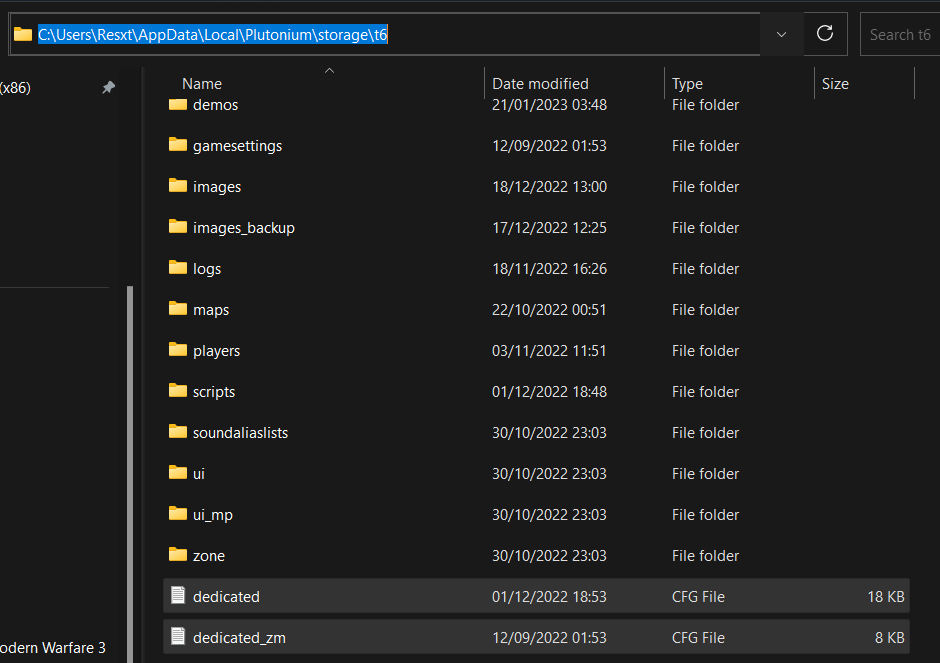
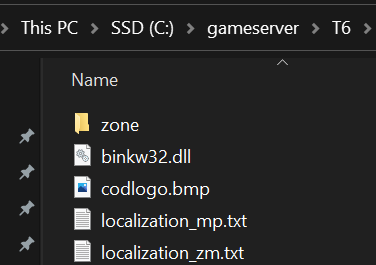
                          Dominican_4ever no as I said you just do what the doc says, it never tells you to put any of these folders here. These folders are automatically created by Plutonium in the right folder, not in your game folder.

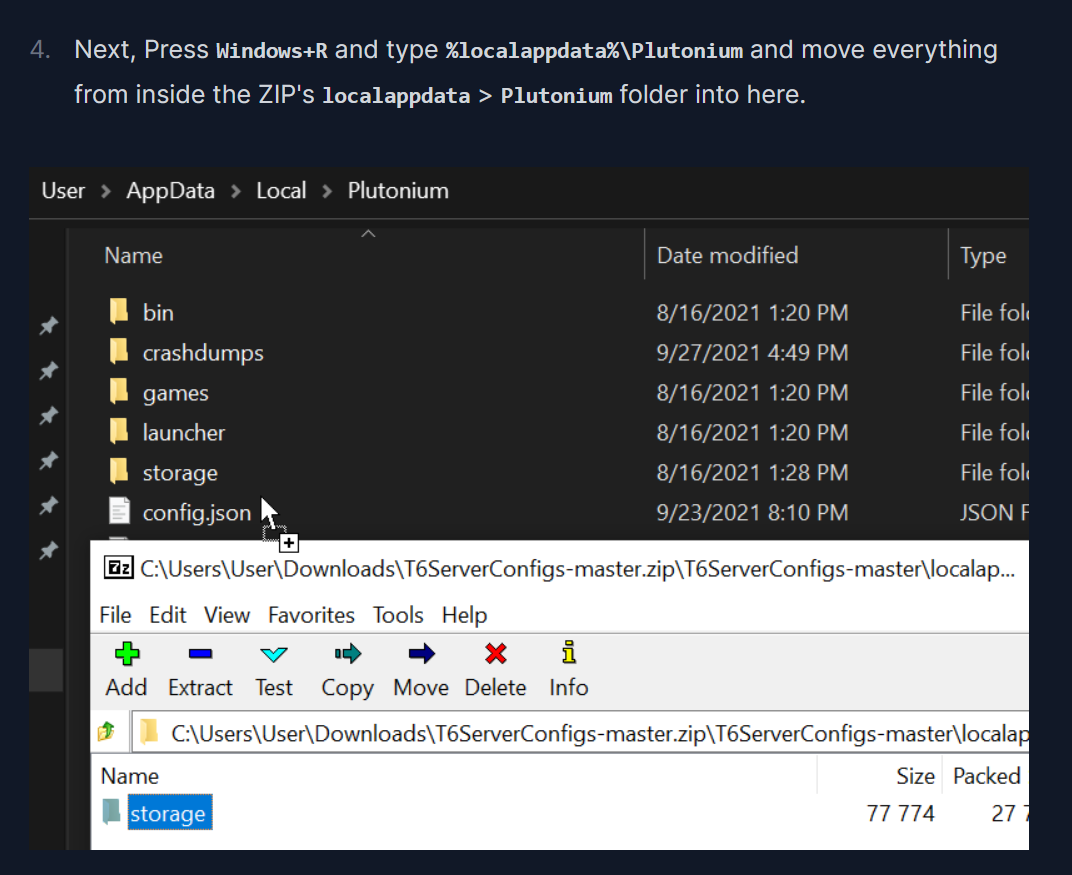
                          As for the server closing I gave you lot of solutions but since it seems like you don't read the doc I'm just gonna guess that you didn't install the files in Plutonium as said in the doc which as a result fails to boot because there is no cfg file
                          2d3ab7b7-344a-43e6-8534-1f8105784d51-image.png

                          Again, just read the doc. Everything is explained. Don't think by yourself just do what is said it cannot be more simple
                          4f535a26-0f9f-44fe-83ab-4c4740ea6337-image.png
                          280348ff-d044-4e27-bb6b-56f5d3f358bd-image.png

                          Dominican_4ever 1 Reply Last reply
                          0
                          • Resxt Resxt

                            Dominican_4ever no as I said you just do what the doc says, it never tells you to put any of these folders here. These folders are automatically created by Plutonium in the right folder, not in your game folder.

                            As for the server closing I gave you lot of solutions but since it seems like you don't read the doc I'm just gonna guess that you didn't install the files in Plutonium as said in the doc which as a result fails to boot because there is no cfg file
                            2d3ab7b7-344a-43e6-8534-1f8105784d51-image.png

                            Again, just read the doc. Everything is explained. Don't think by yourself just do what is said it cannot be more simple

                            4f535a26-0f9f-44fe-83ab-4c4740ea6337-image.png
                            280348ff-d044-4e27-bb6b-56f5d3f358bd-image.png

                            Dominican_4ever Offline
                            Dominican_4ever Offline
                            Dominican_4ever
                            wrote on last edited by Dominican_4ever
                            #16

                            Resxt not tryna be rude but, that's literally what I was doing before I looked up a tutorial, that's the reason I looked up a YouTube tutorial because when I followed the doc, it didn't work. Also, !start_mp_server.bat works so idk why zm don't work, I am currently running a multiplayer server right now.

                            Resxt 1 Reply Last reply
                            0
                            • Dominican_4ever Dominican_4ever

                              Resxt not tryna be rude but, that's literally what I was doing before I looked up a tutorial, that's the reason I looked up a YouTube tutorial because when I followed the doc, it didn't work. Also, !start_mp_server.bat works so idk why zm don't work, I am currently running a multiplayer server right now.

                              Resxt Offline
                              Resxt Offline
                              Resxt
                              Plutonium Staff
                              wrote on last edited by
                              #17

                              Dominican_4ever is it ok now? The doc provides up-to-date instructions so if it doesn't work for you then something is wrong (bad port forward rule, bad server key, firewall issue etc)

                              Dominican_4ever 1 Reply Last reply
                              0
                              • Resxt Resxt

                                Dominican_4ever is it ok now? The doc provides up-to-date instructions so if it doesn't work for you then something is wrong (bad port forward rule, bad server key, firewall issue etc)

                                Dominican_4ever Offline
                                Dominican_4ever Offline
                                Dominican_4ever
                                wrote on last edited by
                                #18

                                Resxt It loads up for a brief second then it closes

                                1 Reply Last reply
                                0

                                Hello! It looks like you're interested in this conversation, but you don't have an account yet.

                                Getting fed up of having to scroll through the same posts each visit? When you register for an account, you'll always come back to exactly where you were before, and choose to be notified of new replies (either via email, or push notification). You'll also be able to save bookmarks and upvote posts to show your appreciation to other community members.

                                With your input, this post could be even better 💗

                                Register Login
                                Reply
                                • Reply as topic
                                Log in to reply
                                • Oldest to Newest
                                • Newest to Oldest
                                • Most Votes


                                • Login

                                • Don't have an account? Register

                                • Login or register to search.
                                • First post
                                  Last post
                                0
                                • Unread 0
                                • Recent
                                • Tags
                                • Popular
                                • Users
                                • Groups
                                • Donate

