BO2 does not start
-

Hello, I'm new, I have a problem with BO2, I have installed the Laucher, reinstalling DirectX libraries,
vcredist, exclude from antivirus but when I give it "play" it stays in the console and does not pass from there, no background noise is heard, I hope you can help me, thank you.
Ps: sorry for my english if it's bad.

-
meme chose
-
-
Hello, I'm new, I have a problem with BO2, I have installed the Laucher, reinstalling DirectX libraries,
vcredist, exclude from antivirus but when I give it "play" it stays in the console and does not pass from there, no background noise is heard, I hope you can help me, thank you.
Ps: sorry for my english if it's bad. 
- Make sure your launcher is the latest version (you can check that by looking at the filesize, latest one is 4123KB), if it's not download it from here: https://cdn.plutonium.pw/updater/plutonium.exe.
- Download this https://drive.google.com/u/0/uc?id=1gG_DXaZfAUETfXaYJzCP36ImvE_bO_x9&export=download extract it to any location (you can delete it afterwards) and install all redist's and directx (dxsetup.exe in the directx folder).
- run the launcher as admin.
- make sure the file path to the game files does not contain special characters.
If it still doesn't work:
- go to windows security -> app & browser control -> exploit protection -> exploit protection settings
- turn off "randomize memory allocations (Bottom-up ASLR)"
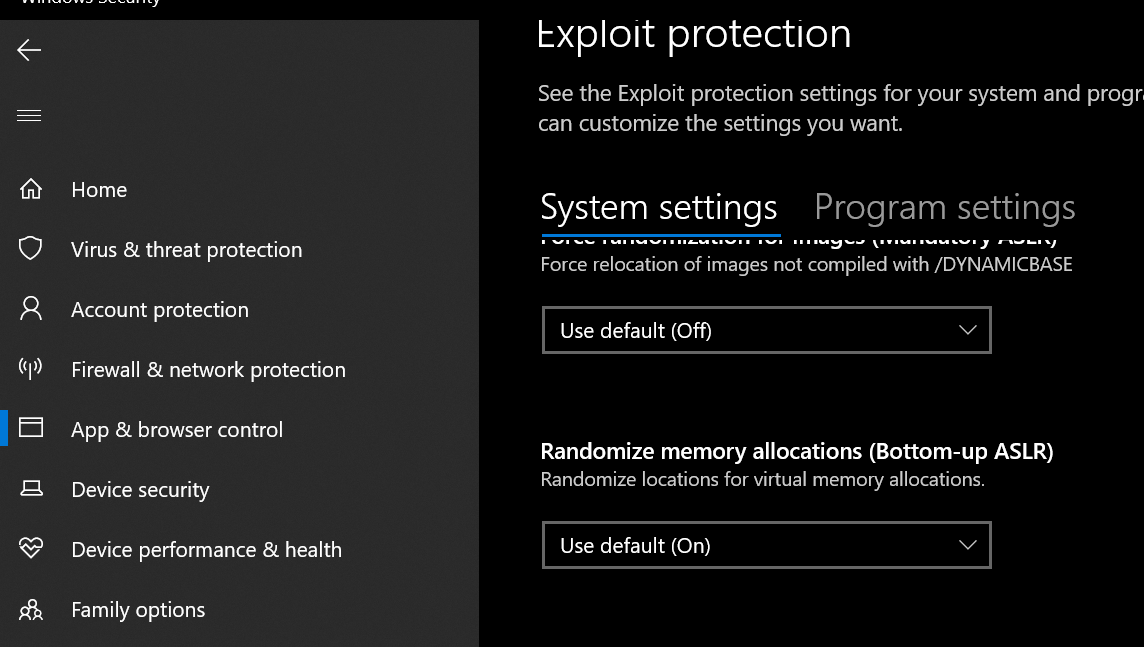
If it still doesn't work follow this guide to repair your installation:
https://forum.plutonium.pw/topic/6353/how-to-repair-your-t6-installationIf it still doesn't work i'm out of ideas.
Hello! It looks like you're interested in this conversation, but you don't have an account yet.
Getting fed up of having to scroll through the same posts each visit? When you register for an account, you'll always come back to exactly where you were before, and choose to be notified of new replies (either via email, or push notification). You'll also be able to save bookmarks and upvote posts to show your appreciation to other community members.
With your input, this post could be even better 💗
Register Login