Skip to content
  • 0 Unread 0
  • Recent
  • Tags
  • Popular
  • Users
  • Groups
  • Donate
Collapse

Plutonium

binaryO_O

binaryO_O

@binaryO_O
Unfollow Follow
About
Posts
71
Topics
66
Shares
0
Groups
0
Followers
16
Following
11

Posts

Recent Best Controversial

  • [ZM] Victis Clothing Pack 1
    binaryO_O binaryO_O
                                            *Russman*
    

    Changes Russman's shirt to be a yellow plaid one instead, with an Avenged Sevenfold t-shirt underneath, as well as making his pants gray instead of that weird teal color
    Includes black hair alt, that's the ~-gc_zom_player_oldman_head_c file. Use it if you want!

    One thing I'll mention is I do know something like this exists already, but I don't know where it's actually from so I just made my own version instead.
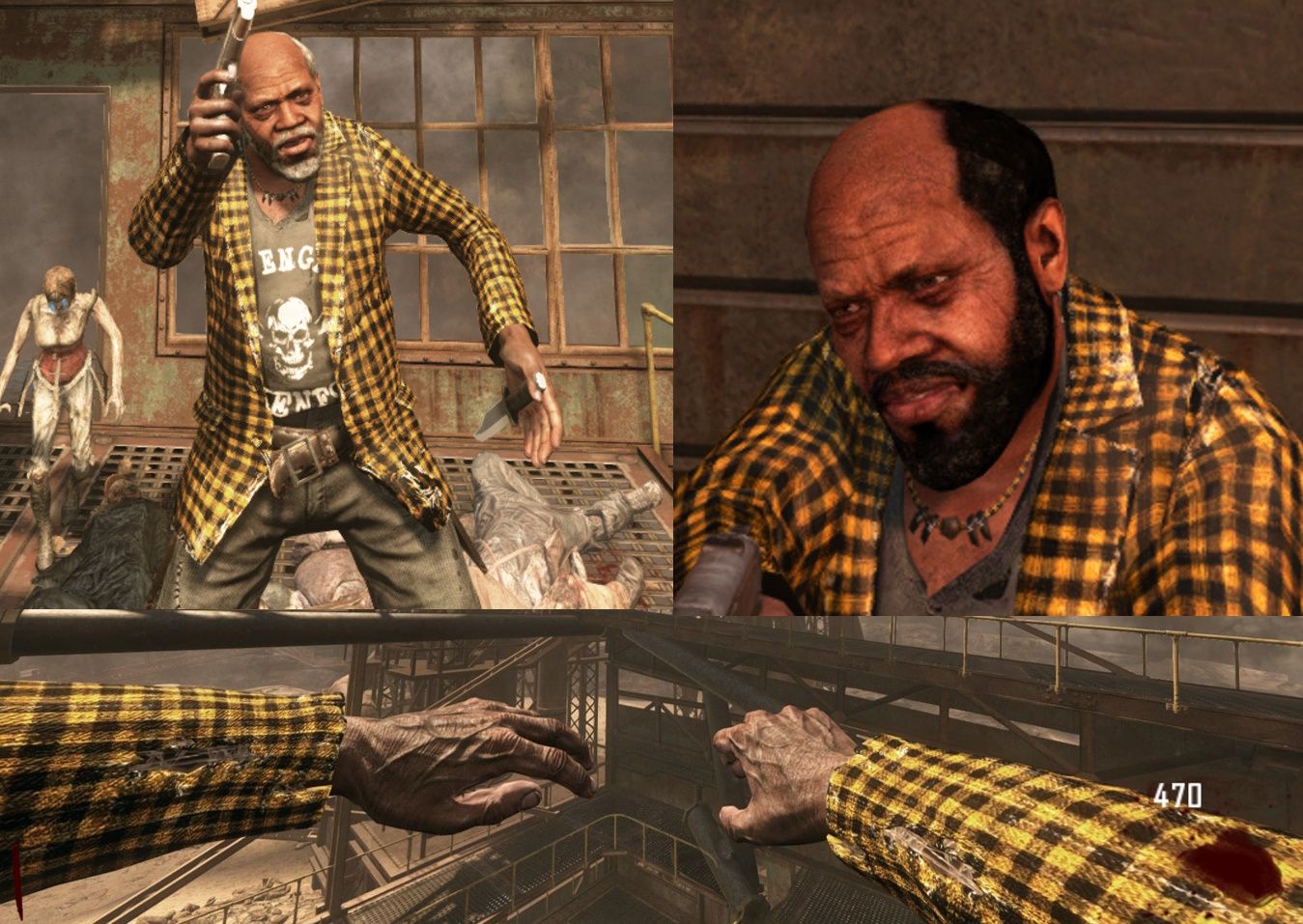
    yrussman.jpg

                                            *Marlton*
    

    I've had this sitting around for awhile now and just never uploaded it. Changes his shirt to a blue-white plaid scheme, makes his tie black and makes his pants a bit nicer.
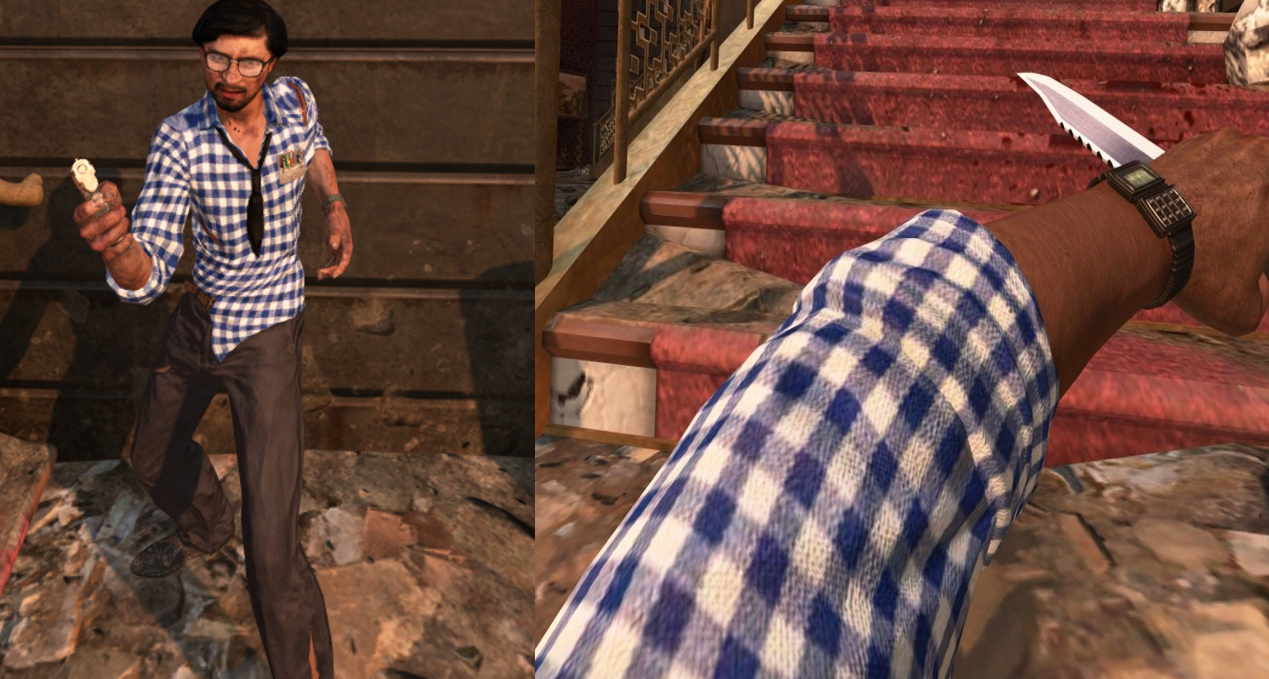
    marlton.png

                                            *Stuhlinger*
    

    This one is based (a little loosely) on Marty McFly's outfit. It was easily the most annoying one to make cause I couldn't find his texture files anywhere, and had to use random files that were his textures just not named properly then name them accordingly from retextures on the forums. That aside, it was pretty fun to make. Did you know his viewmodel implies he's wearing a sweater but that isn't reflected on his thirdperson model? I didn't! Another thing, he has different textures on Buried, which I also didn't know! Except I don't have that texture, so I can't replace it. Sorry Buried fans!
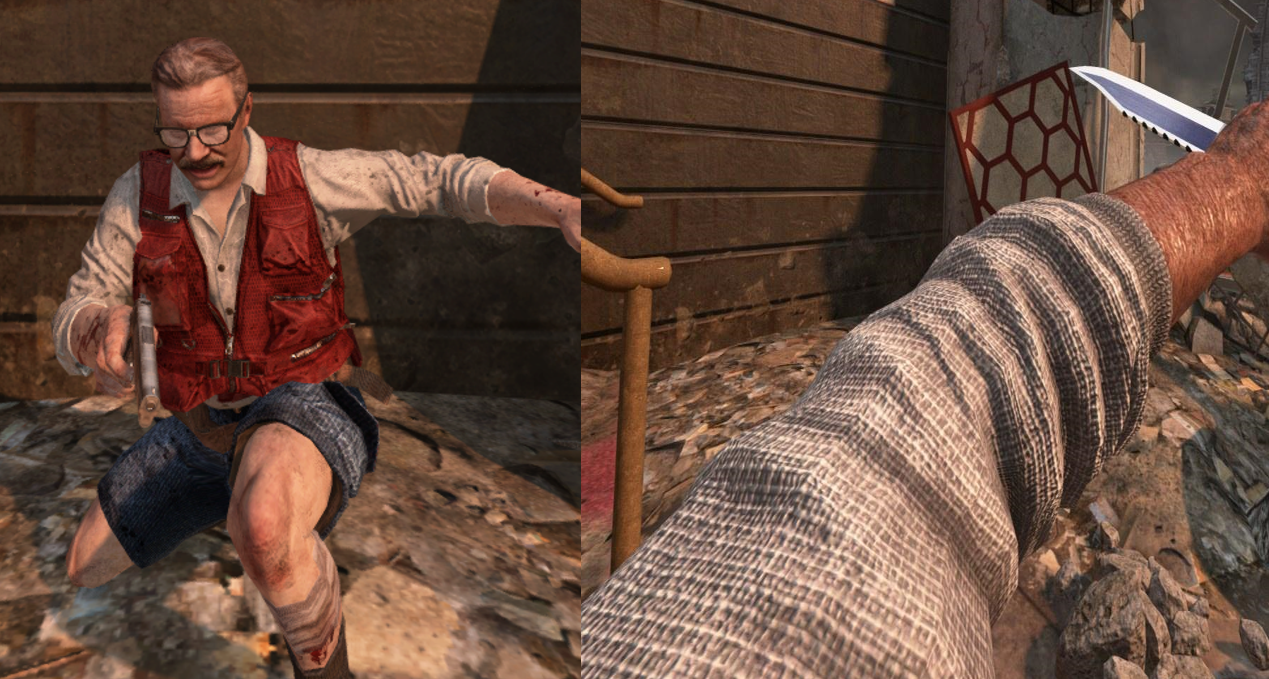
    stuhmcfly.png

                                            *Misty*
    

    I included two versions for Misty here, one with a white plaid shirt and one with a black one. These also weren't too hard to make, and just like my blue shirt mod it also changes her thirdperson gloves to be the same as her firstperson ones, again, if you never noticed this, I'm sorry.
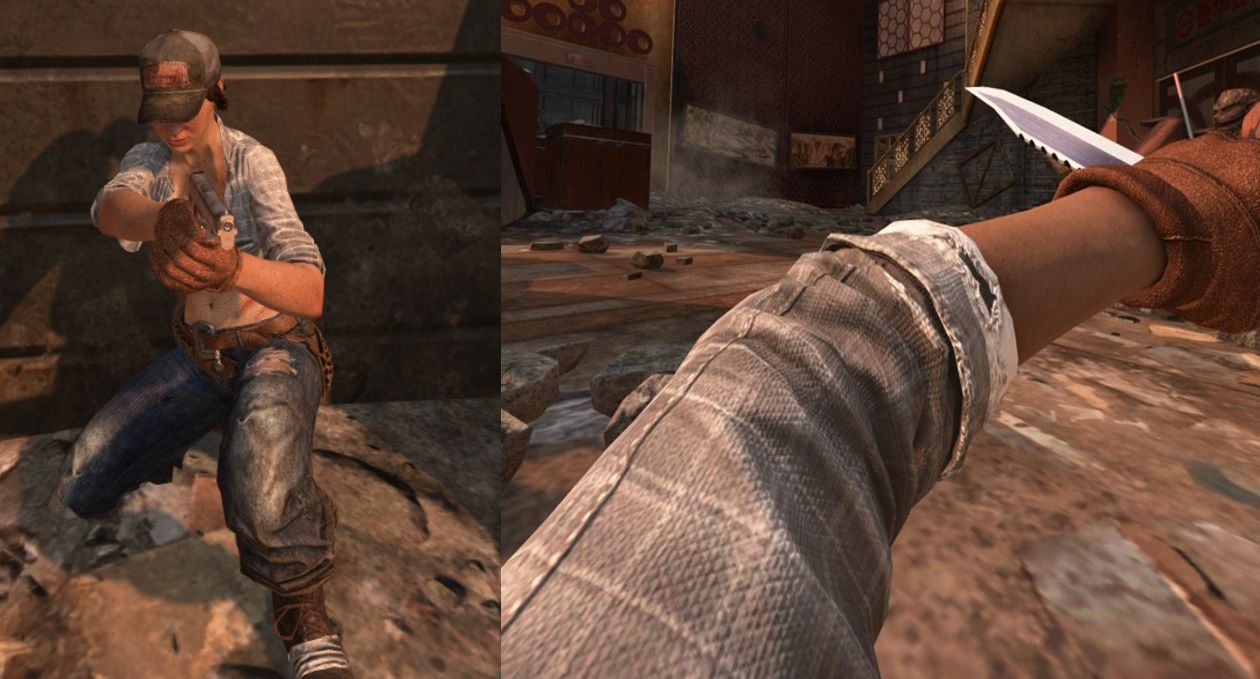
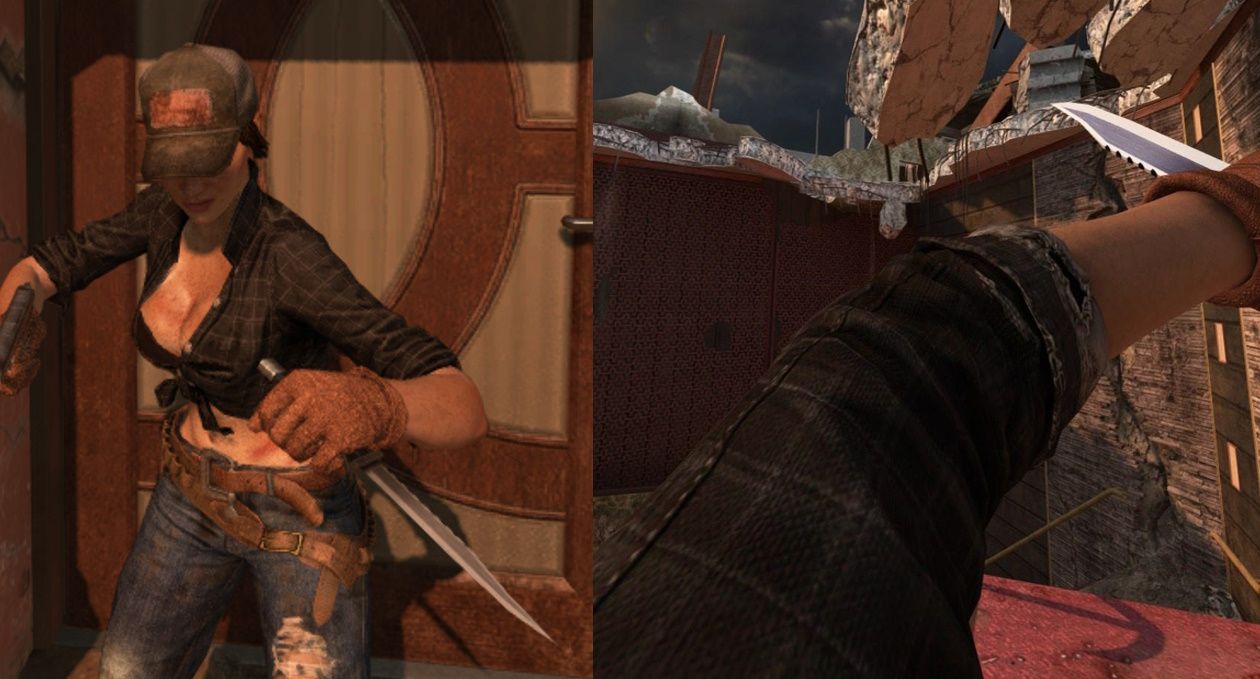
    misty.jpg
    misty2.jpg

    I'm planning on releasing files that should hopefully make this sorta thing easier for anyone interested, I have everyone except Marlton done already. I use paint net so I don't know if it'll work in other programs, but just incase whenever the time comes I'll have a .pdn version and just each individual layer as a .png, I hope it inspires others to make their own textures too!

    [DOWNLOAD].

    put the .iwi files into %LocalAppData%\Plutonium\storage\t6\images. If the images folder doesn't exist then make it.
    When you ever want to stop using them, just take them out of the images folder.

    BO2 Modding Releases & Resources

  • [ZM] Misty's Blue Shirt
    binaryO_O binaryO_O

    changes mistys shirt to be a blue plaid shirt instead, also changes her third person gloves to be accurate to her viewmodel ones. if you've never noticed that it's different then sorry to tell you that

    image1
    image2

    Download

    put the .iwi's into . . .\pluto_t6_full_game\data\images (. . . is whatever location you have the folder in, so probably your documents/games folder)
    the 1911 skin in the pics is the BO1 styled one

    BO2 Modding Releases & Resources

  • [ZM] HD Black Ops 1 M1911 (+Sounds)
    binaryO_O binaryO_O

    ca5e9496-dc22-4fb0-95ca-a7f1f87c8404-image.jpeg 299b61c4-f761-4a11-9595-507e49fe4961-image.jpeg 906b5524-851f-4de6-8d3a-9da30116e667-image.jpeg 6ad483a7-8468-4214-8a52-2d919cd35085-image.jpeg 9c2ddb5a-7e95-47b3-b39e-3e4adf353bf9-image.jpeg 65d3984f-f483-4bb9-a876-95ab45f21b00-image.jpeg

    also comes with a Brown Grip version: 51771b69-f154-403f-9ea8-c6c59a740e64-image.jpeg

    [DOWNLOAD]

    extract the zone and images folders to: %LocalAppData%\Plutonium\storage\t6

    • replaces only the M1911's sounds, compared to the BO1 Sound Pack that includes sounds for everything in one (since it needs to replace the entire .sabl file, you can't easily pick and choose what you want from it.)

    • the texture is much cleaner with most of the wear removed (black smudges, some rust)

    • [BO1 VERSION]
    • [WAW VERSION]

    BLACK OPS 1 PACK

    • [BO1 STYLED PERKS & POWER UPS]
    • [BO1 GRENADES]
    • [BO1 POINTS BLOOD (BO2)]
    • [BO1 DPAD BLOOD]
    • [BO1 STYLED TALLY MARKS]
    BO2 Modding Releases & Resources

  • HD Crosshairs
    binaryO_O binaryO_O

    06ad26d5-67d0-4688-9421-191983127f4d-image.jpeg

    (BO2 ONLY): Includes HD remakes of all/most crosshairs
    59887519-3d16-4f89-b01e-d67fc8ff07cb-image.jpeg

    [DOWNLOAD]

    T6 = Black Ops 2
    T5 = Black Ops 1
    T4 = World at War

    place the folder(s) in: %LocalAppData%\Plutonium\storage

    for comparison this is the default: e6d7babd-81f0-4785-abb4-d7dcf14b5c42-image.jpeg

    BO2 Modding Releases & Resources

  • [ZM] Updated Monkey Bomb Icon
    binaryO_O binaryO_O

    5758d598-85d4-49c2-9b11-f366e8f87077-image.jpeg

    cymbal monkey

    [DOWNLOAD]

    T6 = Black Ops 2
    T5 = Black Ops 1
    T4 = World at War

    Put the folder(s) in: %LocalAppData%\Plutonium\storage

    for comparison this is the default: ab215b36-3be4-4515-ae7e-a51edfd8fbbb-image.jpeg

    • [Custom Monkey Bomb Icon]
    BO2 Modding Releases & Resources

  • [ZM] Red Eyes Ranks
    binaryO_O binaryO_O

    035d67be-3c4f-484d-ae1f-9b16e535e100-image.jpeg

    [DOWNLOAD]

    put the folder in %LocalAppData%\Plutonium\storage\t6

    BO2 Modding Releases & Resources

  • [ZM] Colorful CDC Suits
    binaryO_O binaryO_O

    91080506-d0bb-46cb-ba64-acf251846919-image.jpeg

    Comes with:

    • Rainbow
      48fe560f-5f61-45a5-8dd3-d63310e27b36-image.jpeg ef98fcc4-0cbb-4603-9cf7-0cae6c028990-image.jpeg
    • Red
      d7851218-f6d1-4cf0-b599-9dc35fc96d92-image.jpeg 9cc986a9-0b74-4e0a-9e4f-e4e69aa823ae-image.jpeg
    • Blue
      06b5433e-6a1d-4ce7-84cf-5eaaeedbe967-image.jpeg 65402034-5c0a-4d42-907e-3e9baa8ad3f6-image.jpeg
    • Orange
      81c98ad8-ebb7-413b-baf8-53e997944d85-image.jpeg bccbb845-431a-4a39-9918-4ea89ddcad0e-image.jpeg
    • Dark Green
      fcf2e770-dee8-4f65-9031-0ca6c7f06f9f-image.jpeg f4d8d582-02be-47fd-a062-cc39e45dab08-image.jpeg
    • Highlighter/Toxic
      13580306-89a2-4c39-bb2a-f0a736c1bd4d-image.jpeg 04af25ff-baa7-48c8-8771-5970335caa95-image.jpeg
    • Cyan
      01d6ddda-7ffa-4e00-a2af-a876f9f7f223-image.jpeg 208aa9d0-85fc-4067-8172-74243f877267-image.jpeg
    • Pink
      d50e723e-f7c6-4131-be28-b065e69e6175-image.jpeg 30b0d38e-2546-48ef-9eb5-e7e60e6262d8-image.jpeg
    • White
      ad79b21e-3911-4912-a2ef-fc0c711d4f09-image.jpeg 8786e48e-dc97-4fa4-b15d-7e2844058885-image.jpeg
    • Black
      5cae62d5-8f2b-4a43-9624-bb192c32abfb-image.jpeg 4e423d84-01d0-40ea-9783-65501ae18300-image.jpeg

    [DOWNLOAD]

    Place the images folder from the color you want in: %LocalAppData%\Plutonium\storage\t6

    the visors are fully blacked out, if you don't want to that then delete the visor, head and comandmask files
    you can mix and match the colors too, gear is the backpack, body and gviewarm is the clothing

    BO2 Modding Releases & Resources

  • BO1 Grenade Icon
    binaryO_O binaryO_O

    93bd86c6-ab54-4960-8af2-31544dae1c1f-image.jpeg

    [DOWNLOAD]

    T6 = Black Ops 2
    T4 = World at War

    Put the folder(s) in: %LocalAppData%\Plutonium\storage

    BLACK OPS 1 PACK

    • [HD BO1 M1911]
    • [BO1 STYLED PERKS & POWER UPS]
    • [BO1 POINTS BLOOD (BO2)]
    • [BO1 DPAD BLOOD]
    • [BO1 STYLED TALLY MARKS]
    BO2 Modding Releases & Resources

  • [ZM] Bottle Cap Perk Icons
    binaryO_O binaryO_O

    d604d932-3b97-486d-8a2b-fbb273ed0508-image.jpeg
    13dd4fbd-270c-450a-a376-5f44594022a3-image.jpeg
    e6fde087-88cf-4ae5-a3b7-c7e2a89c7b94-image.jpeg

    DRINK 'EM ALL!!

    It's like when you drink the Perk then you just keep the cap in your pocket, when you get downed you probably drop them all or something..

    Made using the actual Perk bottles from each game, this is as real as it gets!

    [DOWNLOAD]

    (T6 ALT VERSION is the T5 Bottlecaps (Deadshot and PHD have no difference))

    T6 = Black Ops 2
    T5 = Black Ops 1
    T4 = World at War

    Place the folder(s) in: %LocalAppData%\Plutonium\storage

    • [Edited BO1 Styled Perks (and Powerups)]
    BO2 Modding Releases & Resources

  • [ZM] Different Looking Raygun
    binaryO_O binaryO_O

    3ae375a9-3100-45c6-aa8a-d37db8078f9a-image.jpeg
    6f65ce41-9348-4045-85b5-84f38b91e023-image.jpeg
    e973fe49-66ab-4b07-a0fd-f8c3d1fdf3bb-image.jpeg
    ebacd700-b5eb-4c28-8929-e54a5ae6057a-image.jpeg

    NOTE: The gun stays green when you pack-a-punch it, it's still not the real Buried Raygun like PS5

    [DOWNLOAD]

    T6 = Black Ops 2
    T5 = Black Ops 1
    T4 = World at War

    Place the folder(s) in: %LocalAppData%\Plutonium\storage

    Inspired by this mod

    BO2 Modding Releases & Resources

  • [ZM] WAW Points Blood (BO1)
    binaryO_O binaryO_O

    3d772adb-c06e-4cba-9826-260dfeedd6b0-image.jpeg

    [DOWNLOAD]

    Place the folder in: %LocalAppData%\Plutonium\storage\t5

    for comparison this is the default: d88ce173-330d-41c3-b6b7-8c606b939b32-image.jpeg

    • [BO1 BLOOD IN WAW]
    • [WAW BLOOD IN BO2]
    • [NO BLOOD]
    BO1 Modding Releases & Resources

  • [NZ] HD Black Ops 1 M1911
    binaryO_O binaryO_O

    4d84cd11-d71f-4c38-ae41-dee8cf93cde6-image.jpeg
    Texture Only, unfortunately sound modding isnt possible yet for WAW
    [DOWNLOAD]

    cleaner than the original with wear, smudges and rust removed from the texture

    • [BO2 VERSION]
    • [BO1 VERSION]
    WAW Modding Releases & Resources

  • [ZM] Different Revive Icon
    binaryO_O binaryO_O

    d547e6b7-c32c-42d6-9045-4dd78f11c995-image.jpeg

    found it in bo2's files (though i edited it slightly)

    [DOWNLOAD]

    T6 = Black Ops 2
    T5 = Black Ops 1
    T4 = World at War

    Put the folder(s) in here: %LocalAppData\Plutonium\storage

    • [More Different Revive Icons]
    BO2 Modding Releases & Resources

  • HD M1911
    binaryO_O binaryO_O

    0fe603a7-dcfe-40e5-b5e5-64a2b5c0a5d9-image.jpeg
    25906a79-1e81-4314-81c0-e2ecc5c57c69-image.jpeg
    also comes with a Brown Grip version: 089bd6eb-15dd-408e-bde5-7b0dc852d0f6-image.jpeg

    [DOWNLOAD]

    Place the images folder from the version you want in: %LocalAppData%\Plutonium\storage\t5

    the texture is higher quality than the base game, and is also cleaner with most of the wear removed (smudges, rust)

    for comparison this is the base M1911: 1bbccbec-3886-4b1c-aa3a-836d60165464-image.jpeg

    • [BO2 VERSION]
    • [WAW VERSION]
    BO1 Modding Releases & Resources

  • [NZ] Black Fingerless Gloves and (optional) Camo Sleeves
    binaryO_O binaryO_O

    a35331f5-8580-49ad-b62d-f3587fab2fe0-image.jpeg
    t4 t4 t4.png

    [DOWNLOAD]

    Put the contents of the version you want in to: %LocalAppData%\Plutonium\t4

    WAW Modding Releases & Resources

  • [XBOX] HD Buttons (Black & White Versions)
    binaryO_O binaryO_O

    holy smokes.png

    [DOWNLOAD]

    Put the folder for which version you want it in here: %LocalAppData\Plutonium\storage

    93d77524-631a-4ffb-b1d4-4dd91df7f5fe-image.jpeg 7e0de59d-2198-4746-be37-df223b27d8ce-image.jpeg

    • [XBOX - World at War Buttons]
    BO2 Modding Releases & Resources

  • [NZ] BO1 Points Blood (WAW)
    binaryO_O binaryO_O

    3ac79014-7dcd-4c9c-adb9-3cd5c509d946-image.jpeg

    [DOWNLOAD]

    Extract the folder in: %LocalAppData%\Plutonium\storage\t4

    for comparison this is default WAW: 1ec1af18-08d7-410b-a15f-7643d220e504-image.jpeg

    • [WAW BLOOD IN BO1]
    • [BO1 BLOOD IN BO2]
    • [NO BLOOD]
    WAW Modding Releases & Resources

  • [XBOX] HD Buttons (Black & White Versions)
    binaryO_O binaryO_O

    i assume you mean does it work in multiplayer? it should work since it's only replacing textures. i used it in zombies coop after making it too

    BO2 Modding Releases & Resources

  • [NZ] BO1 Points Blood (WAW)
    binaryO_O binaryO_O

    GhostRider01250 lol its a little confusing looking at them together like that

    WAW Modding Releases & Resources

  • 🍟 french fries for tally mark early rounds
    binaryO_O binaryO_O

    a133a8f0-79f6-408f-90e4-f6a5e749b7bf-image.jpeg

    🍟 lol

    [DOWNLOAD]

    place the folder in: %LocalAppData%\Plutonium\storage\t6

    BO2 Modding Releases & Resources
  • 1 / 1
  • Login

  • Don't have an account? Register

  • Login or register to search.
  • First post
    Last post
0
  • Unread 0
  • Recent
  • Tags
  • Popular
  • Users
  • Groups
  • Donate