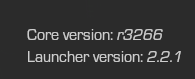
Are you on the latest version? Check your launcher, and make sure you're on r3266. Also, yes screen record the whole thing.
 undefined
Are you on the latest version? Check your launcher, and make sure you're on r3266. Also, yes screen record the whole thing.
You need to copy files/folders inside the all dlcs folder to your game folder in order for it to work. You probably copied the whole folder into your game folder, which obviously won't work.
It would fix your game, so yes. You're probably forgetting to deselect create subfolder and meanwhile you're getting another copy of the game inside your bo1 folder.
Those commands are broken at the moment, you shouldn't be attempting to use them unless you want your stats file to be corrupted.
It's probably gonna be fixed somewhere in the near future.
Select the pluto_t6_full_game folder that you downloaded through the torrent. So, if you put it inside C:/plutonium, then select C:/plutonium/pluto_t6_full_game in game settings of the launcher.
System > Sound > Device properties > Additional device properties > Advanced tab, and disable "allow applications to take exclusive control of this device".
If it's still the same thing, you could adjust the volume manually or disable the voice chat completely ingame.
Probably something on your end blocking Pluto - could be a 3rd party firewall, AV, your ISP, etc. Try a VPN, if you get past that screen with no connectivity issues, then it's caused by one of the things I listed above.
So your ingame res is actually set to 1440p correct? But the game looks fucked? Set image quality to Native in the settings.
Not at the moment, proper offline support is planned and will arrive somewhere in the near future.
Try writing this into the bootstrapper window:
r_mode 1920x1080;vid_xpos 0;vid_ypos 0;vid_restart
Double check if you have set your server key correctly.
https://plutonium.pw/docs/server/iw5/setting-up-a-server/#12-creating-a-server-key
Well if you haven't installed the game yet, why do you expect the game to run when you're clicking Play? Install the basegame files, click on Game Settings beside Play to reselect your directory, and try launching the game again.
https://plutonium.pw/docs/install/#installing-the-base-game-bo2
You could do 1.1.1.1 , something on your side is blocking Plutonium, try checking for any 3rd party firewalls which may do so. Is your windows date/time synced?