Skip to content

Launcher Support

4.0k Topics 14.1k Posts

Request support for the Plutonium Launcher, please wait at-least 1 day for a reply, it can get busy.

  • Failed to load

    1
    0 Votes
    1 Posts
    139 Views
    No one has replied
  • mods have endless download or error, what i must do?

    2
    2
    0 Votes
    2 Posts
    215 Views
    [image: 1770534886779-ca55b209-edc1-4461-b81d-2ee3567f7b07-2026-01-30_18-06-36.png]
  • Redownloaded Plutonium, Account Not Found?

    4
    0 Votes
    4 Posts
    291 Views
    can you show a screenshot of you trying to log into the launcher?
  • 0 Votes
    2 Posts
    168 Views
    we've tried turning off and messing around with most of the windows defenders settings, using administrator, moving the folder in a another directory, using Chatgpt to help us but non of the solutions seems to help
  • Launcher error

    4
    1
    0 Votes
    4 Posts
    488 Views
    Go to your windows defender,find application and browser control and click smart app control settings and select off button
  • Launcher won't boot up WAW (crashes after loading for a bit)

    1
    1
    0 Votes
    1 Posts
    208 Views
    No one has replied
  • Failed to download file storage/iw5/mp_nuked.iwd

    5
    0 Votes
    5 Posts
    1k Views
    So this kinda happened to me to but if you already found the solution, then this is from those who don't feel like watching the video i guess. This is what worked for me tho. When you first download Plutonium, you just get the .exe file - it creates the folders and downloads everything else when you run it for the first time. Here's what to do: Create a folder for it first: Make a new folder somewhere (like C:\Games\Plutonium or on your Desktop) Move the plutonium.exe file INTO that folder This is important - it needs its own folder to download all the game files into Run it: Double-click plutonium.exe from inside that folder It will start downloading all the necessary files This includes the COD game files, which can be several GB If you get that download error again: Just try running it again - sometimes the servers are busy Or try the PowerShell command from that folder (Shift + right-click the folder, open PowerShell, then .\plutonium.exe -timeout 0)
  • Plutonium Updater Error - Unable to Connect to the remote server

    3
    0 Votes
    3 Posts
    2k Views
    An extension to the suggestions provided in https://plutonium.pw/docs/update/ Plutonium.Updater.Core.Models.UpdateException: Failed to update file bin/VibeCheck.exe ---> System.UnauthorizedAccessException: Access to the path 'C:\Users\USERNAME\AppData\Local\Plutonium\bin\VibeCheck.exe' is denied. Exclude/whitelist the Plutonium folder from antivirus scanning and remove anything related to it from the AV program's blacklist. System.ComponentModel.Win32Exception (0x80004005): An Application Control policy has blocked this file Disable Windows Smart App Control. System.Net.Http.HttpRequestException: An error occurred while sending the request. ---> System.Net.WebException: The underlying connection was closed: An unexpected error occurred on a send. ---> System.IO.IOException: The handshake failed due to an unexpected packet format. Something is interfering with your connection to the CDN. Malwarebytes antivirus' web protection tends to do that. Add the websites plutoniummod.com and plutonium.pw to the allow list of the antivirus (Malwarebytes), remove them from the blacklist, and allow them through any other thing that is blocking them. System.Threading.Tasks.TaskCanceledException: A task was canceled. System.Net.Http.HttpRequestException: An error occurred while sending the request. ---> System.Net.WebException: Unable to connect to the remote server ---> System.Net.Sockets.SocketException: A connection attempt failed because the connected party did not properly respond after a period of time, or established connection failed because connected host has failed to respond [IP]:443 System.Net.Http.HttpRequestException: An error occurred while sending the request. ---> System.Net.WebException: Unable to connect to the remote server ---> System.Net.Sockets.SocketException: No connection could be made because the target machine actively refused it [IP]:443 System.Net.Http.HttpRequestException: An error occurred while sending the request. ---> System.Net.WebException: The underlying connection was closed: Could not establish trust relationship for the SSL/TLS secure channel. ---> System.Security.Authentication.AuthenticationException: The remote certificate is invalid according to the validation procedure. Plutonium.Updater.Core.Models.UpdateException: Failed to update file storage/iw5/mp_nuked.iwd ---> System.Net.WebException: An exception occurred during a WebClient request. ---> System.IO.IOException: The decryption operation failed, see inner exception. ---> System.ComponentModel.Win32Exception: The specified data could not be decrypted Try these suggestions: Press Shift + right-click in the folder plutonium.exe is in, select "Open Powershell window here", then write and execute this: .\plutonium.exe -timeout 0 Cloudflare DNS/Google DNS Cloudflare WARP/Proton VPN If it doesn’t work after that, restart your PC, have the VPN connected, and relaunch plutonium.exe (the installer/updater) every time it fails.

  • Launcher doesn't show login form

    3
    1
    0 Votes
    3 Posts
    1k Views
    Having this exact same issue!! Can’t for the life of me fix it
  • This topic is deleted!

    1
    0 Votes
    1 Posts
    1 Views
    No one has replied
  • White Screen plutonium

    1
    1
    0 Votes
    1 Posts
    97 Views
    No one has replied
  • Mods folder not showing in window + r

    2
    0 Votes
    2 Posts
    115 Views
    @Soulstealap right click on the empty space. select New select Folder name the folder mods Profit!
  • I forgot my password please help

    2
    0 Votes
    2 Posts
    260 Views
    u can reset password brotha
  • why am getting ban?

    2
    1
    0 Votes
    2 Posts
    251 Views
    @SICOSIAO Probably injected something while online instead of using LAN mode. Any attempts to bypass bans on alts will result in more time being added onto when you'll be unbanned. Guess you'll have to wait a year 🫡
  • plutonioum crash error

    9
    0 Votes
    9 Posts
    2k Views
    @buggedxx yes i have a solution. Press Windows+S and type "Registry editor". Open that as administrator. Expand the HKEY_LOCALMACHINE folder. Find and expand SYSTEM, then CurrentControlSet, then Control, then CI, and then policy. Click on the VerifiedAndReputable value and change it to 2 (Hexadecimal button checked. Then restart your computer. If there is no Policy folder, create it. CASE SENSITIVE. If you had to make a policy folder, or there was no VerifiedandReputable, then right click, New, DWORD (32-bit) value and name it (no speech marks and case sensitive) "VerifiedAndReputable" and set it to hexadecimal then 2
  • Plotonium start error

    2
    0 Votes
    2 Posts
    246 Views
    @andy238 said in Plotonium start error: ThrowForNonSuccess Cloud Flare not working for you for whatever reason.
  • every time i try to launch plutonium this happens

    3
    1
    0 Votes
    3 Posts
    538 Views
    Do what i said here: https://forum.plutonium.pw/topic/43669/can-t-install-the-launcher.-crash?_=1768558935204 Zapret + Game Filter on enabled + ip-set on any + list of ip's that ShikiSoulless mentioned + SIMPLE FAKE ALT 2 bat file = Worked for me
  • kept getting this error when i tried to launch the game

    4
    0 Votes
    4 Posts
    2k Views
    https://forum.plutonium.pw/topic/43904/plutonioum-crash-error
  • Plutonium crash how can i fix?

    4
    1
    0 Votes
    4 Posts
    871 Views
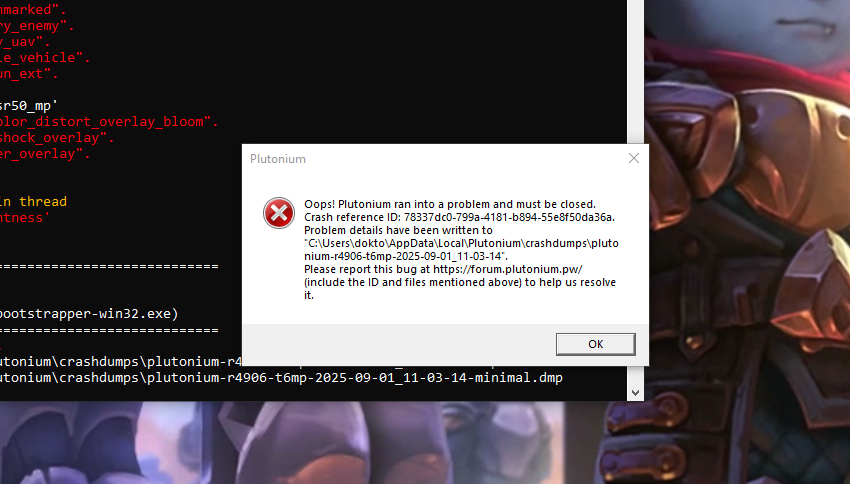
    @DirkRockface ive the same error like him here [image: 1769629368793-51937393-070b-4ce8-8830-7dfd9b2414df-image.png]
  • I cant install the launcher

    4
    1
    0 Votes
    4 Posts
    412 Views
    thanks for the reply! I tried that, i installed the runtime, restarted my pc, it didn't work, so i was like ok sure lemme check, i even repaired the installation and it didn't work, thanks for the reply tho!