Skip to content

BO1 Client Support

Request support for the Plutonium T5 client, please wait at-least 1 day for a reply, it can get busy. The community is free to try to help in any thread.

1.9k Topics 5.6k Posts
  • Cannot join ongoing game BO1 Solo EE Mod

    2
    0 Votes
    2 Posts
    129 Views
    Start a private match instead of solo.
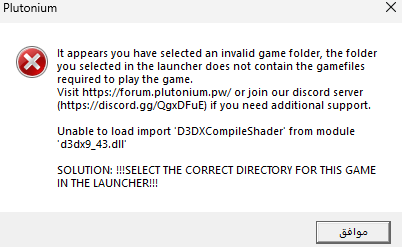
  • anyone know how to fix this error?

    2
    1
    0 Votes
    2 Posts
    228 Views
    Is your game files from steam? You could try verify your game files through steam.
  • Zombies stuck at "Loading game session"

    1
    0 Votes
    1 Posts
    153 Views
    No one has replied
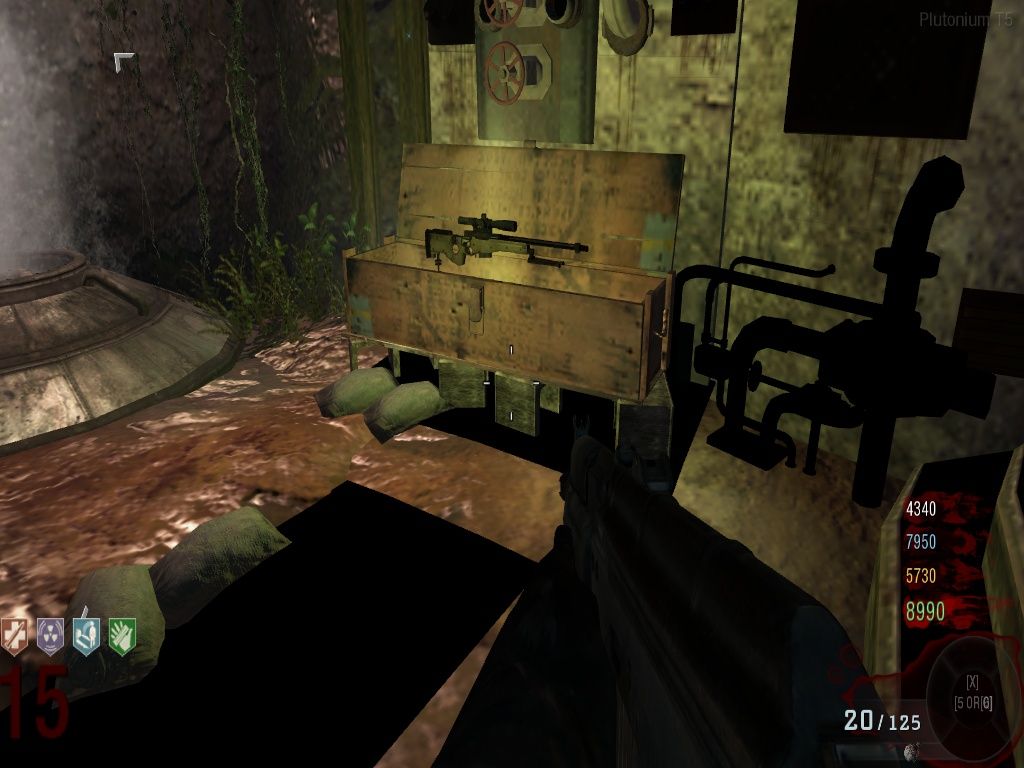
  • Some textures are BLACK!

    5
    8
    0 Votes
    5 Posts
    870 Views
    @Hadi77KSA Okay, THANKS for help! I think this closes the discussion.
  • t5 zombies keeps crashing

    1
    0 Votes
    1 Posts
    127 Views
    No one has replied
  • i get only a blackscreen and a red 0 when trying to play zombies

    4
    0 Votes
    4 Posts
    275 Views
    [image: 1748990765709-screenshot-2025-06-03-174535.png]
  • graphic content

    4
    0 Votes
    4 Posts
    612 Views
    thanks
  • 0 Votes
    3 Posts
    822 Views
    @DirkRockface how is this done???
  • Call of duty black ops Moon

    Moved
    1
    0 Votes
    1 Posts
    156 Views
    No one has replied
  • Call of the dead easter egg reward

    2
    0 Votes
    2 Posts
    517 Views
    The completion saves in a dvar on solo, and as a stat in CO-OP. Those are also where it gets checked from. To check if the completion counted, you could create a file, name it sq_completion_check.gsc (make sure you have file name extensions enabled), paste the following snippet of code into it: init() { thread completionCheck( "COTD" ); } completionCheck( id ) { common_scripts\utility::flag_wait( "all_players_spawned" ); waittillframeend; msg = "sq_completion_check " + id + ": " + maps\_zombiemode::is_sidequest_previously_completed( id ); iPrintLn( msg ); printf( msg ); msg = "sq_completion_check " + id + " solo: " + ( isdefined( level.zombie_sidequest_solo_collectible[id] ) && HasCollectible( level.zombie_sidequest_solo_collectible[id] ) ); iPrintLn( msg ); printf( msg ); if ( !isdefined( level.zombie_sidequest_coop_stat[id] ) ) { return; } for ( i = 0; i < level.players.size; i++ ) { msg = "sq_completion_check " + id + " " + level.zombie_sidequest_coop_stat[id] + " " + level.players[i].playername + ": " + level.players[i] maps\_zombiemode::zombieStatGet( level.zombie_sidequest_coop_stat[id] ); iPrintLn( msg ); printf( msg ); wait 1; } } save the file, press Win+R, paste this path %localappdata%\Plutonium\storage\t5\scripts\sp\zom, place the file into the directory that opened, start a CotD match, then observe the output. You should see an output similar to this: sq_completion_check COTD: 1 sq_completion_check COTD solo: 1 sq_completion_check COTD ZOMBIE_COAST_EGG_COOP player_name: 1 The 1st line determines if the Easter Egg of CotD in this match is considered as previously completed. The 2nd line displays the result of what’s checked for the Easter Egg to be considered as previously completed in solo. Similarly, the 3rd line displays the result of what’s checked for the Easter Egg to be considered as previously completed in CO-OP. You’ll want the number to show as 1 at the end of the 1st line and also at the end of the 2nd line if you’re playing solo and/or at the end of the 3rd line if you’re playing co-op. Otherwise, the completion didn’t save or you didn’t fully complete the Easter Egg. Note that the end of the CotD Easter Egg is when the Wunderwaffe power-up spawns in after knifing the sparking fuse.

  • Waiting for other players

    1
    0 Votes
    1 Posts
    125 Views
    No one has replied
  • l need a new version for my [t5 full game lan mode]

    bo1
    3
    1
    0 Votes
    3 Posts
    562 Views
    @DirkRockface ok my bad ,I will
  • trying to add a third

    1
    0 Votes
    1 Posts
    90 Views
    No one has replied
  • Dumb question about custom maps and mods

    4
    0 Votes
    4 Posts
    499 Views
    hi u can do tap to console button and type this| cl_allowDownload 1 |and u can download mods from server in game (slava Ukraine) if i help u with this guide
  • BO1 crash dumps

    2
    0 Votes
    2 Posts
    187 Views
    Try the suggestion from my comment here: https://forum.plutonium.pw/topic/28379/please-help-error-bo1-crash-when-lanching/14
  • Help me

    3
    1
    0 Votes
    3 Posts
    499 Views
    @Real_Chazaro Piracy is no longer supported. Buy the game on steam.
  • mp/playeranimtypes.txt error

    3
    1
    0 Votes
    3 Posts
    202 Views
    How do i solve this error?
  • Cant join to game just crashes when i try to start it

    2
    1
    0 Votes
    2 Posts
    183 Views
    Try the suggestion from my comment here: https://forum.plutonium.pw/topic/28379/please-help-error-bo1-crash-when-lanching/14
  • Black Ops 1 problem

    Moved
    2
    1 Votes
    2 Posts
    242 Views
    send error message. Also it could be that you set the directory to the exe file than the full file.
  • T5 Config Resetting.

    9
    0 Votes
    9 Posts
    891 Views
    @Hadi77KSA yeah ive tried that too, no luck. this has to be brought to the admins cause i have no clue what could have happened. im lucky its not a detrimental thing where i cant play at all, where this is just a very major inconvenience. i appreciate your help, but i think this is getting us nowhere. its clearly something wrong with the game. thank you for trying to help though, my gratitude is immesurable. all settings reset to defaults, but two settins stay different, 16:9 ratio, 75Hz refresh, and 1920x1080. everything gets reset, including console settings