Skip to content
  • 0 Unread 0
  • Recent
  • Tags
  • Popular
  • Users
  • Groups
  • Donate
Collapse

Plutonium

  1. Home
  2. BO1 Client Support
  3. I dont have sound in my game
I dont have sound in my game

Scheduled Pinned Locked Moved BO1 Client Support
18 Posts 3 Posters 3.1k Views 1 Watching
  • Oldest to Newest
  • Newest to Oldest
  • Most Votes
Reply
  • Reply as topic
Log in to reply
This topic has been deleted. Only users with topic management privileges can see it.
  • kuh_ruhpt Offline
    kuh_ruhpt Offline
    kuh_ruhpt
    wrote on last edited by
    #5

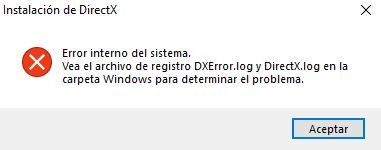
    I am assuming Moonityy_ is getting the same issue I am having when trying to install DirectX. I am running on Windows 11 and downloading the game from steam I get this issue:
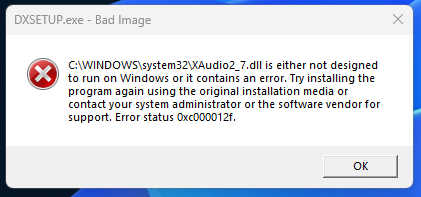
    45d7d098-4555-4230-8a06-5e527705e631-image.png

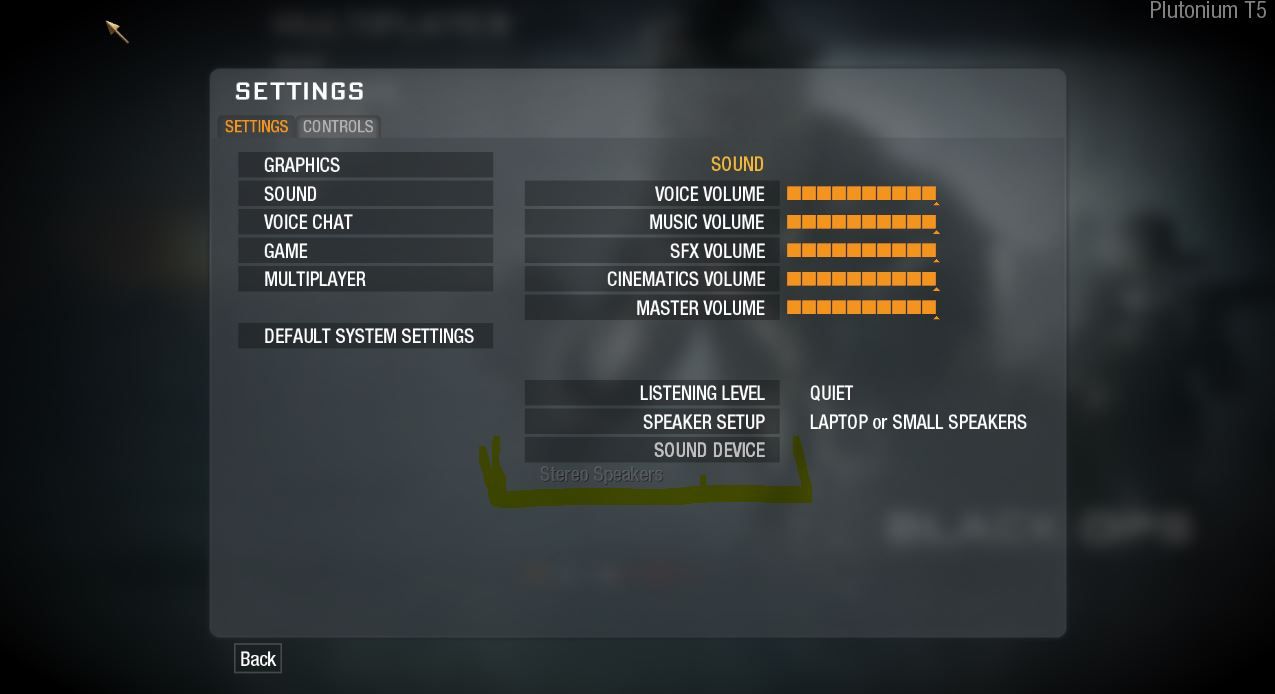
    When going in-game there is no sound and I cannot set my sound device either like they mentioned above. Not sure if this issue is related and connected only to Win 11 or not?

    Moonityy_ 1 Reply Last reply
    0
    • Resxt Resxt

      Moonityy_ try setting your used audio device as the default device in Windows control panel
      Also if you can't even install DirectX this is a problem. Can you show what it says?

      Moonityy_ Offline
      Moonityy_ Offline
      Moonityy_
      wrote on last edited by
      #6

      Resxt How can I do that?
      And yes, here is a screenshot of the error:Captura.JPG

      1 Reply Last reply
      0
      • Resxt Offline
        Resxt Offline
        Resxt
        Plutonium Staff
        wrote on last edited by
        #7

        If you can't install DirectX from Microsoft's website then something is really wrong, maybe corrupted system

        kuh_ruhpt and Moonityy_ I would recommend doing this to try to clean your system
        Open the start menu and search for "cmd"
        Run cmd as admin
        Copy and paste (right click) each command below one by one in the cmd and press enter after each command
        Only put the next command when the one you ran is finished.

        DISM /Online /Cleanup-Image /CheckHealth
        DISM /Online /Cleanup-Image /ScanHealth
        DISM /Online /Cleanup-Image /RestoreHealth
        sfc /scannow
        

        Once it's done restart your PC


        Moonityy_ this is in Windows control panel you simply right click the audio device you want and click set as defaut device
        Control Panel > Hardware and Sound > Sound
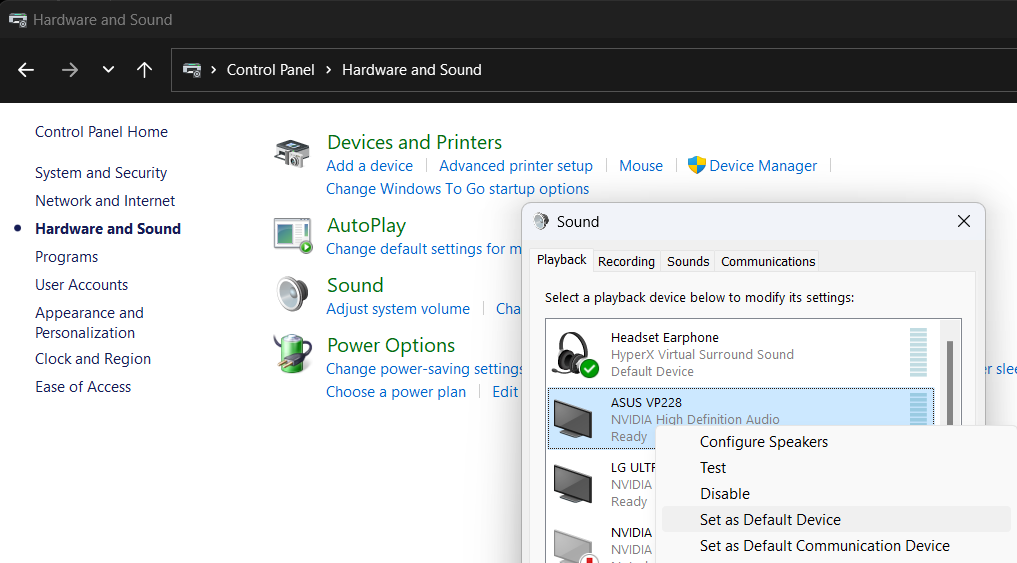
        cdf5e997-d839-460f-b183-6193a63e4ac7-image.png

        Moonityy_ 1 Reply Last reply
        0
        • kuh_ruhpt kuh_ruhpt

          I am assuming Moonityy_ is getting the same issue I am having when trying to install DirectX. I am running on Windows 11 and downloading the game from steam I get this issue:

          45d7d098-4555-4230-8a06-5e527705e631-image.png

          When going in-game there is no sound and I cannot set my sound device either like they mentioned above. Not sure if this issue is related and connected only to Win 11 or not?

          Moonityy_ Offline
          Moonityy_ Offline
          Moonityy_
          wrote on last edited by
          #8

          kuh_ruhpt If it helps you, im using win 10, so maybe it is not because you are using win 11

          1 Reply Last reply
          0
          • Resxt Offline
            Resxt Offline
            Resxt
            Plutonium Staff
            wrote on last edited by
            #9

            Windows 10 and 11 are stable OS and Plutonium works perfectly fine with both
            Unless you have an outdated OS it's not the issue
            DirectX is a Microsoft product so it wouldn't make sense that it would have issues with Microsoft OS especially for such a long time

            1 Reply Last reply
            0
            • Resxt Resxt

              If you can't install DirectX from Microsoft's website then something is really wrong, maybe corrupted system

              kuh_ruhpt and Moonityy_ I would recommend doing this to try to clean your system
              Open the start menu and search for "cmd"
              Run cmd as admin
              Copy and paste (right click) each command below one by one in the cmd and press enter after each command
              Only put the next command when the one you ran is finished.

              DISM /Online /Cleanup-Image /CheckHealth
              DISM /Online /Cleanup-Image /ScanHealth
              DISM /Online /Cleanup-Image /RestoreHealth
              sfc /scannow
              

              Once it's done restart your PC


              Moonityy_ this is in Windows control panel you simply right click the audio device you want and click set as defaut device
              Control Panel > Hardware and Sound > Sound

              cdf5e997-d839-460f-b183-6193a63e4ac7-image.png

              Moonityy_ Offline
              Moonityy_ Offline
              Moonityy_
              wrote on last edited by Moonityy_
              #10

              Resxt Okay, im doing the cmd thing, what is it for exactly?
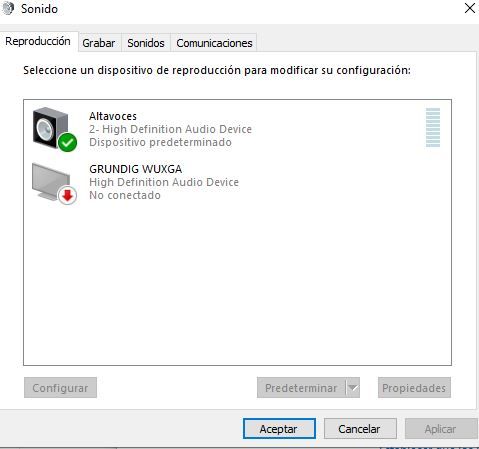
              I checked the windows control panel and the sound device but i dont have nothing more than the computer's speakersCaptura.JPG
              Resxt 1 Reply Last reply
              0
              • Moonityy_ Moonityy_

                Resxt Okay, im doing the cmd thing, what is it for exactly?
                I checked the windows control panel and the sound device but i dont have nothing more than the computer's speakersCaptura.JPG

                Resxt Offline
                Resxt Offline
                Resxt
                Plutonium Staff
                wrote on last edited by
                #11

                Moonityy_ the commands verify and repair corrupted system (Windows) files
                Not being able to install DirectX isn't normal

                Moonityy_ 1 Reply Last reply
                0
                • Resxt Resxt

                  Moonityy_ the commands verify and repair corrupted system (Windows) files
                  Not being able to install DirectX isn't normal

                  Moonityy_ Offline
                  Moonityy_ Offline
                  Moonityy_
                  wrote on last edited by
                  #12

                  Resxt okay, im trying it. After this, do I try to install DirectX again?

                  1 Reply Last reply
                  0
                  • kuh_ruhpt Offline
                    kuh_ruhpt Offline
                    kuh_ruhpt
                    wrote on last edited by
                    #13

                    Resxt I ran those commands but I got the following issue on the second command:

                    WindowsTerminal_jGhv3l5FQZ.png

                    The rest ran fine. Tried restarting but still same issue when attempting to install DX.

                    Moonityy_ 1 Reply Last reply
                    0
                    • kuh_ruhpt kuh_ruhpt

                      Resxt I ran those commands but I got the following issue on the second command:

                      WindowsTerminal_jGhv3l5FQZ.png

                      The rest ran fine. Tried restarting but still same issue when attempting to install DX.

                      Moonityy_ Offline
                      Moonityy_ Offline
                      Moonityy_
                      wrote on last edited by
                      #14

                      kuh_ruhpt i got the same error with DirectX but in my case everything ran out succesfully in the cmd, and it showed that everything was repaired succesfully, but im still cannot install DirectX because it still giving me the same error as before

                      kuh_ruhpt 1 Reply Last reply
                      0
                      • Moonityy_ Moonityy_

                        kuh_ruhpt i got the same error with DirectX but in my case everything ran out succesfully in the cmd, and it showed that everything was repaired succesfully, but im still cannot install DirectX because it still giving me the same error as before

                        kuh_ruhpt Offline
                        kuh_ruhpt Offline
                        kuh_ruhpt
                        wrote on last edited by
                        #15

                        Moonityy_ I have given up hope of having sound again xD my mate and I jammed but his sound worked fine but mine was gone. At least we still got to have fun.

                        Moonityy_ 1 Reply Last reply
                        0
                        • kuh_ruhpt kuh_ruhpt

                          Moonityy_ I have given up hope of having sound again xD my mate and I jammed but his sound worked fine but mine was gone. At least we still got to have fun.

                          Moonityy_ Offline
                          Moonityy_ Offline
                          Moonityy_
                          wrote on last edited by
                          #16

                          kuh_ruhpt I think im going to give up too, i cant find anything to fix this TT.
                          btw, glad you got to have fun!

                          1 Reply Last reply
                          0
                          • Resxt Offline
                            Resxt Offline
                            Resxt
                            Plutonium Staff
                            wrote on last edited by
                            #17

                            I can't really help you more than that if you can't even install DirectX, something is wrong on your system
                            Moonityy_ 1 Reply Last reply
                            0
                            • Resxt Resxt

                              I can't really help you more than that if you can't even install DirectX, something is wrong on your system

                              Moonityy_ Offline
                              Moonityy_ Offline
                              Moonityy_
                              wrote on last edited by
                              #18

                              Resxt its okay! Thank you for your help! ❤

                              1 Reply Last reply
                              0

                              Hello! It looks like you're interested in this conversation, but you don't have an account yet.

                              Getting fed up of having to scroll through the same posts each visit? When you register for an account, you'll always come back to exactly where you were before, and choose to be notified of new replies (either via email, or push notification). You'll also be able to save bookmarks and upvote posts to show your appreciation to other community members.

                              With your input, this post could be even better 💗

                              Register Login
                              Reply
                              • Reply as topic
                              Log in to reply
                              • Oldest to Newest
                              • Newest to Oldest
                              • Most Votes


                              • Login

                              • Don't have an account? Register

                              • Login or register to search.
                              • First post
                                Last post
                              0
                              • Unread 0
                              • Recent
                              • Tags
                              • Popular
                              • Users
                              • Groups
                              • Donate

