BO2 crashes when I open the game
-
When I run BO2 the game starts then stops responding. Can't upload dmp file because it's too large. Can a staff member message me on discord and help me fix this issue? I just redownloaded the new launcher and that didn't help either. My Discord is Wanny#6220
-
When I run BO2 the game starts then stops responding. Can't upload dmp file because it's too large. Can a staff member message me on discord and help me fix this issue? I just redownloaded the new launcher and that didn't help either. My Discord is Wanny#6220
-
Just looked at the cmd prompt for the error and it was a plutonium bootstrapper problem. Hope that helps as well. Not sure what to do still.
Wannyyy Upload the dump file to google drive. Here's some fixes for common issues:
- playing pluto in virtual machines doesn't work incase you're using one
- make sure you are using windows 10 version 1607 or later
- try closing steam and removing steam_api from your game folder
- try closing all programs that are running in the background (especially steam, msi afterburner and rivatuner if you have them)
- try excluding pluto from scanning in your av software: https://plutonium.pw/docs/antivirus/#how-do-i-fix-this-windows-defender
- update your graphics drivers
- if you have a vr headset plugged in unplug it
- verify the integrity of your system files:
- open the start menu and search for "cmd"
- run cmd as admin
- execute the following command
dism /online /cleanup-image /restorehealth- after dism has finished repairing your system restart your pc
-
Wannyyy Upload the dump file to google drive. Here's some fixes for common issues:
- playing pluto in virtual machines doesn't work incase you're using one
- make sure you are using windows 10 version 1607 or later
- try closing steam and removing steam_api from your game folder
- try closing all programs that are running in the background (especially steam, msi afterburner and rivatuner if you have them)
- try excluding pluto from scanning in your av software: https://plutonium.pw/docs/antivirus/#how-do-i-fix-this-windows-defender
- update your graphics drivers
- if you have a vr headset plugged in unplug it
- verify the integrity of your system files:
- open the start menu and search for "cmd"
- run cmd as admin
- execute the following command
dism /online /cleanup-image /restorehealth- after dism has finished repairing your system restart your pc
-
Wannyyy Upload the dump file to google drive. Here's some fixes for common issues:
- playing pluto in virtual machines doesn't work incase you're using one
- make sure you are using windows 10 version 1607 or later
- try closing steam and removing steam_api from your game folder
- try closing all programs that are running in the background (especially steam, msi afterburner and rivatuner if you have them)
- try excluding pluto from scanning in your av software: https://plutonium.pw/docs/antivirus/#how-do-i-fix-this-windows-defender
- update your graphics drivers
- if you have a vr headset plugged in unplug it
- verify the integrity of your system files:
- open the start menu and search for "cmd"
- run cmd as admin
- execute the following command
dism /online /cleanup-image /restorehealth- after dism has finished repairing your system restart your pc
-
Wannyyy need a password to download the file. don't worry about virtual machines if you just have a pc running windows, virtual machine would be for example you running a virtual installation of windows on top of mac os or linux.
-
Seems like that file is damaged.
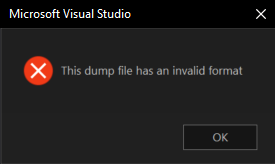
Anyways RektInator (or any other dev) will have to take a look at it.
-
The error code 0xC0000005 (Access violation) could be caused by a lot of reasons like: damaged windows installation/old version or corrupted kernel driver/missing or corrupted dll. If this error occur with any other application I suggest you to run a scan for the system by opening command prompt then execute: sfc /scannow
-
The error code 0xC0000005 (Access violation) could be caused by a lot of reasons like: damaged windows installation/old version or corrupted kernel driver/missing or corrupted dll. If this error occur with any other application I suggest you to run a scan for the system by opening command prompt then execute: sfc /scannow
-
When I run BO2 the game starts then stops responding. Can't upload dmp file because it's too large. Can a staff member message me on discord and help me fix this issue? I just redownloaded the new launcher and that didn't help either. My Discord is Wanny#6220
-
Wannyyy I haven't gotten any responses and I still don't know how to fix it can someone help me?




Hello! It looks like you're interested in this conversation, but you don't have an account yet.
Getting fed up of having to scroll through the same posts each visit? When you register for an account, you'll always come back to exactly where you were before, and choose to be notified of new replies (either via email, or push notification). You'll also be able to save bookmarks and upvote posts to show your appreciation to other community members.
With your input, this post could be even better 💗
Register Login