[MP/ZM] Black Ops II Mapvote


-
Hey,
I've been working on a configurable and customizable mapvote script for the past weeks and decided that it's good enough for a release.
It only works on dedicated servers but can be debugged in custom games.
Both multiplayer and zombies modes are supported.In multiplayer:
At the end of the killcam of each game it will display up to 12 randomized voting elements (maps + modes) to allow players to vote for the map and/or mode they want.
This can be used in various ways, even if you only rotate a few maps and one mode for exampleIn zombies:
At the end of the losing screen of each game it will display up to 12 randomized maps that each have a customizable name and custom CFG
Feel free to request any feature/improvement you would like to see, to give your feedback and to report any bug/issue you encounter.
Thanks to LKurama for helping me test the script!
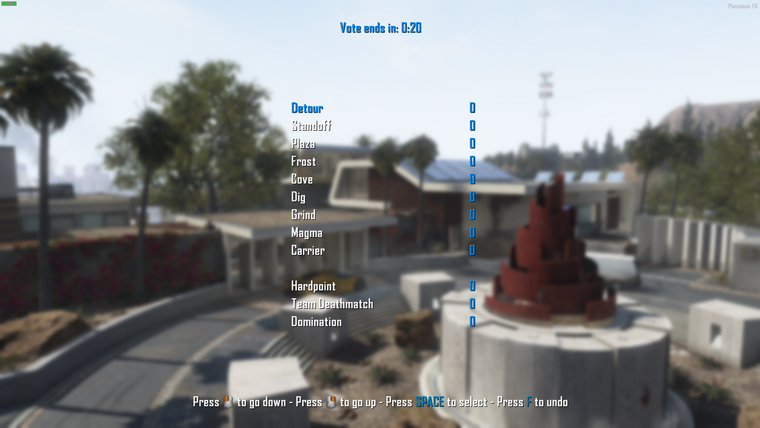
Multiplayer mode. Mouse and keyboard input. Changed settings: limits modes: 3, horizontal spacing: 100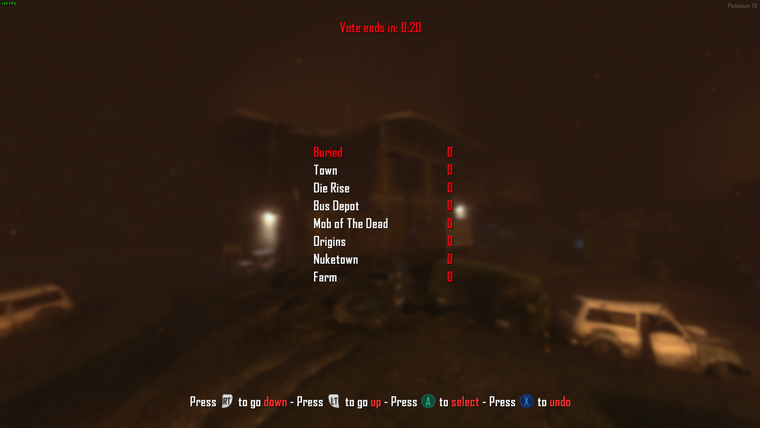
Zombies mode. Controller input. Changed settings: red colors, accent mode: max
All information and downloads on my Github repository
For any information regarding how to download and install scripts go to the root of the repository
This mapvote is also available on other games.
If you're interested just click on the icons below


-
thank you very much..very good..!
 .. it only has that problem that returns the selected item to the top .. and you have to press up again to get it to go down again .. with many people inside the server I did not try it .. just now they are entering . if I have a problem when the server is with several people... tell me about the problem here... very cool... congratulations...!! I wanted something like this...with more maps to vote...and without images of the maps...thank you very much!
 -
thank you very much..very good..!
.. it only has that problem that returns the selected item to the top .. and you have to press up again to get it to go down again .. with many people inside the server I did not try it .. just now they are entering . if I have a problem when the server is with several people... tell me about the problem here... very cool... congratulations...!! I wanted something like this...with more maps to vote...and without images of the maps...thank you very much! -
thank you very much..very good..!
.. it only has that problem that returns the selected item to the top .. and you have to press up again to get it to go down again .. with many people inside the server I did not try it .. just now they are entering . if I have a problem when the server is with several people... tell me about the problem here... very cool... congratulations...!! I wanted something like this...with more maps to vote...and without images of the maps...thank you very much!@CamouflageLvCat I forgot to mention it on the Github and I will add it since you reminded me.
This happens because your right click is set to toggle ads. The way the game treats toggle ads by default is that you have to right click once to aim and right click again to stop aiming right?
For this reason you have to right click twice to register an aiming event in GSC. To make it less annoying I changed that behavior a bit by making it so that when you right click with toggle ads you stay in aiming mode and you have to right click again to stop it.
So basically instead of double clicking all the time to go up by one you simply right click once and right click again when you want it to stop.
I never saw a script that had a right click working normally with toggle ads so I think the way I did it is the best way to do it.
If you change your right click to ads instead of toggle ads you will see it works normally
-
@CamouflageLvCat I forgot to mention it on the Github and I will add it since you reminded me.
This happens because your right click is set to toggle ads. The way the game treats toggle ads by default is that you have to right click once to aim and right click again to stop aiming right?
For this reason you have to right click twice to register an aiming event in GSC. To make it less annoying I changed that behavior a bit by making it so that when you right click with toggle ads you stay in aiming mode and you have to right click again to stop it.
So basically instead of double clicking all the time to go up by one you simply right click once and right click again when you want it to stop.
I never saw a script that had a right click working normally with toggle ads so I think the way I did it is the best way to do it.
If you change your right click to ads instead of toggle ads you will see it works normally
Resxt
yes I understand... I had to use it a few times to realize how it worked... but I had reduced the time to 15 seconds... it didn't give me much time to see how it worked... so for now I'll leave it at 20, 25 seconds until people understand how it works..then i'll narrow it down..great job..! I thank and on behalf of all the players who will give it a lot of use! -
Resxt
yes I understand... I had to use it a few times to realize how it worked... but I had reduced the time to 15 seconds... it didn't give me much time to see how it worked... so for now I'll leave it at 20, 25 seconds until people understand how it works..then i'll narrow it down..great job..! I thank and on behalf of all the players who will give it a lot of use!@CamouflageLvCat adding an option for each player to choose between right click twice or right click to start and stop scrolling would be too hard + saving user preference between each games is not really in this scope and would add complexity so for this reason it will stay like that since I don't think letting server owners choose how their players right click work makes sense
-
@CamouflageLvCat adding an option for each player to choose between right click twice or right click to start and stop scrolling would be too hard + saving user preference between each games is not really in this scope and would add complexity so for this reason it will stay like that since I don't think letting server owners choose how their players right click work makes sense
-
Resxt
lol .. delete that comment for that ... I've been testing it for a few hours with the server full and it doesn't give any errors or problems .. very cool ..! thanks for sharing !!!

-
@CamouflageLvCat great I'm glad it's useful for you and works great

Don't hesitate to keep a look at the Github for any update (and for the zombies support if you're interested)
-
@CamouflageLvCat great I'm glad it's useful for you and works great
Don't hesitate to keep a look at the Github for any update (and for the zombies support if you're interested)
-
Mapvote 2.0.0 is out
Zombies mode is now supported
You can set a display name, a map name and a cfg name for each mapYou can now define maps and/or modes limits to have a precise amount of maps and/or modes.
The max limit is now 12 but can be lowered using a dvar.
If you don't set a limit it will automatically adjust the maps and modes amountWhen you only have one map or one mode it's now hidden to provide a better/more logical user experience (it will then always rotate to your one map or mode without asking players to unnecessarily vote for it)
Fixed the menu centering calculation, it's now really centered (it was slightly off before)
-
Mapvote 2.0.0 is out
Zombies mode is now supported
You can set a display name, a map name and a cfg name for each mapYou can now define maps and/or modes limits to have a precise amount of maps and/or modes.
The max limit is now 12 but can be lowered using a dvar.
If you don't set a limit it will automatically adjust the maps and modes amountWhen you only have one map or one mode it's now hidden to provide a better/more logical user experience (it will then always rotate to your one map or mode without asking players to unnecessarily vote for it)
Fixed the menu centering calculation, it's now really centered (it was slightly off before)
-
Hey,
I've been working on a configurable and customizable mapvote script for the past weeks and decided that it's good enough for a release.
It only works on dedicated servers but can be debugged in custom games.
Both multiplayer and zombies modes are supported.In multiplayer:
At the end of the killcam of each game it will display up to 12 randomized voting elements (maps + modes) to allow players to vote for the map and/or mode they want.
This can be used in various ways, even if you only rotate a few maps and one mode for exampleIn zombies:
At the end of the losing screen of each game it will display up to 12 randomized maps that each have a customizable name and custom CFG
Feel free to request any feature/improvement you would like to see, to give your feedback and to report any bug/issue you encounter.
Thanks to LKurama for helping me test the script!
Multiplayer mode. Mouse and keyboard input. Changed settings: limits modes: 3, horizontal spacing: 100
Zombies mode. Controller input. Changed settings: red colors, accent mode: max
All information and downloads on my Github repository
For any information regarding how to download and install scripts go to the root of the repository
This mapvote is also available on other games.
If you're interested just click on the icons belowResxt
hello Resxt .. a question. there will be no way to adapt this mapvote for the "MW2" of "Xlabs" .. it would be great .. I also have a server that several people join every day .. and it would be very good if we all could vote on the maps and the mode of I play on the server.. I've been looking for a mapvote for the server for several days and I can't find anything.. only one that I can't make it work correctly and it's pretty bad. -
Resxt
hello Resxt .. a question. there will be no way to adapt this mapvote for the "MW2" of "Xlabs" .. it would be great .. I also have a server that several people join every day .. and it would be very good if we all could vote on the maps and the mode of I play on the server.. I've been looking for a mapvote for the server for several days and I can't find anything.. only one that I can't make it work correctly and it's pretty bad.@Snoopy__ yes it's possible. I already tried to get it to work on MW3 and MW2. The most annoying/complex part is finding how to replace the post killcam event and on MW2 it looks quite annoying.
I might do it in the future but it won't be soon
-
@Snoopy__ yes it's possible. I already tried to get it to work on MW3 and MW2. The most annoying/complex part is finding how to replace the post killcam event and on MW2 it looks quite annoying.
I might do it in the future but it won't be soon
-
does it work on custom matches in multiplayer?
AutoTopGR both this topic and the Github repository start with "this only works for dedicated servers" so no.
Sadly the way it rotates map doesn't work in custom games.
I could try to look into supporting both custom games and dedicated servers later but I can't promise anything, it looks like it's simply not possible due to how custom games work -
AutoTopGR both this topic and the Github repository start with "this only works for dedicated servers" so no.
Sadly the way it rotates map doesn't work in custom games.
I could try to look into supporting both custom games and dedicated servers later but I can't promise anything, it looks like it's simply not possible due to how custom games workResxt You could try using the map() function to change the map in private matches but I think that only works in multiplayer.




Hello! It looks like you're interested in this conversation, but you don't have an account yet.
Getting fed up of having to scroll through the same posts each visit? When you register for an account, you'll always come back to exactly where you were before, and choose to be notified of new replies (either via email, or push notification). You'll also be able to save bookmarks and upvote posts to show your appreciation to other community members.
With your input, this post could be even better 💗
Register Login