Skip to content
  • 0 Unread 0
  • Recent
  • Tags
  • Popular
  • Users
  • Groups
  • Donate
Collapse

Plutonium

  1. Home
  2. Launcher Support
  3. Can't Login

Can't Login

Scheduled Pinned Locked Moved Launcher Support
13 Posts 9 Posters 1.9k Views 2 Watching
  • Oldest to Newest
  • Newest to Oldest
  • Most Votes
Reply
  • Reply as topic
Log in to reply
This topic has been deleted. Only users with topic management privileges can see it.
  • Domgamez2011 Offline
    Domgamez2011 Offline
    Domgamez2011
    wrote on last edited by
    #1

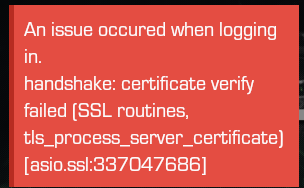
    Idk why But I can't login, It shows ac35df26-e43d-40d1-b669-826618257da2-Plutoinum help.png

    kxrimii Duffman43 2 Replies Last reply
    0
    • keloiskelo Offline
      keloiskelo Offline
      keloiskelo
      wrote on last edited by
      #2

      yea it gives me the same message how to fix??

      1 Reply Last reply
      0
      • aceatron99 Offline
        aceatron99 Offline
        aceatron99
        wrote on last edited by
        #3

        Did you update Plutonium?

        Domgamez2011 1 Reply Last reply
        0
        • aceatron99 aceatron99

          Did you update Plutonium?

          Domgamez2011 Offline
          Domgamez2011 Offline
          Domgamez2011
          wrote on last edited by
          #4

          @xX_joz_Xx How?

          1 Reply Last reply
          0
          • Domgamez2011 Domgamez2011

            Idk why But I can't login, It shows ac35df26-e43d-40d1-b669-826618257da2-Plutoinum help.png

            kxrimii Offline
            kxrimii Offline
            kxrimii
            wrote on last edited by
            #5

            Domgamez2011 i also got the same error. did you manage to fix it?

            Domgamez2011 1 Reply Last reply
            0
            • kxrimii kxrimii

              Domgamez2011 i also got the same error. did you manage to fix it?

              Domgamez2011 Offline
              Domgamez2011 Offline
              Domgamez2011
              wrote on last edited by Domgamez2011
              #6

              kxrimii Nah, I'm waiting to see if a mod reply's.

              1 Reply Last reply
              0
              • itRockyplayz Offline
                itRockyplayz Offline
                itRockyplayz
                wrote on last edited by
                #7

                someone said that a vpn works for them [proton vpn] but it does not work for me see if it does for you

                1 Reply Last reply
                0
                • beenaff4 Offline
                  beenaff4 Offline
                  beenaff4
                  wrote on last edited by
                  #8

                  it gives me the same thing

                  1 Reply Last reply
                  0
                  • Hadi77KSA Offline
                    Hadi77KSA Offline
                    Hadi77KSA
                    Contributor
                    wrote on last edited by
                    #9

                    Hadi77KSA said in I cant login on the plutonium app:

                    The error "handshake: certificate verify failed" is caused by not being on the latest Plutonium version, as mentioned in the common issues post https://forum.plutonium.pw/topic/6832/common-launcher-issues-solutions
                    This can happen if you pin the Plutonium launcher while it’s running. To fix this and prevent it from happening again, the following guide suggests pinning plutonium.exe while it’s not running: https://plutonium.pw/docs/update/#how-to-update-plutonium-mod

                    Domgamez2011 1 Reply Last reply
                    0
                    • Hadi77KSA Hadi77KSA

                      Hadi77KSA said in I cant login on the plutonium app:

                      The error "handshake: certificate verify failed" is caused by not being on the latest Plutonium version, as mentioned in the common issues post https://forum.plutonium.pw/topic/6832/common-launcher-issues-solutions
                      This can happen if you pin the Plutonium launcher while it’s running. To fix this and prevent it from happening again, the following guide suggests pinning plutonium.exe while it’s not running: https://plutonium.pw/docs/update/#how-to-update-plutonium-mod

                      Domgamez2011 Offline
                      Domgamez2011 Offline
                      Domgamez2011
                      wrote on last edited by
                      #10

                      Hadi77KSA Still dosen't work that way

                      Hadi77KSA 1 Reply Last reply
                      0
                      • Domgamez2011 Domgamez2011

                        Idk why But I can't login, It shows ac35df26-e43d-40d1-b669-826618257da2-Plutoinum help.png

                        Duffman43 Offline
                        Duffman43 Offline
                        Duffman43
                        wrote on last edited by
                        #11

                        Domgamez2011 if you have it pinned to your taskbar unpin it as this stops the launcher from updating. so step 1 unpin plutonium launcher from taskbar. step 2 load up the launcher through the application on your desktop. DONE

                        1 Reply Last reply
                        0
                        • Domgamez2011 Domgamez2011

                          Hadi77KSA Still dosen't work that way

                          Hadi77KSA Offline
                          Hadi77KSA Offline
                          Hadi77KSA
                          Contributor
                          wrote on last edited by
                          #12

                          Domgamez2011 as already mentioned, the error is caused by not being on the latest version. To check the version you’re on, press Win+R, paste this: %localappdata%\Plutonium\info.json, press OK, open with Notepad if asked what to open it with, and check the number after "revision"; then compare the number to the "revision" number found in: https://cdn.plutonium.pw/updater/prod/info.json
                          If you’re not on the latest version after performing what I’ve previously suggested, then either you’re somehow bypassing the updater, or you’re facing an error when running the updater. You can try downloading the plutonium.exe again from the installation guide and running it while using Proton VPN.

                          1 Reply Last reply
                          0
                          • i655i Offline
                            i655i Offline
                            i655i
                            wrote on last edited by
                            #13

                            Hadi77KSA Thanks a lot I just unpinned it from task bar then opened it as an administrator then it has updated by it self.

                            1 Reply Last reply
                            0

                            Hello! It looks like you're interested in this conversation, but you don't have an account yet.

                            Getting fed up of having to scroll through the same posts each visit? When you register for an account, you'll always come back to exactly where you were before, and choose to be notified of new replies (either via email, or push notification). You'll also be able to save bookmarks and upvote posts to show your appreciation to other community members.

                            With your input, this post could be even better 💗

                            Register Login
                            Reply
                            • Reply as topic
                            Log in to reply
                            • Oldest to Newest
                            • Newest to Oldest
                            • Most Votes


                            • Login

                            • Don't have an account? Register

                            • Login or register to search.
                            • First post
                              Last post
                            0
                            • Unread 0
                            • Recent
                            • Tags
                            • Popular
                            • Users
                            • Groups
                            • Donate