Skip to content
  • 0 Unread 0
  • Recent
  • Tags
  • Popular
  • Users
  • Groups
  • Donate
Collapse

Plutonium

  1. Home
  2. BO2 Client Support
  3. my game doesn't open

my game doesn't open

Scheduled Pinned Locked Moved BO2 Client Support
21 Posts 5 Posters 1.4k Views 1 Watching
  • Oldest to Newest
  • Newest to Oldest
  • Most Votes
Reply
  • Reply as topic
Log in to reply
This topic has been deleted. Only users with topic management privileges can see it.
  • marvink marvink

    Dss0 no not even an error message appears

    Dss0 Offline
    Dss0 Offline
    Dss0
    Plutonium Staff
    wrote on last edited by
    #6

    marvink possibly caused by your antivirus falsely detecting and blocking pluto: https://plutonium.pw/docs/antivirus/

    1 Reply Last reply
    1
    • marvink Offline
      marvink Offline
      marvink
      wrote on last edited by
      #7

      Captura de Tela (2).png

      after pressing play it loads and then this green message appears and nothing else

      Resxt 1 Reply Last reply
      0
      • marvink Offline
        marvink Offline
        marvink
        wrote on last edited by
        #8

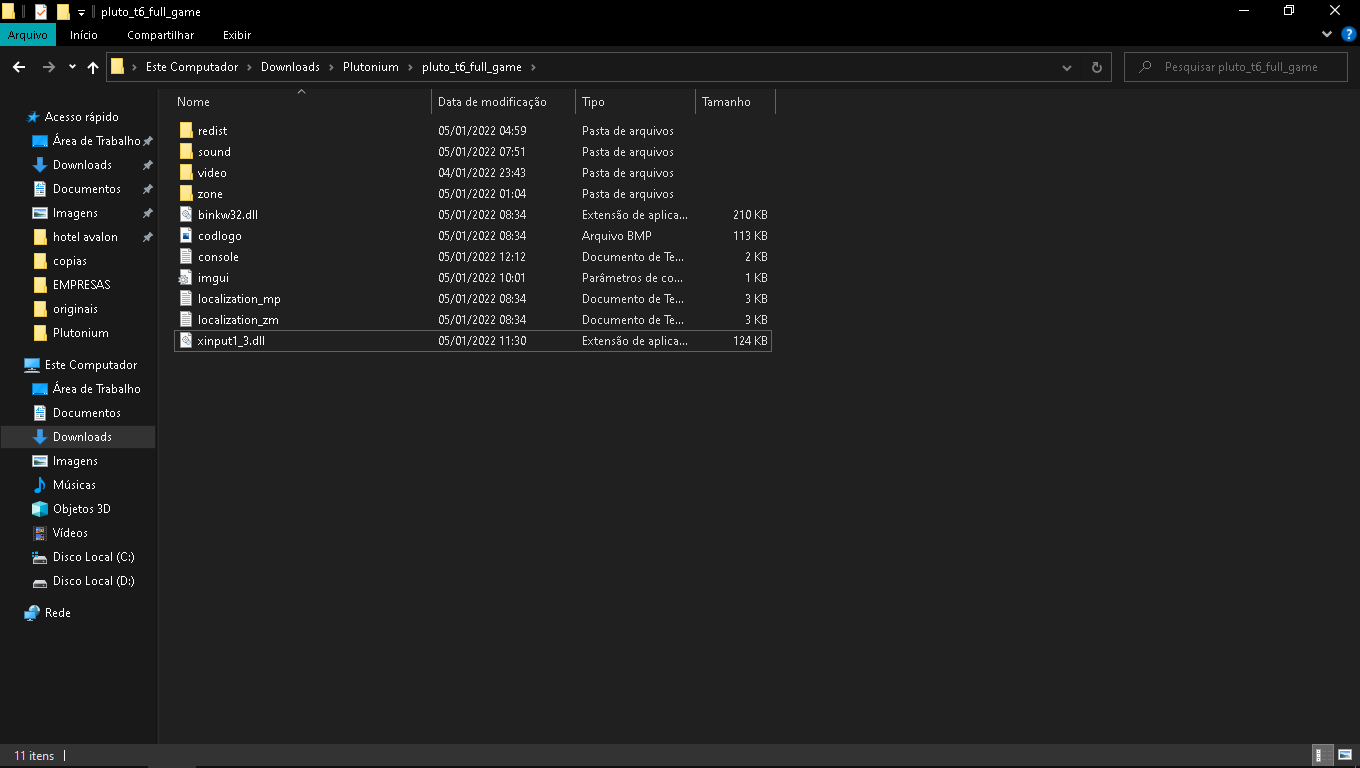
        Captura de Tela (1).png

        this is a picture of the game folder

        I already disabled the ant virus but it didn't work

        1 Reply Last reply
        0
        • marvink marvink

          Captura de Tela (2).png

          after pressing play it loads and then this green message appears and nothing else

          Resxt Offline
          Resxt Offline
          Resxt
          Plutonium Staff
          wrote on last edited by
          #9

          marvink looks like you're messing with the command prompt like clicking inside it or something don't touch anything when it starts. Command prompts stop their execution when you mess with them. Or if you click in it press enter several times to resume execution

          If that's not it maybe this can help https://plutonium.pw/docs/antivirus/

          marvink 1 Reply Last reply
          0
          • Resxt Resxt

            marvink looks like you're messing with the command prompt like clicking inside it or something don't touch anything when it starts. Command prompts stop their execution when you mess with them. Or if you click in it press enter several times to resume execution

            If that's not it maybe this can help https://plutonium.pw/docs/antivirus/

            marvink Offline
            marvink Offline
            marvink
            wrote on last edited by
            #10

            @lResxt does not work, I already disabled the antivirus and it didn't work either

            Resxt 1 Reply Last reply
            0
            • marvink marvink

              @lResxt does not work, I already disabled the antivirus and it didn't work either

              Resxt Offline
              Resxt Offline
              Resxt
              Plutonium Staff
              wrote on last edited by
              #11

              marvink What antivirus is it?

              1 Reply Last reply
              0
              • marvink Offline
                marvink Offline
                marvink
                wrote on last edited by
                #12

                Windows defender

                Dss0 1 Reply Last reply
                0
                • marvink marvink

                  Windows defender

                  Dss0 Offline
                  Dss0 Offline
                  Dss0
                  Plutonium Staff
                  wrote on last edited by
                  #13

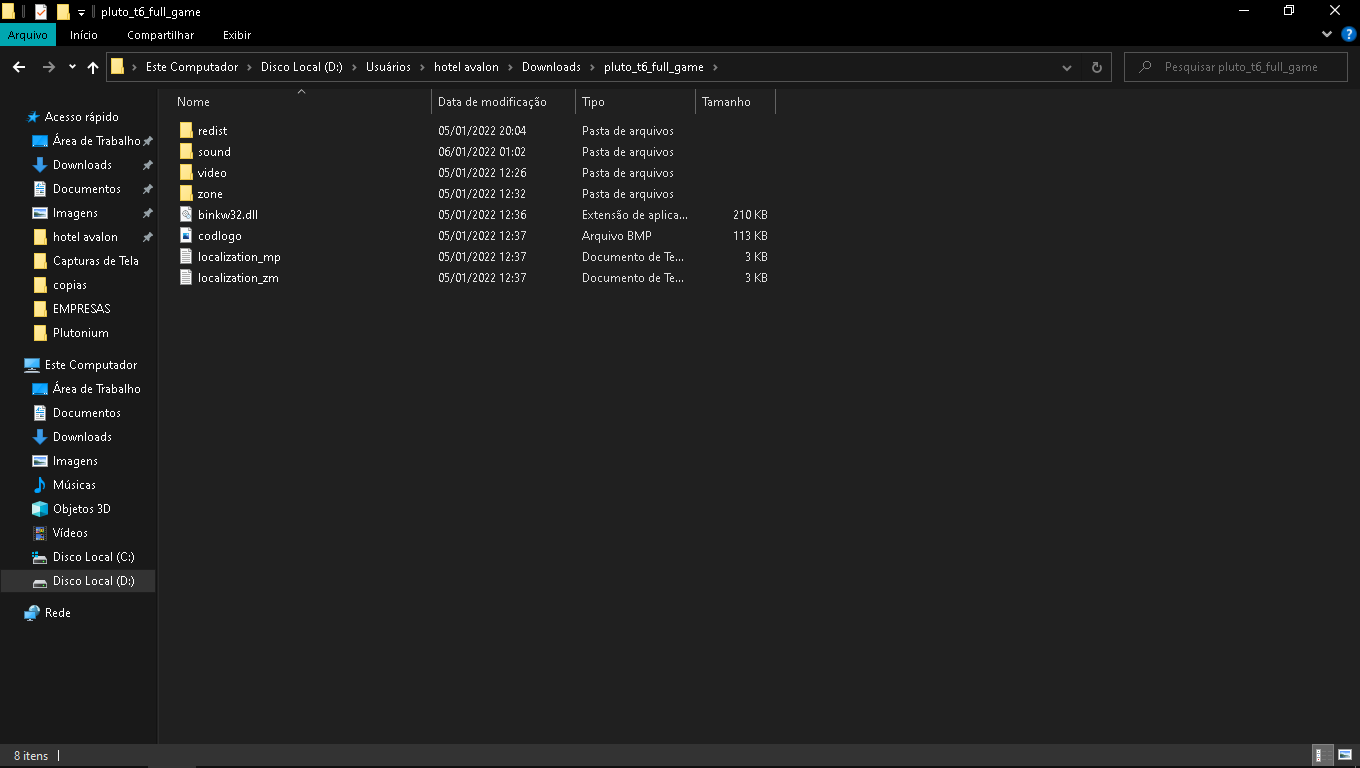
                  marvink what is this?

                  alt text

                  remove that file. If it tells you xinput1_3 is missing you need to install directx which is located in the "redist" folder in your game folder.

                  1 Reply Last reply
                  0
                  • marvink Offline
                    marvink Offline
                    marvink
                    wrote on last edited by
                    #14

                    I reinstalled the plutonium files and integrated directx and it didn't work

                    Captura de Tela (3).png

                    1 Reply Last reply
                    0
                    • JimmyPesto Offline
                      JimmyPesto Offline
                      JimmyPesto
                      wrote on last edited by
                      #15

                      I am having same issue... when I click play, plutonium just disappears... no error code, just shuts down completely

                      Dss0 1 Reply Last reply
                      0
                      • JimmyPesto JimmyPesto

                        I am having same issue... when I click play, plutonium just disappears... no error code, just shuts down completely

                        Dss0 Offline
                        Dss0 Offline
                        Dss0
                        Plutonium Staff
                        wrote on last edited by
                        #16

                        JimmyPesto so it's not the same error, his console stays open but the game doesn't load. Yours is most likely caused by av: https://plutonium.pw/docs/antivirus/

                        JimmyPesto 1 Reply Last reply
                        0
                        • Dss0 Dss0

                          JimmyPesto so it's not the same error, his console stays open but the game doesn't load. Yours is most likely caused by av: https://plutonium.pw/docs/antivirus/

                          JimmyPesto Offline
                          JimmyPesto Offline
                          JimmyPesto
                          wrote on last edited by
                          #17

                          Dss0 Thanks for the help, it was not antivirus... I downloaded and extracted files from that google drive link including directx and that seemed to solve it.

                          https://forum.plutonium.pw/topic/6832/common-launcher-issues-solutions
                          marvink 1 Reply Last reply
                          0
                          • JimmyPesto JimmyPesto

                            Dss0 Thanks for the help, it was not antivirus... I downloaded and extracted files from that google drive link including directx and that seemed to solve it.

                            https://forum.plutonium.pw/topic/6832/common-launcher-issues-solutions

                            marvink Offline
                            marvink Offline
                            marvink
                            wrote on last edited by
                            #18

                            JimmyPesto I will try the same

                            1 Reply Last reply
                            0
                            • marvink Offline
                              marvink Offline
                              marvink
                              wrote on last edited by
                              #19

                              I did and it didn't work

                              marvink 1 Reply Last reply
                              0
                              • marvink marvink

                                I did and it didn't work

                                marvink Offline
                                marvink Offline
                                marvink
                                wrote on last edited by
                                #20

                                Dss0 I managed to solve the error, a friend helped me and we managed to solve it

                                Dss0 1 Reply Last reply
                                0
                                • marvink marvink

                                  Dss0 I managed to solve the error, a friend helped me and we managed to solve it

                                  Dss0 Offline
                                  Dss0 Offline
                                  Dss0
                                  Plutonium Staff
                                  wrote on last edited by
                                  #21

                                  marvink what did you do?

                                  1 Reply Last reply
                                  0

                                  Hello! It looks like you're interested in this conversation, but you don't have an account yet.

                                  Getting fed up of having to scroll through the same posts each visit? When you register for an account, you'll always come back to exactly where you were before, and choose to be notified of new replies (either via email, or push notification). You'll also be able to save bookmarks and upvote posts to show your appreciation to other community members.

                                  With your input, this post could be even better 💗

                                  Register Login
                                  Reply
                                  • Reply as topic
                                  Log in to reply
                                  • Oldest to Newest
                                  • Newest to Oldest
                                  • Most Votes


                                  • 1
                                  • 2
                                  • Login

                                  • Don't have an account? Register

                                  • Login or register to search.
                                  • First post
                                    Last post
                                  0
                                  • Unread 0
                                  • Recent
                                  • Tags
                                  • Popular
                                  • Users
                                  • Groups
                                  • Donate