Skip to content
  • 0 Unread 0
  • Recent
  • Tags
  • Popular
  • Users
  • Groups
  • Donate
Collapse

Plutonium

  1. Home
  2. BO1 Server Hosting Support
  3. Missing Mule Kick?

Missing Mule Kick?

Scheduled Pinned Locked Moved BO1 Server Hosting Support
15 Posts 7 Posters 4.6k Views 3 Watching
  • Oldest to Newest
  • Newest to Oldest
  • Most Votes
Reply
  • Reply as topic
Log in to reply
This topic has been deleted. Only users with topic management privileges can see it.
  • bronzebean bronzebean

    There is an infinite amount of bugs on T5 zombies, especially for servers. It's not even worth spending your fucking time on.
    hindercanrun Offline
    hindercanrun Offline
    hindercanrun
    Contributor
    wrote on last edited by
    #3
    This post is deleted!
    1 Reply Last reply
    0
    • JordanTheDev JordanTheDev

      My server is missing Mule kick on kino is this a known bug or just an issue with my server? I know Kino got mule in a later update. But im not sure if its a me issue or a Pluto issue. Thanks.

      ljave018 Offline
      ljave018 Offline
      ljave018
      wrote on last edited by
      #4

      JordanTheDev some servers have Mule Kick, some don't. That's what always pisses me off honestly. Servers that do have Mule Kick either are fully vanilla or modified to have no perk limit.

      1 Reply Last reply
      0
      • RedxSkull Offline
        RedxSkull Offline
        RedxSkull
        wrote on last edited by
        #5

        Treyarch's stock script has Mule kick set to be enabled by default, but on a server sometimes will be disabled. Here is a quick GSC script to always keep it enabled. Custom scripts are located at
        AppData\Local\Plutonium\storage\t5\scripts\sp\zom

        #include maps\_utility;
        #include common_scripts\utility;
        #include maps\_zombiemode_utility;
        
        main()
        {
          replaceFunc( maps\_zombiemode_ffotd::disable_additionalprimaryweapon_machine_locations, ::Mulekick_Active );
        }
        
        Mulekick_Active()
        {
          return 1;
        }
        
        JordanTheDev 1 Reply Last reply
        3
        • RedxSkull RedxSkull

          Treyarch's stock script has Mule kick set to be enabled by default, but on a server sometimes will be disabled. Here is a quick GSC script to always keep it enabled. Custom scripts are located at
          AppData\Local\Plutonium\storage\t5\scripts\sp\zom

          #include maps\_utility;
          #include common_scripts\utility;
          #include maps\_zombiemode_utility;
          
          main()
          {
            replaceFunc( maps\_zombiemode_ffotd::disable_additionalprimaryweapon_machine_locations, ::Mulekick_Active );
          }
          
          Mulekick_Active()
          {
            return 1;
          }
          
          JordanTheDev Offline
          JordanTheDev Offline
          JordanTheDev
          wrote on last edited by
          #6

          RedxSkull Thanks, this was the only actually useful response.

          drlamb 1 Reply Last reply
          1
          • JordanTheDev JordanTheDev

            RedxSkull Thanks, this was the only actually useful response.

            drlamb Offline
            drlamb Offline
            drlamb
            wrote on last edited by
            #7

            JordanTheDev Were you able to get this to work? As written it doesn't for me.

            1 Reply Last reply
            0
            • drlamb Offline
              drlamb Offline
              drlamb
              wrote on last edited by
              #8

              Never mind. I just noticed it was active on one of my instances. Thank you!

              1 Reply Last reply
              0
              • drlamb Offline
                drlamb Offline
                drlamb
                wrote on last edited by drlamb
                #9

                Edit 2: So it turns out even with the above script Mule Kick will still fail to show up every time.

                I've currently got 7 BO1 instances with 4 of them featuring Kino in their map rotations.

                Last night I noticed it working on one but this morning on that same instance (since restarted) it's gone.

                My severs are docker images so they're all using the same base with the above script embedded. Mule kick on kino is just buggy.

                1 Reply Last reply
                0
                • drlamb Offline
                  drlamb Offline
                  drlamb
                  wrote on last edited by drlamb
                  #10

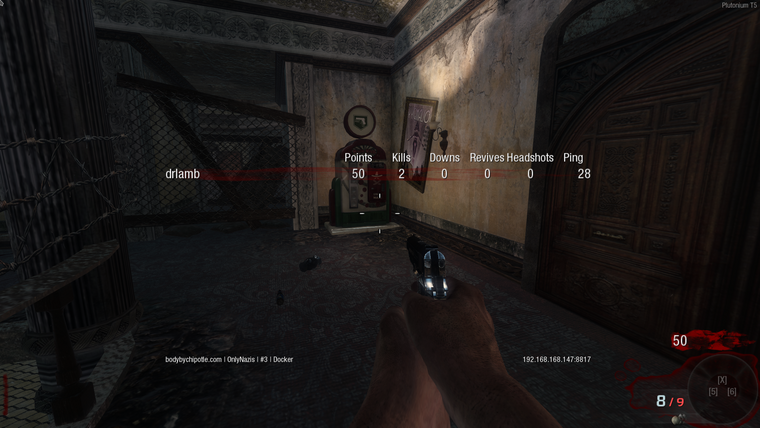
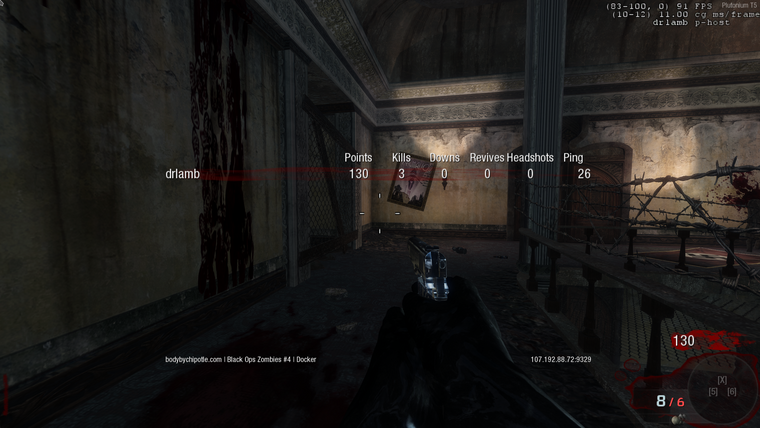
                  Screenshot from 2022-08-20 10-39-38.png Screenshot from 2022-08-22 08-18-01.png

                  To provide additional context: These screenshots are taken 2 days apart on different instances using the same base docker image with a "Activate_Mulekick" gsc script embedded.

                  Pistakilla 1 Reply Last reply
                  0
                  • drlamb drlamb

                    Screenshot from 2022-08-20 10-39-38.png Screenshot from 2022-08-22 08-18-01.png

                    To provide additional context: These screenshots are taken 2 days apart on different instances using the same base docker image with a "Activate_Mulekick" gsc script embedded.

                    Pistakilla Offline
                    Pistakilla Offline
                    Pistakilla
                    wrote on last edited by Pistakilla
                    #11

                    drlamb it's a dvar set scr_zm_extra_perk_all 1 you can add this to your server cfg.

                    drlamb 1 Reply Last reply
                    1
                    • Pistakilla Pistakilla

                      drlamb it's a dvar set scr_zm_extra_perk_all 1 you can add this to your server cfg.

                      drlamb Offline
                      drlamb Offline
                      drlamb
                      wrote on last edited by
                      #12

                      Pistakilla Thank you for this.

                      I can confirm that option works without the previous GSC script being present in my container images. However, it does NOT work at first if the first map on the server is kino.

                      Much like the screen shots above show, the first time a server boots (starting at kino) there won't be mule kick. But if the server rotates BACK to kino the mule kick is present.

                      So it almost seems that this dvar isn't being read/processed on server initialization but is when a server is switching maps.

                      Pistakilla 1 Reply Last reply
                      0
                      • drlamb drlamb

                        Pistakilla Thank you for this.

                        I can confirm that option works without the previous GSC script being present in my container images. However, it does NOT work at first if the first map on the server is kino.

                        Much like the screen shots above show, the first time a server boots (starting at kino) there won't be mule kick. But if the server rotates BACK to kino the mule kick is present.

                        So it almost seems that this dvar isn't being read/processed on server initialization but is when a server is switching maps.

                        Pistakilla Offline
                        Pistakilla Offline
                        Pistakilla
                        wrote on last edited by
                        #13

                        drlamb Try adding the dvar into a gsc script. The script will always execute.

                        init(){setDvar("scr_zm_extra_perk_all", 1);}
                        

                        This line is all you need to execute the dvar. Save it in scripts\sp\zom folder.

                        drlamb 1 Reply Last reply
                        1
                        • Pistakilla Pistakilla

                          drlamb Try adding the dvar into a gsc script. The script will always execute.

                          init(){setDvar("scr_zm_extra_perk_all", 1);}
                          

                          This line is all you need to execute the dvar. Save it in scripts\sp\zom folder.

                          drlamb Offline
                          drlamb Offline
                          drlamb
                          wrote on last edited by drlamb
                          #14

                          Pistakilla Thank you for that as well but I'm still seeing the same behavior.

                          Absent on launch, present on the second rotation.

                          (I've verified the script is present and the variable isn't otherwise set in my server.cfg or launch command arguments)

                          Pistakilla 1 Reply Last reply
                          0
                          • drlamb drlamb

                            Pistakilla Thank you for that as well but I'm still seeing the same behavior.

                            Absent on launch, present on the second rotation.

                            (I've verified the script is present and the variable isn't otherwise set in my server.cfg or launch command arguments)

                            Pistakilla Offline
                            Pistakilla Offline
                            Pistakilla
                            wrote on last edited by
                            #15

                            drlamb Yeah I will have to investigate this further I'll probably come up with a fix soon enough

                            1 Reply Last reply
                            1

                            Hello! It looks like you're interested in this conversation, but you don't have an account yet.

                            Getting fed up of having to scroll through the same posts each visit? When you register for an account, you'll always come back to exactly where you were before, and choose to be notified of new replies (either via email, or push notification). You'll also be able to save bookmarks and upvote posts to show your appreciation to other community members.

                            With your input, this post could be even better 💗

                            Register Login
                            Reply
                            • Reply as topic
                            Log in to reply
                            • Oldest to Newest
                            • Newest to Oldest
                            • Most Votes


                            • Login

                            • Don't have an account? Register

                            • Login or register to search.
                            • First post
                              Last post
                            0
                            • Unread 0
                            • Recent
                            • Tags
                            • Popular
                            • Users
                            • Groups
                            • Donate