sehteria SOLVED: I had some modded weapon sounds that I even forgot i had edited in, so i just placed the backup over it using the original SABS/SABL files and its now loading perfectly.
 undefined
AdrX003
@AdrX003
Posts
-
[Release] [ZM] [Mod] zm_weapons - Adding all weapons to maps -
[Release] [ZM] [Mod] zm_weapons - Adding all weapons to mapssehteria any idea on what could be happening if the game freezes after i load the mod?
(i simply cant click any button after the menu shows the mod is loaded, theres no way to control with the mouse or keyboard, the plutonium terminal also hangs and doesnt respond any command and i can only close it)Tested with both 2.0 and 2.1, and only other mods are working normally like Reimagined or the AK47/MP. will get back to test older versions and mark the one that is still loading after i get back from work.I can provide any other detail if necessary, just unsure of how to troubleshoot this.Solved in later posts, Custom Sounds are not complatible with the mod anymore, only with older versions of it. read the full thread to understand clearly, thanks.
-
[RELEASE][ZM] [BETA] New bo2 hud systemdontknowletspl what about a snippet of the drops/powerups positioning?
or you could say its "easy" for someone kinda new to GSC would know were to find it in JezuzzLizzard's stock scripts?
if you could at least tell wich file exactly has something to identify them/how to "pick" them in the code to them join it in the script that will be changing positions that would help a ton... -
Start with B23R + regular pistol??WolflexZ But couldnt anyone convert it to source with gsc-tool or cerberus... ?
(anything thats not obfuscated for whatever reason at least............) -
[Release] [ZM] [Mod] zm_weapons - Adding all weapons to mapssehteria Maybe add both to box and remove Mauser's supressor and change to the BO3 Origins sound to match it? (just a personal taste that i would do if i had the time but still an idea maybe worth trying)
-
[RELEASE][ZM] [BETA] New bo2 hud system -
[ZM] Black Ops 4 HUD | W.I.Ptupivere_ i guess you can make all this based on Cod War Mod from Gerard by extracting all of it and seeing how that one works, its so cool the way he made the HUD.
-
Is it possible to patch these mods for doing any player easter eggs in to the Ps3 version of bo2 for Tranzit,die rise and buried using PS3HEN (a way to hombrew the ps3)?????Probably adapting everything you need to use and compile using SeriousHD's Console Compiler and injecting but i dunno if anybody here would know how to deal with PS3 code if its any different. all if know of this is it uses alot of code that plutonium doesnt support anymore and the code would look more like a Redacted port.
Also someone here will surely wanna comment this is not a question to be made here or even delete my message if i tell you you could go for CabCon's site for this.
-
UPDATE CUSTOM CAMOSvzbiggie You can only use one of a time if theyre replace the same camo.
For now as we still cannot ADD camos and only REPLACE stuff the camos use, if we make alot of different camos and the BASE of all of them is Paladin for example, only one if them can be loaded in game at a time.The problem of making multiple camos that can be used at once is only one: PROPRIETIES. most dlc camos have unique features that they cannot be replicated (at least still in the modding scene, it may change because theres custom FF loading on pluto now)
Examples:
- Basic camos and some DLC like Etching covers only specific gun parts and it haves only basic proprieties of a small level of faking 3D like WaW had;
- A Camo like Diamond+DLCs like Kawaii and Graffiti have layers for the main and alternative camo in separate making a very interesting "duo style" with a pattern and a solid+all the above;
- Weaponized 115 may have some strange propriety that i wouldnt know what to say about it now but yeah, its a funny one to test stuff on;
- Bacon and Paladin covers the whole gun and it have more layers on it that helps to do fake 3D things to the gun+some the above;
- Ghosts starts to have multiple layers with one that you can make glow in the dark with the correct way you set up the "light" on it+some the above;
- Afterlife and Cyborg have all of the above and are animated with a texture that loops on a movement on the whole surface+all the above.
-
CAN SOMEONE TEACH ME HOW TO INSTALL THIS CAMOUFLAGE PLEASEkiluat Good, the more people on custom clients and outside activisions practices the better. Sadly i cant say all i think about it here, it seems.
-
CAN SOMEONE TEACH ME HOW TO INSTALL THIS CAMOUFLAGE PLEASETraduce esto si no puedes leer inglés:
It seems you're new to PC gaming in general where there are moddable games so i will try to explain this as detailed as possible and im keeping it to english because there can be some other people who find this post if they have the same or similar question, + all the explanation being done here is with least ammount of tecnicalities so it can be easier to understand.
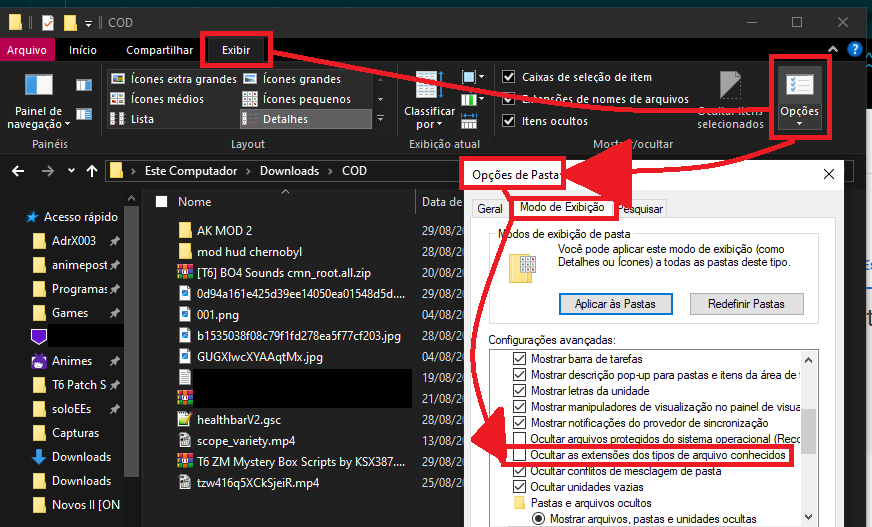
First of all its a very good idea to turn on this option i marked as OFF, because it will show you the actual file types to sort what the game uses from other stuff in the same place as the file name after a dot. Files must have types so it helps you to know what is what when they are in a state of everything being mixed up in the same folder for example. Now lets understand what you are seeing in the folders after you turn the option off and are able to see the file formats right in the file names (yes they are in the Column were it says Type but this will help you using the information way better not just for this case, that column have other uses too):
-
IWI is the image format from COD, pretty much "everything that you can see" in game is this, it can be the floor, the gun colors, character colors, camos being static or animated, emblems, items in game or in the menus, gloves and all that...
-
DDS is another "game type format" that needs to be used kind of because it haves to be a bridge between the "completely editable format" that is a PNG and IWI that is the final one the game uses.
-
PNG is a "more normal" image format just like JPG or JPEG in photos. its commonly used in editors to change them do DDS, to normally store yout photos, icons in the pc or anything like that.
In the case of this pack you downloaded, the uploader separated stuff in this way to help both people who wish install the mods, edit them or just see printscreens of them if thats what in it too (i dont see this pack its been years i think, cant remember).
You can use the PNG ones to see some kind of what the thing will look like in game(if that is what the uploader posted in the PNG images wich i dont know)
And you can use the IWI ones to place in your textures folder were the game will load them (%localappdata%\Plutonium\storage\t6\images) you can copy whats insider without them to the Run window (Windows+R if this folder exists, if its not you must create the images folder inside t6 wich is a folder plutonium needs to run BO2 so it surely already exists on the computer)Can you find out what to do with the information?
-
-
[Release-Beta] [ZM] Cold War Zombies ModSpleenThief You seem to have some texture missing, reinstall replacing all the textures into %localappdata%\Plutonium\storage\t6\images
-
[Release] [ZM]Ammomatic V-2 for all maps (BO2) -
Return to Alpha: Zombies -
How i create a server in world at war ?RedxSkull

oh nice images can be directly pasted
anyway if its not related to the question these could be deleted soon. -
Translate BO2 to Brazilian Portuguese -
How i create a server in world at war ? -
Permanent Afterlife ViewhandsDirtyDan247 pretty sure thats only with custom FF loading like Jbleezy did in BO2 Reimagined Mod loading other weapon models, sounds and anims from singleplayer/mp to zombies.
-
[ZM] Round Counter Position (Configurable)xNando you can get them from Cold War itself or extracting from the Cold War Mod that was made wich would be the easier route, after having those, just overriding them in the folder and loading the mod would be all done i guess.
-
BO2 Custom Game Saving.yeah, the last post by JezuzLizard points to a tutorial in the pluto site but are you asking here in other post... for zombies maybe?
the max i can think for zombies is to customize the Strat Tester configs.