PsychoMizo in console /bind P "map_restart" or whatever the restart command is. Also P is any unused key

Resxt
@Resxt
Posts
-
MW3 Sabotage (more rounds to play) -
MW3 Sabotage (more rounds to play)PsychoMizo I searched in the Sabotage gamemode files and the only dvars I found are
gameOpt sabData.bombTimer "30" // [ 5, 0-120 ]
gameOpt sabData.defuseTime "5.0000" // [ 5, 0-10 ]
gameOpt sabData.plantTime "2.5000" // [ 1, 0-10 ]
gameOpt sabData.sharedBombTimer "0" // [ 0, 1 ]
So none of them could do what you're asking for but maybe modifying these values could be a temporary solution for you?
Also there's this
gameOpt commonOption.scoreLimit "0"and maybe changing it to 2 for example would make 2 rounds but that's just a blind guess.You could also restart the game when it ends even though it's not optimal. You could make it smoother by binding the restart command to a key.
Now to try to do exactly what you asked for the two things that come to mind would either be finding a dvar for this if there's any or creating a GSC script to force/simulate several rounds. You should try asking in the #mw3-modding channel on the Discord server maybe some people there will be able to help you.
If you never find a way to do it your last resort would be asking Plutonium to implement that feature (if that's even technically possible) https://forum.plutonium.pw/category/42/feature-bug-bounties
-
wont workCodlover69 what do you expect us to tell you by saying "won't work" and "won't let me play" ?
If you want help you need to be clear.
Take a minute to read this https://plutonium.pw/docs/support/ -
Help me install mods for bo2 zombies plutonium?Oscarcito0404 well not much we can do with a topic asking for help without saying anything else. What mod? Did you try to install it first? There's nothing hard at all + everything is explained on the link sent above and it won't break your game and even if it did it's just a gsc file you can delete at anytime.
Please read the guide above carefully to install mods. If you really can't find it then answer back with clear explanations. We can't guess stuff for you
-
it says i cant download767 you can do what was said above or use the redist installer to install all the required redists and avoid similar issues https://github.com/ChxseH/Redist-Installer/releases/download/latest/Redist-Installer.bat
-
FR patch ?Bunkers https://traductionjeux.com/COD-Black-Ops-2-patch-fr.html for the torrent. If you have the game on Steam you can simply go in the game properties on Steam and change the language there.
@Mr-MaPSaBino this is not true. If you find language files you can apply them on top of your game files
-
Select the correct directory for this game in the launcherSinisterHappy just read the install guide properly. T6 is BO2 not MW3 and obviously you can't play BO2 with MW3 files. If you read the guide carefully there is no way it doesn't work
-
LAN Mode On Dedicated ServerTann3r_ Are you really sure you need a dedicated server? Dedicated server is for 24/7 public servers. If you just wanna play with a mod menu with your friends it's way easier to just create a custom game which will automatically give you the mod menu (since you will be the host) and then give it to your friend via the mod menu Player sub menu.
I'm not sure if the mod menu you linked allows the host to give the menu to other players.
If that's not the case you can find another or try this one that I posted that has the feature https://forum.plutonium.pw/topic/15934/zm-hells-vengeance-v2-mod-menu -
[ZM] Elasticity V1 - Mod MenuJezuzLizard
I'm not sure whatmain_shared/is so I tried multiple locations including%localappdata%\Plutonium\storage\t4\raw\scripts\spbut none of them seemed to work. The only time I got something to load I got these errors so I'm guessing the scripts aren't properly recognized and cause errors?
I kept trying with GSC files from other menus with the extractor you sent me and also the files you sent but I didn't get anything to work.
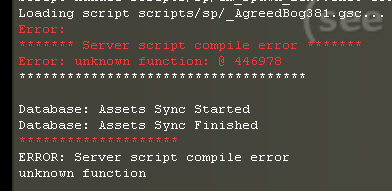
The best method I found since I can't get it to work with GSC files is to put the
common.fffile in%localappdata%\Plutonium\storage\t4\zone. Is this considered file replacement since it doesn't actually replace a file for the user and can just easily delete it whenever he wants to stop using the mod or is it still not allowed? I think that's a good in-between solution.Creating a folder in the
modsfolder and putting thecommon.fffile in there works too but since the user has to load the mod which makes it impossible to play any custom map with the menu loaded (unless there's a way to have 2 mods loaded that I don't know but I didn't find anything)So what should I do?
- FF file in the zone folder (no file replacement, works with everything)
- FF file in a mod folder in the mods folder (no file replacement, only works with base map)
- Keep digging to make it work with GSC files only (I have no clue if that's even possible)
-
When I click play nothing happens?JokeLawls https://plutonium.pw/docs/antivirus/
If that doesn't help, check this our common issues Forum Post:
https://forum.plutonium.pw/topic/6832/common-launcher-issues-solutions -
ERROR DELAY PLUTONIUM BO2JHN28 The delay is not caused by Plutonium it's you / your settings. Here's what you can do:
- If you play with a Bluetooth controller try plugging it in instead or if you play with a wireless mouse try plugging it in too.
- Disable v-sync in-game
- Try switching between fullscreen and windowed fullscreen
- Update your GPU drivers
- Install Direct X
- Lower your graphics settings
-
how make a bot who dosn't move ?Zalec_ I don't know about a command for that but an easy way to do this is to use a mod menu.
I posted two on the forum if you wanna check it out. They also contain instructions in case you want to use another.
https://forum.plutonium.pw/topic/15856/mp-echelon-v2-mod-menu
https://forum.plutonium.pw/topic/15855/mp-solitary-mod-menu -
Having problems over hereSighBlanker899 the links above are the second step in case step 1 doesn't work @Mr-MaPSaBino
So SighBlanker899 just use this redist installer. Let it download and install everything and once it says it's done restart your PC and you'll be good.
If this still doesn't work you can use the links given above
-
Crashes Without Specific Errorraxeldaddy What is your antivirus? Even if it's disabled it's important
-
Some maps dont Work@Legendness If you right click on the iw5 folder you'll see it's not even 1gb so... no
Do what he said. It'll only delete IW5 related data like maps and scripts. You can just move it to a temporary location to have a backup. Then when you'll open the launcher again it will re-download the files to make sure none of them are broken -
necesito ayuda para este error que no me deja jugarjygsaw1927 All of this is false. You only need to install Direct X
-
Inconsistent FPS/GPU usageFormed Try updating your GPU drivers and also run this redist installer (let it finish downloading and installing everything) https://github.com/ChxseH/Redist-Installer/releases/download/latest/Redist-Installer.bat
-
Camos not showingKinhc send a screenshot showing how you installed the camo, including the path
-
Bootstrapper pop up T6