Skip to content
  • 0 Unread 0
  • Recent
  • Tags
  • Popular
  • Users
  • Groups
  • Donate
Collapse

Plutonium

  1. Home
  2. BO2 Modding Releases & Resources
  3. [Release] Black ops II Mapvote for Zombies and Multiplayer

[Release] Black ops II Mapvote for Zombies and Multiplayer

Scheduled Pinned Locked Moved BO2 Modding Releases & Resources
gscgsc scriptmapvote
167 Posts 41 Posters 98.4k Views 5 Watching
  • Oldest to Newest
  • Newest to Oldest
  • Most Votes
Reply
  • Reply as topic
Log in to reply
This topic has been deleted. Only users with topic management privileges can see it.
  • Sorex Sorex

    @CamouflageLvCat The issue is just an issue on war translation, on bo2 the g_gametype is called tdm but the gsc code have a translation error. If you download the code not from the release section the code will not have that issue.

    Ghost420_ Offline
    Ghost420_ Offline
    Ghost420_
    wrote on last edited by
    #136
    This post is deleted!
    1 Reply Last reply
    0
    • Sorex Sorex

      @CamouflageLvCat The issue is just an issue on war translation, on bo2 the g_gametype is called tdm but the gsc code have a translation error. If you download the code not from the release section the code will not have that issue.

      Ghost420_ Offline
      Ghost420_ Offline
      Ghost420_
      wrote on last edited by
      #137
      This post is deleted!
      Ghost420_ 1 Reply Last reply
      0
      • Ghost420_ Ghost420_

        This post is deleted!

        Ghost420_ Offline
        Ghost420_ Offline
        Ghost420_
        wrote on last edited by
        #138

        @CamouflageLvCat
        plutonium-bootstrapper-win32_2022_09_29_16_12_44_241.jpg

        👍 😁 😁 😁 😁 😁 😁 😁 😁

        1 Reply Last reply
        0
        • Sorex Sorex

          Black ops II Mapvote for Zombies and Multiplayer

          Developed by DoktorSAS

          Special thanks to @ZECxR3ap3r & @JezuzLizard for their contributions to the development. Additional thanks to @John Kramer for image editing and birchy for the LUI starting point.

          Introduction

          This project, initiated in March 2020, enables players to vote for the next map and/or game mode in upcoming matches. The project does not provide compiled files; if needed, compile the file using the gsc-tool.

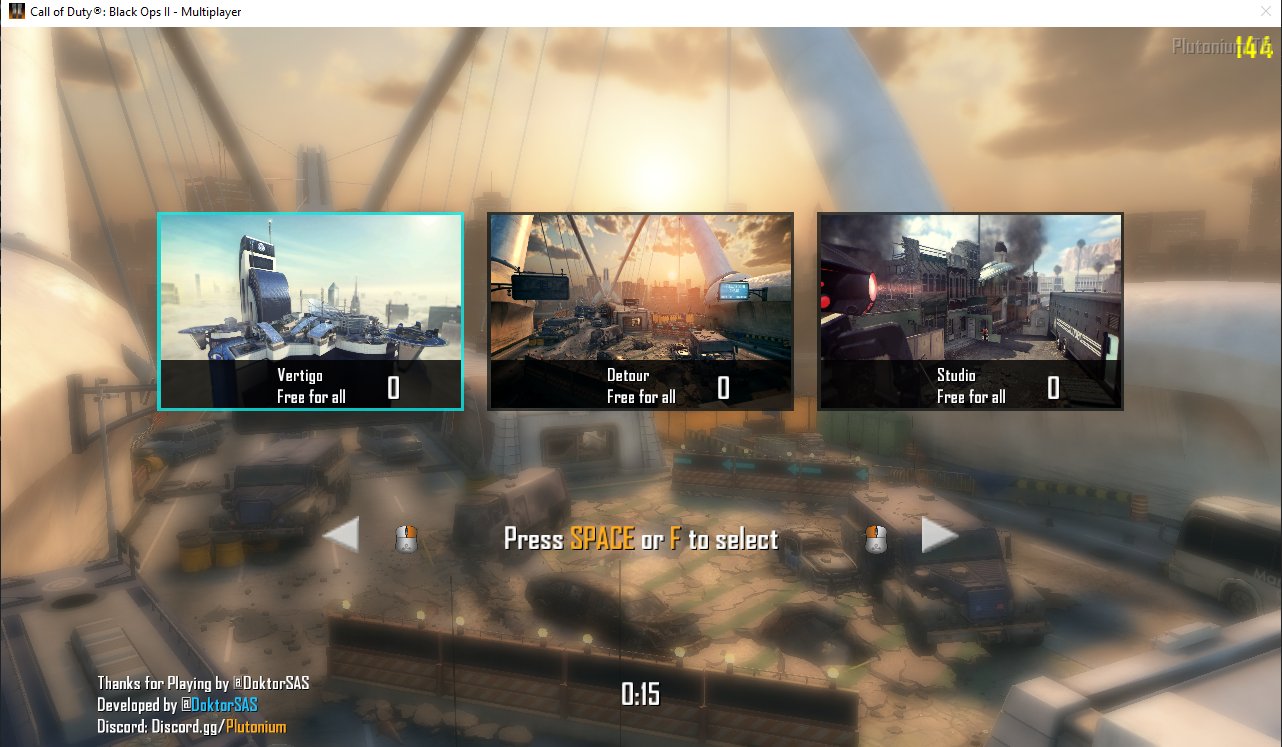
          Black Ops II: multiplayer

          Preview

          How to setup the mapvote step by step

          1. Compile the Script:
            Compile the mapvote.gsc file using a GSC Compiler. This step is not required if you are working with the plutonium client.

          2. Place the Compiled File:
            Copy the compiled file into your directory %localappdata%\Plutonium\storage\t6\scripts\mp\.

          3. Configure Server File:
            Copy the content of mapvote.cfg into your server configuration file (e.g., server.cfg, dedicated_mp.cfg, dedicated.cfg, etc.) that manages the Multiplayer server.

          4. Edit Dvars for Aesthetic Parameters:

            • Set the Dvar mv_maps to specify the maps shown in the mapvote. For example:
              set mv_maps "mp_studio mp_nuketown_2020 mp_carrier mp_drone mp_slums"
              
            • Set the Dvar mv_enable to 1 to activate the mapvote on your Multiplayer server.
            • For random gametypes, set the Dvar mv_gametypes specifying the gametype ID (dm, war, sd, etc.) and the file to run if necessary. For example:
              set mv_gametypes "[email protected] [email protected]"
              
          5. (Plutonium ONLY) LUI UI with mod support:

            • Take the content of the folder T6Mapvote and place it in your folder %localappdata%\Plutonium\storage\t6\mods\
            • Set the dvar fs_game in your server configuration file (e.g., server.cfg, dedicated_zm.cfg, dedicated.cfg, etc.)
            • Set the dvar mv_lui to in your server configuration file (e.g., server.cfg, dedicated_zm.cfg, dedicated.cfg, etc.)
          6. Run the Server:
            Start the server and immerse yourself in the map voting experience. You're done!

          Settings: dvars

          Dvar Default Value Description
          mv_enable 1 Enable/Disable the mapvote (1 for enable, 0 for disable).
          mv_maps "" List of maps that can be voted on the mapvote; leave empty for all maps.
          mv_time 20 Time (in seconds) allotted for voting.
          mv_credits 1 Enable/Disable credits of the mod creator.
          mv_socialname "SocialName" Name of the server's social platform (Discord, Twitter, Website, etc.).
          mv_sentence "Thanks for playing" Thankful sentence displayed.
          mv_votecolor "5" Color of the vote number.
          mv_arrowcolor "white" RGB color of the arrows.
          mv_selectcolor "lighgreen" RGB color when a map gets voted.
          mv_backgroundcolor "grey" RGB color of the map background.
          mv_blur "3" Blur effect power.
          mv_gametypes "" Dvar to have multiple gametypes with different maps. Specify gametype IDs and associated files.
          mv_extramaps 0 Enable 6 maps mapvote when set to 1.
          mv_allowchangevote 1 Enable/Disable the possibility to change vote while the time is still running (1 for enable, 0 for disable).
          mv_randomoption 1 If set to 1 it will not display which map and which gametype the last option will be (Random)
          mv_minplayerstovote 1 Set the minimum number of players required to start the mapvote
          mv_lui 1 If set to 1 it will use the LUA/LUI ui interface (It required the mod support and the lua files)

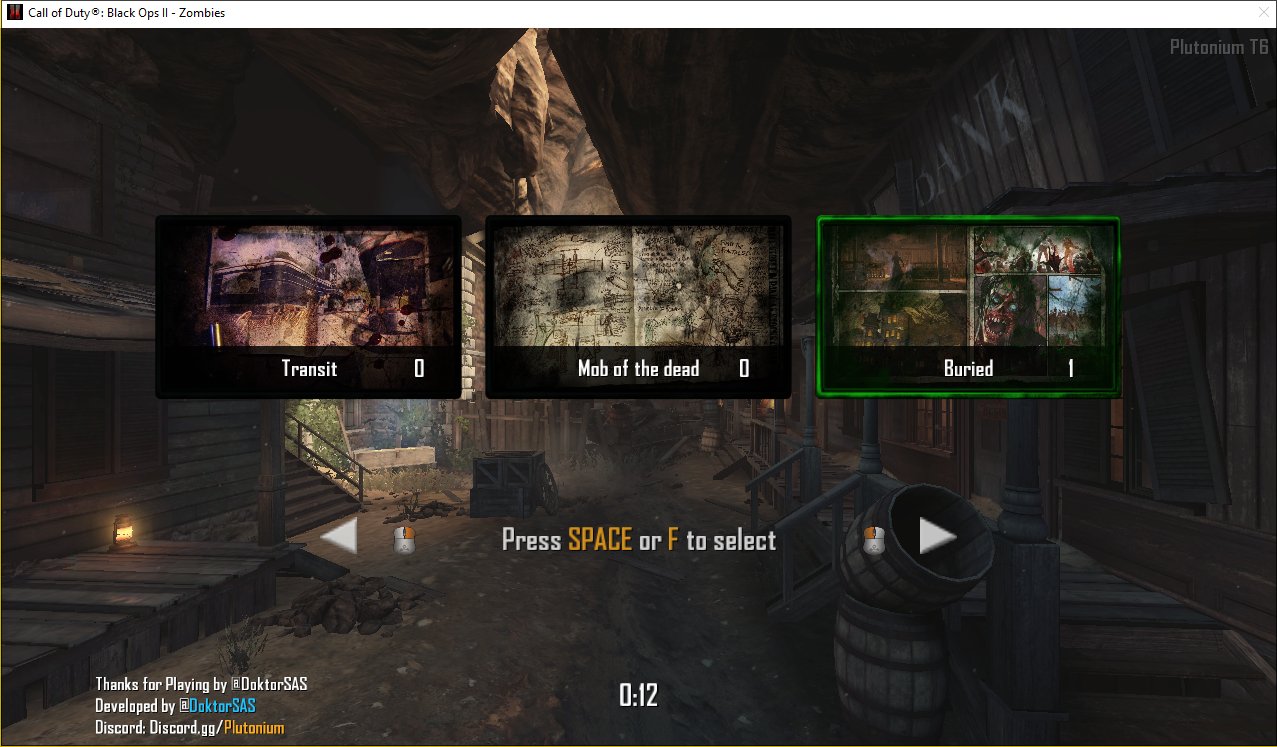
          Black ops II: zombies

          Preview

          How to setup the mapvote step by step

          1. Compile the Script:
            Compile the mapvote.gsc file using a GSC Compiler. This step is not required if you are working with the plutonium client.

          2. Place the Compiled File:
            Copy the file into your directory %localappdata%\Plutonium\storage\t6\scripts\zm\.

          3. Configure Server File:
            Copy the content of mapvote.cfg into your server configuration file (e.g., server.cfg, dedicated_zm.cfg, dedicated.cfg, etc.) that manages the Zombies server.

          4. Edit Dvars on your configuration file:

            • Set the Dvar mv_maps to specify the maps shown in the mapvote. For example:
              set mv_maps "zm_tomb zm_buried zm_town zm_busdepot zm_farm zm_transit zm_prison zm_highrise zm_nuked"
              
            • Set the Dvar mv_enable to 1 to activate the mapvote on your Zombies server.
          5. Run the Server:
            Start the server and enjoy the map voting experience. You're done!

          Download

          It is possbile to download either the source code or the released code. The source code is not fully test and could run into issue that need to be reported while the release is tested code that could have some bug not fixed but working as intended.

          I highly recommend using the unreleased version and keeping it up to date for implementing features and patching reported bugs.
          The following buttons will direct you to the corresponding pages:

          Download from release

          Download from git

          Ghost420_ Offline
          Ghost420_ Offline
          Ghost420_
          wrote on last edited by
          #139

          Sorex
          any idea why this happens?
          plutonium-bootstrapper-win32_2022_10_05_01_42_33_780.jpg

          1 Reply Last reply
          0
          • Matheus14Silva Offline
            Matheus14Silva Offline
            Matheus14Silva
            wrote on last edited by
            #140

            Sorex Hey man, after the setting up, the server won't load past: "Loading fastfile seasonpass_load_mp", and if I try to connect it says: "Lost connection to host".

            1 Reply Last reply
            0
            • Sorex Offline
              Sorex Offline
              Sorex
              Contributor
              wrote on last edited by
              #141

              Matheus14Silva
              This issue seems unrelated to the mapvote. Could be related to others mods/script are you loading or it could e caused by a wrong full setup of any of this mods/script and server configuration.

              If you can prove that its caused by the mapvote i will look into it.

              1 Reply Last reply
              0
              • Sosuu Offline
                Sosuu Offline
                Sosuu
                wrote on last edited by
                #142

                hey ! I was a little confused about the mod. Specifically, I mean im confused about how to add multiple game types. When I try to run the server it works normally for the first game. But upon the map voting section all 3 maps are in FFA, and when going into the game the scoreboard does not work.

                TL;DR,
                I just want to add FFA, Domination, TDM, and CTF to the gametype rotation pool but im unsure how to do so.

                (I think its just me specifying the gametypes wrong in the CFG, probably malformatted.

                Sorex 1 Reply Last reply
                0
                • Sosuu Sosuu

                  hey ! I was a little confused about the mod. Specifically, I mean im confused about how to add multiple game types. When I try to run the server it works normally for the first game. But upon the map voting section all 3 maps are in FFA, and when going into the game the scoreboard does not work.

                  TL;DR,
                  I just want to add FFA, Domination, TDM, and CTF to the gametype rotation pool but im unsure how to do so.

                  (I think its just me specifying the gametypes wrong in the CFG, probably malformatted.

                  Sorex Offline
                  Sorex Offline
                  Sorex
                  Contributor
                  wrote on last edited by
                  #143

                  Sosuu
                  If you look at the guide is writtend how to do that there.

                  To add support for multiple gametypes you need to edit the dvar like that :

                  set mv_gametypes "dm;freeforall.cfg war;mycustomtdm.cfg"
                  

                  dm is the g_gametype and freeforall.cfg is the custom file to execute if you want set specific setting for that gamemode.

                  Sosuu 1 Reply Last reply
                  0
                  • Sorex Sorex

                    Sosuu
                    If you look at the guide is writtend how to do that there.

                    To add support for multiple gametypes you need to edit the dvar like that :

                    set mv_gametypes "dm;freeforall.cfg war;mycustomtdm.cfg"
                    

                    dm is the g_gametype and freeforall.cfg is the custom file to execute if you want set specific setting for that gamemode.

                    Sosuu Offline
                    Sosuu Offline
                    Sosuu
                    wrote on last edited by
                    #144

                    Sorex said in [Release] Black ops II Mapvote for Zombies and Multiplayer:

                    dm;freeforall.cfg war;mycustomtdm.cfg

                    this seemed to fix the "free for all" issue, but now it is only playing the first specified gamemode on the line

                    CopgunPlays 1 Reply Last reply
                    0
                    • Sosuu Sosuu

                      Sorex said in [Release] Black ops II Mapvote for Zombies and Multiplayer:

                      dm;freeforall.cfg war;mycustomtdm.cfg

                      this seemed to fix the "free for all" issue, but now it is only playing the first specified gamemode on the line

                      CopgunPlays Offline
                      CopgunPlays Offline
                      CopgunPlays
                      wrote on last edited by
                      #145

                      Sosuu This is the same issue I'm having currently.

                      exp111 1 Reply Last reply
                      0
                      • CopgunPlays CopgunPlays

                        Sosuu This is the same issue I'm having currently.

                        exp111 Offline
                        exp111 Offline
                        exp111
                        wrote on last edited by
                        #146

                        CopgunPlays same issue here. Managed to work around it by only giving the gamemodes („dm tdm gun“) but that fucks with some modes (like kill confirmed having 9999 points for each team and not being able to view the scoreboard)

                        1 Reply Last reply
                        0
                        • Sasino97 Offline
                          Sasino97 Offline
                          Sasino97
                          wrote on last edited by
                          #147

                          I'm unable to compile it using GSC Tool.

                          [ERROR]:compiler:mapvote.gsc:177:39: local variable 'g1' not found at mapvote.gsc
                          

                          And before this I had another issue with encoding, but I figured it out, basically the file is UTF8 with BOM, I converted it to standard UTF8 and it is now able to at least parse it, however I have the above issue.

                          The error above may be caused by the original scripters using a different compiler, if so, why doesn't the readme/description specify which compiler instead of just saying "use a gsc compiler"? However, I'd prefer to just fix these compile errors using the GSC Tool, because it seems it's the most supported one now; I have no GSC experience at all, but I have a C, Java and C# background.

                          Any help is appreciated 🙏

                          Resxt 1 Reply Last reply
                          0
                          • Sasino97 Sasino97

                            I'm unable to compile it using GSC Tool.

                            [ERROR]:compiler:mapvote.gsc:177:39: local variable 'g1' not found at mapvote.gsc
                            

                            And before this I had another issue with encoding, but I figured it out, basically the file is UTF8 with BOM, I converted it to standard UTF8 and it is now able to at least parse it, however I have the above issue.

                            The error above may be caused by the original scripters using a different compiler, if so, why doesn't the readme/description specify which compiler instead of just saying "use a gsc compiler"? However, I'd prefer to just fix these compile errors using the GSC Tool, because it seems it's the most supported one now; I have no GSC experience at all, but I have a C, Java and C# background.

                            Any help is appreciated 🙏

                            Resxt Offline
                            Resxt Offline
                            Resxt
                            Plutonium Staff
                            wrote on last edited by
                            #148

                            Sasino97 you don't have to use any compiler

                            Sasino97 1 Reply Last reply
                            0
                            • Resxt Resxt

                              Sasino97 you don't have to use any compiler

                              Sasino97 Offline
                              Sasino97 Offline
                              Sasino97
                              wrote on last edited by
                              #149

                              Resxt Thanks for the info, but it's just to make sure that it still works after any customization I make, and that there are no errors.
                              Btw the issue above was solved by using the master branch instead of release 1.0.0.

                              Resxt 1 Reply Last reply
                              0
                              • Sasino97 Sasino97

                                Resxt Thanks for the info, but it's just to make sure that it still works after any customization I make, and that there are no errors.
                                Btw the issue above was solved by using the master branch instead of release 1.0.0.

                                Resxt Offline
                                Resxt Offline
                                Resxt
                                Plutonium Staff
                                wrote on last edited by
                                #150

                                Sasino97 the game has a compiler built-in

                                Sasino97 1 Reply Last reply
                                1
                                • Resxt Resxt

                                  Sasino97 the game has a compiler built-in

                                  Sasino97 Offline
                                  Sasino97 Offline
                                  Sasino97
                                  wrote on last edited by
                                  #151

                                  Resxt Gotcha, but in case of errors where will the error messages show?

                                  Resxt 1 Reply Last reply
                                  0
                                  • Sasino97 Sasino97

                                    Resxt Gotcha, but in case of errors where will the error messages show?

                                    Resxt Offline
                                    Resxt Offline
                                    Resxt
                                    Plutonium Staff
                                    wrote on last edited by
                                    #152

                                    Sasino97 in the middle of your screen lol

                                    1 Reply Last reply
                                    0
                                    • Echostars Offline
                                      Echostars Offline
                                      Echostars
                                      wrote on last edited by
                                      #153

                                      I'm having trouble setting this up for zombies. I got transit to show on the vote thing but no other maps. I am also curious how I could run a custom cfg for a map

                                      1 Reply Last reply
                                      0
                                      • Sorex Sorex

                                        Black ops II Mapvote for Zombies and Multiplayer

                                        Developed by DoktorSAS

                                        Special thanks to @ZECxR3ap3r & @JezuzLizard for their contributions to the development. Additional thanks to @John Kramer for image editing and birchy for the LUI starting point.

                                        Introduction

                                        This project, initiated in March 2020, enables players to vote for the next map and/or game mode in upcoming matches. The project does not provide compiled files; if needed, compile the file using the gsc-tool.

                                        Black Ops II: multiplayer

                                        Preview

                                        How to setup the mapvote step by step

                                        1. Compile the Script:
                                          Compile the mapvote.gsc file using a GSC Compiler. This step is not required if you are working with the plutonium client.

                                        2. Place the Compiled File:
                                          Copy the compiled file into your directory %localappdata%\Plutonium\storage\t6\scripts\mp\.

                                        3. Configure Server File:
                                          Copy the content of mapvote.cfg into your server configuration file (e.g., server.cfg, dedicated_mp.cfg, dedicated.cfg, etc.) that manages the Multiplayer server.

                                        4. Edit Dvars for Aesthetic Parameters:

                                          • Set the Dvar mv_maps to specify the maps shown in the mapvote. For example:
                                            set mv_maps "mp_studio mp_nuketown_2020 mp_carrier mp_drone mp_slums"
                                            
                                          • Set the Dvar mv_enable to 1 to activate the mapvote on your Multiplayer server.
                                          • For random gametypes, set the Dvar mv_gametypes specifying the gametype ID (dm, war, sd, etc.) and the file to run if necessary. For example:
                                            set mv_gametypes "[email protected] [email protected]"
                                            
                                        5. (Plutonium ONLY) LUI UI with mod support:

                                          • Take the content of the folder T6Mapvote and place it in your folder %localappdata%\Plutonium\storage\t6\mods\
                                          • Set the dvar fs_game in your server configuration file (e.g., server.cfg, dedicated_zm.cfg, dedicated.cfg, etc.)
                                          • Set the dvar mv_lui to in your server configuration file (e.g., server.cfg, dedicated_zm.cfg, dedicated.cfg, etc.)
                                        6. Run the Server:
                                          Start the server and immerse yourself in the map voting experience. You're done!

                                        Settings: dvars

                                        Dvar Default Value Description
                                        mv_enable 1 Enable/Disable the mapvote (1 for enable, 0 for disable).
                                        mv_maps "" List of maps that can be voted on the mapvote; leave empty for all maps.
                                        mv_time 20 Time (in seconds) allotted for voting.
                                        mv_credits 1 Enable/Disable credits of the mod creator.
                                        mv_socialname "SocialName" Name of the server's social platform (Discord, Twitter, Website, etc.).
                                        mv_sentence "Thanks for playing" Thankful sentence displayed.
                                        mv_votecolor "5" Color of the vote number.
                                        mv_arrowcolor "white" RGB color of the arrows.
                                        mv_selectcolor "lighgreen" RGB color when a map gets voted.
                                        mv_backgroundcolor "grey" RGB color of the map background.
                                        mv_blur "3" Blur effect power.
                                        mv_gametypes "" Dvar to have multiple gametypes with different maps. Specify gametype IDs and associated files.
                                        mv_extramaps 0 Enable 6 maps mapvote when set to 1.
                                        mv_allowchangevote 1 Enable/Disable the possibility to change vote while the time is still running (1 for enable, 0 for disable).
                                        mv_randomoption 1 If set to 1 it will not display which map and which gametype the last option will be (Random)
                                        mv_minplayerstovote 1 Set the minimum number of players required to start the mapvote
                                        mv_lui 1 If set to 1 it will use the LUA/LUI ui interface (It required the mod support and the lua files)

                                        Black ops II: zombies

                                        Preview

                                        How to setup the mapvote step by step

                                        1. Compile the Script:
                                          Compile the mapvote.gsc file using a GSC Compiler. This step is not required if you are working with the plutonium client.

                                        2. Place the Compiled File:
                                          Copy the file into your directory %localappdata%\Plutonium\storage\t6\scripts\zm\.

                                        3. Configure Server File:
                                          Copy the content of mapvote.cfg into your server configuration file (e.g., server.cfg, dedicated_zm.cfg, dedicated.cfg, etc.) that manages the Zombies server.

                                        4. Edit Dvars on your configuration file:

                                          • Set the Dvar mv_maps to specify the maps shown in the mapvote. For example:
                                            set mv_maps "zm_tomb zm_buried zm_town zm_busdepot zm_farm zm_transit zm_prison zm_highrise zm_nuked"
                                            
                                          • Set the Dvar mv_enable to 1 to activate the mapvote on your Zombies server.
                                        5. Run the Server:
                                          Start the server and enjoy the map voting experience. You're done!

                                        Download

                                        It is possbile to download either the source code or the released code. The source code is not fully test and could run into issue that need to be reported while the release is tested code that could have some bug not fixed but working as intended.

                                        I highly recommend using the unreleased version and keeping it up to date for implementing features and patching reported bugs.
                                        The following buttons will direct you to the corresponding pages:

                                        Download from release

                                        Download from git

                                        Echostars Offline
                                        Echostars Offline
                                        Echostars
                                        wrote on last edited by
                                        #154

                                        Sorex Hi i'm still having issues getting this to work on zombies

                                        1 Reply Last reply
                                        0
                                        • maxiking913 Offline
                                          maxiking913 Offline
                                          maxiking913
                                          wrote on last edited by maxiking913
                                          #155

                                          anyone know why its not working? every time when the rounds end you get the connection interrupted after killcam and idk why that is so. server doesnt give an error. using master branch ofc

                                          Sorex 1 Reply Last reply
                                          0

                                          Hello! It looks like you're interested in this conversation, but you don't have an account yet.

                                          Getting fed up of having to scroll through the same posts each visit? When you register for an account, you'll always come back to exactly where you were before, and choose to be notified of new replies (either via email, or push notification). You'll also be able to save bookmarks and upvote posts to show your appreciation to other community members.

                                          With your input, this post could be even better 💗

                                          Register Login
                                          Reply
                                          • Reply as topic
                                          Log in to reply
                                          • Oldest to Newest
                                          • Newest to Oldest
                                          • Most Votes


                                          • 1
                                          • 2
                                          • 5
                                          • 6
                                          • 7
                                          • 8
                                          • 9
                                          • Login

                                          • Don't have an account? Register

                                          • Login or register to search.
                                          • First post
                                            Last post
                                          0
                                          • Unread 0
                                          • Recent
                                          • Tags
                                          • Popular
                                          • Users
                                          • Groups
                                          • Donate