
i only started playing bo2 again after the recent update, but i've had some similiar fps drops that i didn't have a few months back.
Ryzen 2400g
RX 570 8GB
16GB DDR4 RAM
game on ssd, everything up to date yada yada
i only started playing bo2 again after the recent update, but i've had some similiar fps drops that i didn't have a few months back.
Ryzen 2400g
RX 570 8GB
16GB DDR4 RAM
game on ssd, everything up to date yada yada
outdated servers will now be displayed with red text and have a warning text on the server page
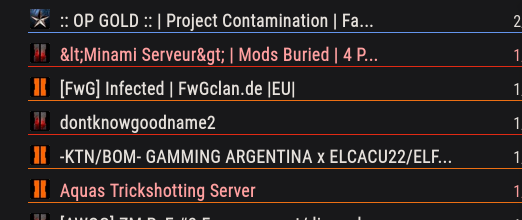
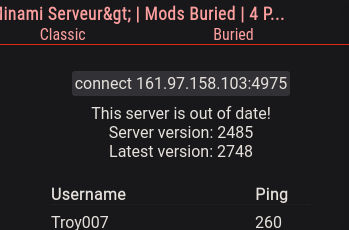
api now returns "uptodate: boolean" for every server
the api now returns a timestamp instead of the age of the server data: "date: string"
Cal Beans said in dude aimbotting "iB 7":
I'm new to Plutonium; what are we supposed to do if we encounter a hacker?
You can report them to the admins of the server you are on (!report playername reason), if an admin of that specific server is online they may ban the cheater quickly. This will only get them banned on that server tho.
To get them banned on plutonium itself just post proof of it on the forum like you did, so an admin can look into it.
upload it to youtube
Sounds to me like you aren't using your username to login, or you made a typo.
Make sure to use Skrill4, exactly like that, no lower case S.
Whats the error message?
Use your username to login, also its case sensitive.
https://forum.plutonium.pw/topic/6832/common-launcher-issues-solutions
Make sure to install both, x64 and x86, versions and restart your PC.
Don't download some random dlls and put them on your system.
init() {
    level thread chatListener();
}

chatListener() {
    while (true) {
        level waittill("say", message, player);
        println(player.name + " said: " + message);
    }
}

I think you are missing files, are you sure the download is finished?
https://pluto.mxve.de/t6mp
Look for a server, click on it, after that click on 'connect ..' which should copy the command which you can then paste into the games console (with right click)
You start plutonium using the plutonium.exe you've downloaded. There is not start menu entry or something like that.
The plutonium files are installed to %localappdata%\Plutonium
Worldbreaker I've never played on console/controller, I'm just not an entitled little shit 
Worldbreaker said in B02 should stay Balanced According to Original:
No auto-aim assist AKA aim lock aka snap aim assist rewarding bad players. Why revert DSR nerfs?
It's up to server owners to enable/disable aim-assist. It even says on the server list whether a server has aim-assist enabled. Can't find one you like? Host one yourself.
sv_patch_dsr50 can be used to toggle the state of the DSR, find a server that has it enabled or, as said before, host one yourself.
You aren't entitled to anything. Plutonium is provided completely for free, people are hosting servers for you to play on, again completely for free, and thousands of players enjoy it.
Don't like it? Don't play it.
Buying a XIM 4 and using your stupid aim assist with my mouse and kb now
double standard much
updatink yes

Just checked, it doesn't show up ingame for me, directly connecting doesn't work either, so there seems to still be an issue.
I guess you gotta wait for someone with more knowledge about this than me to look at it.
Afaik if it's listed on the API it should be working.
Whats the server name?
Plutonium isn't about playing for free, it's about adding features and enhancements to old games
BO3 already has most, if not all, things plutonium would be adding
A Plutonium client for BO3 wouldn't make it suddenly get more players
@Dr-Stone762 said in T7.:
I think I would like to see bo1 or even aw more than bo3 because they are games that I have not played in 2 generations of consoles (ps3), I would like the plutonium team to support one of those 2, I personally loved it that plutonium gave me the opportunity to replay the great and nostalgic bo2
bo3 < bo1/aw
for nostalgia
BO1 (T5) has already been announced. Theres no ETA, but it is being worked on.
Check whether the server is listed on https://pluto.mxve.de/ (or directly on the pluto api https://plutonium.pw/api/servers). I think it's possible the server just doesn't show up for you on your own network.
Did you open the port for both UDP and TCP?
sv_hostname doesn't do anything, the server name is set by the key.
Did you forward the port?
https://plutonium.pw/docs/server/t6/setting-up-a-server/#port-forwarding