Skip to content
  • Recent
  • Tags
  • Popular
  • Users
  • Groups
  • Donate
Collapse

Plutonium

SoyKappyundefined

SoyKappy

@SoyKappy
Contributor
About
Posts
153
Topics
52
Shares
0
Groups
1
Followers
56
Following
9

Posts

Recent Best Controversial

  • [Release] Better Aiming Pack [1.3]
    SoyKappyundefined SoyKappy

    1.3 changelog:
    :::
    -fixed scopes edges in zombies. [1.1]
    -The scopes sprite has been slightly improved [1.1]
    -fixed missing pixels in zombie reticles [1.2]
    Fixed dual band scope [1.3]
    :::

    adadadadadadad.png

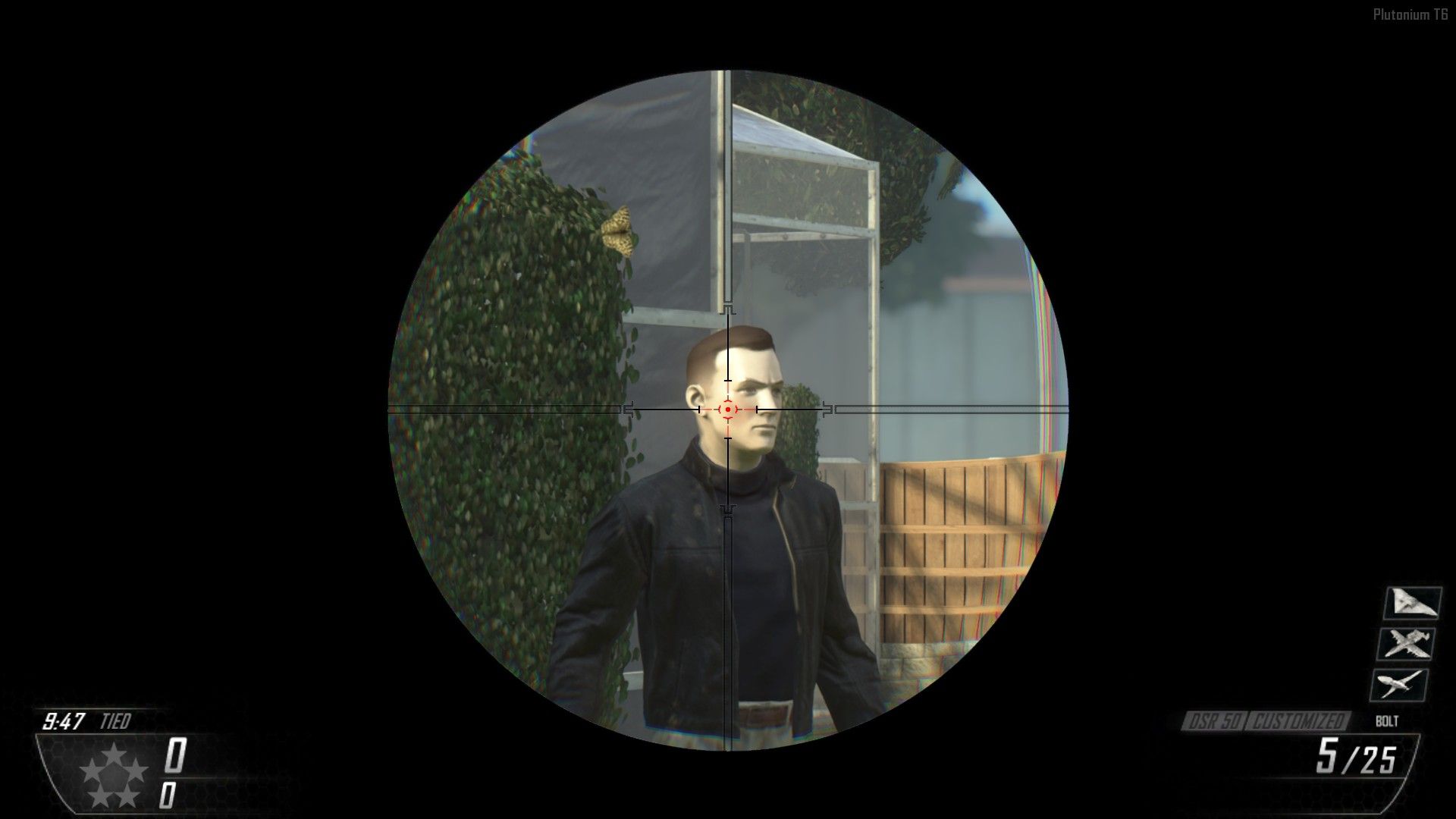
    A Texture Pack that modifies the reticles of the sights and the scopes of the snipers to have a better aiming experience.


    ➡DOWNLOAD⬅


    1621226970008-adadadadadaaddasdadad.png

    • Absolutely all the scopes of all the snipers have been replaced by the one in the image.

    • The circle of vision of the scopes has been enlarged.

    • In some snipers the scope has a very narrow view, now all scopes of all snipers have the same size.

    • the thickness of the scopes sprite has been reduced for better vision.

    • The "realistic" scopes opacity fade has been removed.
    mpshot0000.jpg


    adadaadadsasdasdasddadadadad.png
    Captura de pantalla (59).png


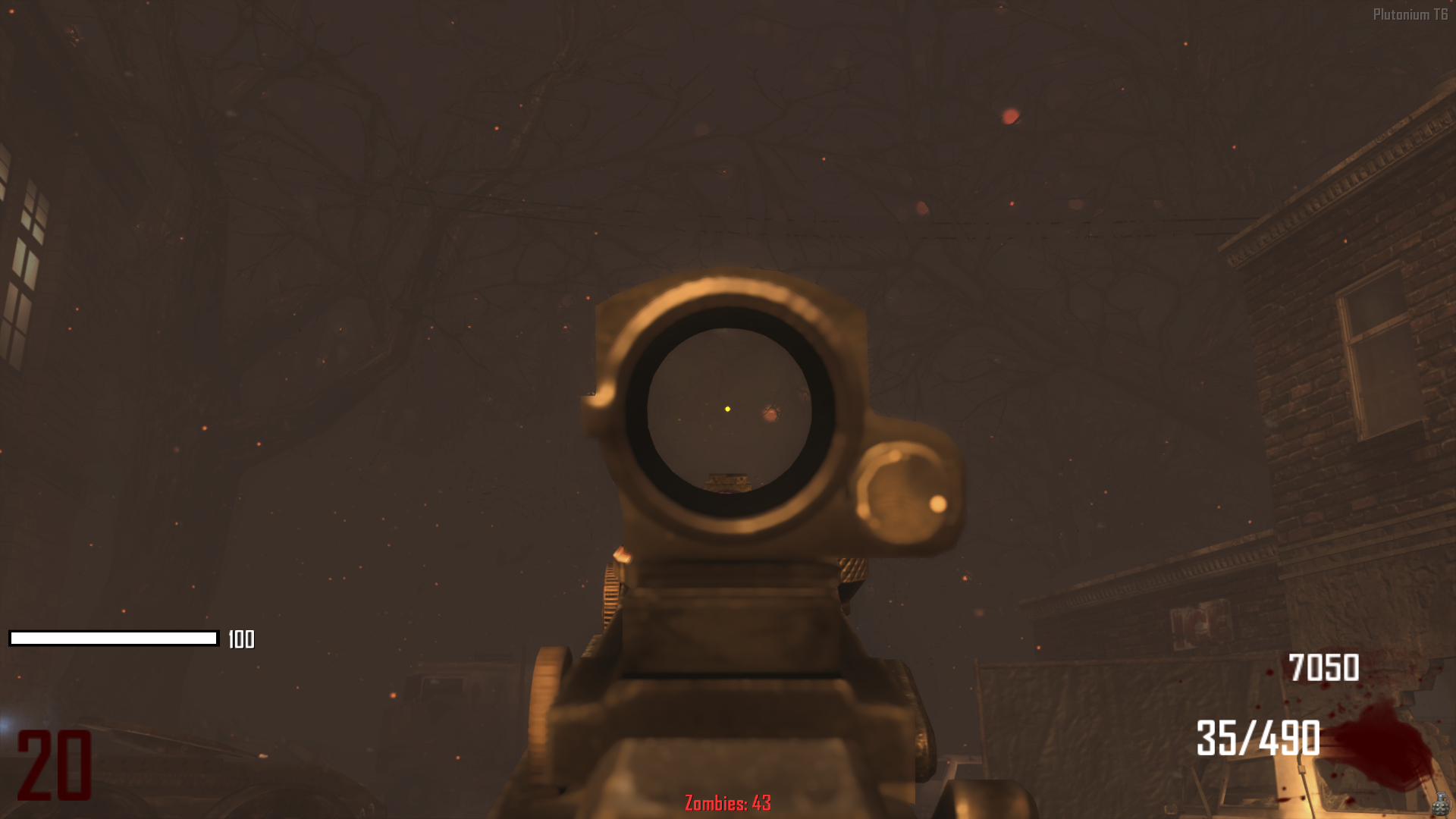
    • Absolutely all the random reticles in all the sights that exist in Zombies have been replaced by a dot.

    • In Zombies when you upgrade a weapon in the PaP in the weapon a random reticle is applied.

    • This causes many of them to be very bad and you don't want that reticle, but with this change of the dot sight it won't happen again.

    Captura de pantalla (58).png
    Captura de pantalla (60).png


    • INSTALL GUIDE:

    download the .rar file at the top of this post, unzip it and paste the ".iwi" files in this path:

    YourBo2Folder\t6r\data\image
    

    If one of the folders does not exist, simply create it.

    BO2 Modding Releases & Resources

  • [Release] Confusing Pack [ZM]
    SoyKappyundefined SoyKappy

    @M0untainLight6 said in [Release] Confusing Pack [ZM]:

    would be a fun challenge for sure! maybe change the round numbers too?

    Yes, I will try to expand this post with things I come up with.

    BO2 Modding Releases & Resources

  • [Release] Confusing Pack [ZM]
    SoyKappyundefined SoyKappy

    ➡DOWNLOAD⬅

    Normally texture packs are used to enhance your experience, but in this case it's the opposite, this pack is made to challenge and overwhelm you.

    The only thing this pack does is to replace some textures with others, such as perks, bottles or even ammo numbers.


    Do you notice anything strange here?
    Captura de pantalla (35).png

    Captura de pantalla (34).png
    Wow, Juggernog with Stamin-Up bottle and Mule Kick icon.
    What's next, swap some numbers for others?

    giphy.gif
    Said and done. Look at the ammo.

    Unfortunately I have not been able to find the numbers for Green Run and Nuketown, but on the rest of the maps it works.

    Captura de pantalla (37).png
    It should be noted that the powerups are also interchanged, not surprisingly.


    In short, all the perks are interchanged, all the bottles are interchanged, all the powerups are interchanged and even the ammo numbers are interchanged.

    I hope you have a very confusing experience.


    • INSTALL GUIDE:

    download the .rar file at the top of this post, unzip it and paste the files in this path:

    YourBo2Folder\t6r\data\image
    

    If one of the folders does not exist, simply create it.

    BO2 Modding Releases & Resources

  • [Release] Loading Screens Pack [ZM]
    SoyKappyundefined SoyKappy

    zxc_richtofen only use the files "loadscreen_transit_grief_town.iwi" and "loadscreen_transit_standard_town".

    BO2 Modding Releases & Resources

  • [Release] Loading Screens Pack [ZM]
    SoyKappyundefined SoyKappy

    Zombies loading screens have a comic vignette format that may be unrepresentative for people who are not into the lore, which is most of them.

    That's why I made this pack of loading screens.

    By the way, all loading screens also apply for its "Grief" variants.

    ➡DOWNLOAD⬅


    • Tranzit/Bus Depot
      Tranzit - Bus Depot.png

    • Farm
      Farm.png

    • Town
      Town.png

    • Die Rise
      Die Rise.png

    • Buried
      Buried.png

    • Nuketown
      Nuketown.png

    • Mob of the Dead
      Mob of The Dead.png

    • Origins
      Origins.png


    • INSTALL GUIDE:

    download the .rar file at the top of this post, unzip it and paste the files in this path:

    YourBo2Folder\t6r\data\image
    

    If one of the folders does not exist, simply create it.

    BO2 Modding Releases & Resources

  • [Release] Wunderwaffe Color Camo Pack [WaW]
    SoyKappyundefined SoyKappy

    @M0untainLight6 Thanks

    WAW Modding Releases & Resources

  • [Release] Wunderwaffe Color Camo Pack [WaW]
    SoyKappyundefined SoyKappy

    A simple color camo pack for the Wunderwaffe in World at War (T4)
    ➡DOWNLOAD⬅


    • Blue
      blue.png

    • Red
      red.png

    • Green
      green.png

    • Purple
      purple.png

    • Pink
      pink.png


    • INSTALLATION:

    Download the file at the top of this post, unzip it, go into the folder of the camo you want and copy the files and paste them into this path:

    ➡  %localappdata%\plutonium\storage\t4\raw\images
    

    If the "Images" folder does not exist, create it in that path.

    Enjoy.

    WAW Modding Releases & Resources

  • (ZM) Pack-A-Punch Galaxy/Space Camo
    SoyKappyundefined SoyKappy

    @Delta115 said in Galaxy/Space Camo:

    this replaces the pack-a-punch camo texture, so you dont have to replace weapons texture one by one

    Ah ok, I was referring to the camo of the weapons themselves, the texture of the PaP is separate and applies to all weapons.

    WAW Modding Releases & Resources

  • (ZM) Pack-A-Punch Galaxy/Space Camo
    SoyKappyundefined SoyKappy

    @Drago-DRG It is a very time-consuming process, because in WaW there are no camouflages as such, but you have to replace the texture of the weapons one by one.

    WAW Modding Releases & Resources

  • [Release] Black Ops 1 in Black Ops 2 [Pack]
    SoyKappyundefined SoyKappy

    zxc_scorpion yes, simply make copies of the camo several times and rename them with the origins camo file names.

    BO2 Modding Releases & Resources

  • [Release] Black Ops 1 in Black Ops 2 [Pack]
    SoyKappyundefined SoyKappy

    ➡DOWNLOAD⬅

    This pack brings together a few things that have changed since Black Ops back in Black Ops 2.


    • M1911 Silver
      m191.png
      m192.png
      m193.png

    https://www.youtube.com/watch?v=H4q5PasBRJ4&ab_channel=KappyALT

    The video looks bad because of the bitrate, rely more on the images.


    • Double Tap I (Only texture, no effects)
      dt.png

    • Perks
      1618876101665-captura-de-pantalla-553.png
      1618876110070-dasdasdasdasadsadsasa.png
      1618875481053-asdasdasdasdasda-resized.png
      These perks are from an old post of mine, you can download them individually here.

    • Circuits PAP Camo
      Click to zoom
      circuits.png

    All assets have been directly extracted from the original game, except for the M1911, which was remade.


    • Install guide:

    download the .rar file at the top of this post, unzip it and paste the files in this path:

    YourBo2Folder\t6r\data\image
    

    If one of the folders does not exist, simply create it.

    BO2 Modding Releases & Resources

  • Launcher suggestion
    SoyKappyundefined SoyKappy

    Number1S0n It seems coherent and viable to me.

    General Discussion
  • 1
  • 2
  • 3
  • 4
  • 5
  • 6
  • 7
  • 8
  • 6 / 8
  • Login

  • Don't have an account? Register

  • Login or register to search.
  • First post
    Last post
0
  • Recent
  • Tags
  • Popular
  • Users
  • Groups
  • Donate